Running social media without an agency means managing your own content, scheduling, and engagement using a focused DIY social media strategy, AI tools, and a realistic posting plan. Social media agencies charge between $1,500 and $10,000 per month. For most small business owners, that budget is better spent elsewhere. The good news: with the right tools and a one-page strategy, you can manage social media independently, build a real audience, and get results without paying agency fees.
What do you actually need to run social media without an agency?
The three requirements are the right tools, a few core skills, and the right mindset. None of them require a marketing degree or a big budget.
Tools that make DIY manageable:
- AI writing tools (such as ChatGPT or Claude) generate captions, post ideas, and content drafts in seconds
- AI design tools (such as Canva’s AI features or Adobe Firefly) produce on-brand visuals without a designer
- Scheduling platforms (such as Buffer or Later) let you publish posts automatically across platforms
- Free built-in analytics on Instagram, Facebook, and LinkedIn show you what is working
AI tools automate content generation and scheduling, but the owner must retain control over brand voice, content pillars, and audience targeting. That is the part no tool can replace.
Skills you need:
You need to write a short caption, take a decent photo with your phone, and respond to a comment in a friendly tone. That is genuinely it to start. The rest you learn by doing.

Mindset:
Consistency beats perfection every time. Posting three times a week for six months outperforms posting daily for two weeks and then going quiet. Commit to a schedule you can hold even during your worst week.
Pro Tip: Start in “approval mode” with any AI tool. Let the AI draft posts, but review and edit each one before it goes live. This trains the AI on your brand voice and prevents off-brand content from reaching your audience.
How do you build a DIY social media strategy that actually sticks?
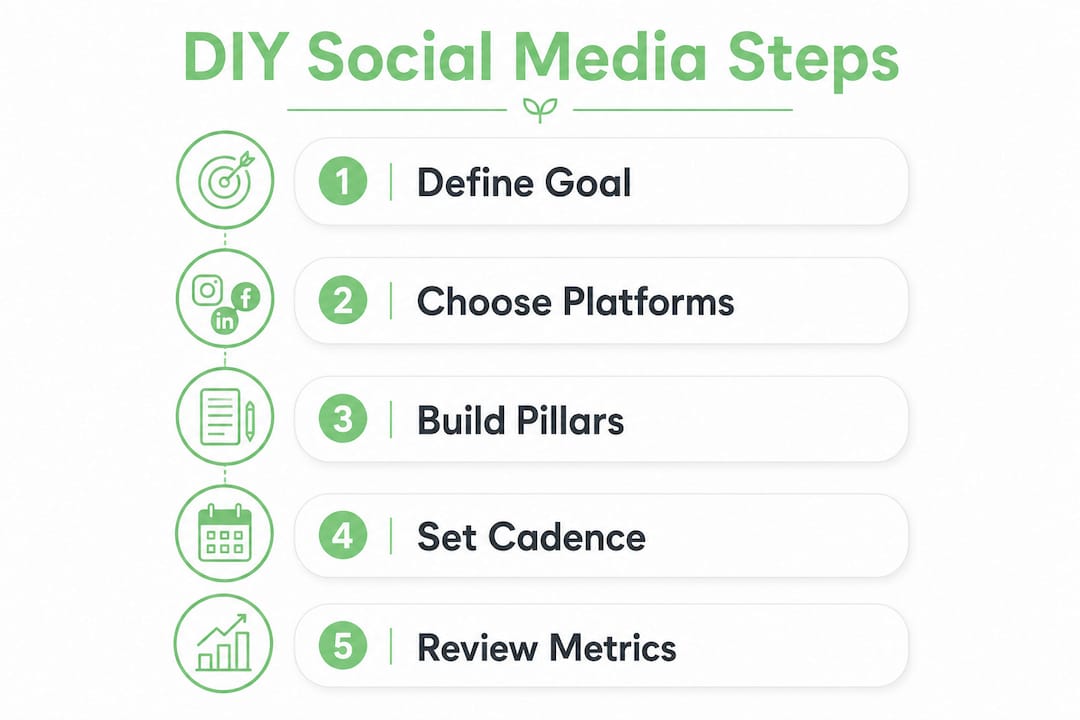
The most effective social media strategies fit on one page, focusing on a single measurable goal, a defined audience, two or three platforms, and three to five content pillars. Anything more complex than that becomes hard to follow when you are also running a business.
Step 1: Define one goal and your audience
Pick one goal: grow followers, drive website traffic, or generate leads. Then write one sentence describing your ideal customer. “Women aged 30–50 in Ontario who own small retail shops” is useful. “Everyone” is not.
Step 2: Choose two or three platforms
Focusing on two or three platforms where your customers are most active beats spreading thin across six or more channels. A plumber’s customers are on Facebook and Nextdoor. A clothing boutique’s customers are on Instagram and Pinterest. Go where your buyers already spend time.
Step 3: Build your content pillars
Content pillars are the three to five recurring topics you post about. A bakery might use: behind-the-scenes baking, customer stories, seasonal specials, baking tips, and local community moments. Pillars give you a decision framework so you never stare at a blank screen wondering what to post.
Step 4: Set a posting cadence using the worst-week test
Ask yourself: “How many times could I post during my absolute worst week?” If the answer is two, post twice a week. Never build a schedule around your best week. Consistency is what the algorithm rewards, not volume.
Step 5: Build in review cycles
Check your analytics weekly for five minutes. Do a deeper review monthly to see which content pillar performs best. Adjust your strategy quarterly based on what the data tells you.
| Strategy component | What to define |
|---|---|
| Goal | One measurable outcome (followers, traffic, leads) |
| Audience | One-sentence description of your ideal customer |
| Platforms | Two or three channels where your customers are active |
| Content pillars | Three to five recurring topics that reflect your brand |
| Posting cadence | Frequency you can hold during your worst week |
| Review cycle | Weekly check, monthly review, quarterly strategy update |
A focused digital marketing strategy like this one gives you a decision filter for every piece of content you create.
How to create and schedule content without burning out
Batching is the single biggest time saver in self-managing social media accounts. Instead of creating content daily, you sit down once a week and produce everything at once.
Here is a practical weekly batching workflow:
- Block 90 minutes on one day. Monday morning or Sunday evening works well for most owners. This is your content creation window for the entire week.
- Generate your drafts with AI. Feed your content pillar and a few notes into an AI writing tool. Ask for five caption options per post. Pick the best one and edit it to sound like you.
- Create or source your visuals. Use an AI design tool to generate images, or pull from a folder of photos you have taken throughout the week. Batch your visuals at the same time as your copy.
- Customize per platform. A LinkedIn post needs a different tone than an Instagram caption. Spend two minutes adapting each post to fit the platform’s style before scheduling.
- Schedule everything at once. Load all posts into your scheduling tool and set publish times based on when your audience is most active. Your week is done.
Managing a multi-platform presence in under two hours per week is realistic with batching and AI tools. Daily manual management, by contrast, takes 10–15 hours per week. The time savings alone justify the workflow change.
The 80/20 content rule applies here: 80% of your posts should educate, entertain, or inform your audience, and only 20% should promote your products or services directly. Audiences disengage fast when every post is a sales pitch.
Pro Tip: When using an AI image tool, generate four or five visual options for each post and choose the strongest one. The marketing automation checklist from Cloudsprout covers which tools work best for small business batching workflows.
Want this working in your business — without doing it yourself?
Start a Project →Why daily engagement is the part you cannot automate
Automation handles your content calendar. It cannot handle your relationships. Spending 15–20 minutes daily responding to comments and messages builds genuine community and delivers higher ROI than any content you post.
Here is what that daily engagement practice looks like in practice:
- Reply to every comment on your posts within 24 hours. Even a short, genuine reply signals to the algorithm that your content drives conversation.
- Respond to direct messages promptly. A DM that goes unanswered for three days is a lost customer.
- Engage with relevant conversations in your niche. Comment on posts from local businesses, industry accounts, or potential customers. This builds visibility outside your existing followers.
- Avoid robotic replies. “Thanks for sharing!” on every comment reads as automated and damages trust. Write something specific to what the person said.
The real role of social media for small businesses is relationship building, not broadcasting. Agencies often fall short here because their responses lack the personal knowledge only an owner has. That is your competitive advantage when you handle social media yourself.
A common mistake is spending 90% of your time creating content and 10% engaging. Flip that ratio. A post that gets ten genuine replies outperforms a polished post that gets none.
How do you measure whether your DIY social media is working?
Measurement does not require a paid analytics tool. Every major platform gives you free data. The goal is to check it consistently and act on what you find.
Key metrics to track:
- Follower growth rate: Are you gaining followers week over week? Flat or declining growth signals a content or platform mismatch.
- Engagement rate: Likes, comments, and shares divided by your follower count. A healthy engagement rate varies by platform, but consistent growth in engagement matters more than the absolute number.
- Website traffic from social: Check Google Analytics or your website’s built-in stats to see how many visitors arrive from social media. This connects your social effort to business outcomes.
- Top-performing content: Which posts get the most engagement? Look for patterns in topic, format, or time of posting.
Run a five-minute weekly check on these numbers. Do a deeper monthly review to identify trends. Adjust your content pillars and cadence based on what the data shows, not on gut feeling.
Part-time social media help is worth considering once your business surpasses approximately 200 customers or when social media revenue clearly justifies the added cost. Below that threshold, DIY is the right call. For staffing and workflow questions at that growth stage, resources like NOWJOBS cover efficient approaches to adding part-time help without overcommitting.
Key Takeaways
Small business owners can run social media without an agency by combining a one-page strategy, AI-assisted batching, and 15–20 minutes of daily human engagement.
| Point | Details |
|---|---|
| One-page strategy | Define one goal, two or three platforms, and three to five content pillars before posting anything. |
| Batch content weekly | Create all posts in one 90-minute session to replace 10–15 hours of daily manual work. |
| Use AI with human review | Start in approval mode to train AI on your brand voice before allowing autonomous posting. |
| Engage daily for 15–20 minutes | Human replies to comments and DMs build community trust that automation cannot replicate. |
| Measure and adjust quarterly | Track follower growth, engagement rate, and website traffic, then update your strategy every quarter. |
What I have learned from watching owners take back their social media
Most small business owners who hire an agency do it because they feel like they are not qualified to manage social media themselves. That belief is the actual problem, not the workload.
The owners I have seen get the best results are not the ones with the most polished content. They are the ones who show up consistently, reply to every comment personally, and talk about their business the way they would talk to a customer in person. That authenticity is impossible to outsource. An agency writing your captions will never know that your best-selling sandwich is named after your grandmother, or that your plumbing crew has been together for 12 years. Those details are what make people follow you and stay.
The biggest mistake I see is owners trying to be everywhere at once. They set up accounts on five platforms, post sporadically for a month, and then abandon everything because it feels unmanageable. Picking two platforms and committing to them for six months produces better results than spreading across six channels for six weeks.
AI tools have genuinely changed what is possible for a solo operator. The batching workflow I described above is not theoretical. Owners with no marketing background are producing consistent, on-brand content in under two hours a week. The key is keeping yourself in the loop on strategy and brand voice while letting AI handle the drafting and scheduling.
Start smaller than you think you need to. One platform, two posts a week, 15 minutes of engagement daily. Master that before adding anything. The owners who try to do everything on day one are the ones who quit by week three.
— Cristo
How a strong website amplifies everything you do on social media
Your social media posts drive traffic somewhere. If that destination is a slow, outdated, or confusing website, you lose the customer you just earned.

Cloudsprout builds custom websites for small and mid-sized businesses across Ontario and Canada, designed to convert the traffic your social media generates. Every site is built in-house with no outsourcing, on transparent month-to-month pricing with no lock-in contracts. If you are putting real effort into your social media and want a website that matches that effort, Cloudsprout’s digital marketing services cover everything from SEO to content, all under one roof. Start with a free digital audit to see exactly where your online presence stands.
FAQ
How much does it cost to run social media without an agency?
The main cost is your time. AI writing and design tools are available at low monthly rates, and scheduling platforms offer free tiers for small accounts. You avoid the $1,500–$10,000 per month that agencies typically charge.
How many hours per week does DIY social media take?
With a batching workflow and AI tools, most small business owners manage a multi-platform presence in under two hours per week for content creation, plus 15–20 minutes daily for engagement.
Which platforms should a small business focus on?
Focus on two or three platforms where your specific customers are most active. Spreading across six or more channels reduces consistency and dilutes your brand presence.
When should I hire help instead of managing social media myself?
Consider part-time help once your business surpasses approximately 200 customers or when social media revenue clearly justifies the added cost. Below that threshold, a focused DIY approach is more cost-effective.
Can AI fully replace a social media manager?
AI handles drafting and scheduling well, but it cannot replace the owner’s knowledge of brand voice, audience nuance, and genuine personal engagement. Use AI for execution and keep strategy and daily replies in your own hands.
Recommended
Less reading. More growing.
We build the systems these articles describe — websites, AI follow-up, reviews, automation — and run them for you.
Keep reading