For most small businesses, a managed hybrid AI chatbot is the fastest path to 24/7 customer coverage without hiring extra staff. The Cloudsprout AI Employee handles routine questions, captures leads after hours, books appointments, and passes complex or emotional cases to a human — all on a predictable monthly cost with no long-term contracts.
Here is what you get in the first 14 days with a managed approach:
- 24/7 chat coverage from day one, even before your team is trained on the tool
- Lead capture and CRM sync so no after-hours inquiry falls through the cracks
- Appointment booking connected to your existing calendar
- A defined escalation path so customers never hit a dead end
- A free digital audit that maps your knowledge gaps before the bot goes live
Pro Tip: Before your first vendor call, write down your three most common customer questions. That list becomes the foundation of your chatbot’s knowledge base and cuts setup time significantly.
Key Takeaways
A managed hybrid AI chatbot is the most practical choice for small businesses: it delivers 24/7 coverage, captures leads, and hands off complex cases to humans without requiring in-house technical management.
| Point | Details |
|---|---|
| Hybrid outperforms AI-only | LoopReply’s 10,000-conversation study shows hybrid systems win on resolution rate and revenue impact. |
| Pricing range: $15–$500/month | Self-serve SaaS plans start low but carry hidden costs; managed services bundle setup and optimization. |
| Implementation takes 5–8 weeks | Discovery, knowledge capture, integration, QA, and soft launch each require dedicated time and owner input. |
| Set KPIs before launch | Track deflection rate, lead capture rate, CSAT, and handoff rate from day one to measure real ROI. |
| Cloudsprout AI Employee | Fully managed, no lock-in, month-to-month — includes free audit, build, integration, and ongoing optimization. |
Table of Contents
- What does a small business AI chatbot actually do?
- Why AI chatbots deliver real ROI for small businesses
- How do you choose the right AI chatbot approach?
- What does implementation actually look like, step by step?
- What does a small business AI chatbot cost?
- What security and privacy questions should you ask vendors?
- Where do chatbots fail, and how do you design a safe handoff?
- How do you know if your chatbot is actually working?
- How Cloudsprout builds and runs an AI employee for your business
- What Cristo actually thinks about AI chatbots for small businesses
- Cloudsprout’s AI Employee: what you get and how to start
- Sources
- FAQ
What does a small business AI chatbot actually do?
The term “AI chatbot” covers a wide range — from a simple FAQ pop-up to a fully agentic system that can book, pay, and follow up without human input. Knowing the difference saves you from buying more than you need or less than you can use.
Three capability tiers to understand:
A rule-based bot follows a decision tree. It answers only what it was explicitly programmed to answer. Fast to build, brittle in practice — one unexpected question and the conversation dies.
An LLM-powered chatbot uses a large language model to generate natural responses. It handles varied phrasing and can answer questions it was never explicitly trained on, but without grounding it in your own documents, it can hallucinate facts. Google Cloud’s guidance on conversational agents recommends using retrieval-augmented generation (RAG) to anchor responses in your actual business content, which cuts hallucination risk significantly.
An agentic AI employee goes further: it can take actions. Book a slot in your calendar, create a CRM contact, send a follow-up SMS, trigger a payment link. Microsoft’s Copilot Studio is one example of a platform that connects chat to live business data and prebuilt workflow agents.
Core features to expect from any serious small-business chatbot:
- Chat widget embedded on your website, with mobile-responsive design
- Knowledge-base answers drawn from your FAQs, service pages, and documents
- Lead capture forms and qualification questions (budget, service type, location)
- Appointment booking with calendar integration (Google Calendar, Outlook, Calendly)
- Automated follow-up sequences via email or SMS
- Multi-channel support: web chat, SMS, and optionally WhatsApp or Facebook Messenger
- Handoff to a human agent with full conversation context attached
- Analytics dashboard showing volume, resolution rate, and drop-off points
Integration expectations: your chatbot should connect to your CRM (HubSpot, Zoho, Salesforce), your calendar, a payment processor if needed (Stripe, Square), and your helpdesk (Freshdesk, Zendesk). Most modern platforms offer native integrations or simple webhooks for custom connections.
Pro Tip: Ask every vendor for their integration list in writing before signing anything. “We integrate with most CRMs” is not the same as “we have a native HubSpot connector with two-way sync.”
Why AI chatbots deliver real ROI for small businesses
The staffing math is straightforward. A chatbot handles unlimited simultaneous conversations at any hour; a human agent handles one at a time during business hours. For a small business fielding 200 routine inquiries a month, that gap is significant. According to SendPulse, chatbots excel at 24/7 availability and absorbing high volumes of repetitive queries — and the recommendation from most practitioners is to combine bots with live chat rather than choose one over the other.
BizTech Magazine’s analysis points to staffing relief as one of the clearest benefits: when a bot handles routine queries, your existing staff can focus on higher-value work instead of answering the same five questions all day.
Primary benefits for owner-operators:
- Round-the-clock availability with no overtime cost
- Faster first response (seconds vs. hours for email)
- Consistent answers — no variation based on who picks up the phone
- Lead capture during evenings and weekends when most small businesses go dark
- Data on what customers actually ask, which feeds your content and SEO strategy
Highest-value use cases for small businesses:
- Appointment booking for trades, clinics, salons, and professional services
- Order status and basic troubleshooting for e-commerce
- Lead qualification (service area, budget, timeline) before a sales call
- FAQ automation for pricing, hours, policies, and location
- Cart recovery prompts for online stores
- Guided onboarding for new clients or members
A concrete example: An HVAC contractor in Ontario misses roughly a third of inbound calls after 5 PM. A chatbot on their site captures the caller’s name, address, issue type, and preferred callback time — and syncs it to their CRM overnight. The next morning, the owner has a qualified lead list ready before the first coffee. No missed opportunity, no extra staff.
How do you choose the right AI chatbot approach?
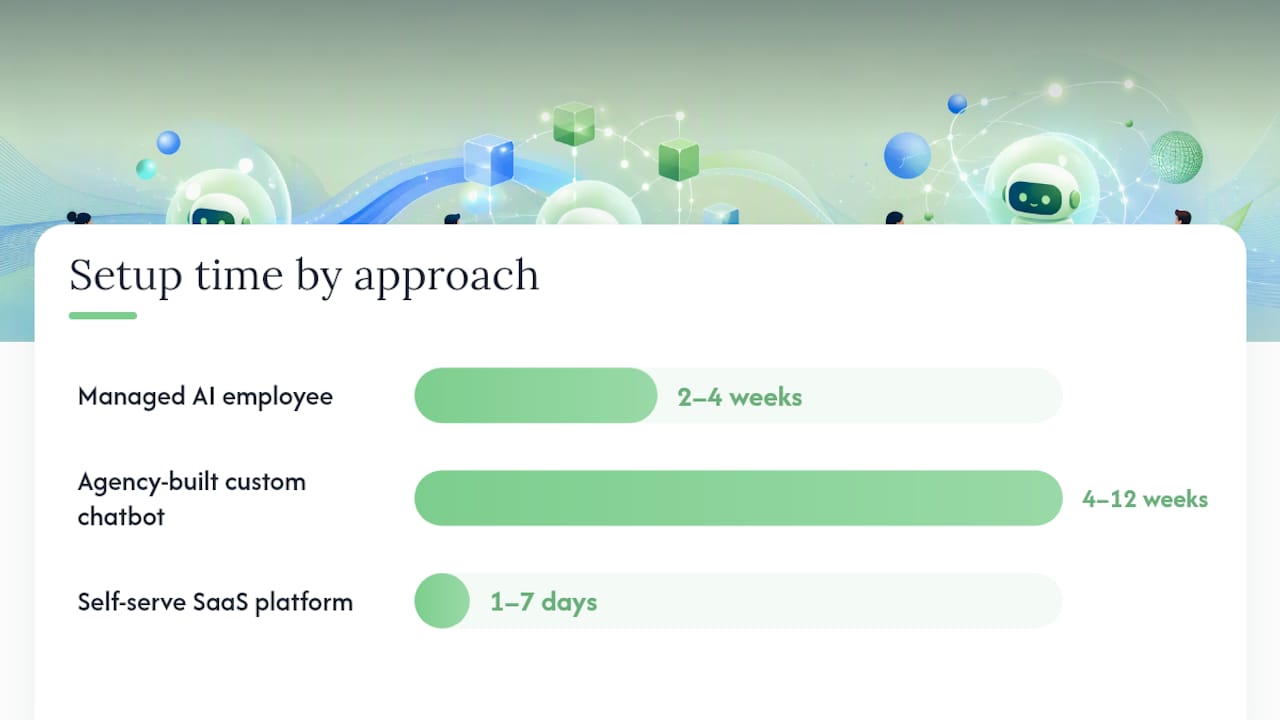
The decision comes down to three variables: how much time you have to manage the tool, how complex your customer queries are, and what integrations you need on day one.
Decision framework — ask yourself these four questions:
- How many customer conversations do you handle per month? Under 500 is entry-level territory; over 1,000 and you need a platform with solid analytics and escalation rules.
- Are your queries mostly routine (hours, pricing, booking) or do they involve judgment (eligibility, disputes, custom quotes)?
- Which systems must the chatbot connect to on launch day — CRM, calendar, payment, helpdesk?
- Do you have someone in-house who can manage training and updates, or do you need a vendor to own that?
Three approaches compared:
| Approach | Setup time | Monthly cost range | Control | Best for |
|---|---|---|---|---|
| Managed AI employee (Cloudsprout) | 2–4 weeks | Custom, month-to-month | High (vendor manages) | Owner-operators with no in-house tech |
| Agency-built custom chatbot | 4–12 weeks | Varies by project scope | High after handoff | Businesses with complex workflows |
| Self-serve SaaS platform | 1–7 days | $15–$500/month | Full DIY | Tech-comfortable teams with simple needs |
Questions to ask every vendor before you commit:
- What is your full integration list, and which ones are native vs. webhook-only?
- How does escalation work — what triggers a handoff, and what context does the agent receive?
- Where is customer data stored, and which country’s privacy laws apply?
- How do you train and update the bot when my services or policies change?
- What are your SLAs for uptime and support response?
- What does the trial or pilot include, and what does success look like at 30 days?
- If I want to leave, what happens to my data and conversation history?
Red flags to walk away from:
- Vague answers on data residency (“it’s in the cloud” is not an answer)
- No defined escalation flow or handoff mechanism
- Pay-per-resolution pricing with no cap
- No trial, pilot, or demo with real data
- No success metrics offered at the start of the engagement
What does implementation actually look like, step by step?
A realistic small-business chatbot rollout takes 5–8 weeks from kickoff to soft launch. Here is how it breaks down:
- Discovery and scoping (Week 1). Map your top 20 customer questions, define the use cases you want the bot to handle, and confirm which integrations are required. The owner’s input here is irreplaceable — no vendor can guess your service area rules or pricing nuances.
- Knowledge capture and training (Weeks 2–3). Gather your FAQs, service pages, policy documents, and any scripts your team currently uses. This becomes the bot’s knowledge base. The quality of this step determines 80% of the bot’s accuracy at launch.
- Setup and integrations (Week 3–4). The vendor or developer connects the bot to your CRM, calendar, and any other required systems. Test each integration with real data before moving forward.
- Testing and QA (Days 1–5 of Week 5). Run the bot through every scenario in your use-case list. Include edge cases: what happens when a user asks something completely off-topic? What triggers a handoff?
- Soft launch and monitoring (Weeks 5–8). Go live with a small traffic segment or a single page. Review conversations daily for the first two weeks. Flag any response that is wrong, confusing, or missing.
Roles during rollout:
- Owner: approves knowledge base content, defines escalation rules, reviews weekly reports
- Marketing or support lead: monitors live conversations, flags issues, updates FAQs
- Vendor or agency: builds, integrates, trains, and maintains the bot
- Developer (optional): handles custom API connections if the platform requires it
Common pitfalls to avoid:
- Launching without a tested escalation path — customers who hit a dead end do not come back
- Skipping the soft launch phase and going straight to full traffic
- Treating the bot as “set and forget” — it needs monthly updates as your business changes
- Underestimating knowledge capture time — this is always the longest step
30/60/90-day plan at a glance:
- Day 30: Bot live, handling top 10 FAQs, escalation tested, first KPI baseline set
- Day 60: Lead capture and CRM sync confirmed, first optimization pass on low-resolution queries
- Day 90: Full use-case coverage, CSAT data collected, ROI estimate vs. staff time calculated
What does a small business AI chatbot cost?
Crescendo puts small-business chatbot plans at roughly $15–$500 per month for self-serve SaaS platforms, with enterprise solutions starting considerably higher. Entry-level market options (such as $29/month starter plans with a 2,000-conversation cap) exist, but the limits matter as much as the headline price.
Typical pricing components:
- Platform subscription: the base monthly fee for the software
- Per-conversation or per-message fees: some platforms charge after a monthly conversation cap
- Setup and training fee: one-time cost to build and configure the bot, often $500–$5,000 for custom work
- Integration fees: some CRM or helpdesk connectors cost extra, especially on lower tiers
- SMS and WhatsApp fees: channel costs are usually passed through at carrier rates
- Support and SLA tier: faster response times and dedicated support cost more
How to estimate your monthly cost:
Where hidden costs appear:
- Overage fees when you exceed your monthly conversation cap
- Premium integrations locked behind higher tiers
- Re-training fees when your knowledge base changes significantly
- White-label or branding removal fees on lower plans
A managed service like Cloudsprout’s AI Employee bundles setup, training, integrations, and ongoing optimization into a single month-to-month fee — no surprise overages, no separate line items for each integration. For an owner-operator without time to manage a SaaS platform, that predictability often justifies the higher base cost compared to a $29/month DIY tool that still requires hours of configuration.
Want this running in your business without doing it yourself?
Book a Free Consultation →What security and privacy questions should you ask vendors?
Customer data flowing through a chatbot is a real liability if the vendor’s practices are weak. You do not need to be a security expert to ask the right questions — you just need a short checklist.
Minimum security commitments to require before launch:
- Data residency: confirm which country your conversation data is stored in and which privacy laws apply (PIPEDA for Canadian businesses, state-level laws for U.S. customers)
- Encryption in transit and at rest: TLS 1.2 or higher for data in transit; AES-256 or equivalent at rest
- Access controls: role-based permissions so only authorized staff can view conversation logs
- Retention policy: how long is conversation data kept, and can you request deletion?
- Breach notification: what is the vendor’s process and timeline if a breach occurs?
- PII handling: can the bot redact or avoid storing sensitive data (credit card numbers, health details)?
- Audit logs: can you see who accessed conversation data and when?
Two approaches to LLM data handling — and why it matters:
| Approach | How it works | Privacy implication |
|---|---|---|
| Local knowledge base only | Bot answers from your documents; no data sent to external LLM at query time | Lower exposure; data stays within your environment |
| External LLM at query time | Each conversation is processed by a third-party model (OpenAI, Anthropic, etc.) | Vendor’s data-processing agreement with that provider governs your data |
Most modern chatbots use an external LLM. That is not automatically a problem, but you need the vendor’s data processing agreement in writing, and you need to confirm the LLM provider does not train on your conversation data by default.
Practical checklist before you sign:
- Request the vendor’s privacy policy and data processing agreement
- Confirm data residency in writing (not just verbally)
- Ask whether the LLM provider uses your data for model training
- Verify you can export or delete all conversation data if you leave
- Check whether the platform has SOC 2 Type II certification or equivalent
Where do chatbots fail, and how do you design a safe handoff?
A poorly designed escalation path is the single most common reason chatbot deployments damage customer relationships instead of improving them. Industry analysis from Intelegencia warns that unsupervised automation can reduce short-term ticket volume while quietly increasing churn — customers who hit a dead end once rarely come back.
Common failure modes:
- Hallucinations: the bot generates a plausible-sounding but wrong answer, especially on pricing, eligibility, or policy details
- Emotional cases: a frustrated or grieving customer who gets a scripted response escalates fast
- Complex billing or eligibility disputes: these require human judgment and access to account history
- Regulatory-sensitive topics: legal, medical, or financial questions the bot should never attempt to answer
- Ambiguous intent: the user’s question could mean two different things and the bot picks the wrong one
Handoff design that actually works:
A good escalation is not just a “talk to a human” button. It is a structured transfer that gives the agent everything they need to pick up without asking the customer to repeat themselves.
- Set a confidence threshold: if the bot’s match score for a query falls below a defined level, it escalates automatically rather than guessing
- Capture full conversation context and attach it to the agent ticket
- Include user-provided data (name, issue type, account number) in the handoff summary
- Define mandatory escalation triggers: billing disputes, complaints, legal questions, and any message containing words like “cancel,” “lawyer,” or “refund”
- Log who owns the conversation after handoff so nothing falls between the cracks
Operational rules for the handoff loop:
- Set a maximum bot-response limit before forced transfer (three failed attempts is a common threshold)
- Notify the customer of the handoff and give an estimated wait time
- Follow up after resolution to confirm the issue was closed
Pro Tip: Build a “frustration detector” into your escalation rules. If a user sends the same question twice, or types “this isn’t helping,” trigger an immediate handoff. Catching frustration early costs nothing; losing the customer costs everything.
How do you know if your chatbot is actually working?
Set your KPI baseline before launch, not after.
Primary KPIs to track in months 1–3:
- Conversations started: total volume the bot handles each month
- Deflection rate: percentage of conversations resolved without human involvement
- Lead capture rate: percentage of conversations that produce a qualified lead
- Resolution rate: percentage of conversations where the user got a complete answer
- Average first response time: should be near-instant for the bot; track separately for human handoffs
- CSAT or NPS: collect a one-question rating at the end of each conversation
- Handoff rate: percentage of conversations escalated to a human (high is not always bad — it depends on your use case)
Simple ROI formula:
Monthly time saved (hours) × your team’s hourly cost = approximate monthly savings
If your bot deflects 300 conversations per month that would otherwise take 10 minutes each of staff time, that is 50 hours. At $20/hour, that is $1,000 in recovered staff capacity — before counting the value of after-hours leads captured.
Warning signs that something is wrong:
- Rising repeat contacts (users coming back with the same question)
- CSAT below 3.5 out of 5 for bot-handled conversations
- Handoff rate above 60% in month two (the bot is not resolving enough)
- Zero leads captured despite traffic (the lead form is broken or buried)
A LoopReply analysis of 10,000 conversations found that hybrid systems (AI plus human handoff) outperform AI-only setups on blended metrics including resolution rate and revenue impact. That finding is the clearest argument for tracking handoff quality alongside bot performance — the two work together, not in competition.
How Cloudsprout builds and runs an AI employee for your business
Cloudsprout’s AI Employee service is a fully managed implementation, not a software license you configure yourself. Every project follows the same six-stage process:
- Discovery: Cloudsprout maps your top use cases, required integrations, and escalation rules in a structured kickoff session
- Knowledge capture: your FAQs, service pages, policies, and any existing scripts are organized into a structured knowledge base
- Build and integrate: the AI employee is built on your site and connected to your CRM and ERP systems, calendar, and any other required tools
- Test: every scenario in the use-case list is tested with real queries before launch
- Soft launch: the bot goes live with monitoring; Cloudsprout reviews conversations weekly for the first month
- Monthly optimization: knowledge base updates, new use cases, and performance reviews are included in the ongoing engagement
What makes Cloudsprout’s approach different:
- Zero outsourcing — the team that builds your AI employee is the same team you talk to every week
- Month-to-month pricing with no lock-in contracts
- Direct access to the people doing the work, not a support ticket queue
- Free digital audit included at the start to identify knowledge gaps and integration priorities
- All work done in-house, covering website, CRM, automation, and AI employee in one place
What Cristo actually thinks about AI chatbots for small businesses
The chatbot industry sells confidence. Every vendor promises a 10-minute setup and instant ROI. The reality for a 12-person plumbing company or a family-run restaurant is messier than that.
The honest advice: start smaller than you think you need to. A bot that handles your top five FAQs and captures a lead form reliably is worth more than a complex agentic system that hallucinates your pricing and frustrates customers. Get the basics right first — accurate answers, clean escalation, and a lead that lands in your CRM — then expand.
The managed hybrid approach works for owner-operators specifically because you do not have time to babysit a SaaS dashboard. You need someone else to own the training updates when your prices change in March, or when you add a new service in the fall. That is what a managed AI employee delivers. And when it comes to sensitive cases — a customer who is upset, a billing dispute, anything involving personal circumstances — the bot should get out of the way immediately and let a human take over. No exceptions.
Measure outcomes at 30, 60, and 90 days. If the numbers are not moving, something in the knowledge base or the escalation path needs fixing. That is normal. Iterate.
Cloudsprout’s AI Employee: what you get and how to start
Cloudsprout builds and manages AI employees for small and mid-sized businesses across Ontario and Canada, covering everything from the initial website integration to CRM and automation and ongoing monthly optimization. Every engagement starts with a no-cost digital audit that identifies your highest-value use cases, your knowledge gaps, and which integrations are ready to connect on day one.

There are no lock-in contracts. Pricing is month-to-month, and you get direct access to the team doing the work — not a support queue. The free audit takes about an hour and gives you a clear picture of what a chatbot can realistically do for your business before you commit to anything. To get started, visit Cloudsprout’s services page or request your free audit today.
Sources
- AI Chatbot vs Live Chat: 2026 Data Study | LoopReply
- Chatbot vs live chat — which is better? | SendPulse
- Crescendo
- Microsoft 365 Copilot Business
- Conversational Agents and AI chatbots (Google Cloud)
FAQ
What is the best AI chatbot for a small business?
The best approach for most small businesses is a managed hybrid system that combines an AI chatbot for routine queries with a defined human handoff for complex or emotional cases. Cloudsprout’s AI Employee is built specifically for owner-operators who need this setup without managing it themselves.
How much does an AI chatbot cost for a small business?
Self-serve SaaS platforms run roughly $15–$500 per month depending on features and conversation volume. Managed implementations bundle setup, training, and ongoing optimization into a single monthly fee, which typically costs more than a DIY plan but eliminates hidden overage and re-training charges.
What is the difference between a chatbot and live chat?
A chatbot responds automatically using a knowledge base or AI model; live chat connects a customer to a human agent in real time. Research from LoopReply shows that combining both in a hybrid system outperforms either option alone on resolution rate and revenue impact.
How long does it take to set up a small business AI chatbot?
A realistic rollout takes 5–8 weeks from kickoff to soft launch, covering discovery, knowledge capture, integration, testing, and monitoring. Self-serve platforms can go live faster but require significantly more owner time to configure and maintain.
What AI is best for small businesses overall?
For customer-facing automation, a hybrid AI chatbot with human escalation is the most practical choice. For workspace productivity, platforms like Microsoft Copilot or Google Gemini Enterprise offer no-code agent builders that connect to existing business tools — useful when your team already lives in Microsoft 365 or Google Workspace.
Recommended
Less reading. More growing.
We build the systems these articles describe. Websites, AI follow-up, reviews, automation. And run them for you.
Keep reading