

If you are trying to figure out how much a website costs in Canada in 2026, the most useful answer is not a single number. The price depends on whether you are building a simple DIY site, hiring a professional for a lead-generation website, launching an online store, or developing custom functionality.
For context, the Business Development Bank of Canada (BDC) says web development costs for most of its clients typically range from $10,000 to $30,000 for the initial build, although simpler projects can cost less and complex projects can go significantly higher.
That does not mean every Canadian small business needs a $10,000 website. Packaged small-business builds, freelancers, DIY platforms, and agencies with standardized processes can all come in below that benchmark. For example, CloudSprout currently offers one-off custom Project Builds from $2,500 to $10,000+ CAD, depending on scope.
All prices in this guide are in Canadian dollars unless otherwise noted. Pricing changes over time, so platform and vendor prices should always be confirmed before purchasing.
Key Takeaways
| Point | What It Means |
|---|---|
| There is no single Canadian website price | A basic DIY site may cost hundreds per year, while professional and custom builds can cost thousands or tens of thousands. |
| Scope matters more than page count alone | Booking systems, e-commerce, CRM integrations, custom forms, automation and member areas can increase development time quickly. |
| Budget beyond the initial build | Domains, hosting, software, maintenance, content and third-party services can create recurring costs after launch. |
| Compare what is included | A $5,000 quote that includes copy, SEO, analytics and integrations may offer more value than a cheaper design-only quote. |
| Canadian benchmarks vary widely | BDC reports $10,000–$30,000 as typical for many of its client projects, while smaller packaged builds can cost substantially less. |
| CloudSprout publishes its pricing | One-off Project Builds currently range from $2,500 to $10,000+ CAD, with optional month-to-month growth plans available after launch. |
Table of Contents
- How Much Does a Website Cost in Canada?
- Website Cost in Canada by Project Type
- What Are You Actually Paying For?
- Recurring and Hidden Website Costs
- How Do Web Designers and Agencies Charge?
- Realistic Website Budget Examples
- What Makes a Website More Expensive?
- How to Reduce Website Costs Without Cutting Corners
- How CloudSprout Website Pricing Works
- Questions to Ask Before Signing a Website Quote
- Looking for a Canadian Website Development Team?
- Sources
- FAQ
How Much Does a Website Cost in Canada?
A Canadian business website can cost anywhere from a few hundred dollars per year for a do-it-yourself setup to tens of thousands of dollars for a professionally designed website with custom development.
The important distinction is what you are actually buying.
A five-page site built from an existing template is a very different project from a five-page site that includes original UX design, professionally written copy, location-specific SEO, analytics, CRM integration, automated lead follow-up and custom quoting tools.
BDC provides one of the more useful Canadian reference points. It reports that web development costs for most of its clients typically fall between $10,000 and $30,000 for the initial build, with some complex projects reaching $60,000 to $100,000. That should be viewed as a business-development benchmark rather than a minimum price every Canadian company must pay.
At the lower end of the market, website builders and standardized WordPress builds can reduce the cost substantially. At the higher end, custom applications, portals, large e-commerce catalogues and complex business integrations can exceed the typical small-business range quickly.
Website Cost in Canada by Project Type
The following ranges are useful planning estimates rather than fixed national averages. Your actual quote will depend on design requirements, content, functionality, integrations and the team building the project. Stores cost more than brochure sites; here is an ecommerce website cost breakdown.
| Website Type | Typical Planning Budget | Best Suited For |
|---|---|---|
| DIY website | A few hundred to $1,500+ per year | New businesses, personal brands and very simple informational sites |
| Small-business professional website | $2,500–$15,000+ | Local businesses that need professional design, lead generation, SEO foundations and forms |
| More involved agency project | $10,000–$30,000+ | Businesses requiring strategy, custom design, more content, integrations or extensive development |
| Small e-commerce website | $5,000–$25,000+ | Businesses selling products online with payments, shipping, tax and inventory requirements |
| Custom portal or web application | $25,000+ | Businesses needing dashboards, custom workflows, account systems or software-like functionality |
These ranges overlap because the website category alone does not determine the workload. A polished five-page lead-generation site with custom copy, photography and automation can require more work than a 20-page site built from an established template.
Industry data also illustrates how wide the market is. Clutch’s web development pricing data, based on projects and client reviews on its marketplace, shows that project costs and hourly rates vary substantially according to provider location, experience and project complexity.
What Are You Actually Paying For?
A professional website quote is rarely just a charge for putting pages online. It can include strategy, design, development, content, testing, integrations and post-launch support.
- Domain registration: CIRA says a typical .CA domain costs about $10 to $20 per year, although registrar pricing, promotions and premium domain names can change the final price.
- Hosting: BDC cites roughly $20 to $60 per month as a typical hosting range for many business websites, with traffic and technical requirements affecting the price.
- SSL: many current hosting companies and website platforms include SSL certificates in their plans, although premium security products may cost extra.
- Website platform: WordPress itself is open source, but hosting, premium plugins and third-party services may carry fees.
- E-commerce platform: Shopify’s Canadian pricing starts at approximately $37 CAD per month for Basic when billed yearly, before optional apps, payment-related charges and other services.
- Strategy and UX: planning navigation, calls to action, page hierarchy and conversion paths before development begins.
- Visual design: layouts, mobile design, typography, imagery and brand implementation.
- Development: turning the approved design into a fast, responsive and manageable website.
- Copywriting: writing pages around what customers actually search for and what they need to know before contacting you.
- SEO setup: titles, headings, crawlability, internal linking, redirects, metadata, schema where appropriate and local search foundations.
- Integrations: booking software, payment systems, CRMs, forms, email marketing platforms, analytics and automation.
- Testing: checking mobile layouts, forms, browser compatibility, performance, accessibility and tracking before launch.
A lower quote is not automatically a better deal if essential work is excluded. Ask for a detailed list of what the price includes so you can compare proposals on the same basis.
If content is being quoted separately, see CloudSprout’s guide on why website copy matters for SEO before deciding to leave copywriting until after the site is built.

What Recurring and Hidden Website Costs Should You Budget For?
The initial build is only part of the lifetime cost of a website. Some expenses continue monthly or annually, while others appear when the business or technology changes. Read the contract line by line to catch hidden fees in agency proposals.
Common recurring costs include:
- Domain renewal: typically around $10 to $20 per year for a standard .CA domain according to CIRA, although registrar retail prices vary
- Hosting: commonly tens of dollars per month for a conventional small-business site, with managed and high-traffic environments costing more
- Premium plugins and software: forms, booking systems, backups, e-commerce tools and other software may require annual or monthly subscriptions
- Website maintenance: WordPress, themes, plugins, integrations and server software need updates and testing
- Content: new service pages, landing pages, case studies, photography and articles require ongoing production
- SEO: businesses competing in search may invest in technical improvements, content and local SEO after launch
- Automation and CRM: lead-management systems, SMS tools, AI systems and workflow platforms can carry usage or subscription fees
E-commerce businesses also need to consider payment processing, platform charges, shipping software, product-management tools and potentially paid apps. Those costs depend on your provider and plan, so calculate them against expected order volume rather than treating them as a fixed website expense.
Taxes matter too. GST/HST treatment depends on the place-of-supply rules and province or territory. For example, the CRA currently lists Ontario’s HST rate at 13%, while rates differ elsewhere in Canada. Confirm whether a project quote is before or after applicable tax.
What About Website Grants in Canada?
Do not build your 2026 website budget around the Canada Digital Adoption Program (CDAP). Federal reporting confirms that the program stopped accepting new applications in February 2024 and ended on March 31, 2025.
Funding opportunities can change, however. Businesses looking for current assistance can review the Government of Canada’s business support and financing resources and check relevant provincial, regional and industry programs before starting a project.
How Do Web Designers and Agencies Charge in Canada?
Website providers generally use one or a combination of four pricing structures.
Fixed-Price Projects
You receive a defined scope and fixed project price. This works well when page requirements, features and deliverables are known before development begins.
Hourly Billing
You pay for the hours used. This can make sense for consulting, troubleshooting and changing requirements, but the final total can be harder to predict if the scope remains open.
Monthly Retainers
A monthly fee covers an agreed level of ongoing work such as maintenance, development, SEO, content or marketing. Retainers are useful when the website is treated as an active business system rather than a one-time project.
Milestone Billing
The project is divided into stages, with payments tied to milestones such as strategy, design approval, development and launch.
Whichever pricing model you choose, make sure the proposal states what is included, what triggers an additional charge and who owns the finished site and associated assets.
What Do Realistic Website Budgets Look Like?
These examples show why two projects that both appear to be “small-business websites” can have very different totals.
| Scenario | What the Budget May Include | Typical Complexity |
|---|---|---|
| DIY brochure website | Website builder, domain, template, stock imagery and your own content | Low |
| Professional local service website | Strategy, custom WordPress build, mobile design, contact or quote forms, basic SEO setup and launch support | Low to medium |
| Lead-generation website with CRM | Custom website, landing pages, lead forms, CRM setup, automated follow-up, analytics and SEO | Medium |
| Small e-commerce website | Store design, product setup, payments, tax configuration, shipping, inventory, analytics and testing | Medium to high |
| Custom business platform | Accounts, dashboards, workflows, API integrations, custom databases and ongoing development | High |
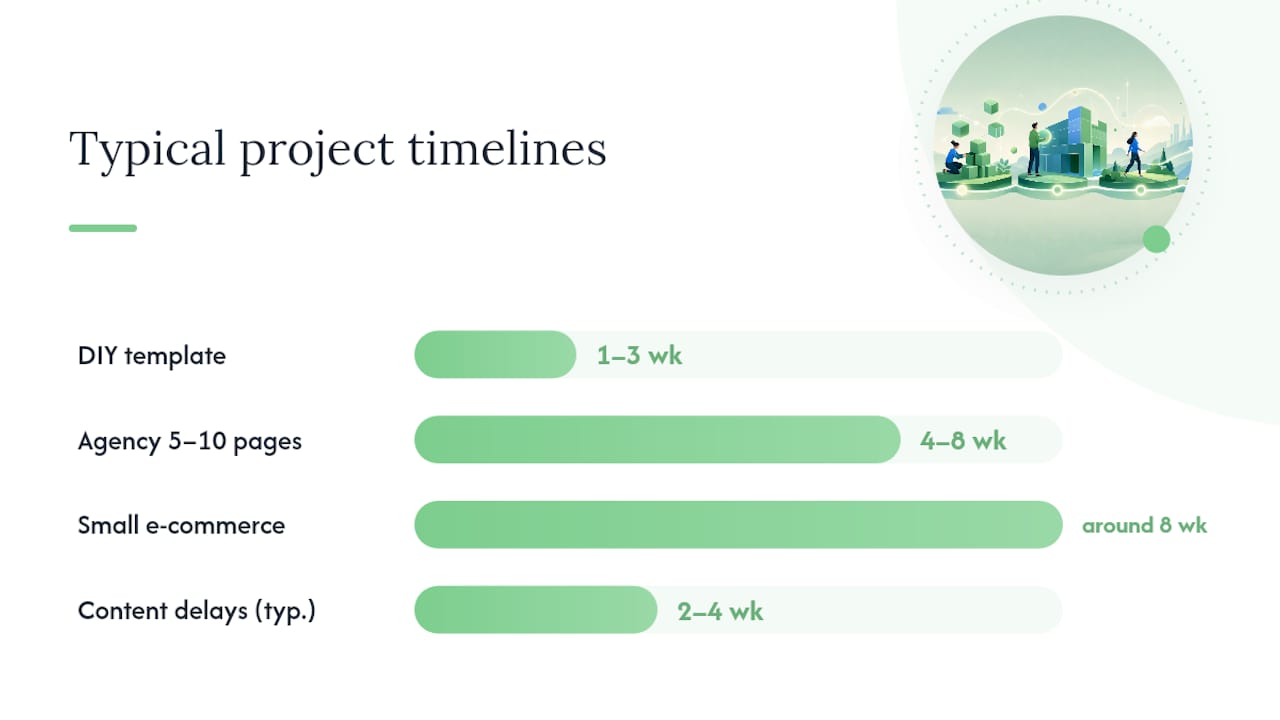
Timeline affects budget as well. A focused small-business build can often move quickly when copy, branding and approvals are ready. Projects slow down when content arrives late, decision-makers request repeated design changes or custom integrations need additional testing.
What Makes a Website More Expensive?
Website price usually rises because of additional labour and complexity rather than the number of pages alone.
- Custom design: unique page layouts require more strategy, design and development than a pre-built template
- More unique pages: 20 individually designed service pages take more work than 20 pages using one standard layout
- E-commerce: products, variants, inventory, tax, shipping and checkout add substantial requirements
- Booking: calendars, availability rules, deposits, reminders and scheduling integrations require setup and testing
- CRM integration: sending website leads into a CRM and triggering follow-up adds implementation work
- Automation: lead routing, SMS responses, email sequences and AI-assisted workflows increase the system’s scope
- Custom functionality: portals, calculators, quoting tools, dashboards and database-driven features involve development beyond ordinary page building
- Content production: copywriting, photography, video and original graphics can become a significant part of the project
- SEO requirements: migrations, redirects, large information architectures and competitive local markets can require additional research and implementation
The best way to control these costs is to decide what the website needs to accomplish before deciding what it should contain.
How Can You Reduce Website Costs Without Cutting Corners?
You do not necessarily need to remove the features that matter. In many cases, the better strategy is to phase the project.
- Start with revenue-critical pages. Launch the pages customers need to understand the offer, trust the business and contact or buy from you.
- Prepare content early. Delayed copy, product information and photography can slow a project and create extra revision cycles.
- Use repeatable layouts. Service and location pages can share a strong content system without requiring a unique design every time.
- Separate must-haves from phase two. A customer portal or advanced automation may be valuable without being required on launch day.
- Choose software before development. Changing booking, e-commerce or CRM platforms halfway through a build can create unnecessary rework.
- Get change requests in writing. Clear scope protects both the client and the development team.

Do not reduce the budget by skipping fundamentals such as mobile testing, working forms, backups, accessibility checks, security basics or analytics. Those are part of delivering a functional business website, not optional decoration.
How Does CloudSprout Price Website Projects?
CloudSprout uses a different pricing structure from agencies that only quote large one-time website projects.
For businesses that simply want a defined website project, CloudSprout’s current Project Build is priced at $2,500 to $10,000+ CAD one time. It includes a custom website, can include automation from the start and does not require an ongoing retainer.
Businesses that want ongoing website work, lead generation and business systems can instead use one of CloudSprout’s month-to-month plans:
| CloudSprout Plan | Current Monthly Price | Setup Range |
|---|---|---|
| Sprout | $300/month CAD | $500–$1,500 |
| Grow | $600/month CAD | $1,500–$3,500 |
| Scale | $1,200/month CAD | $3,500–$7,500 |
The current plans combine website work with different levels of hosting, support, lead funnels, CRM, SEO, content and automation rather than treating every service as a separate vendor relationship. Plans are month-to-month, while the Project Build remains available for businesses that only want a one-off build.
You can see the current inclusions and pricing on the CloudSprout pricing page.
What Should You Ask Before Signing a Website Quote?
Comparing two website quotes by total price alone is rarely useful. Compare what you actually receive.
- Exactly which pages are included?
- Is the design custom, customized from a theme, or entirely template-based?
- Who writes and uploads the content?
- Is basic on-page and technical SEO included?
- Are analytics and conversion tracking installed?
- Who owns the domain, website, content and design assets?
- Can your team update the site after launch?
- Are hosting and maintenance included or billed separately?
- Which plugins, apps or third-party subscriptions require recurring fees?
- What happens when you request something outside the original scope?
- How are forms, bookings and payment workflows tested?
- What support is available after launch?
- Does the quoted total include applicable taxes?
A good proposal should make these answers obvious before you pay a deposit.
Looking for a Canadian Website Development Team?
CloudSprout is a Canadian-owned digital agency based in Ontario and serving businesses across Canada. Its website development service covers strategy, custom WordPress development, SEO foundations, integrations, mobile performance and launch support.
For businesses that need more than a website, CloudSprout also combines SEO, digital marketing, content, CRM, AI and business automation so the website can connect directly to the systems that handle leads and follow-up.
If you are still comparing options, start by checking the current pricing. If you want to see a possible direction before committing to a build, CloudSprout also offers a free tailored website preview.
Not sure what your website should cost? Tell CloudSprout what you are building and get a scope based on the pages, functionality and business systems you actually need.
Sources
- Business Development Bank of Canada: Developing a Budget for Your Website
- CIRA: How Much Does a .CA Domain Cost?
- Shopify Canada: Pricing
- Clutch: Web Development Pricing Guide
- Canada Revenue Agency: GST/HST Rates and Collection
- Government of Canada: Business Support and Financing
- Innovation, Science and Economic Development Canada: CDAP Program Reporting
- CloudSprout: Current Pricing
Guides in this topic
More CloudSprout guides on costs and hiring help:
- $3,500–$12,000: Toronto Web Design Budgets for Small Businesses
- SEO Cost in Toronto: 2026 Pricing & Buyer’s Guide
- Logo Design Cost in Canada: What $500 to $2,500 Buys and Who Owns It
- Canada Blog Writing Prices: $50–$500+, GST Rules & Sample Briefs
- How Much Does Social Media Cost for a Small Business in Canada?
- CRM Pricing in Canada: Under $10 to About $50, Pilot First
- Small Business Buyers: $6,450 Median & 3-Factor Agency Pricing Models
- Marketing Contract Length: Small Businesses Try 3–6 Month Pilots
- 3–12 Month Runway: Month to Month SEO for Small Businesses in Canada
- PIPEDA Checks First: Choose a Digital Agency in Canada in 90 Days
- How Much Does an Online Store Cost in Canada in 2026?
- Hidden Agency Fees: 8 Charges Canadian Small Businesses Can Catch
Other topics
- Local SEO: Google Business Profile Optimization for Canadian SMBs
- SEO basics: Canadian Business Website SEO Basics: 2026 Guide
- Websites: $50–$150 Starter Website Maintenance Plan for Small Canadian Businesses
- Social media: Canadian Business Social Media Content Plan for 2026
- Content and brand: What Is Content Marketing? A Guide for Small Businesses
- Digital marketing strategy: Canada Small Business Digital Marketing Guide 2026
- AI for small business: AI Agents for Business: A Founder’s Pilot Playbook
- Automation and CRM: Marketing Automation Checklist for Canadian Small Businesses
Frequently Asked Questions About Website Cost in Canada
How much does a website cost in Canada?
A website in Canada can cost anywhere from a few hundred dollars per year for a DIY setup to tens of thousands of dollars for a custom professional build. BDC reports that web development costs for most of its clients typically range from $10,000 to $30,000 for the initial build, while smaller packaged projects can cost less.
How much does a small-business website cost in Canada?
A professionally built small-business website commonly requires a budget of several thousand dollars. The final price depends on whether the project includes custom design, copywriting, SEO, online booking, e-commerce, CRM integration or other functionality.
How much does CloudSprout charge for a website?
CloudSprout currently lists one-off Project Builds at $2,500 to $10,000+ CAD depending on scope. It also offers month-to-month plans starting at $300 CAD per month for businesses that want ongoing website, hosting, support and growth services.
How much does a five-page website cost in Canada?
There is no reliable fixed price based on five pages alone. A five-page template website may be relatively inexpensive, while a custom five-page website with strategy, professional copy, SEO, photography, integrations and automation can cost several thousand dollars or more.
Does a website have a monthly cost?
Usually, yes. Even if the website itself is purchased as a one-time project, businesses normally have recurring costs such as domain renewal and hosting. Premium plugins, e-commerce platforms, maintenance, CRM software, email tools, SEO and other services can add additional monthly or annual costs.
How much does a .CA domain cost?
CIRA says a typical .CA domain costs approximately $10 to $20 per year. The retail price depends on the registrar, promotions and whether the domain is already owned or considered a premium name.
Is the Canada Digital Adoption Program still available for website funding?
Businesses should not budget around CDAP as an active 2026 funding program. Federal reporting states that it stopped accepting new applications in February 2024, and the program ended on March 31, 2025. Businesses looking for current support should check federal, provincial and regional business-funding programs for current eligibility.