

Automated lead routing sends every new lead straight to the right rep, at the right moment, without anyone touching a spreadsheet. It fixes the classic small-business problem where a hot inbound lead sits in a shared inbox until Monday. The fastest first move is simple: list every place leads come from, then turn on a basic rotation for your highest-intent inbound form before you build anything fancier.
TL;DR:
- Automated lead routing instantly assigns leads to the appropriate rep based on sources, reducing delays and ensuring faster follow-up.
- The most effective method depends on team size and complexity but often involves rules based on existing ownership, territory, or capacity.
- Setting up routing requires inventorying sources, standardizing fields, defining hierarchy, configuring SLAs, and testing thoroughly before going live.
- Native CRM tools like Salesforce or HubSpot have limitations, making an orchestration layer necessary for complex rules or real-time calendar integration.
- Monitoring key metrics such as time-to-assignment and unassigned rates helps identify and fix routing issues before they impact sales pipeline performance.
Table of Contents
- What Is Automated Lead Routing and Why Does It Matter?
- Which Lead Routing Method Actually Fits Your Team?
- How Do You Set Up Automated Lead Routing Step by Step?
- What Are the Salesforce, HubSpot, and Calendar Sync Gotchas?
- How Do You Know If Your Lead Routing Is Actually Working?
- Where Does Lead Routing Break, and How Do You Prevent It?
- How CloudSprout Builds Lead Routing for Small Business Clients
- Why Most SMB Routing Advice Gets the Sequence Backward
- Get a Free Routing Audit Before You Build Anything
- Sources
- FAQ
What Is Automated Lead Routing and Why Does It Matter?
Automated lead routing is a set of rules that decides, the instant a lead arrives, who on your team should own it. Those rules can live inside your CRM (Salesforce assignment rules, HubSpot rotation) or in a separate orchestration layer that sits between your forms and your CRM. Either way, the job is the same: match a lead to a person before a human has to think about it.
Most small businesses hit this problem in a handful of places: a website contact form, a chat widget, a referral from a past client, or a signup from a free trial. Without routing, those leads land in one inbox, get triaged by whoever checks email first, and often wait hours or days. With routing, the assignment happens in seconds.
The business case is straightforward once you see it laid out:
- Faster speed to lead. A rep gets notified the moment a form submits, not after someone forwards an email.
- Continuity of ownership. Repeat leads route back to whoever already has the relationship, instead of starting a new rep from zero.
- Balanced workload. Nobody drowns in leads while a teammate sits idle.
- Fewer leads falling through cracks. Every lead has a named owner and a clock running, which is the whole point of automated lead management systems in the first place.
Which Lead Routing Method Actually Fits Your Team?
There is no single best method. The right one depends on team size, how specialized your reps are, and how much data you capture at the point of lead capture. Here is how the main approaches stack up.
- Round robin. Each new lead goes to the next eligible rep in line. It is the easiest to set up and genuinely fair, but round robin lead routing breaks down fast without eligibility checks. If it does not check ownership, availability, and capacity before assigning, you end up sending leads to reps on vacation or reps who already own the account.
- Rule-based hierarchies. You define a priority order: check for an existing owner first, then territory, then lead score, then everything else falls to a general pool. This is the workhorse method for most SMBs because it mirrors how a sales manager would actually decide by hand.
- Weighted rotation. Instead of pure round robin, leads get distributed by capacity. A senior rep who closes faster might get a higher share; a newer rep gets a lighter load until they are ramped. This keeps the fairness of round robin without ignoring the reality that not every rep has the same bandwidth.
- Availability and skills-based routing. Leads route based on who is actually online right now and who has the right expertise. Pega Sales Automation lets you build routing conditions around location, skill, availability, and workload, and applies those same conditions to both brand-new leads and leads that already exist in the system. Pairing this with calendar sync means a lead never routes to someone who is out of office.
- Lead-to-account matching. For account-based selling, you match the lead to its parent account first, then apply territory rules, then run round robin inside that territory pool. Mature revenue teams often layer it this way: match to account, then territory, then rotation inside the pool, which keeps fairness intact without breaking account ownership.
Pick one method to start. Layering all five on day one is how routing projects stall before they launch.
How Do You Set Up Automated Lead Routing Step by Step?
Building a working routing system is less about clever rules and more about doing the boring prep work first. Here is the sequence that actually holds up in production.
- Inventory every lead source. List each place a lead can originate: website forms, chat, phone, referrals, trade shows, trial signups. Note what data each source captures at the moment of submission.
- Standardize routing fields. Every lead needs the same core fields (territory, product interest, company size, lead score) regardless of source, or your rules will have gaps to fall through.
- Define your routing hierarchy and rep pools. Decide the priority order (existing owner, then territory, then score) and group reps into pools that match how your team actually sells.
- Configure SLAs, reminders, and escalation. Set a time limit for first contact, send a reminder before it breaches, and automatically reassign the lead if a rep misses the deadline. This single step is the one most best-practice guides flag as the difference between routing that works and routing that just moves the problem.
- Add availability and capacity rules with calendar sync. Connect Google or Outlook calendars so a rep on PTO or already booked solid does not get flooded.
- Test every branch with sample records. Run fake leads through duplicates, missing fields, an unavailable rep, and an SLA timeout before anything touches real prospects.
- Monitor and iterate. Pull your metrics weekly for the first month, then monthly after that, and adjust the rules that are clearly underperforming.
Pro Tip: Start with a rotation just for your highest-intent inbound form (demo requests, quote requests) before touching anything else. Getting one clean, well-tested route live beats a half-built system covering every source at once.
What Are the Salesforce, HubSpot, and Calendar Sync Gotchas?
Every CRM handles routing differently, and the platform you are on shapes what is realistic to build.
- Salesforce ships with native assignment rules, but they cap out fast. Simple round robin through native rules works for small teams, but once you need weighting, availability checks, or account matching, most implementations move to Salesforce Flow or a dedicated routing platform.
- HubSpot has a native rotation action inside workflows, but it is limited to straightforward round robin. Anything more nuanced (capacity-aware, skills-based) typically requires Ops Hub extensions or a third-party layer.
- Calendar sync matters more than most teams expect. Without it, availability-based routing is just a guess based on stale office-hours settings, not what a rep’s actual calendar looks like today.
- When to bring in an orchestration layer. If your rule set is changing every few weeks, if you need real-time availability across time zones, or if your exception paths keep multiplying, a dedicated routing platform usually pays for itself faster than fighting native CRM limits.
If you are building or rebuilding the forms that feed this whole system, get the website integration right first. Clean data in means clean routing out.
How Do You Know If Your Lead Routing Is Actually Working?
You cannot manage what you cannot see, and routing is one of those systems that quietly breaks without anyone noticing until pipeline reports look strange.
Start with the audit trail. A solid routing setup logs which rule matched, which rep got the lead, and exactly when. HubSpot’s guidance on routing explainability points to this “why” visibility as what cuts down the endless back-and-forth between reps and managers arguing over who should have gotten a lead.
Test cases worth running before and after launch:
- Duplicate lead submitted twice within minutes
- A record missing the field your routing rule depends on
- A rep marked unavailable receiving a lead anyway
- An SLA timer expiring with no reassignment triggered
Track these core metrics on a recurring dashboard:
- Time-to-assignment (how long from submission to a named owner)
- Time-to-first-contact (how long from assignment to actual outreach)
- Reassignment rate (how often leads bounce between reps)
- Unassigned rate (leads stuck with no owner)
- Conversion rate by route (which paths actually produce deals)
Fast, fair routing isn’t just about speed. It’s about accountability, and a visible audit log is what makes that accountability possible without a manager manually digging through records every time a lead gets questioned.
Where Does Lead Routing Break, and How Do You Prevent It?
Routing rarely fails all at once. It degrades slowly as reps churn, rules go stale, and nobody owns the upkeep.
The failure modes that show up again and again:
- Overloaded reps. A high performer keeps getting more leads because the rule never accounts for their current pipeline load.
- Stale rules. Territory boundaries or product lines change, but the routing logic never gets updated to match.
- Bad data at capture. A missing region or company-size field means the lead falls into a default bucket instead of the right one.
- Misrouted ownership. An existing customer submits a new form and gets treated as a brand-new lead, landing with a stranger instead of their account rep.
Build these safeguards in from the start:
- Dedupe and qualify leads before they hit your routing rules, not after. Tools built for pre-call qualification, like Commas’ Qualifier, can confirm who is actually a fit before a rule even fires.
- Route anything that fails a rule check into a fallback queue instead of letting it disappear.
- Auto-reassign on SLA breach rather than letting a lead quietly age.
- Version your routing rules so you can see exactly what changed and roll it back if a change causes problems.
Pro Tip: Assign one named person as the owner of your routing rules, even if that person also has ten other jobs. Rules with no owner are the ones that go stale first.
How CloudSprout Builds Lead Routing for Small Business Clients
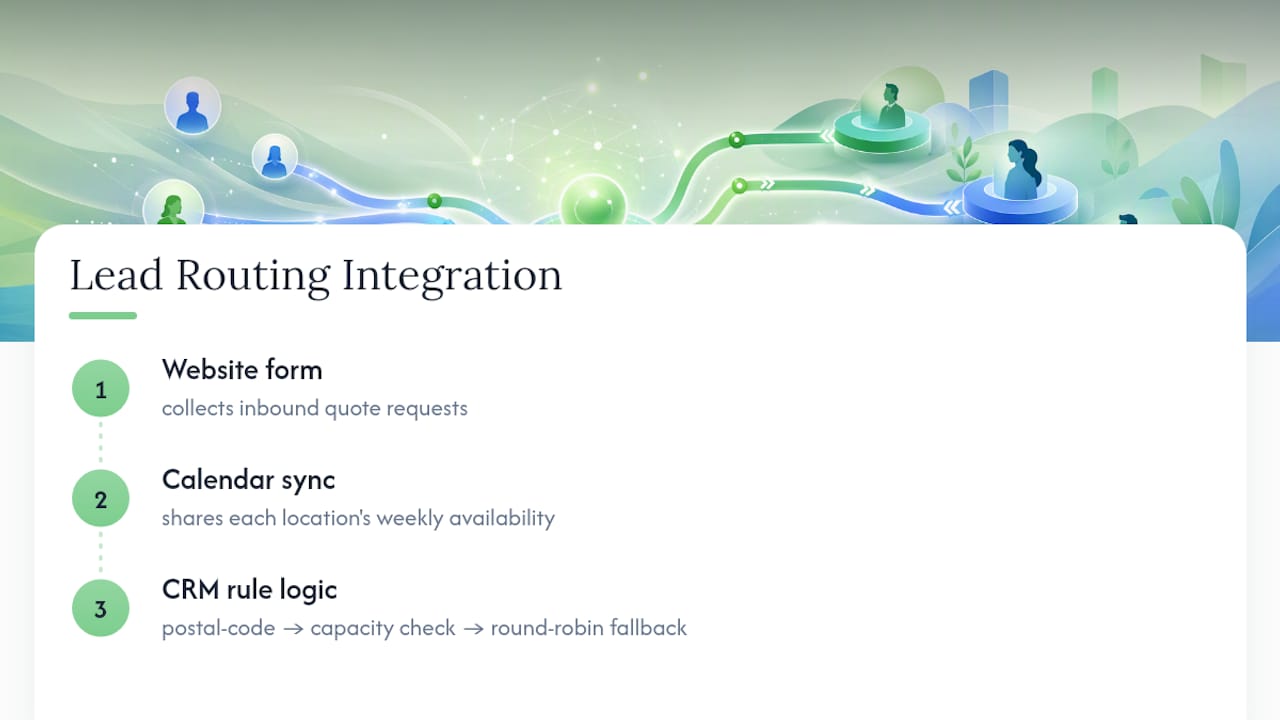
We recently helped a multi-location home services client route inbound quote requests by postal code first, then by which location had capacity that week, falling back to round robin inside each location’s team. The result: quote requests stopped piling up at their busiest location while a second location sat half-booked.

Our approach connects the pieces most SMBs handle separately: the website form, a synced calendar for availability, and the CRM record that actually holds the rule logic. That connection is where most DIY routing attempts fall apart, because the form and the CRM were never talking to each other cleanly in the first place.
A realistic timeline runs two to four weeks from audit to a live, tested rule set for a straightforward setup, longer if calendar-aware routing or account matching is involved. We build every client engagement in-house, with no outsourced pieces in that chain.
Why Most SMB Routing Advice Gets the Sequence Backward
Most guides tell you to design the perfect rule hierarchy first: territories, skills, weighting, escalation paths, all mapped out before a single lead moves. For a small team, that is backward. You end up spending weeks designing rules for edge cases that might happen twice a year, while the one inbound form that actually generates revenue still routes to a shared inbox.
Start with the leads that matter most, get a simple rotation live for those in a week, and only add complexity once you can point to a metric that justifies it. Availability-based routing is worth building the day you have reps in different time zones or different shifts. It is a waste of engineering time the day before that.
The CRM-versus-orchestration-layer debate gets treated as ideological when it should be practical. Stay CRM-native as long as your rules fit inside plain language you could explain to a new hire in five minutes. The moment they need a diagram, that is your signal to bring in a dedicated layer, not a reason to feel behind.
— Cristo
Get a Free Routing Audit Before You Build Anything
If your leads are still landing in one inbox and getting sorted by whoever checks it first, that is fixable faster than most owner-operators assume. Cloudsprout builds this kind of automation in-house, start to finish, so you get one team handling your forms, your CRM, and the rules connecting them, instead of stitching together three vendors yourself.

Our free audit walks through your current lead sources, flags where leads are getting lost or delayed, and shows you exactly what a working rotation would look like for your team. From there, engagements typically move through a prototype build, a monitored rollout, and ongoing tuning as your rule set matures. This suits owner-operators and small teams who want routing that actually runs, not another tool they have to configure alone on a weekend. Book a free SEO and lead-flow audit or ask us to review your current website setup for lead-capture gaps before we touch any routing rules.
Sources
For teams that want to go deeper on platform-specific setup, Pega Academy’s lead routing documentation walks through conditional routing configuration in detail. LeanData’s Salesforce routing automation guide covers the native limits worth knowing before you build. Selling Signals’ round robin rules and best practices write-up is a solid reference for SLA design.
- Automate lead assignment with lead routing | Pega Academy
- Round-Robin Lead Routing: The RevOps Guide to Fair, Fast Lead Distribution — The GTM Advisor Group
- How to Automate Lead Routing in Salesforce
- Round Robin Lead Routing: Rules, Examples & Best Practices
- Automated lead routing is essential for multi-product …
FAQ
What Does Automated Lead Routing Mean?
It means a system, not a person, decides which rep gets a new lead the moment it arrives, based on rules like territory, availability, or existing ownership rather than manual sorting.
What Is the Best Software for Sales Routing?
It depends on your CRM: Salesforce teams often extend native assignment rules with Flow, HubSpot teams use native rotation actions or Ops Hub extensions, and teams outgrowing both typically add a dedicated routing layer. Cloudsprout evaluates this fit as part of its routing audits before recommending a build.
What Is a Lead Automation System?
A lead automation system captures, qualifies, and assigns leads without manual handling, covering everything from initial form capture through routing, SLA tracking, and reassignment on missed deadlines.
What Is Lead Routing in Salesforce and How Does It Work?
Salesforce lead routing uses native assignment rules or, for more complex needs, Salesforce Flow to check conditions like territory, lead score, and existing ownership, then assigns the lead to the matching rep or queue automatically.
How Do I Know if My Routing Needs an Orchestration Layer?
If your routing rules change often, need real-time calendar availability, or have grown too many exception paths for a CRM’s native tools to handle cleanly, a dedicated routing platform usually solves that faster than more CRM workarounds.