

If your team is still copying leads from a contact form into a spreadsheet, CRM automation for small business is worth adopting now, not next quarter. Automate as soon as the same follow-up, reminder, or data-entry task repeats more than a few times a week. If you can’t describe your sales process in five steps yet, fix the process before you automate it; hire help once setup starts eating more than a weekend.
TL;DR:
- Automate CRM processes once manual tasks exceed a few times weekly to prevent leaks in lead management and reduce errors.
- Prioritize features like lead capture integrations, routing, and automated follow-up sequences to maximize early time savings.
- Use phased rollouts, starting with lead capture and follow-up, then expand to integrations, task automation, and monitoring over several weeks.
- Keep CRM data clean through regular deduplication, verification, and testing automation in sandbox environments to avoid breakdowns.
- Opt for managed automation builds for teams over one person and beware of vendor lock-ins, unclear costs, and untested workflows.
Table of Contents
- Why CRM Automation Matters for Small Businesses
- Which CRM Automation Features Should You Prioritize?
- How Do You Choose the Right CRM Automation Approach?
- What Does a CRM Automation Rollout Actually Look Like?
- Real CRM Automation Examples You Can Copy This Week
- How Do You Keep CRM Data Clean and Automations Reliable?
- What Should CRM Automation Cost a Small Business?
- What Mistakes Break CRM Automation Most Often?
- How CloudSprout Approaches CRM Automation Projects
- Get CRM Automation Built and Running Without the Guesswork
- Sources
- FAQ
Why CRM Automation Matters for Small Businesses
The math is simple. Every minute a bookkeeper or an owner spends retyping a lead into a spreadsheet is a minute not spent closing work or running the shop. CRM automation, in plain terms, means workflows, rules, and triggers that fire on their own when something happens, a form gets submitted, a deal changes stage, an invoice goes unpaid past 30 days. Vtiger’s breakdown of CRM automation describes exactly this: routing, follow-ups, notifications, and record updates that would otherwise eat up an employee’s morning.
The payoff shows up in a few concrete places:
- Faster response times, because a new lead gets an automatic acknowledgment within minutes instead of whenever someone checks email.
- Fewer dropped follow-ups, since the system reminds a person to call instead of relying on memory.
- Shorter sales cycles, because reminders and sequences push deals forward instead of letting them stall.
- More consistent client experience, since every new customer gets the same onboarding steps regardless of who’s on shift.
Not every small business needs this on day one. Vtiger’s own guidance makes the point that automation pays off fastest on repeatable tasks that already drain the most time, not on every process at once. A landscaping company doing 15 quotes a month probably doesn’t need automated lead scoring. A dental office managing 40 new patient inquiries a week almost certainly does.
Pro Tip: Track how many hours a week your team spends on manual data entry and follow-up calls before you automate anything. That number becomes your baseline for measuring whether the automation actually worked.
The threshold to watch for is volume plus repetition. Once you’re handling more than a handful of similar customer interactions weekly, manual tracking starts to leak leads and create errors that cost real money.
Which CRM Automation Features Should You Prioritize?
Not every feature matters equally when you’re setting up small business CRM tools for the first time. Here’s the order that actually moves the needle, based on what tends to break first when businesses skip steps.
- Lead capture integrations. Web forms, webhooks, and email parsing that pull a new inquiry straight into the CRM without anyone copying and pasting. This is the single highest-leverage automation because every downstream step depends on clean, timely lead data.
- Routing and lead assignment. Rules that send a lead to the right person, by service type, territory, or deal size, so nothing sits in a shared inbox for three days.
- Automated follow-up sequences. Pre-written email or SMS templates that go out on a schedule after a lead comes in, a quote goes unanswered, or an appointment is booked.
- Task creation and reminders. The CRM automatically assigns a call, a check-in, or a paperwork step to a specific team member with a due date attached.
- Native integrations. Calendar syncing and accounting software connections (QuickBooks is the common one for Canadian small businesses) so data doesn’t live in three disconnected places.
- Open API or low-code connectors. For businesses that outgrow templates, the ability to build custom automations without waiting on a developer for every change.
- Monitoring and reporting triggers. Alerts that flag when an automation stops firing, an email bounce rate spikes, or a sequence has zero engagement, so a broken workflow doesn’t run silently for months.
Pro Tip: Set up the monitoring trigger before you launch anything else. A silently broken welcome email sequence can run for months without a single person noticing, and by the time someone does, you’ve lost every lead that came through during that window.
Zapier’s roundup of CRMs for small business sorts tools by use case, product-based, service-based, inbound-heavy, and so on, which is a useful reminder that the “best” feature set depends entirely on how your business actually generates and closes work. A contractor booking site visits needs different automation priorities than an e-commerce shop managing repeat customers.
How Do You Choose the Right CRM Automation Approach?
Three paths exist: do it yourself inside an existing platform, use a low-code connector to stitch a few tools together, or bring in an agency to build and manage it for you. The right choice depends on your team’s time, technical comfort, and how complex the workflow needs to be.
A one-person shop sending simple follow-up emails can usually handle DIY setup inside a low-cost platform. BDC’s guidance for Canadian small businesses specifically recommends starting with free or low-cost tools that match your existing process, rather than buying more platform than you need. A team of five to fifteen people juggling multiple service lines usually benefits from low-code connectors or a managed build, because the risk of a broken automation quietly costing sales goes up fast once more people touch the system.
Before committing to any option, ask these questions directly:
- How does data migration work if we need to leave this platform later?
- Who owns the automation logic once it’s built, us or the vendor?
- Is there a rollback option if an automation misfires and sends the wrong message to fifty contacts?
- What’s the actual support response time, not the marketing promise?
- Can we test changes in a sandbox environment before they go live to real customers?
A closed platform that won’t let you export your contact list, or a pricing page that hides the cost of “advanced” automation behind a sales call, tells you more about the vendor’s incentives than any feature list does.
Watch for red flags: platforms that lock your data behind proprietary export formats, pricing that scales unpredictably with contact count, or automation limits that only reveal themselves after you’ve already migrated your customer list. Ease of use and cost-effectiveness matter more than feature count for most owner-operators, a point BDC makes directly when comparing entry-level CRM options.
What Does a CRM Automation Rollout Actually Look Like?
Most small businesses fail at automation not because the tools are bad, but because they try to automate everything at once. A phased rollout avoids that trap.
- Preparation (before week one). Audit your existing contact data, map your actual sales or service process on paper, and pick one to three automations that solve your biggest time drain. Resist the urge to automate everything you can think of.
- Phase 1, quick wins (weeks 0 to 2). Launch automated lead capture and a single follow-up sequence. Expect immediate, visible results: faster response times and a noticeably shorter list of “forgot to call back” leads.
- Phase 2, core automation and integrations (weeks 2 to 6). Connect your calendar and accounting software, add task assignment rules, and build out routing logic for different lead types. This is where most of the real time savings show up.
- Phase 3, optimization and training (weeks 6 to 12). Train the team on exception handling, refine sequences based on open and response rates, and set up the monitoring alerts that catch failures early.
- Post-launch (ongoing). Review key metrics monthly, response time, conversion rate by source, and automation failure alerts, and adjust one workflow at a time rather than overhauling the system every quarter.
A business with clean data and a simple process can realistically be running Phase 1 automations within two weeks. A business migrating from spreadsheets with years of messy contact history should budget closer to six weeks before Phase 2 integrations are stable.
Real CRM Automation Examples You Can Copy This Week
Templates make CRM automation examples concrete instead of theoretical. Here are workflows small businesses use immediately, adapted from patterns Nutshell documents in its list of CRM automation examples.
- New lead capture: A form submission triggers a welcome email to the customer and a Slack or text notification to the owner within seconds.
- Lead scoring and escalation: Leads matching high-value criteria (budget size, service type, urgency) get automatically flagged and routed to a senior team member instead of the general queue.
- Appointment booking: A booked slot triggers a confirmation email, then an automated reminder text 24 hours before, cutting no-show rates without a manual call.
- Customer onboarding: A signed contract triggers a checklist of tasks, welcome packet, kickoff call, account setup, assigned automatically to the right team members.
- Win/loss follow-up: A closed-won deal triggers a feedback request; a closed-lost deal triggers a short survey asking why, feeding back into your pitch.
- Service ticket routing: An incoming support request gets categorized and assigned automatically, with an SLA reminder if no one responds within a set window.
None of these require custom software. They’re standard workflow rules available in most small business CRM tools, and Salesforce’s own overview of CRM automation notes that this kind of automation shortens sales cycles precisely because it removes the lag between an action and a response. The caution worth repeating: automation speeds up the mechanics, but it still needs a human checking in on exceptions.
How Do You Keep CRM Data Clean and Automations Reliable?
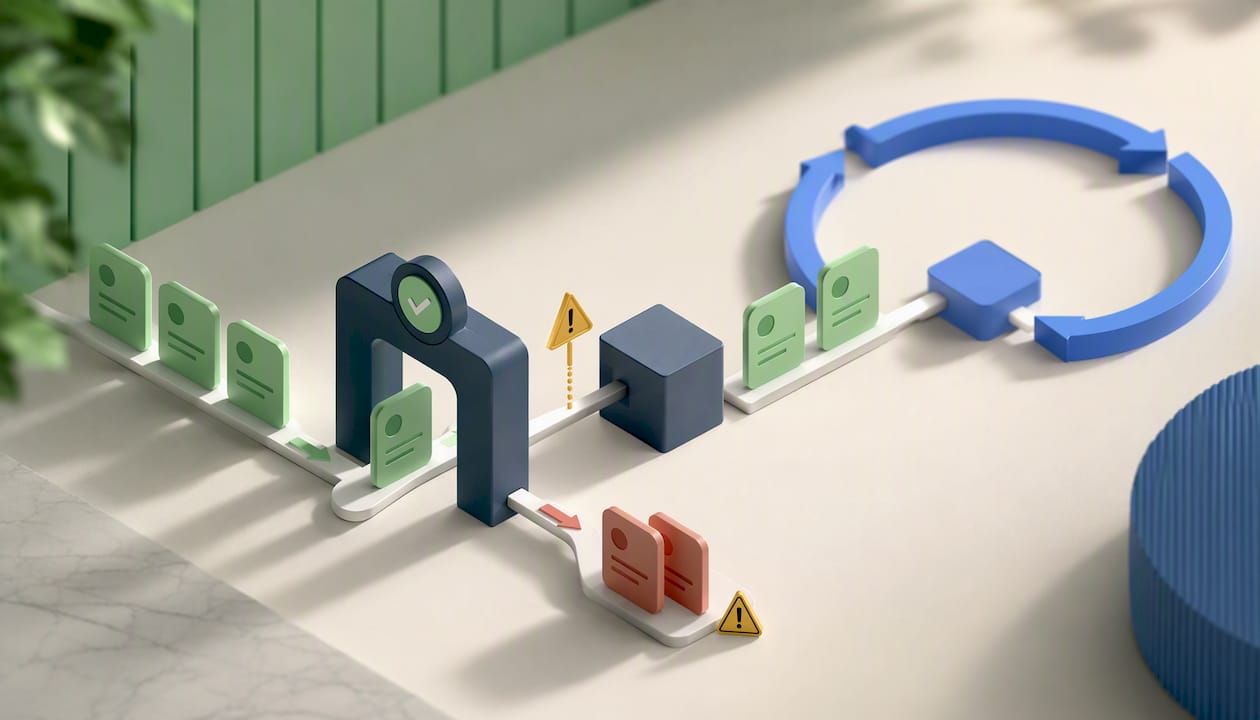
Automation built on bad data doesn’t save time, it just breaks things faster and at scale. A duplicate contact record doesn’t just look messy; it can trigger the same welcome sequence twice to one customer, which reads as spammy and unprofessional.
Assign a single person as the data owner for your CRM, even in a five-person company. Without a named owner, “someone will clean it up eventually” becomes nobody does. That person runs a monthly hygiene pass:
- Deduplicate contact records before they multiply across multiple lead sources.
- Verify email addresses and flag hard bounces so sequences stop hitting dead inboxes.
- Remove or archive contacts that have gone stale for a year or more.
- Confirm every active automation still has a clear owner and a documented purpose.
Before enabling any major workflow, test it in a sandbox or with a small internal group first, not on fifty live customer records. A rollback option matters here too: if a sequence goes out with the wrong offer or a broken merge field, you need a way to pause it immediately, not wait for a support ticket.
Pro Tip: Watch open rates, click rates, and unsubscribe rates weekly for the first month after any new sequence launches. A sudden spike in unsubscribes usually means the automation is either firing too often or targeting the wrong list segment.
Automation left unmonitored is how “data rot” sets in, stale records and broken workflows quietly degrading the customer experience until someone notices a pattern of complaints.
What Should CRM Automation Cost a Small Business?
Pricing for CRM automation software generally follows one of three models: per user, per contact, or per automation run. Costs climb fastest when you add more seats, cross a contact threshold, or need advanced workflow logic that free tiers don’t include.
Free and low-cost tiers work fine for basic contact management and a single follow-up sequence, which is exactly what BDC recommends for businesses just starting out. Paid plans become necessary once you need multiple automated sequences running simultaneously, team-wide task assignment, or integrations beyond basic email.
A few ways to control cost as you scale:
- Roll out automations in phases instead of buying the top-tier plan on day one.
- Segment contacts so inactive leads don’t count against paid-tier contact limits.
- Lean on native integrations (calendar, accounting) before paying for third-party connector tools.
- Expect an agency-managed starter engagement to run as a defined project (audit and build) followed by a lighter monthly retainer for ongoing management, rather than an open-ended hourly arrangement.
What Mistakes Break CRM Automation Most Often?
Most CRM automation failures trace back to a handful of avoidable habits.
- Automating on top of dirty data, duplicates, typos, and dead emails, guarantees a messy result at scale, not a clean one.
- Ignoring engagement metrics after launch lets a sequence keep firing long after it started hurting your open and unsubscribe rates.
- Skipping a rollback plan means one bad automation can run for days before anyone catches it.
- Failing to train staff on exceptions leaves customers stuck when a workflow doesn’t fit their specific situation and nobody knows how to intervene manually.
Pro Tip: Give every automation a named owner and a pause button before it goes live, not after something breaks. It takes five minutes to set up and saves hours of cleanup later.
How CloudSprout Approaches CRM Automation Projects
Across the CRM and automation projects Cloudsprout has built for Ontario trades, food service, and professional service businesses, the pattern repeats: owners underestimate how much time gets recovered once follow-ups stop depending on memory. A contractor who used to lose quotes in an inbox starts closing faster simply because reminders fire automatically.
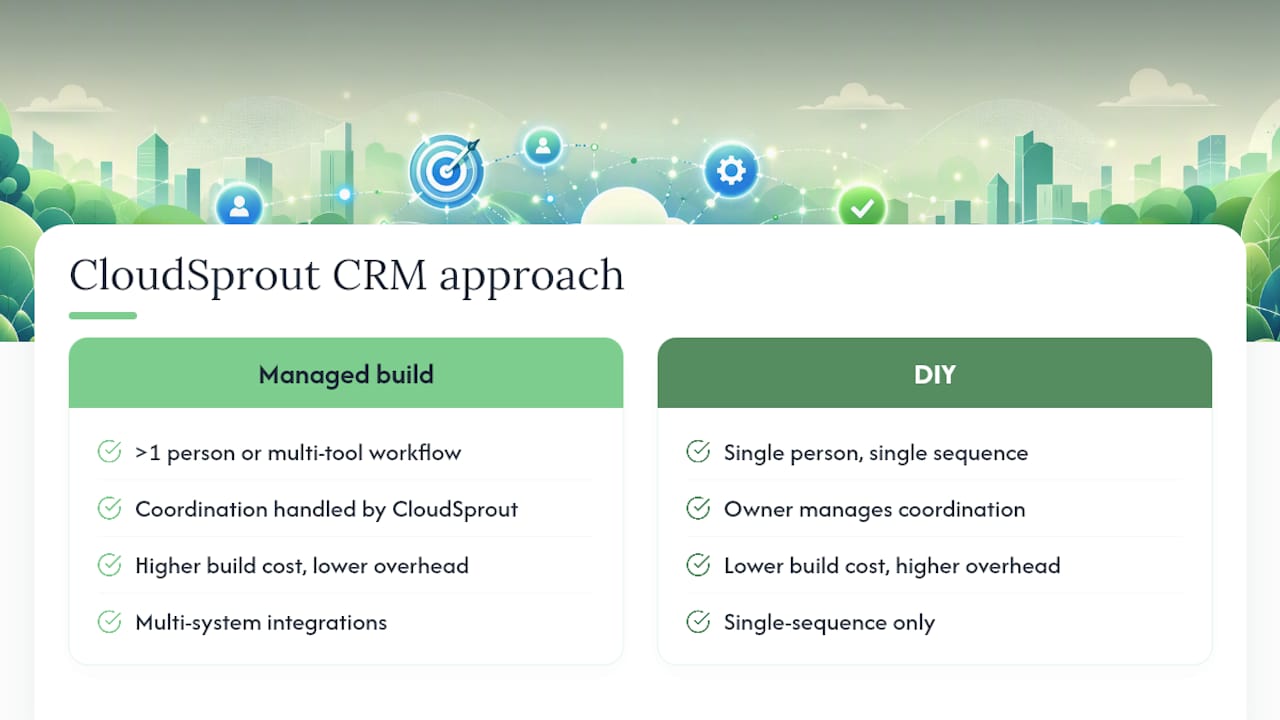
Cloudsprout recommends a managed build whenever a business has more than one person touching customer data, or when the workflow spans multiple tools, website forms, accounting software, scheduling. DIY makes sense for a true one-person operation running a single sequence. Beyond that, the coordination overhead of DIY usually costs more than it saves.
— Cristo
Get CRM Automation Built and Running Without the Guesswork
Cloudsprout builds and operates CRM automation entirely in-house, no outsourced developers, no black-box platforms you can’t get support on directly from the people who built it. If you’ve read this far and recognized your own business in the “still copying leads into a spreadsheet” problem, that’s the exact gap Cloudsprout closes.

A typical starter engagement runs in three steps: audit your current process and data, build the priority automations from the checklist above, then train your team and hand over a system you actually understand instead of one you’re locked into. Every client starts with a free trial that includes a full digital audit, so you see exactly what’s broken before committing to anything. If your CRM setup lives inside your website already, or needs to, Cloudsprout’s website development services cover that integration directly. Ready to see what’s actually slowing your follow-ups down? Start with a free audit and get a plain-language breakdown of where automation would save the most time.
Sources
For a wider look at how CRMs get categorized by business type, Zapier’s 2026 roundup breaks tools down by use case rather than a generic ranking. BDC’s guide to free and low-cost CRM options is worth reading before you spend a dollar on a paid plan. For workflow ideas beyond what’s covered here, Nutshell’s list of CRM automation examples has seventeen more to borrow from.
On the Cloudsprout side, the QuickBooks CRM integration guide walks through connecting accounting and customer data directly, and the AI chatbot guide covers how chat-based lead capture feeds into the automations described above.
- The 11 best CRMs for small business in 2026
- CRM Software: Free & Low-cost Options
- CRM Automation: Definition, Benefits, Use Cases, and Examples – Vtiger CRM Blog
FAQ
What CRM is best for small business?
There’s no single best option. The right small business CRM tools depend on your use case, Zapier’s roundup sorts CRMs by product-based, service-based, and inbound-growth needs because a contractor and an e-commerce shop need different feature priorities.
Will CRM be replaced by AI?
No. AI increasingly assists CRM automation, speeding up follow-ups and forecasting, but Salesforce notes that automation and AI support human decision-making rather than replace it, and a system still needs someone to handle exceptions and judgment calls.
How much does a CRM cost for a small business?
Costs typically follow per-user, per-contact, or per-automation pricing, and BDC recommends starting on free or low-cost tiers before upgrading, since most small businesses don’t need advanced paid features on day one.
Can AI build me a CRM system?
AI tools can help configure workflows and templates faster, but a reliable CRM automation setup still requires clean data, tested rollback processes, and a defined owner, work that Cloudsprout handles directly for clients who want a managed build instead of a DIY project.