

Local business schema is a machine-readable description of your business, usually written in JSON-LD. It helps Google connect the name, address, phone number, hours, website, and business type shown on your page with the same real-world business. For a Canadian small business, the safest approach is to publish one accurate entity, use the most specific business type that genuinely applies, and keep the markup consistent with the visible page and your Google Business Profile.
Schema can improve how clearly search engines understand your business, but it does not guarantee a rich result or a higher position in the local pack. Google says local results are mainly based on relevance, distance, and prominence. Treat schema as clean technical infrastructure—not a shortcut around a complete Google Business Profile, useful location pages, reviews, links, and strong service content.
By CloudSprout Editorial Team · Reviewed September 25, 2026
TL;DR:
- Use the most specific valid
LocalBusinesssubtype, such asDentist,Plumber, orRestaurant.- Google currently lists
nameandaddressas required LocalBusiness properties. Add accurate recommended properties—such astelephone,url,geo, and opening hours—when they apply.- Do not add a second schema block before checking what WordPress, Yoast, your theme, or another plugin already outputs.
- For multiple locations, use a dedicated page and a unique business entity for each real location.
- Validate the live URL with Google’s Rich Results Test and Schema.org Validator, then recheck after major site or business-information changes.
Table of Contents
- What Is Local Business Schema?
- What Can Local Business Schema Actually Do?
- What Does Google Require?
- How Do You Choose the Right Subtype?
- Before You Add Code: Audit What Is Already There
- What Should Your LocalBusiness Markup Include?
- How Do You Add It in WordPress?
- What About Service-Area Businesses?
- How Should Multiple Locations Be Structured?
- How Do You Test and Monitor It?
- Common LocalBusiness Schema Mistakes
- Canadian Small-Business Rollout Checklist
- When Is Professional Help Worth It?
- Sources
- FAQ
What Is Local Business Schema?
LocalBusiness is a Schema.org type used to describe a particular physical business or branch. In JSON-LD, the information sits in a structured-data block that people do not see on the page but search engines can read.
Instead of forcing a crawler to infer which phone number, address, or set of hours belongs to a location, the markup labels each detail. This can help Google reconcile the entity described on your website with information it finds elsewhere. It also gives other systems a structured description of the business.
The markup must reflect reality. If the page shows one address while the schema contains another, the code is not improving clarity—it is creating a contradiction.
What Can Local Business Schema Actually Do?
LocalBusiness schema can help search engines understand business details and may make a page eligible for supported search features. Google may use structured data for information such as hours, directions, and other business details, but valid markup does not guarantee that a special result will appear.
Schema is also not a direct local-ranking switch. Google’s own guidance says local results are mainly determined by relevance, distance, and prominence. A complete and accurate Google Business Profile, strong service and location pages, genuine reviews, links, and overall website quality still do the heavy lifting.
For a buyer comparing Canadian providers, schema works best when it supports information that already helps the decision: what the business does, where it operates, when it is available, how to contact it, and which page represents the correct location.
What Does Google Require in LocalBusiness Schema?
Google’s current LocalBusiness documentation lists two required properties for this feature:
name— the real business or location nameaddress— the physical location, structured as aPostalAddress
Your JSON-LD also needs the normal Schema.org structure, including @context and a valid @type. Google recommends using the most specific LocalBusiness subtype possible. Recommended properties should be added when they are accurate and relevant—not filled with guesses just to make a validator look complete.
| Property | Why it is useful | Canadian implementation note |
|---|---|---|
telephone |
Connects the location to its customer-facing phone number | Use the real number, preferably in +1 international format |
url |
Identifies the page for this business or location | Use the full HTTPS URL |
geo |
Provides precise latitude and longitude | Google asks for at least five decimal places |
openingHoursSpecification |
States regular opening hours in a structured format | Keep it aligned with the hours visible on the page and profile |
priceRange |
Gives users a broad price indicator when appropriate | Use a simple, truthful value such as $$ |
sameAs |
Connects the entity to official profiles | Include only profiles that represent the same business |
Important: do not add aggregateRating to your own LocalBusiness markup expecting organic review stars. Google does not display self-serving review snippets for LocalBusiness or Organization pages controlled by the business being reviewed. Reviews can still help customers and your Google Business Profile; the restriction is about review rich results on your own website.
Canadian addresses should be separated into fields such as streetAddress, addressLocality, addressRegion, postalCode, and addressCountry. Use the applicable province or territory abbreviation and CA for the country.
How Do You Choose the Right LocalBusiness Subtype?
Choose the type that most closely describes the location’s primary real-world activity. A dental clinic can use Dentist, a plumbing company can use Plumber, and a restaurant can use Restaurant. A specific type inherits LocalBusiness properties and can support fields relevant to that category.
- Restaurant or café: consider
RestaurantorCafeOrCoffeeShop, plus accurate cuisine or menu information where relevant. - Retail: select the closest
Storesubtype available. - Trades: look for types such as
Electrician,Plumber,RoofingContractor, or another valid subtype. - Professional services: check for a specific type such as
AccountingService,LegalService, orRealEstateAgent.
If no specific subtype honestly fits, plain LocalBusiness is better than choosing an inaccurate category. Google also supports multiple types in an array when more than one type genuinely applies; do not use multiple types simply to stuff service keywords into the markup.
Before You Add Code: Audit What Is Already There
Many WordPress sites already output structured data through Yoast SEO, another SEO plugin, a schema plugin, the theme, or custom code. Adding a fresh LocalBusiness block without checking can create duplicate entities with different names, URLs, or addresses.
- Run the live homepage and relevant location page through Google’s Rich Results Test.
- View the detected structured-data items and note their type, identifier, name, URL, and address.
- Check whether Yoast or another plugin already represents the organization or local business.
- Decide which single system will own the business data going forward.
- Update or extend the existing graph where practical instead of publishing a competing entity.
This step matters more than the code generator you choose. One maintained source of truth is easier to trust, update, and troubleshoot than several overlapping plugins.
What Should Your LocalBusiness Markup Include?
Your visitors do not need to see raw JSON-LD code on the page. The markup should be added behind the scenes through WordPress, an SEO plugin, or a carefully managed code snippet. What users see on the page should be clear business information.
Before publishing LocalBusiness markup for a Canadian location, confirm that it contains accurate information for:
- The most specific business type that genuinely applies
- The public-facing business or location name
- A complete Canadian postal address, when customers can visit the location
- The correct location URL and customer-facing phone number
- Current regular opening hours
- Accurate latitude and longitude when geographic coordinates are included
- A stable identifier for the business or branch
- Official social profiles only when they represent the same business
The structured data should remain hidden from normal page visitors. Test the live page after implementation to confirm that Google can detect it without displaying it as article text.
How Do You Add LocalBusiness Schema in WordPress?
You do not need to edit hosting files. In WordPress, use the safest option already supported by your setup:
- Existing SEO or schema plugin: use its organization or local-business settings if it supports the fields and type you need.
- A dedicated schema plugin: useful when your current SEO plugin cannot model the business or locations correctly, but avoid overlapping output.
- A WordPress code-snippet tool: suitable for carefully reviewed structured data when a plugin does not provide the required control.
- Developer implementation: preferable for multi-location sites, custom post types, or an existing connected schema graph.
If you add JSON-LD manually, WordPress must insert it as structured data behind the scenes rather than visible page copy. What matters is that it appears only once, describes the correct business entity, and remains easy to maintain after WordPress updates.
Do not add a second block simply because a plugin does not show every possible property. Fewer complete and accurate properties are better than a large block filled with stale, duplicated, or unsupported information.
What About Service-Area Businesses?
A service-area business—such as a plumber, cleaner, or mobile technician—may visit customers without serving them at its business address. Google Business Profile allows eligible service-area businesses to hide the address and show service areas instead.
Do not expose a residential or hidden address in website markup just to satisfy a schema field. Google’s LocalBusiness rich-result documentation requires a physical address, so a business without a public customer location should not force misleading LocalBusiness markup onto the page. Use accurate Organization information where appropriate, describe the real service area in visible content, and configure the Google Business Profile according to Google’s service-area rules.
Schema and the Google Business Profile are separate systems. An areaServed property does not replace the service-area settings in the profile, and it does not make a business eligible to rank across every city named in the code.
How Should Multiple Locations Be Structured?
For a genuine multi-location business, each branch should normally have its own useful location page and its own identifiable business entity.
- Create one page per real location. Include the branch’s address, local phone number where applicable, hours, services, directions, and useful location-specific information.
- Give each branch a unique identifier. This helps search engines distinguish one physical location from another.
- Keep the branch details accurate across the website and Google Business Profile. The information should describe the same real-world location; harmless formatting differences such as “Street” versus “St.” are not a reason to panic.
- Use department relationships only for real departments. A pharmacy inside a larger store is different from a separate branch across town.
For a deeper location-page strategy, read CloudSprout’s guide to multi-location SEO.
How Do You Test and Monitor Your Schema?
Publishing is only the first check. Test the live URL—not only a copied code fragment—so you see the markup after WordPress, plugins, caching, and the theme have processed the page.
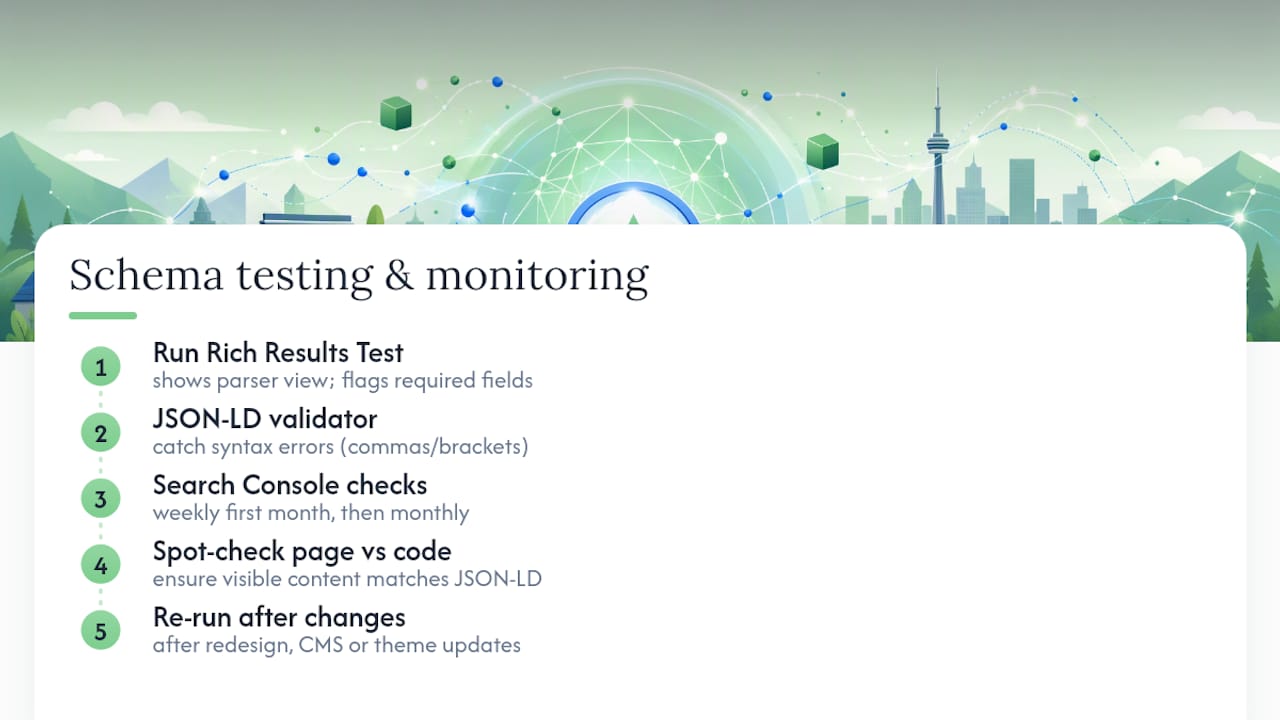
- Use Google’s Rich Results Test. It checks whether Google can read the page and whether detected markup is eligible for supported rich-result features.
- Use Schema.org Validator. It helps inspect Schema.org vocabulary and the relationships between entities, including properties that are not part of a Google rich result.
- Inspect the live page. Confirm that the business name, address, phone, URL, and hours in the markup agree with the visible content.
- Use URL Inspection after publishing. In Google Search Console, request indexing when appropriate and confirm that Google can access the updated page.
- Recheck after major changes. Test again after a redesign, migration, plugin change, new location, phone-number change, or permanent hours update.
Search Console may show reports for supported structured-data features detected on your site, but do not assume every LocalBusiness implementation will produce a dedicated report. Keep a simple internal record of the page, owner, source of the markup, and last validation date.
Common LocalBusiness Schema Mistakes
- Adding duplicate business entities. Yoast, the theme, another plugin, and a manual snippet may all describe the same business differently.
- Publishing inaccurate or hidden information. Markup should represent the business and content users can verify on the page.
- Using the wrong subtype. A specific but false type is worse than an accurate general type.
- Expecting self-serving review stars. Your own LocalBusiness or Organization pages are not eligible for Google’s self-serving review snippets.
- Marking up several branches as one location. Separate real branches with dedicated pages and identifiers.
- Forgetting maintenance. Old phone numbers, moved offices, or outdated hours turn once-correct markup into conflicting data.
- Treating validation as a ranking guarantee. A valid result means the markup can be understood; it does not promise visibility, clicks, or rankings.
Canadian Small-Business Rollout Checklist
- Confirm the legal or public-facing business name and the name used on the location page.
- Confirm whether customers can actually visit the address.
- Use the correct Canadian province or territory abbreviation and identify Canada as the country.
- Check the phone number, permanent hours, location URL, and map coordinates.
- Choose the closest valid Schema.org subtype.
- Audit existing WordPress schema before adding anything.
- Use one stable identifier for each entity or branch.
- Validate the live page with both Google and Schema.org tools.
- Keep a repeatable update process for moves, new locations, phone changes, and permanent hour changes.
Before editing your markup, it is also worth reviewing the broader owner-operated business SEO checklist and your Google Business Profile setup. Schema cannot repair inaccurate business information upstream.
When Is Professional Help Worth It?
A single-location business with clean WordPress output can often manage schema through a well-configured plugin. Help becomes more valuable when the site has multiple locations, conflicting plugins, custom booking or product systems, a recent migration, or business details that appear differently across important pages.

CloudSprout works with Canadian businesses on technical SEO, WordPress, location pages, and the systems that turn search visibility into enquiries. A free 30-minute strategy call can review the current setup, identify the highest-priority gaps, and clarify whether the fix is a plugin setting, a content update, or development work.
If the issue is broader search visibility, explore CloudSprout’s SEO services. If the schema problem is tied to the site structure, templates, or location-page build, see WordPress website development. Or book a free call for a no-obligation review.
Sources
- Local Business Structured Data — Google Search Central
- Introduction to Structured Data — Google Search Central
- Self-Serving Review Rich Results Policy — Google Search Central
- Tips to Improve Your Local Ranking — Google Business Profile Help
- Manage Service Areas — Google Business Profile Help
- LocalBusiness — Schema.org
- Schema.org Validator
FAQ
What is local business schema?
Local business schema is structured data that describes a physical business or branch in a machine-readable format. It can identify details such as the business type, name, address, phone number, URL, coordinates, and opening hours.
Which LocalBusiness properties does Google require?
Google currently lists name and address as required LocalBusiness properties. The JSON-LD must also use valid Schema.org syntax and an appropriate type. Google lists properties such as telephone, URL, geographic coordinates, and opening hours as recommended when applicable.
Does LocalBusiness schema improve local rankings?
Schema can help Google understand your business, but it does not guarantee a higher local-pack position. Google says local results are mainly based on relevance, distance, and prominence.
Where should LocalBusiness schema go?
Place it on the page that describes the business or specific location. The structured data should be inserted behind the scenes rather than displayed as page copy. On WordPress, first check whether your SEO plugin, schema plugin, or theme already outputs the entity so you do not create a duplicate.
Should a service-area business publish its hidden address in schema?
No. Do not expose a residential or non-public address just to complete LocalBusiness markup. Keep the Google Business Profile configured according to Google’s service-area rules, publish accurate service-area content, and use only structured data that truthfully represents the business.
Do multiple locations need separate schema?
Each real branch should normally have a dedicated, useful location page and a unique business entity with its own identifier, address, phone, hours, and canonical URL. Avoid combining unrelated branch addresses into one LocalBusiness object.