Pick one or two platforms where your customers actually spend time, where your content strengths fit the format, and where you can post consistently for six months. That’s the whole decision. Not five platforms. Not whatever app your cousin says is “blowing up right now.”
Before you pick anything, sort platforms into rough categories:
- Short-form video (TikTok, Instagram Reels, YouTube Shorts)
- Long-form video (YouTube)
- Visual and photo-first (Instagram, Pinterest)
- Professional and networking (LinkedIn)
- Community and search-led (Google Business Profile, Reddit, niche forums)
Pick your top candidate from the framework below, then commit to a structured six-month test before you touch a second platform.
Key Takeaways
Choosing social media platforms comes down to matching your audience, your content strengths, and your available hours to one or two channels, then testing for six months before adding more.
| Point | Details |
|---|---|
| Pick 1-2 platforms | Match audience location, content format, and available weekly hours before choosing. |
| Run the MVP test | Commit to six months with fixed outputs, three tracked metrics, and monthly reviews. |
| Match format to strength | Choose short video, long video, photo, or text based on what you can produce consistently. |
| Budget real time weekly | Short-form video runs 4 to 6 hours a week; LinkedIn runs closer to 1.5 to 2 hours. |
| Repurpose before expanding | Turn one piece of content into three formats instead of creating for each platform separately. |
Table of Contents
- How Do I Choose Social Media Platforms for My Business?
- Which Platform Fits Your Business Goals?
- What Does Each Platform Actually Cost You in Time?
- How Do I Run a Six-Month Platform Test?
- Your First 90 Days: Setup and Routine
- What Does Successful Platform Selection Look Like in Practice?
- Sources
- FAQ
How Do I Choose Social Media Platforms for My Business?
Start with a question most business owners skip: where do your actual customers already hang out online? Not where you personally scroll. Not where your competitor posts. Your customers.
1. Map where your audience spends time. Ask three recent customers how they found you, or add one line to your checkout or booking form: “How did you hear about us?” If you already have a website, Google Analytics referral data will show you which platforms are sending traffic right now, if any.
2. Categorize your content strengths honestly. Can you shoot quick video on your phone, or do you freeze up on camera? Do you have a backlog of finished projects to photograph? Are you a natural writer who could bang out a how-to post in fifteen minutes? Match the platform to the skill you already have, not the one you wish you had.

3. Estimate weekly time realistically. A platform only counts as “resourced” if you can name who does the work each week and for how many hours. If nobody on your team can commit two hours a week, that platform is off the list regardless of how good it looks in theory.
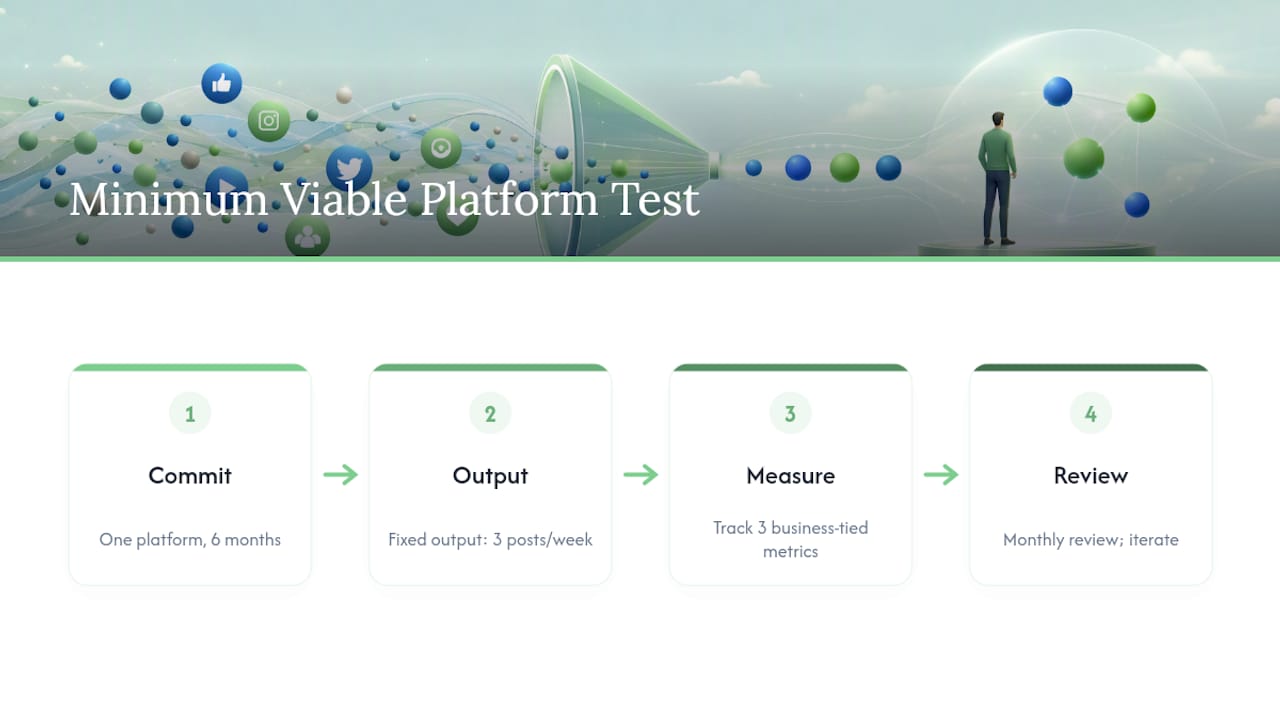
4. Run the Minimum Viable Platform test. Commit to one platform for six months, define a fixed output (say, three posts a week), track three metrics tied to your actual business goal, and review monthly. Sprout Social’s platform guidance backs this same approach: focus on one or two channels and repurpose content rather than spreading across five.
Pro Tip: If you can’t answer “who posts this every week” with a name, not a job title, you haven’t resourced the platform. You’ve wished for it.
Which Platform Fits Your Business Goals?
Every platform rewards a different kind of content, and forcing your business into the wrong one wastes months. Here’s how the major categories break down in practice.
- Short-form video (TikTok, Reels, Shorts) works for discovery and brand awareness, especially with younger audiences. It demands frequent, visual, personality-driven content. A landscaping company showing before-and-afters does well here; a bookkeeping firm usually doesn’t.
- Long-form video (YouTube) suits tutorials, product demos, and evergreen “how it works” content. Content that favors search-driven discovery has a much longer shelf life than short-form clips, but it costs more upfront in scripting and editing.
- Visual and photo-first platforms (Instagram, Pinterest) fit retail, food service, and trades with strong before/after or finished-product shots. A kitchen renovation contractor or a bakery has an easy visual story to tell here.
- Professional networking (LinkedIn) is built for B2B leads and credibility. It rewards long-form posts and carousels over polished video.
- Community and search-led platforms (Google Business Profile, Reddit, local forums) drive local discovery and customer support, particularly for service businesses where reviews and local search matter more than follower counts.
One piece of content rarely has to serve one platform, and leveraging a content strategy platform can help automate scheduling and data-driven content decisions for better efficiency. A single job-site video can become a Reel, a YouTube Short, a LinkedIn clip, and a Google Business Profile update, with editing being the only added cost.
What Does Each Platform Actually Cost You in Time?
This is the part most advice skips, and it’s the part that actually breaks small businesses. Choosing a platform isn’t really a marketing decision. It’s a staffing decision.
Rough weekly time ranges, once you include filming, editing, scheduling, and replying to comments:
- Short-form video: about 4 to 6 hours a week for 3 to 5 posts
- Long-form YouTube video: about 6 to 11 hours a week
- Photo and carousel content (Instagram, Pinterest): about 2.5 to 3.5 hours a week
- Text and networking platforms (LinkedIn): about 1.5 to 2 hours a week
LinkedIn deserves special attention here. It has the highest visitor-to-lead conversion rate of any major social network at 2.74 percent, and roughly 80 percent of B2B social leads originate there, per the same research. For a professional services business in Ontario, that’s a lot of return for under two hours a week. Google Business Profile updates carry a similarly low time cost for high local-search payoff.
Want this running in your business without doing it yourself?
Book a Free Consultation →How Do I Run a Six-Month Platform Test?
Six months isn’t arbitrary. It’s long enough to build a real posting rhythm and see whether the algorithm and your audience actually respond, but short enough that you’re not stuck for years on a platform that never worked.
- Set 30/60/90 day output goals. Define exactly how many posts, videos, or updates go out each week, and name who’s responsible.
- Pick metrics that match your goal. Awareness goals track reach and follower growth. Engagement goals track engagement rate. Lead-generation goals track visitor-to-lead conversion. Local service goals track calls, messages, and Google Business Profile actions.
- Review monthly, not daily. Daily numbers are noise. Monthly trends tell you whether to keep going.
- Set exit rules before you start. Decide in advance what “this isn’t working” looks like, such as flat engagement after 90 days with consistent posting, so you’re not making that call emotionally in month five.
| Month | Focus | Decision Point |
|---|---|---|
| Month 1-2 | Establish posting rhythm and baseline metrics | Confirm you can sustain the time commitment |
| Month 3-4 | Track the one metric tied to your goal | Adjust content format if engagement is flat |
| Month 5-6 | Compare results against your exit rule | Keep, scale, or drop the platform |
Your First 90 Days: Setup and Routine
Getting started is mostly mechanical, and the mechanics matter more than people expect.
- Set up your business profile properly. Add a clear bio, contact button, and website link. If you’re using Facebook and Instagram together, link them through Meta Accounts Center, since that unlocks cross-posting and shared ad tools without extra setup work.
- Set a content cadence you can actually hit. Three posts a week beats seven if seven means you quit by week four.
- Build a daily engagement routine. Ten minutes replying to comments and messages does more for algorithm reach than a fourth weekly post.
- Apply the one-to-three repurposing rule. One job photo becomes an Instagram post, a Google Business Profile update, and a LinkedIn caption. This is where CloudSprout’s content pillar planning approach saves owner-operators hours every week.
The most common failure isn’t picking the “wrong” platform. It’s spreading across four platforms at once, ignoring the analytics tab entirely, and posting inconsistently until momentum dies.
What Does Successful Platform Selection Look Like in Practice?
The pattern shows up consistently among businesses that actually stick with social media long term: they pick narrow, not wide. Analysis of successful independent creators found that 94 percent focused on just one or two primary platforms rather than trying to maintain a presence everywhere at once. That’s the opposite of what most small business owners feel pressured to do.
Think about a home renovation contractor. The audience research is easy: homeowners browse renovation ideas on Instagram and search “kitchen renovation near me” on Google. That points to two channels, not five: Instagram for the visual portfolio and Google Business Profile for local search and reviews. No TikTok dance required.
Compare that to a bookkeeping firm targeting other businesses. Its audience isn’t scrolling Instagram for inspiration. It’s researching vendors on LinkedIn and asking peers for referrals. LinkedIn’s B2B lead conversion advantage makes it the obvious first bet, with Google Business Profile as a low-cost secondary channel for local searches.
Neither business needs to be on every platform. Each needs to be consistently good on the one or two platforms where its actual buyers make decisions. That’s the engagement-to-conversion evaluation that matters more than raw follower counts: a smaller, well-matched audience converts better than a large mismatched one. A niche trades Facebook group with 300 engaged local homeowners often outperforms a generic Instagram account with 3,000 followers who will never hire a contractor in your service area.
An Ontario Owner’s Take on Platform Overload
Most small business owners don’t fail at social media because they picked the “wrong” platform. They fail because they tried to run four platforms with the time and budget for one. That’s the pattern Cristo, drawing on the framework behind CloudSprout’s social media work with Ontario trades and food-service clients, sees over and over.
CloudSprout runs everything in-house, month-to-month, with no lock-in contracts, and every new client starts with a free digital audit. For a landscaping client, that meant killing three underperforming platforms and putting all the weekly hours into Instagram and Google Business Profile instead, the exact one-to-three repurposing workflow described above. Fewer platforms, done properly, beats more platforms done halfway.
— Cristo
Sources
Wharton Online on LinkedIn conversion rates, Statista’s 2026 platform usage data, and Sprout Social’s platform guidance.
- Which social media platforms should I use for my business? — Wharton Online insights
- How to Choose Social Media Networks in 2026 | Sprout Social
FAQ
How Many Social Media Platforms Should a Small Business Use?
Most small businesses should start with one or two platforms that match where their customers already spend time, rather than spreading thin across four or five.
Is Facebook or Instagram Better for Business?
It depends on your audience and content: Instagram favors visual, product-driven businesses like retail and food service, while Facebook still works well for local community engagement and older demographics.
How Long Should I Test a New Social Media Platform?
Run a structured six-month test with defined weekly outputs and three tracked metrics before deciding to keep, scale, or drop a platform.
What’s the Best Social Media Platform for B2B Leads?
LinkedIn generates the highest visitor-to-lead conversion rate among major social networks at 2.74 percent, making it the strongest starting point for B2B-focused businesses.
How Do I Know if a Platform Isn’t Working?
Set exit rules before you start, such as flat engagement or no measurable progress toward your goal metric after 90 days of consistent posting.
Ready to stop guessing which platform is worth your time? CloudSprout’s free digital audit reviews your current social presence and website together, so you know exactly where to focus before you commit another hour of posting. If the audit turns up bigger gaps, CloudSprout’s social media marketing team builds and runs the whole thing in-house, month-to-month, with no lock-in contracts.
Recommended
Less reading. More growing.
We build the systems these articles describe. Websites, AI follow-up, reviews, automation. And run them for you.
Keep reading

Small Teams: Automate Customer Onboarding in 1–4 Weeks, Keep It Human