Word count is not a Google ranking factor, so chasing a magic number is the wrong goal. For most SEO blog posts, aim for 1,500 to 2,500 words when the query is informational. That range gives you room to answer sub-questions fully without padding. Use the five-step framework below to fit that baseline to your actual keyword and audience.
TL;DR:
- Most ranking pages hover around 1,400 to 1,500 words, but optimal length depends on the query type and search intent.
- Quick-answer questions benefit from 300 to 800 words, whereas in-depth guides often exceed 3,000 words to attract backlinks.
- Effective content should cover sub-questions thoroughly, with around 150 to 300 words per sub-topic, rather than aiming for a fixed word count.
- Post-publication metrics like engagement time and backlinks are better indicators of success than word count alone.
- For small teams, analyzing top competitors and filling content gaps based on their lengths yields better results than hitting specific targets blindly.
Table of Contents
- What’s the Right Blog Length for SEO by Content Type?
- How Do I Pick the Right Word Count for My Keyword?
- What Metrics Prove Whether Your Blog Length Is Working?
- How Do I Structure a Long Blog Post So It Doesn’t Feel Long?
- What Are the Biggest Blog Length Mistakes to Avoid?
- How Cloudsprout Sets Word Count Targets for Small-Business Clients
- A Realistic Length Routine for Busy Marketing Teams
- Need Content That’s Built to the Right Length, Not Just a Long One?
- Sources
- FAQ
What’s the Right Blog Length for SEO by Content Type?
Google’s own guidance and independent industry analysis agree on this: length itself does not move rankings. Search Engine Journal confirms word count is not a direct ranking signal, and relevance, quality, and topical completeness do the actual work. Length just tends to correlate with those things, because a longer piece often (not always) covers more ground.
That correlation still gives you something to work with. Large sample studies put the average first-page result at roughly 1,400 to 1,500 words, which tells you what “typical” looks like across a huge range of queries. But typical isn’t the same as optimal for your specific keyword, and the right target shifts hard depending on what the reader actually wants.
Here’s a working set of ranges by content type, built from converging industry data:
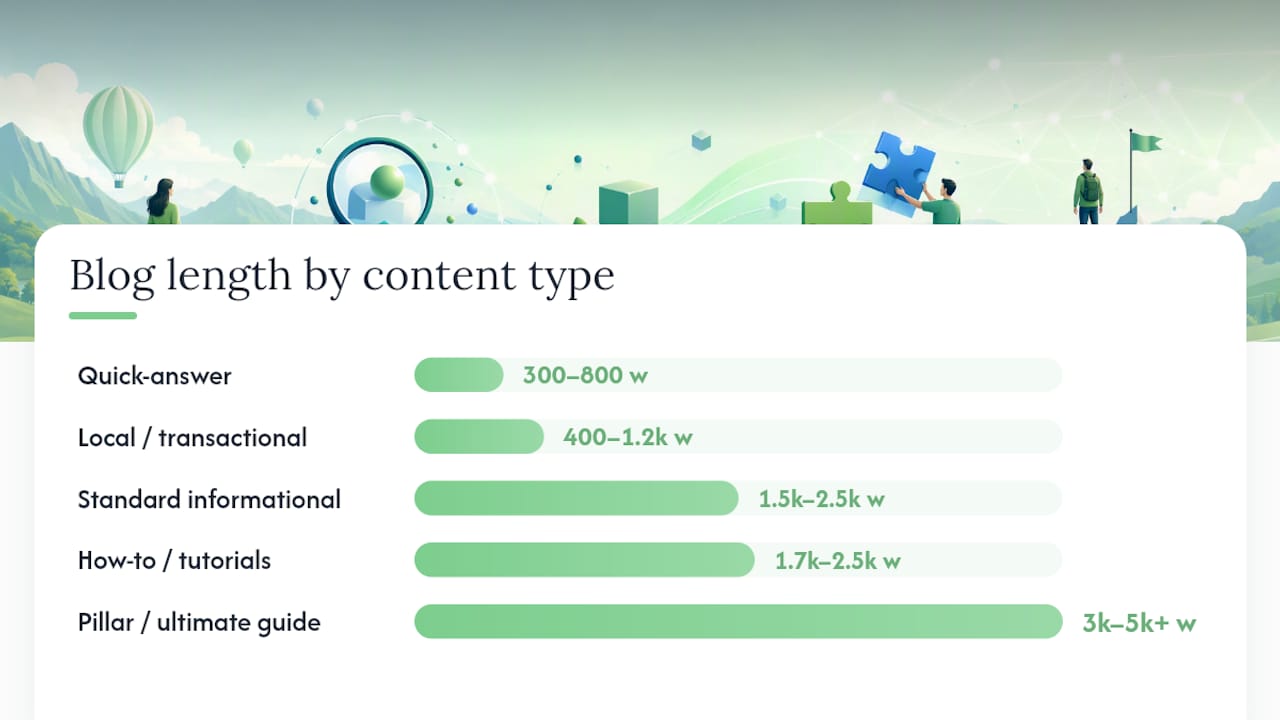
- Quick-answer or definition posts: 300 to 800 words. Someone searching “what is a domain name” wants a fast, clear answer, not a dissertation.
- Standard informational blog posts: 1,500 to 2,500 words. This is the workhorse range for how-to content, comparisons, and explainer posts.
- How-to guides and tutorials: 1,700 to 2,500 words, often with numbered steps and visuals breaking up the text.
- Pillar or ultimate guides: 3,000 to 5,000+ words. These are meant to be the definitive resource on a broad topic, and they tend to attract more backlinks. WordStream’s analysis found posts over 3,000 words earn noticeably more referring domains than shorter posts.
- Local or transactional pages: 400 to 1,200 words. If someone is searching “plumber near me” or looking at your service page, they want to know what you do and how to book you, not a 2,000 word essay.
The moment to deviate from these ranges is when the SERP itself deviates. If the top five results for your keyword are all under 1,000 words, writing 3,000 will not out-rank them. It will just bore the reader who came for a fast answer.
Pro Tip: Check whether the query has a “definitional” shape (what, is, does) versus a “depth” shape (how, guide, best). Definitional queries reward brevity; depth queries reward coverage.
How Do I Pick the Right Word Count for My Keyword?
Guessing a number and writing to it backwards is how you end up with padded, boring content. Use this five-step process instead:
- Determine intent and content type first. Is the searcher looking for a quick fact, a full tutorial, or a comparison of options? This decides which range from above applies before you write a single word.
- Sample the top five to ten ranking pages and average their length. Drop any obvious outlier (a 6,000 word pillar page sitting next to a bunch of 900 word posts will skew your number badly).
- Inventory the sub-questions your topic needs to answer, then budget roughly 150 to 300 words per sub-question. A post covering six real sub-questions naturally lands near 1,800 to 2,000 words without any padding.
- Adjust for your own domain authority and backlink profile. A newer site with a thin backlink history often needs to lean toward the higher end of the range and add more original detail, since it has less trust to lean on. An established site with strong backlinks can sometimes rank a tighter, sharper piece.
- Set a target range, not a fixed number, and define what success looks like before you publish — more time on page, more organic clicks, or more backlinks earned within a set window.
SurferSEO’s analysis makes a point worth repeating here: if your content fully covers the topic and uses the terms readers and search engines expect, length matters far less. A focused 1,200 word post that nails the sub-questions can outrank a padded 2,500 word post that doesn’t. Length is the byproduct of thoroughness, not the goal.
What Metrics Prove Whether Your Blog Length Is Working?
You won’t know if 2,200 words was the right call until you track what happens after you hit publish. Two categories of metrics matter here.
Primary metrics, pulled straight from GA4, tell you whether people actually read what you wrote: average engagement time, engaged sessions, and a rough pogo-sticking proxy (are people bouncing straight back to Google within seconds?). A long post with a two-minute average engagement time is failing, no matter how comprehensive it looks on paper.
Secondary metrics confirm whether the piece is earning authority in the wider web: backlinks (trackable through Ahrefs or SEMrush), organic clicks and impressions in Search Console, and social shares. WordStream recommends leaning on GA4 engagement data alongside these backlink tools as the practical toolkit for judging whether a length decision paid off.
- Give a standard SEO post 6 to 12 weeks before judging its ranking movement.
- Give quick-answer pages a shorter window, since they’re competing on immediate relevance more than accumulated authority.
- Re-run a Search Console query check monthly to catch a post sliding in rank before it becomes a real problem.
How Do I Structure a Long Blog Post So It Doesn’t Feel Long?
A 2,500 word post that reads like a wall of text will lose readers before they get to the good part. Contentellect’s guidance on formatting cadence is a good baseline: break with an H2 every 200 to 300 words, use H3s for subtopics inside a bigger section, and drop in a visual, table, or callout every 300 to 500 words to reset the reader’s attention.
Want this running in your business without doing it yourself?
Book a Free Consultation →- Use bullet lists and tables to condense information that would otherwise take three sentences to explain.
- Build callouts around any statistic or step-by-step process. That’s exactly the kind of block that gets pulled into featured snippets and AI-generated answers.
- Add 3 to 5 internal links per 1,000 words to give readers (and search engines) a path to related, deeper content.
- Repurpose one long post into several short assets: a stat becomes a social graphic, a step becomes a 30-second video, a definition becomes a quick FAQ answer elsewhere on the site.
| Tactic | What it fixes |
|---|---|
| Heading every 200 to 300 words | Readers skim without losing the thread |
| Visual or callout every 300 to 500 words | Attention resets before fatigue sets in |
| 3 to 5 internal links per 1,000 words | Keeps readers (and crawlers) moving through the site |
| One stat repurposed per platform | Turns one post into five pieces of content |
What Are the Biggest Blog Length Mistakes to Avoid?
Most length problems trace back to one of four habits, and all four are fixable without a full rewrite.
- Padding to hit a number. If a post feels bloated at 2,000 words, it usually is. Cut ruthlessly before you publish, not after.
- Applying one word-count rule site-wide. A blanket “every post must be 2,000 words” policy ignores that a quick-answer page and a pillar guide have completely different jobs.
- Ignoring engagement data after publishing. A post can rank fine and still convert nobody if people bounce in ten seconds. Check GA4, not just Search Console.
- Overwriting local or transactional pages. A service page stuffed with 2,000 words of background reading buries the phone number and the booking link. Shorter and clearer converts better here. This is one reason blog posts and landing pages serve different jobs and shouldn’t be written to the same length target.
How Cloudsprout Sets Word Count Targets for Small-Business Clients
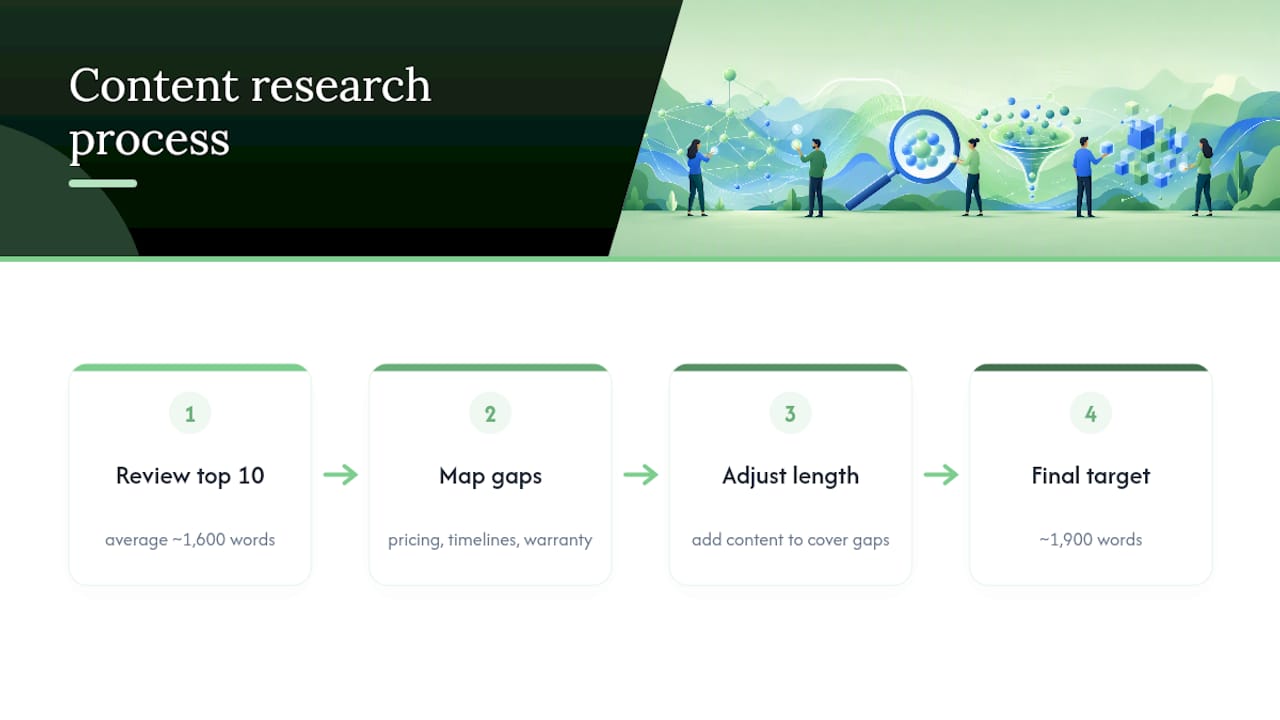
The team writes and manages content for trades, restaurants, and professional service businesses, and word count is never decided before the keyword research happens. For one home services client, the team pulled the top ten ranking pages for a high-intent local repair query, found the average sitting near 1,600 words, then mapped out the actual sub-questions homeowners were asking before deciding the post needed to land closer to 1,900 words to cover pricing, timelines, and warranty questions competitors had skipped.
The team tracks GA4 engagement time, Search Console impressions, and backlink growth on every piece of content it manages, the same metrics outlined above. That’s also why content quality signals matter more to the team than hitting a specific word count on paper.
A Realistic Length Routine for Busy Marketing Teams
The honest verdict: pick a range based on the SERP and your sub-questions, not a number pulled from a blog post you read once. For a small team, a workable monthly routine looks like this: pull the top ten competitors for one target keyword, count their words and note their gaps, then write to fill those gaps rather than to hit a target figure. Check GA4 engagement time four to six weeks later.
One habit worth stealing: before you publish a 2,000 word guide, pull out the three strongest facts or steps and turn each into a short social post or video script. You get five pieces of content from the work you already did once.
— Cristo
Need Content That’s Built to the Right Length, Not Just a Long One?
Cloudsprout is the alternative to hiring a freelance writer or a traditional agency retainer for content strategy in Ontario: instead of guessing at word counts, the in-house team runs the same SERP-average and sub-question research described above on every post, then reports back on the GA4 and backlink metrics that actually prove it worked. There’s no long-term commitment either. Plans run month to month, starting with the Sprout plan at $300 CAD per month.

If you’re not sure whether your current blog posts are too short, too padded, or just poorly structured, Cloudsprout’s free SEO audit will tell you exactly where the gaps are before you commit to anything. Check your services options or request the audit today to see what your content is actually missing.
Sources
- Word count and SEO importance — Search Engine Journal
- How long should a blog post be? — WordStream
- Word Count and SEO: Does Length Matter? The 2026 Data — The Stacc
- How long should blogs be? — Contentellect
FAQ
What Is the 80/20 Rule for Blogging?
Applied to length, it means 20% of your words (the parts answering the searcher’s actual sub-questions) drive most of the ranking and engagement value, while the rest is often supporting detail or padding worth trimming.
Is a 3,000-Word Blog Post Too Long?
Not inherently. For pillar or ultimate-guide content, 3,000+ words tends to earn more backlinks, but for a quick-answer query it would be far longer than the intent requires.
What Is the Ideal Blog Length for SEO?
There’s no single ideal number. Most standard informational posts perform well between 1,500 and 2,500 words, while quick-answer content works better at 300 to 800 words. Match the length to the top-ranking pages for your specific keyword.
What Is the 80/20 Rule in SEO?
It’s the idea that roughly 20% of your optimization effort, like nailing search intent and covering the right sub-questions, produces most of your ranking results, while excess length or extra keywords add diminishing returns.
Does Cloudsprout Write Content to a Fixed Word Count?
No. Cloudsprout sets a length range for each piece based on SERP research and sub-question coverage, then adjusts based on GA4 engagement and backlink data after publishing.
Recommended
Less reading. More growing.
We build the systems these articles describe. Websites, AI follow-up, reviews, automation. And run them for you.
Keep reading


Small Teams: Automate Customer Onboarding in 1–4 Weeks, Keep It Human