Six automations pay for themselves faster than anything else on a small business owner’s list: lead routing, customer onboarding, invoice and expense approvals, support ticket routing, proposal generation, and document data extraction. Each one targets a task that happens dozens of times a week, follows a predictable pattern, and currently eats hours that a person could spend on something a computer can’t do. Lead routing gets a hot prospect to the right person in minutes instead of days. Invoice approvals cut the paper chase that stalls vendor payments. Document extraction turns PDFs nobody wants to retype into clean data automatically. The rest of this guide walks through exactly how to build each one, what tools to use, and how long it realistically takes.
TL;DR:
- Automations like lead routing, invoice processing, and support ticket handling can reduce hours spent on manual tasks by up to 90 percent.
- Building these workflows typically takes one to four weeks, with emphasis on thorough process mapping, testing against real examples, and establishing human review gates.
- The most common failures stem from poorly understood processes, lack of ongoing monitoring, and brittle rules that break with input variations.
- Using the right tool—whether orchestrators, RPA, or point integrations—is essential based on workflow complexity and system connectivity.
- Starting with high-volume, repetitive tasks that directly impact business outcomes ensures automation delivers measurable time and cost savings.
Table of Contents
- Workflow Automation Examples by Business Function
- How to Roll Out a New Automation Without Breaking Anything
- Which Tools Actually Fit Your Workflow
- How Cloudsprout Builds These Workflows for Small Businesses
- What Actually Breaks Automated Workflows (And What Success Looks Like)
- Get a Working Automation Built in Weeks, Not Quarters
- Sources
- FAQ
Workflow Automation Examples by Business Function
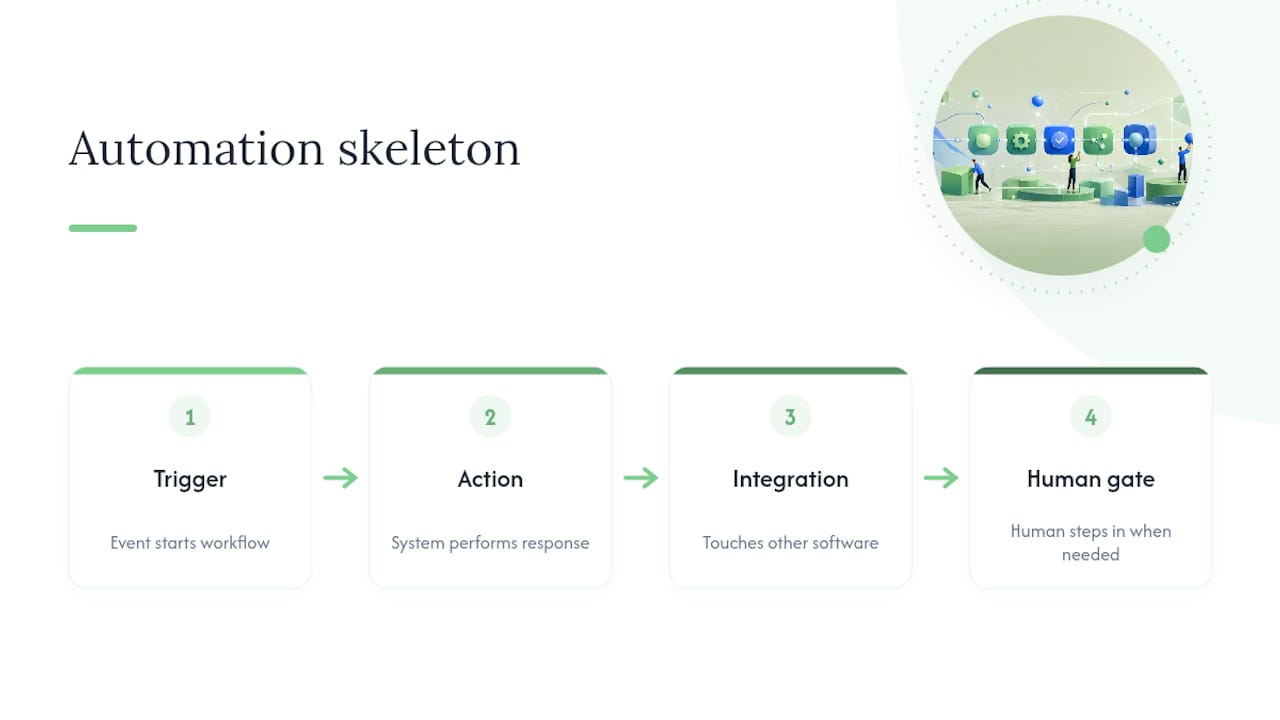
Every one of these examples follows the same skeleton: something happens (a trigger), the system does something in response (an action), that action touches other software (an integration), and a person steps in only when the rules say to (a human gate). Once you see that pattern, you start spotting it everywhere in your own business.
1. Sales Lead Qualification and Routing
A form submission, a phone call transcript, or a new contact in your inbox triggers the workflow. The system enriches the lead with company size or location data, scores it against your criteria, and assigns it to the right rep or queue based on territory, deal size, or service type.
Trigger: New form submission, chat message, or inbound call logged in your CRM.
Actions: Enrich contact data, apply a lead score, assign owner, send a Slack or email alert.
Systems to integrate: Website forms, CRM, email or SMS, calendar for auto-booking.
Human gate: A rep confirms the lead before the first outreach email sends automatically.
Testing checklist: Run 20 real historical leads through the flow and confirm routing accuracy before going live.
Effort estimate: 1 to 2 weeks for a basic version; a Cloudsprout guide on automating lead routing walks through a 2 to 4 week build for small teams. Connecting your site forms directly into a CRM is a smaller first step, and one guide to linking a website to a CRM covers that in under an hour.
2. Customer Onboarding and Welcome Sequences
The trigger is a signed contract or a new customer record. From there, the workflow fires a welcome email, creates onboarding tasks for your team, and sends the client a document checklist automatically.
Trigger: New deal marked “closed won” in the CRM.
Actions: Send welcome email, create task list for the account manager, schedule a kickoff call, generate a client folder.
Systems to integrate: CRM, e-signature tool, calendar, shared drive or document storage.
Human gate: Someone reviews the client’s specific requirements before the automated task list gets finalized.
Testing checklist: Walk through the sequence with a fake client record before pointing it at real customers.
Effort estimate: 1 to 2 weeks. A CRM automation guide built for small businesses covers onboarding sequences specifically.
3. Invoice and Expense Processing With Approvals
An invoice lands in an inbox or a vendor portal, the workflow extracts the line items, checks them against spending policy, and routes the invoice to the right approver based on amount.
One documented build used a simple pipeline connecting Gmail, the automation tool n8n, and the AI model Claude to pull invoice data automatically. That setup reportedly cut monthly invoice handling from around 40 hours down to about 4. That is not a universal outcome, but it shows what a lean extraction plus approval chain can do when the invoice volume is high enough to justify it.
Trigger: New email attachment or upload to a shared invoice inbox.
Actions: Extract vendor, amount, and line items; check against a policy threshold; route to manager if above limit.
Systems to integrate: Email, accounting software, a document extraction tool, Slack or email for approval requests.
Human gate: Any invoice above your set threshold requires manager sign-off before payment.
Testing checklist: Run the extraction against 15 to 20 real historical invoices and check for misreads before trusting it with live vendor payments.
Effort estimate: 2 to 3 weeks depending on invoice format variety.
4. Support Ticket Routing and Response Automation
A customer email, chat, or web form triggers the flow. The system tags the ticket by topic, checks for urgency keywords, and either sends an instant auto-response or escalates to a human agent.
Trigger: New support email or chat message.
Actions: Categorize by topic, apply priority tag, send auto-acknowledgment, escalate if flagged urgent.
Systems to integrate: Help desk software, email, live chat widget, internal messaging tool.
Human gate: Anything tagged as a complaint, refund request, or legal issue routes straight to a person, no auto-reply sent.
Testing checklist: Test with sample tickets covering each category and confirm escalation triggers correctly.
Effort estimate: 1 to 2 weeks for basic routing; longer if you’re piloting an AI agent to draft first-response replies, which a guide to evaluating AI support agents covers step by step.
5. HR Onboarding and Employee Scheduling
A new hire’s start date triggers a checklist: equipment requests, paperwork, training modules, and a first-week schedule, all generated without someone building it from scratch each time.
Trigger: New hire record created in HR software or a signed offer letter.
Actions: Generate onboarding checklist, send paperwork links, notify IT for equipment setup, build first-week calendar.
Systems to integrate: HR platform, e-signature tool, calendar, equipment or access request system.
Human gate: A manager reviews the generated schedule before it goes to the new hire.
Testing checklist: Run through the full sequence with a dummy record and confirm every notification fires on time.
Effort estimate: 1 to 2 weeks. Scheduling specifically is worth testing separately, and a two-week pilot for an AI scheduling assistant is a reasonable starting scope.
6. Marketing Campaign Automation and Nurture Sequences
A form fill, ad click, or content download starts the sequence. The lead gets tagged by interest, dropped into a nurture track, and handed to sales once they hit an engagement threshold.
Trigger: Form submission, ad lead form, or content download.
Actions: Tag by interest, enroll in email nurture sequence, notify sales when engagement score crosses a threshold.
Systems to integrate: Ad platforms, email marketing tool, CRM, landing page builder.
Human gate: Sales reviews any lead flagged “sales ready” before the first call, rather than auto-dialing.
Testing checklist: Send test leads through each tag path and confirm the right emails and delays fire.
Effort estimate: 2 to 3 weeks. Picking the right stack matters more here than anywhere else, and a marketing automation tools checklist for small businesses is worth reading before you commit to a platform.
7. Document and PDF Processing Workflows
A scanned form, a contract, or a supplier confirmation lands in a folder. The workflow extracts key fields, structures them into rows, and routes the record to whichever system needs it next.

This is where document-heavy businesses see the biggest jump. A chemical distribution company’s case study on converting paper files into automated workflows reported turning 900 paper files digital, cutting onboarding time from two days to one, and eliminating the need for two to three full-time data-entry roles. On the enterprise side, the distributor Lemvigh-Müller deployed three cooperating AI agents to read supplier PDF confirmations and match them against purchase orders inside SAP. Smaller businesses won’t need three agents, but the underlying pattern, extract, match, flag exceptions, scales down fine.
Trigger: New file dropped in a folder, inbox, or upload portal.
Actions: Extract fields, validate against expected format, structure into a database row, flag mismatches.
Systems to integrate: Document storage, OCR or extraction tool, database or spreadsheet, notification system.
Human gate: Any record the extraction tool flags as low-confidence goes to a person for manual review.
Effort estimate: 2 to 4 weeks depending on document variety and how messy the source files are.
8. AI Agent Flows for Conditional Approvals
This is the pattern behind most of the AI agent hype right now, and it’s simpler than it sounds. Microsoft’s own lab documentation shows a reusable pattern for expense claim approvals: structured input comes in, an AI checks it against policy, the system routes to a manager only if the policy check flags something, and a final notification closes the loop. The AI doesn’t approve anything on its own. It filters and pre-checks, and a person makes the actual call when it matters.
Trigger: New expense claim, purchase request, or contract submitted for review.
Actions: AI checks against policy rules, auto-approves clean cases under a threshold, routes flagged cases to a human.
Systems to integrate: Expense or procurement tool, AI policy-check layer, approval notification system.
Human gate: Every flagged case, and every case above a dollar threshold, requires a human decision regardless of what the AI recommends.
Testing checklist: Feed 20 to 30 historical approvals through the flow and compare AI decisions to what a human actually approved.
Effort estimate: 3 to 4 weeks, since agent flows involve more testing than a simple trigger-action automation. A 30-day pilot for hiring an AI employee covers what a realistic first agent deployment looks like for a small team.
Pro Tip: Never let an AI agent make the final call on anything involving money above a set threshold, a legal document, or a customer complaint. Build the human checkpoint in from day one. Retrofitting oversight after something goes wrong costs more than building it upfront.
How to Roll Out a New Automation Without Breaking Anything
Picking the right workflow to automate first matters more than picking the right tool. The clearest guidance on this comes down to two or three candidates that share three traits: high volume, repeated friction, and an outcome the business actually cares about. A workflow you run twice a month isn’t worth automating yet, no matter how annoying it is.
Prioritization checklist:
- How often does this happen? (Weekly minimum, daily is better.)
- Is the process the same every time, or does it vary case by case?
- Who owns this task today, and do they have time to help map it?
- What’s the cost of the current manual version, in hours or in mistakes?
Once you’ve picked a candidate, map it before touching any software. A structured automation blueprint recommends standardizing your intake fields and handoffs first, because skipping this step is exactly what produces brittle workflows that break the moment a customer does something unexpected.
Want this running in your business without doing it yourself?
Book a Free Consultation →Process mapping checklist:
- Document the happy path: the normal, no-exceptions version of the task.
- List every edge case you can think of, and ask the person who does this daily for three more.
- Define the data schema: what fields exist, what format they’re in, where they live.
- Assign an owner who’s accountable if the automation misfires.
A useful pilot framework comes from V12 Labs’ three-week playbook: week one for mapping, week two for building the tool integrations, week three for testing against real historical data before anything touches live customers. That same source recommends testing a minimal prototype against 20 to 30 real historical examples before widening scope, which is a good rule regardless of what you’re automating.
Pro Tip: *Start the prototype with only the happy path. Resist the urge to handle every edge case in version one.
Governance doesn’t stop once the workflow is live. MakeAutomation’s framework treats automation as an operating model, not a set-and-forget tool, meaning people, process, and exceptions all need ongoing attention. Keep an audit log of every automated decision, set a service-level expectation for how fast exceptions get human attention, and always leave a manual override switch that doesn’t require a developer to flip.
Which Tools Actually Fit Your Workflow
Three different technology approaches solve three different problems, and picking the wrong one is the single most common reason a workflow automation project stalls out.
An orchestrator (a tool that connects multiple apps and manages multi-step logic) fits stable workflows with several steps and several systems involved, like the lead routing or invoice approval examples above. Robotic process automation, or RPA, mimics clicks and keystrokes on a screen, which makes sense only when there’s no clean way to connect to a system’s data directly, an older internal tool with no API, for instance. A point integration (a single trigger connected to a single action) is the right call when you just need one system to talk to one other system, nothing more.
Common connectors small businesses actually use:
- CRM (contact and deal data)
- Email and calendar (scheduling and notifications)
- Accounting software (invoices, expenses, payments)
- Document storage (contracts, forms, PDFs)
Credential and permission management gets overlooked constantly. Give each integration the narrowest access it needs, rotate API keys periodically, and never share one login across five different automated tools.
The expense-approval pattern from Microsoft’s human-in-the-loop lab is worth studying closely if you’re weighing an agent-based approach: structured data flows into an AI policy check, and only flagged or above-threshold cases go to a human, with a notification closing the loop either way. That mapping, AI does the repetitive filtering, a person makes the judgment call, applies to almost any approval chain, not just expenses.
One number worth sitting with: the n8n and Claude invoice pipeline mentioned earlier reportedly dropped monthly invoice handling from roughly 40 hours to about 4. That’s not typical for every business, but it shows the ceiling on what a well-built extraction pipeline can do when volume is high enough.
Monitoring is not optional. Build in retry logic for when an API call fails, use idempotency checks so a hiccup doesn’t process the same invoice twice, and store credentials in a secrets manager rather than hardcoded into a script.
How Cloudsprout Builds These Workflows for Small Businesses
A digital agency builds custom websites, SEO, content, branding, CRM and ERP automation, and AI employee systems for owner-operated businesses across trades, food service, professional services, and e-commerce, all delivered in-house with no outsourcing. Automation work sits alongside marketing and web projects because the same client conversations, “why isn’t my inbox getting followed up on,” “why do proposals take three days to send,” keep coming up.
A typical lead routing or proposal automation project runs two to four weeks:
- Week 1: Map the current process, identify the trigger and every edge case, agree on the data schema with the client’s team.
- Weeks 2 to 3: Build the integration between the client’s forms, CRM, and notification tools; test against real historical leads or proposals.
- Week 4: Pilot live, monitor exception rates, hand off documentation.
Proposal automation for small teams is one of the more common starting points, since it’s usually the fastest workflow to show a measurable time saving.
What Actually Breaks Automated Workflows (And What Success Looks Like)
The five mistakes that sink automation projects show up in almost every failed rollout: skipping the mapping step and automating a process nobody fully understands, leaving no clear owner once it’s live, ignoring edge cases until customers hit them, writing brittle rules that break the moment an input looks slightly different, and shipping without any monitoring at all.
Track three numbers from week one: throughput time (how long the task takes start to finish), exception rate (how often the automation kicks a case to a human), and human hours recovered per week. If exception rate climbs instead of falling after the first month, your mapping missed something, go back and fix the rules rather than adding more manual overrides on top.
A realistic 90-day outcome for a well-scoped workflow, based on the patterns in the document-processing and invoice examples above, looks like a meaningful drop in manual touchpoints and a cycle time cut in half or better once the exception rules stabilize. That’s not automatic. It’s what happens when the mapping was honest about edge cases from the start.
— Cristo
Get a Working Automation Built in Weeks, Not Quarters
This agency is an alternative to hiring an agency for each piece separately: one in-house team builds your lead routing, invoice approvals, or proposal automation, prices it month to month with no long-term contract, and gives you direct access to the people actually doing the work.

If any of the examples above sound like something your business needs, whether it’s a CRM that finally follows up on leads automatically or an AI employee handling first-pass approvals, the starting point is the same: a free digital audit that maps your current process before anyone writes a line of automation. Cloudsprout’s pricing page lists the Sprout, Grow, and Scale plans along with setup fees, so you can see the full cost before committing to anything. Small projects like lead routing or a proposal workflow typically move from audit to working pilot in two to four weeks. Request the free audit and get a straight answer on what’s worth automating first in your business.
Sources
The Process Street chemical supply chain case study documents a real conversion of 900 paper files into automated workflows and the staffing impact that followed. Microsoft’s human-in-the-loop lab demonstrates the expense-approval agent flow referenced throughout the tools section. V12 Labs’ three-week playbook is the source for the pilot cadence recommended in the rollout section. MakeAutomation’s guide informs the governance framing. The n8n and Claude invoice pipeline writeup backs the invoice processing time estimates.
- Process Street chemical supply chain case study
- Microsoft human-in-the-loop lab — multistage approvals
- How to turn manual business processes into an AI agent in 3 weeks — V12 Labs
- End-to-End Process Automation: The Complete Guide — MakeAutomation
- Automated invoice processing with n8n + Claude
FAQ
How Do You Automate a Workflow?
Start by mapping the current process by hand, including every edge case, before touching any software. Then build the trigger and action steps in an orchestrator tool, test the flow against 20 to 30 real historical examples, and add a human approval gate for anything above a risk threshold, following the phased approach in V12 Labs’ three-week playbook.
What Are Five Examples of Automation in Business?
Lead qualification and routing, customer onboarding sequences, invoice and expense approvals, support ticket routing, and document data extraction are five of the highest-impact examples for small businesses. Each follows the same trigger, action, integration, human-gate pattern described throughout this guide.
Can You Give Me an Example of a Workflow?
A simple example: a new lead fills out a website form, the system checks their company size and location, assigns them to the right sales rep, and sends that rep an alert, all within minutes instead of the hours or days it takes when someone checks the inbox manually. A guide on connecting a website to a CRM shows how to build the first piece of that in under an hour.
What Exactly Is Workflow Automation?
Workflow automation, sometimes called business process automation, is the practice of using software to carry out repeatable, rule-based tasks without manual intervention at each step. It replaces the manual handoffs between people and systems with triggers and actions, while keeping a human involved at the decision points that actually require judgment.
What Does Cloudsprout Charge for Automation Work?
Cloudsprout’s automation projects fall under its Sprout, Grow, and Scale plans, priced at 300, 600, and 1200 CAD per month respectively, with one-time setup fees listed on the pricing page. Exact scope and setup cost depend on the complexity of the workflow being built.
Recommended
Less reading. More growing.
We build the systems these articles describe. Websites, AI follow-up, reviews, automation. And run them for you.
Keep reading
Small Teams: Automate Customer Onboarding in 1–4 Weeks, Keep It Human