Yes, you can automate customer onboarding, and you should, for every step that repeats the same way each time a client signs on. Automation handles the paperwork, scheduling, and reminders. You handle the welcome call and the moments that build trust. Most small teams get a first workflow live within a few weeks, saving hours per client from week one.
TL;DR:
- Automation can typically save three or more hours per client by handling repetitive onboarding tasks such as document setup, scheduling, and reminders.
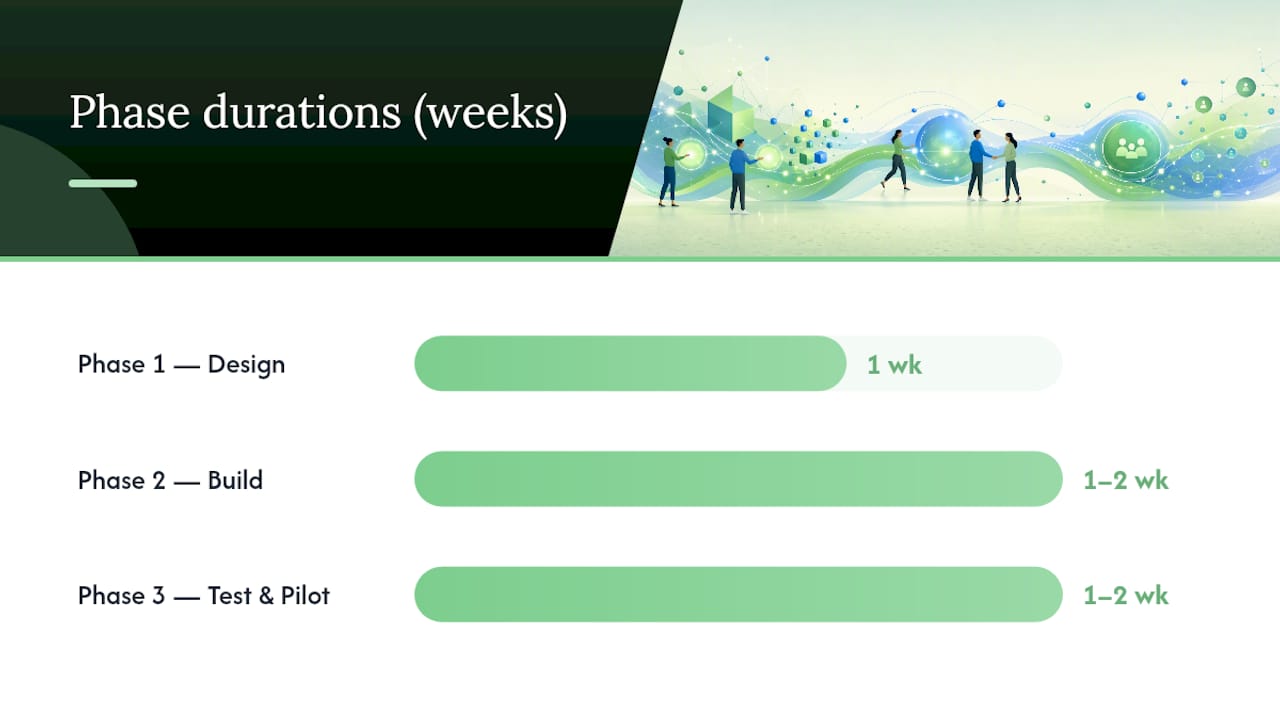
- A minimal viable onboarding workflow can be designed in about one week, built in one to two weeks, and tested with a live pilot within two to four weeks.
- Essential tools for onboarding automation include a trigger system, intake forms, e-signature and payment tools, shared client portals, scheduling, CRM, and internal notification systems.
- Most small businesses can implement these workflows with a stack costing less than a part-time hire, often starting around 300 CAD per month, without needing extensive IT projects.
- Staff roles shift from manual data entry to reviewing automated processes and handling personal client interactions, with automation focusing on paperwork, not relationships.
Table of Contents
- What Does It Mean To Automate Customer Onboarding?
- Why Automate Onboarding: The Real Payoff For Small Teams
- What Are The Key Components Of An Onboarding Workflow?
- How Do You Actually Build This, Step By Step?
- Which Tools Do You Actually Need To Automate Onboarding?
- How Cloudsprout Has Implemented This For Small Teams
- What Should Your Team Expect When This Rolls Out?
- How Cloudsprout Helps You Automate Onboarding In-House
- Sources
- FAQ
What Does It Mean To Automate Customer Onboarding?
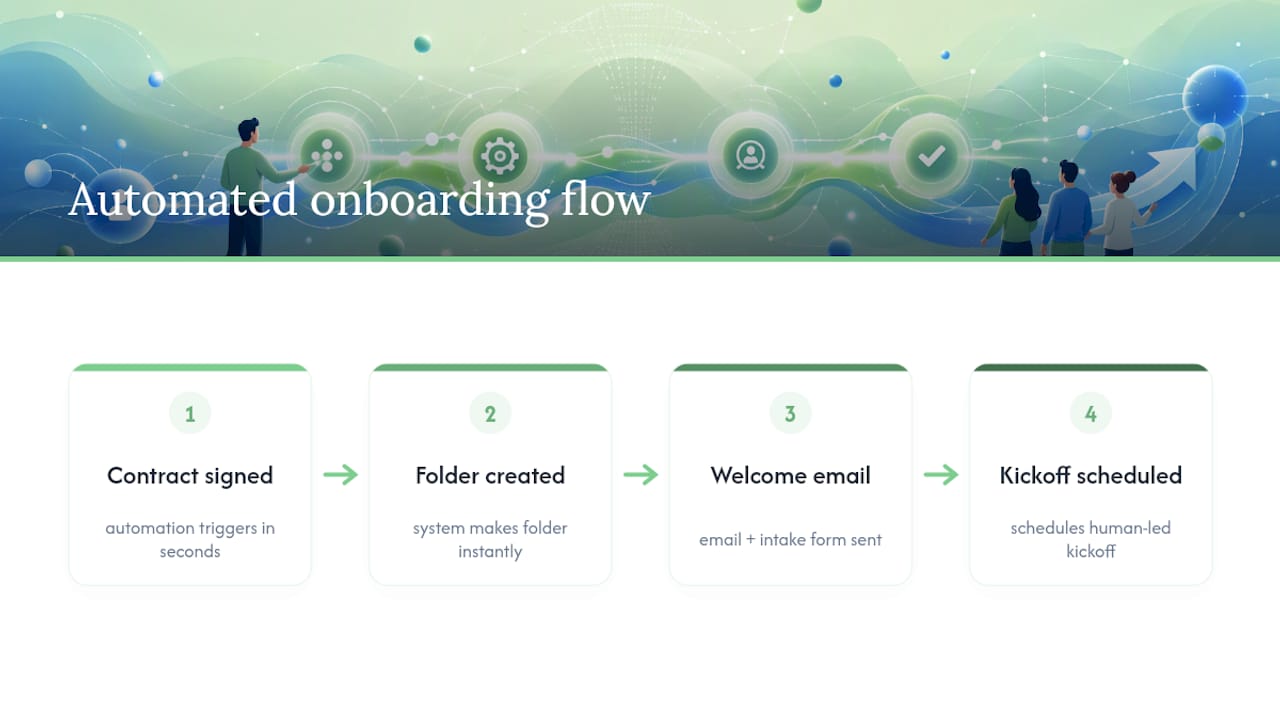
Customer onboarding automation means using software to trigger the repetitive setup work the moment a deal closes, instead of a person doing it by hand every single time. A contract gets signed, and within seconds a folder gets created, a welcome email goes out with an intake form attached, and a kickoff call gets scheduled, all without anyone touching a keyboard. IBM describes this as software and AI handling the repetitive parts of setup, and the effect can compress onboarding from weeks down to days.
That distinction matters for how you plan this. You are not trying to automate the relationship. You are automating the logistics that sit underneath it, the stuff that eats an afternoon and adds zero value when a human does it manually.
Why bother automating onboarding at all
A plumbing company in Barrie signs a new maintenance contract client. Someone on staff has to send the service agreement, collect payment info, set up the client’s profile in the scheduling system, book the first visit, and fire off a welcome text. Do that fifteen times a month and it is a part-time job. Automate the sequence once, and it runs the same way every time, at 2 a.m. or 2 p.m., without anyone remembering to do it.
The bigger point: onboarding is the first real experience a client has with your business after they pay you. A slow, inconsistent start makes them wonder if they made the right call. A fast, clean one confirms it.
Why Automate Onboarding: The Real Payoff For Small Teams
Automation pays off in three concrete ways: staff time, client experience, and fewer dropped balls.
On the time side, routine administrative automation reliably cuts operational costs when applied to processes that repeat the same way every time, and onboarding is about as repetitive as small-business work gets. A basic automated sequence, contract signed, folder created, welcome email with intake form sent, kickoff scheduled, typically takes just a few hours to build and can save three or more hours per client once it is running.
Client experience improves too. Faster kickoffs and clearer expectations tend to raise activation rates, meaning more new clients actually start using what they bought instead of stalling out in limbo. And on compliance, automated intake forms create a consistent paper trail. Every client fills out the same fields, signs the same document, and the system timestamps it. If you ever need to prove what was disclosed and when, that trail is already sitting in your files.
Automation pays off fastest when the onboarding steps are identical every time. If your business runs the same five steps for every new client, automate them. If every engagement is a custom scope with a different sequence of deliverables, forcing that into a rigid workflow will frustrate your team more than it helps.
- Saves hours of manual admin work per client, every single time
- Cuts the chance of a forgotten step, a missed form, a skipped reminder
- Creates a documented, consistent record for compliance and audits
- Speeds up the client’s first real interaction with your service
- Frees staff to spend time on judgment calls instead of data entry
Skip automation for one-off projects, custom consulting engagements with no repeatable shape, or anything where every client’s path genuinely differs.
What Are The Key Components Of An Onboarding Workflow?
Every working onboarding automation is built from the same handful of modules, whether you run a landscaping company or a bookkeeping firm. You mix and match them based on what your process actually needs.
- A trigger. Something has to kick off the sequence: a signed contract, a received payment, or a CRM deal moving to “won.”
- An intake form with conditional logic. Ask different follow-up questions depending on the client’s answers, and let them upload files (photos, IDs, prior invoices) directly into the form.
- E-signature and payment collection. Get the agreement signed and the deposit paid without a single back-and-forth email.
- A client folder or portal. Automatically provision a shared space and grant access so the client isn’t hunting through email threads for documents.
- Scheduling and reminders. Book the kickoff call automatically and send reminders so nobody no-shows.
- CRM and project record creation. The new client should show up in your CRM and project system without anyone retyping their name a third time.
- Internal notifications. Alert the right staff member the moment a new client is ready for their attention.
- Optional AI prep. Some teams use AI to draft a kickoff brief summarizing the client’s intake answers, though Gartner’s guidance on AI in customer service points to AI working best as a support layer that speeds up a person’s work, not a replacement for their judgment on anything client-facing.
Client onboarding platforms built for service businesses tend to bundle several of these into one tool, which is often the fastest way to get started if you don’t already have pieces in place.
How Do You Actually Build This, Step By Step?
You do not need a six-month IT project to automate onboarding. You need a documented process and a handful of connected tools, built in phases so nothing breaks the first week you turn it on.
- Phase 0: Run it manually three times, and write down every step. Before automating anything, do the onboarding process yourself, by hand, for your next three new clients. Note every email you send, every form you use, every reminder you have to remember. This becomes your blueprint. Skip this step and you’ll automate a process that was already broken.
- Phase 1: Design the minimum viable workflow (about one week). Pick one trigger, contract signed is the most common, and map out the shortest possible chain of actions that gets a client from “signed” to “ready for kickoff.” Resist the urge to automate everything at once.
- Phase 2: Build your templates and connect the automation (one to two weeks). Create the actual contract template, the folder structure, and the intake form. Then connect them with your automation tool so the trigger fires the sequence automatically. A minimal flow can go from contract signature straight through folder creation, welcome email, intake form delivery, and calendar scheduling.
- Phase 3: Test with dry runs, then one live pilot (one to two weeks). Run the whole sequence using a fake “client” a few times to catch broken links or missing fields. Implementation guides consistently flag that running a real transaction end to end catches edge cases dry runs miss, so pick one real, low-stakes client to pilot it live. Track how long the sequence takes to complete and ask that client directly how the process felt.
- Phase 4: Roll it out and watch the numbers (two to six weeks). Turn it on for every new client, then track completion rate, hours saved per onboarding, and how long it takes a client to hit their first real result with you. Adjust the sequence based on where clients stall out.
Pro Tip: Keep a rollback switch. Before you go live, make sure you (or whoever built the automation) can flip it off in under five minutes and revert to the manual process. The first week you automate anything is the week something unexpected happens, and you want an exit that doesn’t involve panicking.
Your testing checklist should cover: does the trigger fire reliably, does the intake form save data correctly, does the e-signature request land in spam, does the calendar invite match the right time zone, and does someone on your team actually get notified when a new client completes the sequence. Track completion rate (percentage of clients who finish onboarding without staff intervention), time saved per client compared to the manual process, and time-to-first-value (how long from signup to the client seeing real results). Firms running structured pilots typically see meaningful cycle compression within about 60 days of launch.
Want this running in your business without doing it yourself?
Book a Free Consultation →Which Tools Do You Actually Need To Automate Onboarding?
You don’t need enterprise software to pull this off. Most small businesses run onboarding automation with a stack that costs less than one part-time hire and takes a couple of weeks to wire together.
Start by deciding whether you need a dedicated automation engine or whether your existing tools’ native automations are enough. If your CRM already triggers actions when a deal closes, use that first. Bring in a separate automation engine, a middleware tool that connects apps that don’t talk to each other natively, only when you need to link three or more systems that don’t already integrate.
The categories that matter:
- Intake and forms with conditional logic and file upload support
- E-signature and payment collection, often bundled in one tool
- Storage or a client portal for shared documents
- CRM to hold the client record and track the relationship going forward
- Calendar and scheduling for kickoff calls and recurring check-ins
- Notifications so staff know when action is needed
- Middleware or webhooks to connect tools that don’t natively link
- Optional AI assistants for drafting summaries or prep documents
No-code workflow builders paired with a CRM and a scheduling tool form the low-cost stack many small businesses start with, and integrations with tools like Shopify, Zapier, and Calendly tend to speed adoption because they connect onboarding directly to systems you’re already using for sales and billing.
For Canadian businesses, ask any vendor where client data physically lives and whether it’s covered under PIPEDA obligations for personal information. Storing intake data, especially anything containing financial details or IDs, in a portal with clear access controls and encryption matters more than which specific brand you pick. If you’re already managing client records in a CRM, connecting a website’s lead capture directly to it closes the gap between “someone signed up” and “someone is in your system,” which is half the onboarding trigger problem solved before you build anything else.
Monthly costs for a lean stack typically land in a modest range once you add a form tool, an e-signature tool, and a scheduling tool together, and custom integrations only become worth paying for once you’re connecting more than two or three systems that don’t talk to each other out of the box.
How Cloudsprout Has Implemented This For Small Teams
Cloudsprout builds onboarding automation as part of its in-house business automation work, and the pattern holds across trades, professional services, and e-commerce clients: the first workflow typically goes live within one to four weeks, and a full lead-routing automation build usually lands within two to four weeks.
One recurring example: a professional services client running onboarding manually was spending close to an hour per new client on folder setup, contract sending, and scheduling. After the first automated workflow went live, that dropped to a few minutes of review time, with the system handling the rest.
- First workflow live in one to four weeks from kickoff
- Lead-routing and CRM sync typically running within two to four weeks
- Manual review stays in place for every new client, automation only removes repetitive steps
- Built and supported in-house, with no outsourced development
What Should Your Team Expect When This Rolls Out?
Staff roles shift, not shrink. Someone who used to spend an hour on data entry now spends that hour reviewing what the system did and handling the client call that actually needs a human voice. Tell your team that explicitly, early, or they’ll assume automation is about replacing them.
Keep one rule non-negotiable: the first personal message a new client gets should still come from a person, even if a template drafted it. Automation should hand your team a flagged case the moment something looks off, a stalled form, an unanswered email, so a person can step in before the client notices anything went wrong. The takeaway to share with your team: automate the paperwork, never the welcome.
How Cloudsprout Helps You Automate Onboarding In-House
If reading that roadmap made you tired just thinking about the build, that’s the exact gap Cloudsprout fills for Ontario and Canadian small businesses. Cloudsprout builds these workflows in-house, with no outsourced development, no lock-in contract, and transparent month-to-month pricing, so you’re never stuck paying for a system nobody on your team understands.

This work fits owner-operators and teams of one to fifty employees who don’t have a dedicated IT department but need onboarding to run reliably every time a new client signs on. Every engagement starts with a free digital audit and trial, so you see exactly what a workflow would look like for your business before committing to anything. Cloudsprout’s Sprout, Grow, and Scale plans start at $300 CAD per month, with setup fees scoped to the complexity of what you’re automating. If you’re ready to see what a working onboarding sequence would look like for your business, check out Cloudsprout’s automation services and request your free audit.
Sources
- Customer Onboarding Automation: Streamlining the onboarding journey
- Gartner press release on AI use cases for customer service
- How to Automate Client Onboarding and Save 3+ Hours Per Client – AutoFlow Guide
- Client onboarding software for service businesses – Portico
- Client onboarding automation | Revenue Institute
FAQ
How Do You Automate The Onboarding Process?
Map your current manual steps, pick a single trigger like a signed contract, and connect a form tool, an e-signature tool, and a scheduling tool so the sequence runs automatically once that trigger fires. Most small businesses get a basic version live within a few hours to a few days, then expand it over the following weeks.
What Are The Stages Of A Typical Onboarding Process?
A common structure runs through five stages: intake and data collection, agreement and payment, account or portal setup, kickoff and orientation, and ongoing check-ins. Automation typically handles the first three reliably, while the kickoff and check-ins work best with a human involved directly.
How Do You Automate Customer Service Alongside Onboarding?
Customer service automation usually layers on top of onboarding automation using the same trigger logic, routing common questions to self-serve answers or AI-assisted responses while escalating anything complex to a person. Gartner’s research on AI in customer service points to this kind of augmentation as the highest-value use case, rather than full replacement.
How Much Does It Cost To Automate Client Onboarding?
Costs vary by how many tools you’re connecting and how complex the workflow is, but a lean stack with a form tool, e-signature, and scheduling typically costs far less than one part-time hire. Cloudsprout’s automation work is scoped individually, with plans starting at $300 CAD per month plus a setup fee based on complexity.
How Long Does It Take To See Results After Automating Onboarding?
Most teams see their first workflow live within one to four weeks, and structured pilots at professional services firms show meaningful cycle compression within about 60 days. The bigger win, hours saved per client, is usually visible from the very first automated onboarding.
Recommended
Less reading. More growing.
We build the systems these articles describe. Websites, AI follow-up, reviews, automation. And run them for you.
Keep reading