If your team sends out more than a handful of proposals a month, automating that workflow is worth doing. Teams that automate proposal workflows typically see faster turnaround, fewer copy-paste errors, and more consistent branding across every document that goes out. The fastest path there is a small pilot: pick one proposal template, connect it to your CRM, and prove the concept before you touch anything else.
TL;DR:
- Proposal automation is most effective for teams sending similar proposals regularly, leading to significant time savings and improved consistency.
- Key features include dynamic templates, CRM integration, approval workflows, and analytics, which help prevent outdated content and streamline approval.
- Successful pilots take four to eight weeks, focusing on a single, high-volume proposal type to measure time saved and review cycles before expanding.
- Maintaining current content is crucial, requiring dedicated owners, quarterly reviews, and tagging assets to ensure proposals stay accurate and relevant.
- The primary challenge is governance of content, not the software, making content discipline and regular updates essential for long-term success.
Table of Contents
- What Is Proposal Automation, and When Does It Actually Help?
- What Benefits Have Teams Actually Measured?
- What Features and Integrations Should You Look For?
- Five Ways Teams Actually Use AI in Proposals
- How Do You Actually Roll This Out, Step by Step?
- How Do You Keep Templates and Content From Going Stale?
- What KPIs Actually Prove the ROI?
- How Cloudsprout Helps Small Teams Automate Proposals
- What Does Proposal Automation Actually Cost to Run?
- How Do You Choose the Right Proposal Software?
- What Goes Wrong When Teams Automate Proposals?
- Why Governed Content Matters More Than the AI Itself
- Ready to Pilot Your First Automated Proposal Template?
- Sources
- FAQ
What Is Proposal Automation, and When Does It Actually Help?
Proposal automation is a system, not a single tool. At its core, it combines a central content library (your best answers, case studies, and pricing language, stored once and reused everywhere), templates that auto-populate with client and deal data, an approval routing path, and an export or e-signature step that gets the finished document out the door. Instead of a coordinator hunting through old Word files for “the paragraph about our onboarding process,” the system pulls the approved version automatically.
This works best when proposals repeat in structure even if the details change. Good candidates include:
- Agencies or consultancies responding to similar RFPs every month
- Teams filling out long security or vendor questionnaires with mostly reusable answers
- Trades and professional-service firms quoting similar jobs with variable pricing
- Bid teams juggling multiple deadlines where speed determines who gets shortlisted
Automation is the wrong answer for the highly bespoke, once-a-year creative pitch where every slide is custom-built from scratch. If there’s no reusable structure, you’re just building a system to manage exceptions. The tool comparisons agencies rely on generally agree: automation earns its cost when proposals repeat, not when every one is a blank page.
What Benefits Have Teams Actually Measured?
The numbers here aren’t theoretical. Document automation, broadly, saves roughly 30 days a year per employee by cutting out repetitive formatting, searching, and rewriting tasks. That’s not a rounding error. For a five-person proposal team, it’s the equivalent of adding a full extra month of capacity without hiring anyone.
Beyond raw time, teams that automate report:
- More proposals shipped per person, without weekend crunch before deadlines
- Fewer compliance slips, because legal language and pricing disclaimers come from one approved source instead of five different old templates
- Tighter brand consistency, since every proposal pulls from the same visual and written standards
- Subject-matter experts spending time on strategy and differentiation instead of retyping the same capability statement for the tenth time
Statistic Callout: Document automation can save around 30 days per employee annually, according to a global survey summarized by Templafy, largely by eliminating repetitive drafting and formatting work.
The resource shift matters as much as the time saved. When your best technical people stop copy-pasting boilerplate, they start reviewing the parts of a proposal that actually win deals: the pricing strategy, the risk section, and the client-specific hook.
What Features and Integrations Should You Look For?
Not every proposal tool does the same job, and picking the wrong class of software is the single most common early mistake. Some platforms are built for polished, branded sales documents with e-signatures; others are built to survive brutal RFP questionnaires with hundreds of line items. Know which problem you’re solving before you shop.
- A template and token system. You want modular sections and dynamic fields (client name, project scope, pricing tier) that populate automatically, not static documents you edit by hand each time.
- CRM and ERP integration. The system should pull client details and pricing straight from your CRM or accounting platform, so numbers match what’s actually in the deal record. This is where a CRM built for small business workflows pays off.
- Approval workflows with version control. Every proposal needs a clear audit trail: who edited what, who approved it, and which version actually went to the client.
- E-signature and portal-friendly exports. Many RFP responses have to be uploaded to a specific procurement portal in a specific format. Confirm the tool exports cleanly before you commit.
- Analytics and reporting. You need visibility into which templates get used, where proposals stall in review, and which sections correlate with wins.
- Common integration targets. Most platforms connect to Salesforce or HubSpot, Microsoft 365 or Google Workspace, and accounting systems for pricing accuracy. Proposal management platforms built for enterprise teams tend to bundle governed libraries, approval routing, and CRM sync as a package rather than separate add-ons.
Five Ways Teams Actually Use AI in Proposals
AI’s real value in proposal work isn’t writing flashy prose; instead, it excels in the tedious triage and first-pass drafting tasks that AI consulting firms like AdaptAI Surrey BC specialize in helping businesses automate efficiently. It’s doing the tedious triage and first-pass drafting that eats hours without adding much judgment. Here’s where it earns its place, based on how current platforms are actually being used.
- Go/no-go screening. AI checks incoming RFPs against your written pursuit criteria (budget floor, industry fit, timeline) and flags the ones not worth pursuing before anyone writes a word.
- First-draft generation from a governed library. Rather than generating text from nothing, source-traced (RAG-style) systems pull from your approved content library and cite where each answer came from. AutoRFP.ai and similar platforms report large reductions in RFP response time on complex questionnaires using this approach.
- Targeted SME review, not full-section edits. Instead of routing an entire draft to your lead engineer, the system flags the three specific answers that need expert eyes and leaves the rest alone.
- Language adaptation without fact invention. AI can reword approved content to match a client’s tone or a scoring rubric’s specific phrasing, but it should never be trusted to invent a new capability or number.
- Objective quality checks. Word limits, missing sections, inconsistent numbers between pages: AI catches these mechanical errors fast, while a human still signs off on the final document.
Some presales-focused platforms claim they can auto-draft the bulk of a response by pulling from a verified Q&A library and only routing true exceptions to subject-matter experts, which is the right division of labor: machines handle repetition, people handle judgment.
Pro Tip: Don’t let AI touch pricing or legal commitments without a named human sign-off. Speed is worthless if the AI quietly promises a discount or a delivery date nobody approved.
How Do You Actually Roll This Out, Step by Step?
Automating a proposal workflow is not a weekend project, but it’s smaller than most teams assume if you resist the urge to automate everything at once.
- Define success criteria first. Pick 3 to 5 real past RFPs and write down your go/no-go rules before you touch any software. If you can’t articulate what a “good fit” proposal looks like, no tool will fix that for you.
- Build and clean your content library. Gather approved Q&As, case studies, and pricing blocks. This is the least glamorous step and the one teams skip, which is exactly why most rollouts stall. QorusDocs recommends applying three filters before automating any single workflow, rather than trying to digitize everything on day one.
- Choose one pilot. One template, one CRM sync, one approval path. Set a 4 to 8 week timeline. Anything broader turns into a software evaluation project instead of a working pilot.
- Set governance rules. Name the specific person who approves pricing, the person who signs off on legal language, and how often content gets reviewed for expiry. Version control isn’t optional here.
- Measure the pilot, then decide. Compare turnaround time, reviewer cycles, and win rate on the pilot template against your old process before rolling out to a second template.
Pro Tip: Run your pilot on your least risky, most repeated proposal type first, not your biggest deal of the quarter. You want clean data, not a crisis.
For a sense of how short a focused automation pilot can be, teams have automated lead routing in 2 to 4 weeks using the same pick-one-workflow discipline.
How Do You Keep Templates and Content From Going Stale?
The system only stays useful if the content behind it stays current, and that’s a governance problem, not a technology problem.
Build proposals from modular sections with dynamic placeholders rather than monolithic documents, so a pricing update or a new case study drops into every proposal at once instead of requiring twenty separate edits. Tag each asset with metadata (industry, service line, date approved) so the system can auto-insert the right block instead of forcing someone to search a shared drive.
Assign real ownership:
- A named content owner for each major section (legal, pricing, case studies)
- A review cadence, often quarterly, to catch outdated claims or pricing
- An expiry or archival rule so a two-year-old testimonial doesn’t quietly resurface in a new proposal
The most commonly reused assets are legal clauses, the pricing matrix, case-study blocks, and team CVs or bios. Treat those four categories as your minimum viable content library before you expand further.
What KPIs Actually Prove the ROI?
Track a small set of numbers before and after your pilot, not a dashboard full of vanity metrics. The ones that matter: time saved per response, proposals processed per month, win rate, and average sales-cycle length.
Statistic Callout: Templafy’s guidance is to measure pilot success narrowly, tracking time saved on the specific pilot template and reviewer cycles reduced, before claiming any broader organizational ROI.
Also record SME hours reclaimed. If your lead estimator used to spend six hours a week on boilerplate and now spends one, that’s five hours redeployed to billable work or better pricing strategy. On the quality side, count compliance issues caught before submission and how many review rounds a proposal needs before it ships. A drop from four rounds to two is a real signal your governance and content library are working.
How Cloudsprout Helps Small Teams Automate Proposals
Some digital agencies build CRM and ERP automation and custom systems for owner-operated businesses across trades, professional services, and e-commerce, with all work delivered in-house without outsourcing. That matters for proposal automation specifically: the same team that connects your CRM data also builds the templates and approval logic that pull from it, so nothing gets lost in translation between vendors.
For a small business owner running proposals out of email and old Word documents, the fastest fix is usually the CRM sync and template structure, not a big-name enterprise platform. Some agencies work directly with owners and managers to map what’s actually repeatable in their proposals before recommending any automation, keeping the first project scoped to what will genuinely save time.
What Does Proposal Automation Actually Cost to Run?
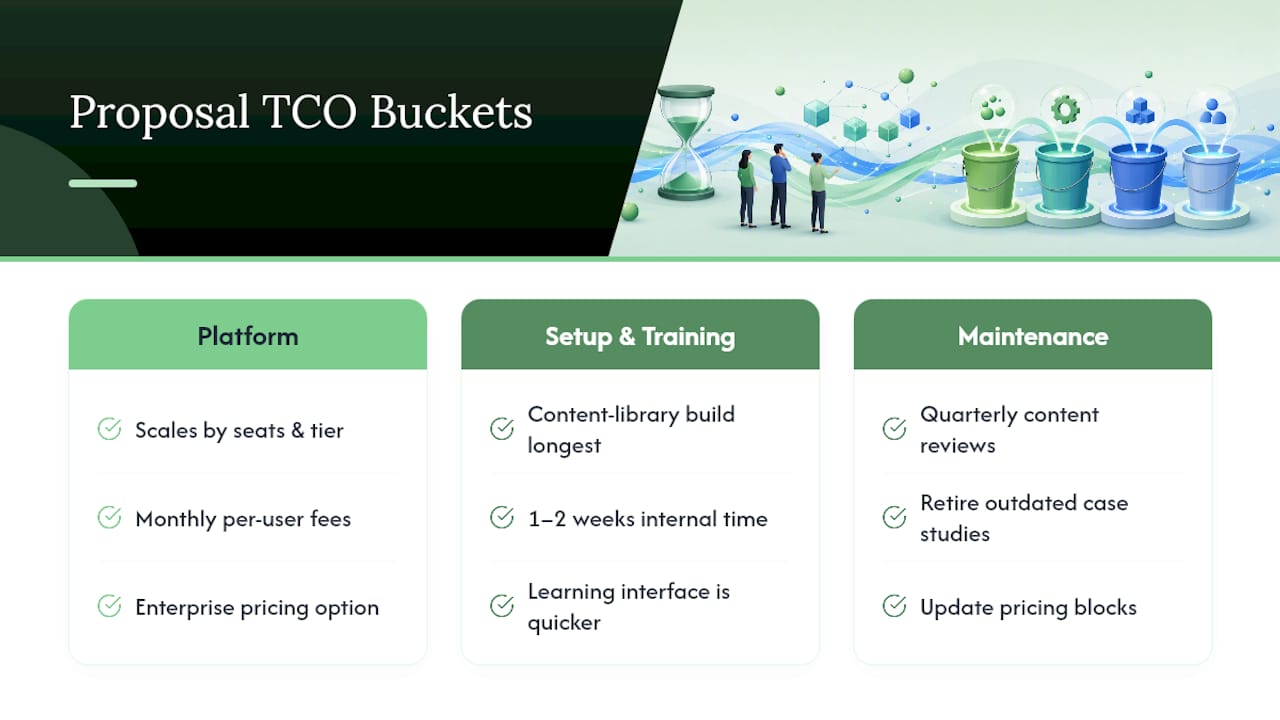
Software subscription is only one line item, and it’s often not the biggest one. Total cost of ownership breaks into three buckets: the platform fee, training and setup time, and ongoing maintenance.
Want this running in your business without doing it yourself?
Book a Free Consultation →Platform pricing for proposal tools generally scales with seats and feature tier, ranging from modest per-user monthly fees for template-and-e-signature tools up to higher enterprise pricing for full RFP-response engines with AI drafting and CRM sync. Setup and training cost more time than money for a small team: expect the content library build (gathering, cleaning, and tagging your best proposal language) to take longer than learning the software interface itself. That’s the step most budgets underestimate.
Maintenance is the ongoing cost people forget entirely. Someone needs to own quarterly content reviews, retire outdated case studies, and update pricing blocks when rates change. If nobody owns that job, the system quietly degrades and proposals start going out with stale numbers, which defeats the entire point of automating in the first place.
For a small or mid-sized team, the realistic total cost of a first-year rollout includes the software fee, roughly one to two weeks of internal time building the content library, and a named owner spending a few hours a month on upkeep. That’s a modest investment against a month of reclaimed staff time per employee, per year.
How Do You Choose the Right Proposal Software?
Start by identifying which problem you actually have. A proposal builder for polished branded sales collateral is a different product than an RFP-response engine built for portal questionnaires with hundreds of line items, and buying the wrong category is the most expensive mistake on this list.
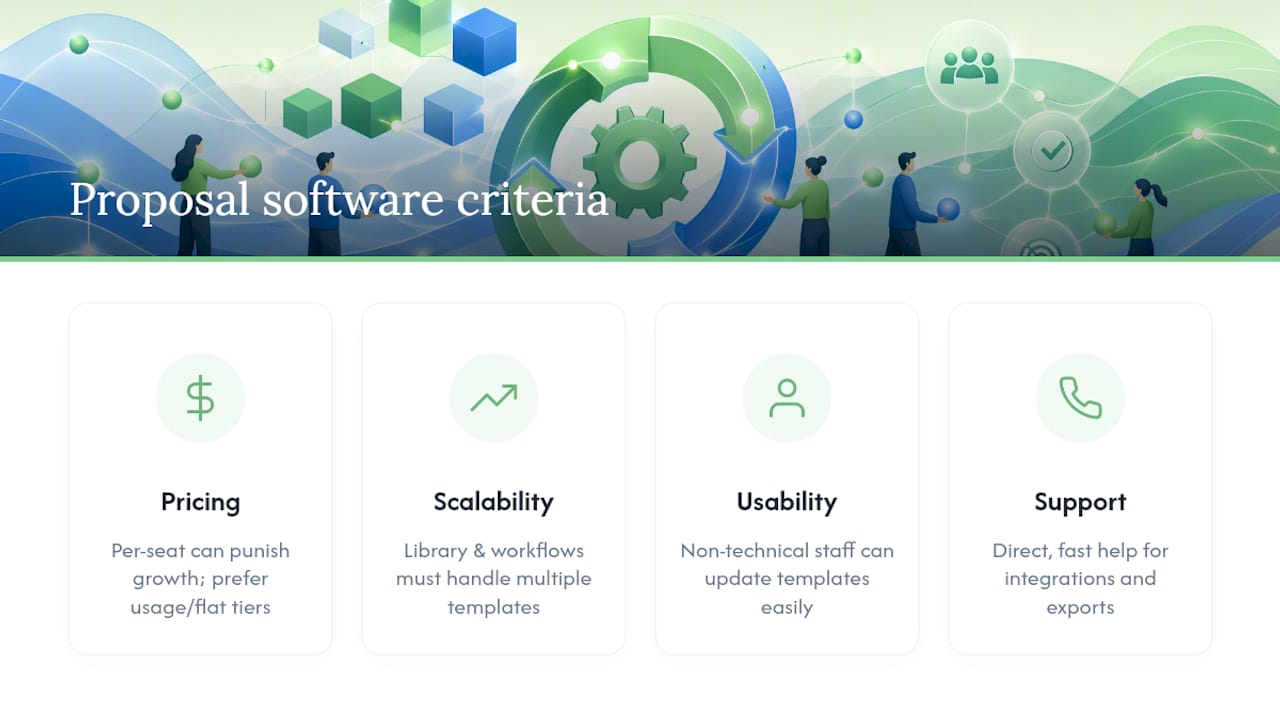
Once you know your category, evaluate on four practical criteria:
Pricing model. Per-seat pricing punishes growing teams; usage-based or flat-tier pricing tends to scale better for a small business that might double its proposal volume next year.
Scalability. Ask whether the content library and approval workflow structure can handle five templates as easily as one, or whether you’ll be rebuilding logic every time you add a service line.
Ease of use. If your team needs a week of training to draft a single proposal, adoption will stall. The best tools let a non-technical coordinator update a template without calling support.
Customer support. Look for direct access to a support team that can troubleshoot integration issues (CRM sync breaking, export formatting errors) quickly, since a broken proposal pipeline during a deadline week is a genuine business risk.
Weight these against your actual proposal volume. A five-proposal-a-month shop doesn’t need the same platform as a team fielding fifty.
What Goes Wrong When Teams Automate Proposals?
The most common failure isn’t the software. It’s skipping the content cleanup step and automating a mess. If your old proposals had inconsistent pricing language or outdated case studies, automation just makes those errors spread faster and wider.
A second frequent pitfall is scope creep during the pilot. Teams start with “just one template” and end up trying to digitize every proposal type in the company at once, which turns a 6-week pilot into a 6-month stall with no measurable win to point to.
Governance gets skipped too. Without a named owner for pricing and legal content, automated proposals drift out of date, and nobody notices until a client calls out an old rate or an expired guarantee. Set expiry dates on content from day one.
Finally, teams sometimes hand AI too much authority too early, letting it draft and send without human review on the sections that matter most (pricing, contractual commitments, client-specific promises). Keep a named human as the final check on anything that creates a legal or financial obligation, no matter how good the draft looks.
Why Governed Content Matters More Than the AI Itself
Here’s the uncomfortable part most vendor pitches skip: the AI isn’t the hard part of this project. Your content is. A polished drafting engine pointed at a messy, outdated library just produces polished, outdated proposals faster. The teams that get real value from automation are the ones who did the boring work of writing down their actual pursuit criteria and cleaning their best answers before they ever touched a tool.
The conventional advice treats proposal automation like a software purchase decision: compare features, pick a vendor, done. That undersells the governance work, and it’s why so many rollouts stall at month three with an expensive tool nobody trusts. Priority one isn’t picking between an RFP engine and a proposal builder. It’s deciding who owns your pricing language and how often it gets reviewed.
If there’s one thing worth doing differently than most guides suggest, it’s this: treat the pilot as a test of your content discipline, not a test of the software. A tool that drafts fast from a stale library will lose you more deals than doing it slowly by hand, because the errors ship faster too.
— Cristo
Ready to Pilot Your First Automated Proposal Template?
There are other paths here: standalone RFP platforms, generic document builders, or hiring a proposal writer outright. Each solves part of the problem, but most owner-operated businesses don’t need a whole new platform to manage. They need one working template, connected to the CRM data they already have, built by people who answer the phone when it breaks.

Cloudsprout runs a free digital audit and pilot engagement that maps your current proposal process, builds one automated template tied to your CRM, and measures the time saved before you commit to anything bigger. No lock-in contract, no outsourced work, and no guessing at what a bigger rollout would actually cost. After the pilot, you’ll have a working template, a synced client-data pipeline, and real numbers on turnaround time instead of a vendor’s sales pitch. If your CRM setup needs work first, Cloudsprout’s CRM automation for small business work covers that groundwork too. Start with a free SEO and digital audit and ask about a proposal automation pilot as the next step.
Sources
- Proposal automation: What it is, benefits and best software tools – Templafy
- Autorfp
- Proposal management software for enterprise teams | Responsive
- AI Proposal Management Software for Presales | SiftHub
FAQ
What Does It Mean to Automate Proposal Workflows?
It means connecting a governed content library, templates with dynamic fields, approval routing, and CRM data into one system so proposals draft and route automatically instead of being built by hand each time.
How Long Does It Take to Automate a Proposal Process?
A focused pilot covering one template, one CRM sync, and one approval path typically runs 4 to 8 weeks, with wider rollout following once pilot KPIs are measured.
Is Proposal Automation Worth It for a Small Team?
Yes, if proposals repeat in structure. Document automation broadly saves around 30 days per employee annually, which matters even more for a small team without spare capacity.
What Should I Automate First?
Start with your highest-volume, lowest-risk proposal template rather than your biggest or most complex deal, so you get clean pilot data without high stakes if something goes wrong.
Can Cloudsprout Help Set Up Proposal Automation?
Cloudsprout builds CRM integrations and custom templates in-house for small and mid-sized businesses, starting with a free audit and pilot to prove the workflow before any larger commitment.
Recommended
Less reading. More growing.
We build the systems these articles describe. Websites, AI follow-up, reviews, automation. And run them for you.
Keep reading

Small Teams: Automate Customer Onboarding in 1–4 Weeks, Keep It Human