
Schema for local business is a block of code, called JSON-LD, that tells Google exactly who you are, where you are, and when you’re open, instead of making Google guess from your homepage text. The fastest fix: add one LocalBusiness JSON-LD block to your homepage or location page, using your most specific business subtype, with your name, address, and phone number matching your Google Business Profile exactly. Schema.org defines the vocabulary, Google Search Central sets the requirements, and tools like the Rich Results Test confirm you got it right.
TL;DR:
- Using specific subtypes like Bakery or Plumber in your schema helps unlock tailored search features and accurate entity recognition.
- Ensure your business’s name, address, and phone number match your Google Business Profile exactly to prevent data mismatches.
- Include at least the four core fields—type, name, address, and telephone—in your JSON-LD to qualify for rich results, with additional properties improving display options.
- For multi-location businesses, create a dedicated page and schema block for each location, matching details precisely and assigning unique identifiers.
- Regularly validate and monitor your schema after implementation to catch drift, such as changed NAP data or mismatched hours, which can harm search visibility.
Table of Contents
- What Is Schema for Local Business, and When Should You Use It?
- What Does Google Actually Require in LocalBusiness Schema?
- How Do You Choose the Right LocalBusiness Subtype?
- How Do You Actually Add JSON-LD to Your Website?
- Running Multiple Locations? Here’s the Right Structure
- How Do You Test and Monitor Your Schema Once It’s Live?
- What Are the Most Common Schema Mistakes to Avoid?
- Notes From Rolling This Out for Ontario Small Businesses
- Want Someone Else to Handle This Correctly the First Time?
- Sources
- FAQ
What Is Schema for Local Business, and When Should You Use It?
LocalBusiness is a data type defined by Schema that gives search engines and AI tools a structured, machine-readable version of your business identity. Instead of Google’s crawler trying to guess your phone number from a footer image, the code states it plainly: "telephone": "+1-416-555-0134". No parsing required.
Schema.org lists more than 100 specific subtypes under the LocalBusiness umbrella. A bakery uses Bakery. A law office uses LegalService. A plumber uses Plumber. Each subtype inherits the base LocalBusiness properties (name, address, phone) and unlocks extra fields specific to that trade, which is why picking the closest match beats defaulting to the generic type.
Common subtypes small businesses reach for:
- Restaurant — unlocks
servesCuisineandmenuproperties - Store — covers retail, from a hardware shop to a boutique
- ProfessionalService — accountants, consultants, agencies
- HomeAndConstructionBusiness — electricians, roofers, HVAC techs
Schema helps in two ways that matter for different reasons. It gives search engines entity clarity, meaning Google and AI answer engines are more confident about who you are and what you do, helping with knowledge panels and AI-generated summaries. What it does not do is directly control your local pack ranking. Your position in Google Maps results comes from your Google Business Profile, proximity to the searcher, and review signals, not from schema markup alone.
One distinction trips people up: LocalBusiness assumes a physical location customers can visit. If you run a service-area business with no public storefront, like a mobile dog groomer or a traveling electrician, you’ll often want Organization combined with an areaServed property instead of implying a walk-in address that doesn’t exist.
What Does Google Actually Require in LocalBusiness Schema?
Google’s structured data guidelines are narrower than most blog posts suggest. Four fields are required for your markup to be eligible for rich results at all.
The required fields:
@type— your most specific subtype, not the generic “LocalBusiness”name— your business name, matching what’s on your storefront and Google Business Profileaddress— structured as aPostalAddressobject, not a plain stringtelephone— in a format search engines can parse reliably
Beyond that floor, Google recommends a second tier of properties that improve data quality and unlock richer display options, even though they won’t block eligibility if missing.
| Property | What it does | Format note |
|---|---|---|
geo |
Pins your exact coordinates | Latitude/longitude to decimals |
openingHoursSpecification |
Structured hours, not a text blob | Time in 24-hour format |
priceRange |
Signals cost tier | Simple string like “$$” |
url |
Canonical page for this business | Full HTTPS URL |
sameAs |
Links to verified social/directory profiles | Array of URLs |
aggregateRating |
Displays star ratings | First-party reviews only |
Pro Tip: Coordinate precision matters more than people think. A latitude/longitude pair rounded to 2 decimal places can be off by over a kilometer, which is a problem if your storefront sits next to three other units in the same plaza. Pull coordinates straight from Google Maps, not a rough guess.
On formatting: phone numbers should use full international format, meaning +1 before the area code for anywhere in Canada or the US. Addresses need to break into separate streetAddress, addressLocality, addressRegion, and postalCode fields rather than one long string. This matters more than it looks. OpeningHoursSpecification and geo fields both have exact formatting expectations, and a malformed field often gets silently ignored rather than flagged as an error, which means your schema looks fine to you but tells search engines nothing useful.
On aggregateRating: only add this if you have real, first-party reviews visible on the same page. Google’s review snippet guidelines treat fabricated or hidden review markup as a violation that can trigger a manual action against your site. It’s not worth the risk for a small ranking nudge.
How Do You Choose the Right LocalBusiness Subtype?
Specificity unlocks capability. A generic LocalBusiness type tells search engines almost nothing beyond “this is a business somewhere.” A Restaurant type tells them you serve food, and lets you attach servesCuisine (Italian, Thai, fusion) and a menu link, both of which can surface in richer search features.
The selection logic is simpler than it looks:
- Match your primary revenue activity, not a secondary service you occasionally offer
- Check Schema.org’s subtype list before defaulting to something close enough
- If two subtypes fit, pick the more specific one; you can still describe secondary services in your page content
A few patterns cover most small businesses. A dental office uses Dentist. A CPA firm uses AccountingService. A gym uses ExerciseGym or the broader SportsActivityLocation if it also runs classes. A café that’s part bakery, part sit-down restaurant can reasonably choose CafeOrCoffeeShop and let the page content fill in the rest.
Use plain LocalBusiness only as a genuine fallback, when nothing in the subtype list is close, or for a business model that doesn’t map to a physical visit pattern at all. And if you’re running a business with no fixed public address (a mobile mechanic, a virtual bookkeeping service), Organization with areaServed is usually the more honest fit than forcing a storefront schema onto a business that doesn’t have one.
How Do You Actually Add JSON-LD to Your Website?
Here’s a working example for a small Ontario coffee shop, annotated so you can see what each line is doing:
{
  "@context": "https://schema.org",
  "@type": "CafeOrCoffeeShop",
  "@id": "https://www.examplecafe.ca/#business",
  "name": "Example Cafe",
  "image": "https://www.examplecafe.ca/images/storefront.jpg",
  "url": "https://www.examplecafe.ca",
  "telephone": "+1-905-555-0142",
  "priceRange": "$$",
  "address": {
    "@type": "PostalAddress",
    "streetAddress": "142 King Street West",
    "addressLocality": "Hamilton",
    "addressRegion": "ON",
    "postalCode": "L8P 1A1",
    "addressCountry": "CA"
  },
  "geo": {
    "@type": "GeoCoordinates",
    "latitude": 43.25654,
    "longitude": -79.86923
  },
  "openingHoursSpecification": [
    {
      "@type": "OpeningHoursSpecification",
      "dayOfWeek": ["Monday", "Tuesday", "Wednesday", "Thursday", "Friday"],
      "opens": "07:00",
      "closes": "18:00"
    },
    {
      "@type": "OpeningHoursSpecification",
      "dayOfWeek": ["Saturday", "Sunday"],
      "opens": "08:00",
      "closes": "16:00"
    }
  ],
  "sameAs": [
    "https://www.instagram.com/examplecafe",
    "https://www.facebook.com/examplecafe"
  ]
}
That @id field is easy to skip and worth keeping. It’s a stable internal identifier that lets other schema on your site, like a BreadcrumbList or an event listing, reference this exact business entity without repeating the whole block.
Where it goes: drop this inside a <script type="application/ld+json"> tag in the <head> or <body> of your homepage if you have one location. If you have multiple locations, each one needs its own dedicated page and its own JSON-LD block, never a single block trying to describe several addresses at once.
Getting it into the page without touching code:
- Hand-code it if you’re comfortable copying the example above and swapping in your details
- Use a generator tool like BabyLoveGrowth’s JSON-LD schema tool to fill in a form and get clean output
- Paste generated code through a validator before publishing, since generators sometimes leave placeholder brackets or duplicate fields behind
The most common generator mistake is leaving a sample value in place, like a demo phone number or a placeholder city, because the tool auto-filled something and the field looked complete. Read every line before you paste it live. The second most common mistake is pasting the block twice, once from an old plugin and once from a manual edit, which creates duplicate identical markup that confuses validators more than it helps.
Running Multiple Locations? Here’s the Right Structure
Multi-location businesses get this wrong constantly by trying to cram five addresses into one schema block. The correct pattern is more work upfront but far cleaner long term.
Want this running in your business without doing it yourself?
Book a Free Consultation →- Build a dedicated page per location, each with its own URL, its own visible address and hours, and its own JSON-LD block matching that page’s content exactly.
- Give each location a unique
@idorbranchCode, so search engines and your own future markup can tell your Yonge Street location apart from your Bloor Street one. - Keep NAP identical to each location’s Google Business Profile, meaning the name, address, and phone in your JSON-LD should match the GBP listing character for character, not a close approximation.
- Nest with
departmentonly when it reflects real structure, like a pharmacy counter inside a grocery store or a walk-in clinic inside a larger medical building.
Businesses running more than one storefront benefit from treating this as its own project rather than a copy-paste task, since a mismatch between one location’s schema and its GBP listing can quietly undercut that location’s visibility while the others perform fine.
How Do You Test and Monitor Your Schema Once It’s Live?
Publishing the code isn’t the finish line. Three checks confirm it’s actually working and stays working.
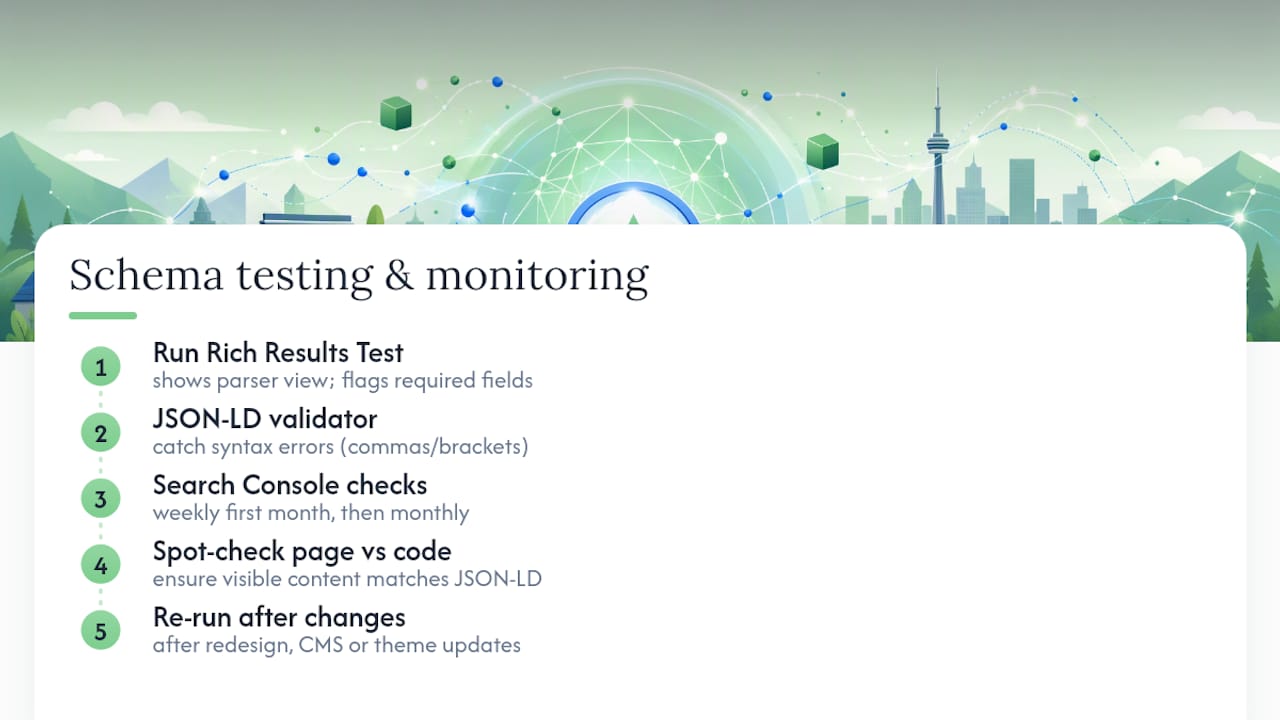
Run your page through Google’s Rich Results Test first. It shows you exactly what Google’s parser sees, flags missing required fields in red, and flags missing recommended fields as warnings you can choose to fix or ignore. Pair that with a general JSON-LD validator to catch pure syntax errors, like a missing comma or an unclosed bracket, that the Rich Results Test sometimes lets slide.
Second, once it’s live, check Search Console’s enhancement reports weekly for the first month, then monthly after that. This is where Google reports how many pages it detected with valid LocalBusiness markup and flags any that generated warnings or errors after a crawl.
Third, spot-check that what’s in the code matches what’s visible on the page. If your JSON-LD says you’re open until 9 PM but your visible hours say 8 PM, that’s a contradiction Google can flag, and it’s an easy one to introduce accidentally after a seasonal hours update that only gets applied to the visible text.
Re-run all three checks after any site redesign, CMS migration, or theme change, since a surprising number of redesigns strip structured data without anyone noticing until traffic dips weeks later.
What Are the Most Common Schema Mistakes to Avoid?
Most schema failures aren’t exotic. They’re a handful of repeat offenders showing up on nearly every audit.
- NAP mismatch with Google Business Profile. Your schema says “St.” and your GBP says “Street.” Small, but it erodes the entity confidence Google is trying to build.
- Choosing an overly generic subtype. Plain
LocalBusinesswhenElectricianwas available and free. - Duplicate identical markup from stacking a plugin’s auto-generated schema on top of a manually added block.
- Markup that contradicts or invents information not shown on the page, like an
aggregateRatingwith no visible reviews anywhere on the site.
Pro Tip: If you inherited a website with schema already in place, don’t assume it’s correct just because it exists. Old plugin-generated JSON-LD is one of the most common sources of stale NAP data on small business sites, since nobody updates it when the phone number or hours change.
A compact rollout checklist: canonicalize your NAP across every platform first, build a page per location, validate every JSON-LD block before publishing, and check Search Console monthly going forward. Skipping the first step is the reason the other three often need redoing.
Notes From Rolling This Out for Ontario Small Businesses
Cristo has walked owner-operators through this exact process across Ontario, and the pattern repeats almost every time: the business has a Google Business Profile that’s roughly right, a website that’s never had schema touch it, and an owner who assumed the two were already talking to each other. They weren’t.
A typical rollout looks like this. Pull the GBP listing details first, since that’s the source of truth, not the website. Confirm the business’s most specific subtype rather than defaulting to generic. Build or update the location page so its visible content and its JSON-LD say the exact same thing. Validate with the Rich Results Test before calling it done, then check back in Search Console a few weeks later.
The gap that costs businesses the most isn’t a missing field, it’s drift. A phone number changes, hours shift for a holiday, and the schema quietly stops matching reality. If you’re doing this yourself, run a quick audit against your own GBP listing before you touch a line of code. Confirm your listing is accurate, confirm your location page reflects it, then add the markup last, not first.
— Cristo
Want Someone Else to Handle This Correctly the First Time?
Cloudsprout is the alternative to hiring a freelancer or wrestling with a generator plugin for your schema for local business rollout: everything gets built in-house, from the JSON-LD code to the Google Business Profile sync, by the same team that answers your emails, with no outsourced contractor touching your site.

An engagement typically starts with a free trial that includes a full digital audit, checking whether your current NAP data actually matches across your website, your Google Business Profile, and your directory listings before a single line of code changes. From there, Cloudsprout builds out per-location pages where needed, implements the JSON-LD blocks with the correct subtype and required fields, and runs the validation checks covered above so nothing goes live broken. Ongoing SEO clients also get their structured data checked as part of monthly Search Console monitoring, so a schema-breaking site update doesn’t sit unnoticed for months.
If your site needs the underlying developer work to add this properly, website development covers that build. If you just want to know where your current listing and site stand before committing to anything, start with the free SEO audit.
Sources
- Local Business (LocalBusiness) Structured Data | Google Search Central
- Schema
- Local Business Schema JSON-LD – Examples and 100+ Sub-Types
- LocalBusiness Schema: Complete Guide (2026)
FAQ
What Is a Local Business Schema?
It’s a structured data format, written in JSON-LD, that tells search engines your business name, address, phone number, hours, and category in a format machines can read directly rather than infer from page text.
How Do You Create a Local Business Schema?
Pick your most specific Schema.org subtype, fill in the required fields (@type, name, address, telephone), add recommended fields like geo and openingHoursSpecification, then paste the JSON-LD into your page’s HTML and validate it with Google’s Rich Results Test.
What Are the Four Types of Schema?
Schema.org defines far more than four types, with over 100 LocalBusiness subtypes alone, but the four most common categories small businesses encounter are LocalBusiness, Organization, Product, and Review/AggregateRating schema.
Can You Give an Example of Local SEO?
A café that keeps its name, address, and phone number identical across its website, Google Business Profile, and JSON-LD schema, and adds accurate openingHoursSpecification and geo coordinates, is practicing local SEO fundamentals that support both map visibility and structured data quality.
Does Adding Schema Guarantee a Better Local Pack Ranking?
No. Schema improves entity clarity for search engines and AI tools, but your position in Google’s local pack depends primarily on your Google Business Profile, proximity to the searcher, and review signals.
Recommended
Less reading. More growing.
We build the systems these articles describe. Websites, AI follow-up, reviews, automation. And run them for you.
Keep reading

One Page Voice Chart: 8 Brand Voice Examples Small Businesses Can Use