

A digital marketing audit is a data-first, revenue-focused diagnostic of every active channel and asset you own. It shows you exactly what to fix first. Before anything else, do three things: verify that GA4 and your conversion tracking actually fire correctly (broken tracking makes every finding that follows unreliable), find and stop immediate budget waste in paid accounts, and shortlist three high-impact fixes you can ship in 30–90 days. Those three moves alone will do more for your marketing performance than any strategy deck.
Most teams skip straight to tactics. The audit forces you to stop, look at the data honestly, and ask the harder question: is any of this actually driving revenue? According to Digitaso, teams that follow a tiered audit process recover an average of 22% of their paid budget in the first 90 days, and accounts that audit quarterly are 2.3× more likely to hit revenue targets compared to those that review annually.
That is the case for doing this properly.
Table of Contents
- What does a digital performance audit actually cover?
- How to run a digital audit step by step
- Channel-specific checklists and sample KPIs
- Which tools and templates do you actually need?
- How do you turn audit findings into a 30–90 day roadmap?
- How do you know if the audit actually worked?
- What separates a useful audit from a superficial one?
- How to run a pilot audit in 7–14 days
- Key Takeaways
- Why the 90-day roadmap beats the laundry list
- Cloudsprout’s pilot audit gets you a clear plan, fast
- Useful sources and further reading
- FAQ
What does a digital performance audit actually cover?
A full audit is not just a website review. It touches every system that touches your customer, and the scope is wider than most teams expect when they start.
Here is what a complete inventory covers:
| Domain | What to pull | Sample check |
|---|---|---|
| Website (pages, landing pages, forms) | Crawl export, GA4 behavior data | Broken links, missing meta, form submission errors |
| Analytics and tag manager | GA4 event audit, GTM container export | Conversion events firing correctly, no duplicate tags |
| Paid accounts (Google Ads, Meta, LinkedIn) | Account exports, search term reports | Wasted spend, audience overlap, ROAS by campaign |
| Organic assets (content, blog) | GSC performance report, crawl data | Keyword cannibalization, thin pages, indexation gaps |
| Backlinks | Ahrefs or Semrush link report | Toxic links, lost referring domains |
| Email systems | ESP dashboard, deliverability report | Bounce rates, list hygiene, automation gaps |
| Social profiles | Native analytics exports | Engagement quality, ad attribution, channel fit |
| CRM and attribution | CRM pipeline data, UTM audit | Lead source accuracy, closed-won attribution |
| Creative assets | Ad library, content inventory | Message match from ad to landing page |
| Integrations (CDP/CRM) | Integration logs | Data sync errors, missing contact records |
Quick health check vs. full audit: A quick health check (3–5 days, one analyst) covers analytics, paid, and top-traffic pages. A full audit (2–4 weeks, cross-functional team) covers every domain above. For most small businesses spending under $5,000/month on digital, the quick check delivers 80% of the value at a fraction of the cost. Scale up when you have multiple channels running simultaneously or when revenue attribution is genuinely unclear.
How to run a digital audit step by step
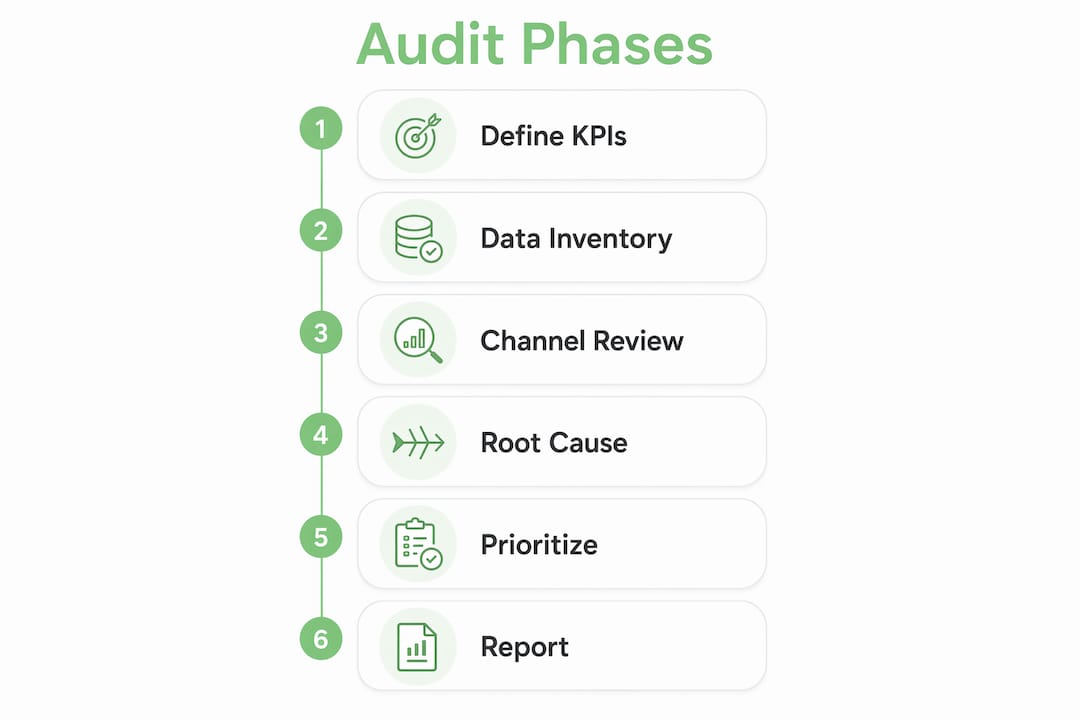
A structured digital performance audit converts noisy dashboards into decisions tied to commercial outcomes. Six phases get you there.
Phase A: Define objectives, KPIs, and revenue mapping
Start by agreeing on what counts as a win. Who owns each channel? What is a conversion worth? What is your average customer lifetime value? Without these anchors, the audit produces a list of observations instead of a prioritized plan. Write down your top three business goals, map each to a channel, and assign a dollar value to each conversion type before you pull a single report.

Phase B: Inventory and data quality
Export everything. Run a GA4 event audit and compare conversion counts against your CRM records. If GA4 shows 200 form submissions last month and your CRM shows 80 new leads, you have a tracking problem that will distort every conclusion downstream. Reconcile the numbers before moving on.
Phase C: Channel diagnostics
Run a high-level performance review for each channel: SEO, paid media, email, social, content, and conversion rate optimization. The goal here is not depth, it is pattern recognition. You are looking for channels that are spending money but not contributing to pipeline, pages that get traffic but no conversions, and campaigns that have never been touched since launch.
Phase D: Root-cause analysis
Symptoms are easy to spot. Causes take more work. A landing page with a 4% conversion rate is a symptom. The cause might be audience mismatch, a weak headline, a form with too many fields, or a page that loads in 6 seconds on mobile. Link each symptom to a specific, fixable cause before you write a recommendation.
Phase E: Prioritization and action plan
Score every finding by impact and effort. High-impact, low-effort fixes go in month one. Medium-impact fixes that require development go in month two. Strategic builds, like a new content program or a CRM integration, go in month three. Assign an owner and a success metric to each item.
Pro Tip: Before finalizing the roadmap, flag dependencies. A landing page test cannot run if conversion tracking is broken. Fix tracking first, or every test result is meaningless.
Phase F: Report and handoff
A good audit report is not 60 pages long. It is a one-page executive summary, a prioritized findings table with owners and timelines, and a measurement plan. The Harvard Business School framing is useful here: the audit’s job is to surface opportunities for improvement and align marketing efforts with business goals, not to document every metric you looked at.
Channel-specific checklists and sample KPIs

A thorough audit treats SEO, UX, content, acquisition, and conversion as an interconnected system. Here is what to check in each channel.
SEO
- Technical crawl: broken links, redirect chains, duplicate content, canonicalization errors
- Indexation: pages indexed vs. pages submitted in GSC
- Core Web Vitals: LCP, CLS, INP scores by device
- Structured data: schema markup present and error-free
- Keyword mapping: primary keyword assigned to each key page, no cannibalization
KPIs: Organic sessions, organic conversion rate, keyword ranking movement, crawl error count.
Content
- Which pages drive traffic AND conversions (not just one or the other)
- Content gaps: topics your audience searches for that you do not cover
- Pruning candidates: pages with zero traffic for 12+ months
- Intent alignment: does the page match what the searcher actually wants?
- Internal linking: are high-value pages getting enough internal link equity?
KPIs: Pages with assisted conversions, content-to-conversion rate by funnel stage, organic conversion velocity.
Paid media
- Conversion tracking: are all conversion actions firing and attributed correctly?
- Search term reports: what are you actually paying for? Pull the last 90 days and filter for irrelevant terms
- Negative keyword lists: are they current and applied at the right level?
- Audience overlap: are your remarketing audiences cannibalizing each other?
- ROAS and CPL by campaign and landing page
KPIs: Cost per acquisition, ROAS by campaign, impression share lost to budget vs. rank.
Pro Tip: Message match is the single most underused lever in paid media. If your ad says “Free consultation” and the landing page says “Request a quote,” you are losing conversions to friction you created yourself. Check every active ad against its destination page.
- Deliverability: sender score, spam complaint rate, bounce rate
- List hygiene: percentage of contacts active in the last 90 days
- Automation health: are triggered sequences actually sending? Check for broken triggers
- Open-to-click-to-conversion ratios by sequence
KPIs: Deliverability rate, click-to-conversion rate, revenue per email sent.
Social
- Channel fit: is your audience actually on this platform, or are you posting out of habit?
- Engagement quality: comments and saves matter more than likes for organic reach
- Ad conversion attribution: are social ad conversions verified against CRM data or just platform-reported?
KPIs: Engagement rate, cost per lead from paid social, assisted conversion count.
Website and CRO
- Funnel drop-off: where do users leave before converting? Use GA4 funnel exploration
- Page load time: target under 3 seconds on mobile (use PageSpeed Insights or GTmetrix)
- CTA clarity: is there one clear next step on every key page?
- Form friction: count the fields. Every unnecessary field costs you conversions
- Mobile UX: test on a real device, not just a browser emulator
KPIs: Conversion rate by page, bounce rate on key landing pages, form completion rate.
Which tools and templates do you actually need?
You do not need a $2,000/month tech stack to run a solid audit. Here is the practical minimum, organized by job.
Site crawls and technical SEO: Screaming Frog (free up to 500 URLs), Ahrefs Webmaster Tools (free), or Semrush Site Audit. For most small businesses, Screaming Frog covers 90% of what you need.
Page speed and Core Web Vitals: Google PageSpeed Insights (free), GTmetrix (free tier available), Chrome DevTools Lighthouse panel.
Session replay and heatmaps: Microsoft Clarity (free, no session limits), Hotjar (free tier for low-traffic sites). Use these to understand why users drop off, not just where.
Ad account exports and analysis: Native exports from Google Ads and Meta Ads Manager, then pivot tables in Google Sheets or Excel. No paid tool required for most accounts.
Email deliverability: Mail-Tester (free spot checks), Google Postmaster Tools (free for Gmail deliverability data).
Attribution and testing: GA4 (free), Google Optimize has been sunset, so use VWO or Optimizely for A/B tests if budget allows. For small budgets, manual before/after measurement with a 30-day window works fine.
Minimum template set:
- Inventory spreadsheet: one tab per channel, columns for asset name, URL, owner, last updated, and status
- Impact-vs-effort prioritization sheet: rows for each finding, columns for impact score (1–5), effort score (1–5), and recommended timing
- Conversion tracking checklist: list every conversion event, the trigger, the destination, and the last verified date
- One-page audit report template: executive summary, top three findings, prioritized action table, measurement plan
For teams that want to build their marketing automation checklist alongside the audit, that is a natural next step once the tracking foundation is solid.
How do you turn audit findings into a 30–90 day roadmap?
The audit is only useful if it produces decisions. An impact-vs-effort scoring method keeps the roadmap from becoming a wishlist.
Want this running in your business without doing it yourself?
Book a Free Consultation →Score each finding on two dimensions: impact (estimated revenue gain or cost savings, scored 1–5) and effort (time and resources required, scored 1–5, where 5 is highest effort). Divide impact by effort to get a priority score. Fixes with a score above 2.5 go first.
Here is a sample prioritization table:
| Finding | Owner | Impact (1–5) | Effort (1–5) | Priority Score | Timing |
|---|---|---|---|---|---|
| GA4 conversion tracking broken on contact form | Analytics lead | 5 | 1 | 5.0 | Month 1 |
| Paid search: 34 irrelevant search terms burning budget | Paid media manager | 4 | 1 | 4.0 | Month 1 |
| Landing page CTA unclear on mobile | Web developer | 4 | 2 | 2.0 | Month 1 |
| Blog content gap: 8 high-intent topics uncovered | Content lead | 3 | 3 | 1.0 | Month 2 |
| CRM and GA4 attribution reconciliation | IT/CRM owner | 4 | 4 | 1.0 | Month 2 |
| Full content refresh for top 10 organic pages | Content lead | 5 | 5 | 1.0 | Month 3 |
Month 1 is for quick wins: fix tracking, cut wasted spend, and clear the obvious UX friction. These moves cost little and produce measurable results fast, which builds the internal credibility to fund the bigger fixes.
Month 2 moves into medium-complexity work: content gaps, audience refinement, email automation repairs.
Month 3 is for strategic builds that require cross-team coordination, like a CRM integration or a new landing page program.
Pro Tip: Estimate effort conservatively. If you think a fix takes two days, budget four. Blocked roadmaps usually happen because someone underestimated a dependency, not because the strategy was wrong. Map dependencies before you commit to timelines.
For teams building a broader digital marketing strategy alongside the audit, the roadmap becomes the bridge between findings and execution.
How do you know if the audit actually worked?
Define success before you start fixing things. Otherwise, you will not know whether the improvement came from your audit work or from a seasonal traffic spike.
Short-term success metrics (days 1–30)
- Tracking accuracy: GA4 conversion counts match CRM records within 10%
- Recovered budget: paid accounts show reduced spend on irrelevant terms
- CPA improvement: cost per acquisition trending down week over week
Medium-term business metrics (days 31–90)
- Pipeline contribution: MQLs from audited channels increasing
- Organic conversion velocity: more organic sessions converting, not just more sessions
- Revenue attribution uplift: more closed deals traceable to specific channels
Recommended reporting cadence
- Weekly: Sprint check-in on active fixes. Are tasks complete? Are metrics moving?
- Monthly: Full channel performance review against pre-audit baseline
- Quarterly: Focused re-audit of the highest-spend channels
Teams with higher monthly ad spend should audit quarterly. Lower-spend teams can run a focused check every six months, with a full audit annually.
To verify that improvements are real and not seasonal, use a simple before/after comparison with a 30-day holdout window. If you changed a landing page on March 1, compare conversion rate for February vs. March, then check whether the same period last year showed a similar natural lift. If it did not, the improvement is likely audit-driven.
Data-driven decision-making at this level, where you tie a specific fix to a specific outcome, is what separates teams that keep improving from teams that just keep reporting.
What separates a useful audit from a superficial one?
Most audits fail not because the data is wrong, but because the output is a list of symptoms with no diagnosis and no owner.
A digital marketing audit that connects channel metrics to revenue decisions is a management tool. One that lists vanity metrics is a report no one acts on. The difference is not the data — it is the question the audit is designed to answer.
The most common pitfalls:
- Broken tracking from the start. If GA4 is misconfigured, every conclusion built on it is wrong. Fix tracking before you analyze anything else.
- Siloed channel reviews. SEO, paid, and email reviewed separately miss the cross-channel dynamics that cause the real problems. A paid campaign driving traffic to a page that organic search already owns is a budget problem AND an SEO problem simultaneously.
- Long lists with no prioritization. A 47-item finding list with no scoring is not a roadmap. It is analysis paralysis in document form.
- Missing stakeholders. Audits that exclude the CRM owner, the product team, or the sales lead produce recommendations that cannot be implemented. The FMA Belgium audit framework explicitly includes team skills and agency accountability as audit topics, and that is the right instinct.
The Harvard Business School case study of OOFOS is instructive: their audit succeeded because it connected data to audience understanding and customer journey decisions, not because it produced the most comprehensive report. The team used findings to refine strategy and keep efforts aligned with business goals.
Quarterly audits are not just good hygiene. According to Digitaso, accounts that audit quarterly are 2.3× more likely to hit revenue targets than those that review annually. That gap is large enough to treat cadence as a strategic decision, not an administrative one.
How to run a pilot audit in 7–14 days
You do not need a full audit to start. A focused pilot delivers a prioritized 30–90 day plan in under two weeks.
Pilot audit checklist (7–14 days):
- Day 1–2: Verify GA4 setup, conversion events, and CRM match. Document every discrepancy.
- Day 3–4: Pull paid account exports. Identify wasted spend, irrelevant search terms, and audience overlap.
- Day 5–6: Run a site crawl. Flag technical errors, page speed issues, and mobile UX problems.
- Day 7–8: Review top 10 organic pages for traffic, conversion contribution, and intent alignment.
- Day 9–10: Audit email deliverability and automation sequences for broken triggers.
- Day 11–12: Score all findings using the impact-vs-effort matrix.
- Day 13–14: Write the one-page report and present findings to the executive sponsor.
Who to involve:
- Marketing owner: sets objectives and approves the final roadmap
- Analytics lead (in-house or contractor): owns tracking verification and data pulls
- Product/ops/IT contact: needed for any tracking fixes or integration work
- Sales/CRM owner: validates lead quality and attribution data
- Executive sponsor: approves budget shifts that come out of the pilot findings
Decision gates after the pilot: If the pilot surfaces fewer than five high-priority findings and your team has the skills to fix them, handle it in-house. If findings point to systemic tracking failures, cross-channel attribution problems, or gaps that require specialist skills, that is the signal to bring in agency support. A digital presence audit from a specialist can compress the timeline significantly for small teams without a dedicated analytics resource.
Key Takeaways
A digital marketing audit works when it connects channel data to revenue decisions, fixes tracking first, and produces a scored roadmap with clear owners.
| Point | Details |
|---|---|
| Fix tracking before anything else | Broken GA4 or conversion events make every downstream finding unreliable. |
| Stop budget waste in month 1 | Audited accounts recover an average of 22% of paid budget in the first 90 days. |
| Score findings by impact and effort | Use a priority score (impact ÷ effort) to sequence fixes and avoid analysis paralysis. |
| Set a reporting cadence | Quarterly audits for higher-spend accounts; biannual for lower-spend, with a full annual review. |
| Cloudsprout pilot audit | Cloudsprout offers a structured pilot audit covering tracking, waste, and a prioritized 30–90 day plan for Ontario small businesses. |
Why the 90-day roadmap beats the laundry list
Most audit reports I have seen from Ontario small businesses share the same flaw: they are thorough and completely unusable. Forty findings, no scores, no owners, no timeline. The business owner reads it once, files it, and nothing changes.
The 90-day roadmap format exists specifically to prevent that outcome. When you force every finding through an impact-vs-effort score and assign it to a named person with a deadline, the audit stops being a document and starts being a work plan. That shift matters more than the quality of the analysis.
For owner-operators running a trades business or a food service in Ontario, the resource constraint is real. You cannot act on 40 things. You can act on three. So the audit’s job is not to find everything wrong. It is to find the three things that will move revenue in the next 90 days, and make it obvious who does what by when. Everything else goes on a backlog for the next cycle.
Audits should also function as a control mechanism for updating skills, tools, and agency accountability over time, not just a one-off report. The teams that improve consistently are the ones that treat the audit as a quarterly habit, not a crisis response.
Cloudsprout’s pilot audit gets you a clear plan, fast
Running a pilot audit yourself is absolutely possible with this guide. But if you are an Ontario owner-operator or small marketing team and you want a practitioner to do the heavy lifting, Cloudsprout built its free trial around exactly this process.

The Cloudsprout pilot audit covers three things: a full tracking and conversion verification (GA4, tag manager, CRM match), a paid account waste review, and a prioritized 30–90 day roadmap with scored findings and named next steps. You get a one-page report you can act on immediately, not a 60-page deck that sits in a folder.
This is built for Ontario businesses spending or planning to spend on digital channels, whether that is Google Ads, SEO, social, or email. No long-term contract, no outsourcing, direct access to the team doing the work.
Start with a free SEO audit if SEO is your top priority, or explore Cloudsprout’s full digital marketing services to see where the pilot audit fits into a broader engagement. Either way, the first step is a conversation, not a commitment.
Useful sources and further reading
- Digital Marketing Audit: How to Run One (+ Framework) — Covers the full audit definition, scope, and channel-by-channel review process.
- Digital Marketing Audit Checklist: 12 Checkpoints — Source for the 22% budget recovery figure and the quarterly audit cadence recommendation.
- How to Conduct a Digital Marketing Audit — Harvard Business School overview including the OOFOS case study on connecting audit findings to business outcomes.
- Digital Audit: Complete Step-by-Step Method — Supports the cross-channel, interconnected-system framing used in the channel checklists section.
- Why Every C-Suite Needs a Digital Performance Audit — Explains why dashboards mask the gap between reported activity and actual business outcomes.
- Digital Performance Audit (FMA Belgium) — Source for including team skills and agency accountability as audit topics.
- What Is a Digital Presence Audit for Small Businesses — Cloudsprout’s own guide to digital presence audits for Canadian small businesses.
FAQ
What is a digital marketing audit?
A digital marketing audit is a systematic, data-driven review of all online marketing channels to identify what drives revenue and what wastes budget. It produces a prioritized action plan, not just a list of observations.
How long does a digital marketing audit take?
A quick health check covering analytics, paid, and top pages takes 3–5 days. A full audit across all channels typically runs 2–4 weeks, depending on team size and the number of active channels.
What should I fix first after an audit?
Fix broken conversion tracking first. If GA4 and your CRM do not agree on conversion counts, every other finding is built on unreliable data. After tracking is verified, cut wasted paid spend before touching anything else.
How often should I run a digital marketing audit?
Quarterly for accounts with higher digital spend, biannual for lower-spend businesses, with a full audit at least once per year. Quarterly audits are associated with a 2.3× higher likelihood of hitting revenue targets compared to annual reviews.
Can Cloudsprout run the audit for my business?
Yes. Cloudsprout offers a pilot audit covering tracking verification, paid waste review, and a prioritized 30–90 day roadmap for Ontario small businesses. It is included as part of the free trial, with no long-term contract required.
Recommended
Less reading. More growing.
We build the systems these articles describe. Websites, AI follow-up, reviews, automation. And run them for you.
Keep reading


One Page Voice Chart: 8 Brand Voice Examples Small Businesses Can Use
