Email nurture automation is a set of trigger-based email sequences that respond to what a lead actually does, rather than dumping everyone into the same fixed schedule. The single best first step is not picking software. It’s mapping one high-ROI workflow, from trigger to exit rule, and building that before touching anything else. Once that workflow works, the rest follows a five-stage structure: capture, welcome, educate, convert, re-engage.
TL;DR:
- Building a single high-ROI nurture workflow with clear trigger, segmentation, and exit rules is crucial before expanding automation efforts.
- Most effective sequences focus on four to six emails tailored to specific stages like welcome, demo follow-up, trial, or cart recovery, to prevent engagement drop-offs.
- Personalization beyond basic merge fields includes dynamic content and behavior-driven templates, with AI recommendations used cautiously under human oversight.
- Regularly reviewing performance metrics like open, click-through, and conversion rates, and updating content every six months, enhances program ROI.
- Small businesses should prioritize one well-defined workflow first and consider external services for setup to ensure consistent follow-through without overcomplicating processes.
Table of Contents
- What Is Email Nurture Automation, and What Are the Five Stages?
- How Do I Build an Automated Nurture Workflow?
- What Do Ready-to-Use Nurture Sequences Look Like?
- How Do I Personalize Nurture Emails Without Losing Automation?
- How Do You Measure and Improve a Nurture Program?
- What Mistakes Quietly Break Nurture Automation?
- How Does CloudSprout Set Up Nurture Automation for Small Businesses?
- What Should Small Teams Prioritize First?
- How Do You Get Started Without Building This Yourself?
- Sources
- FAQ
What Is Email Nurture Automation, and What Are the Five Stages?
A drip campaign fires on a fixed calendar. Everyone who signs up gets email one on day one, email two on day three, regardless of what they do in between. Nurture automation is different: it branches. Someone who clicks a pricing link gets a different next email than someone who ignores three messages in a row. The system reacts.
That reaction is only useful inside a structure. Most working nurture programs run through five stages, according to a framework Oracle uses to describe lead nurturing:
- Capture and segment. A lead fills a form or downloads something, and gets tagged by source, role, or interest. Metric: percentage of leads with a usable segment tag.
- Welcome. The first automated touch, usually within minutes. Metric: open rate on email one (this should be your highest of the whole sequence).
- Educate. Content that builds trust and answers objections before a sales call. Metric: click-through on educational links.
- Convert. The direct ask, demo booking, or trial signup. Metric: conversion rate from sequence to opportunity.
- Re-engage. Winning back leads who went cold. Metric: reactivation rate.
Skipping a stage doesn’t just weaken it. It creates leakage, where leads quietly vanish between stages you never built. Run through your own program right now and ask which of the five stages has no email attached to it. That gap is usually your biggest fix.
How Do I Build an Automated Nurture Workflow?
Nine decisions turn a strategy into a workflow you can actually launch, following the sequence most automation platforms expect you to configure, as laid out in a nine-step framework for building lead nurturing workflows:
- Map the sales cycle. Write down every step a lead takes from first contact to closed deal, and how long each stage typically takes.
- Define the persona. Not “small business owners” broadly. The specific role, pain point, and buying trigger for this workflow.
- Set the goal. A booked call, a trial activation, a purchase. Pick one.
- Choose the success metric. Conversion rate, not open rate, is usually the number that matters.
- Set the enrollment trigger. A form fill, a cart abandonment, a demo no-show. Be specific.
- Build segmentation logic. Behavior (what they clicked) plus firmographic data (company size, industry).
- Write branching rules. What happens if they click versus if they ignore three emails.
- Decide cadence and channel. Days between sends, and whether email alone is enough.
- Set the exit rule. Every workflow needs a clean way out: convert, unsubscribe, or disqualify.
That last one gets skipped constantly, and it’s the reason inboxes fill with irrelevant emails. Skipping persona definition and sales-cycle mapping is one of the most common operational mistakes in nurture programs, according to HubSpot’s content-mapping framework, because it pushes the failure downstream where it’s much harder to diagnose.
Pilot with one segment before rolling the workflow out to your full list. HubSpot Academy’s own lead nurturing training treats a clear testing plan as essential, not optional, before scaling.
Pro Tip: Build your exit rule before you write a single subject line. If you don’t know what “done” looks like for a lead, you’ll never know when to stop emailing them.
What Do Ready-to-Use Nurture Sequences Look Like?
You don’t need six workflows on day one. Start with the single highest-ROI use case and prove it works before building the next.
- Welcome sequence. Trigger: form submission. Touch 1 (immediate): thank-you plus one resource. Touch 2 (day 2): social proof or a quick case example. Touch 3 (day 5): direct CTA to book a call. Exit: reply or booking.
- Demo no-show follow-up. Trigger: missed calendar event. Touch 1 (1 hour later): easy reschedule link. Touch 2 (day 2): short value reminder. Touch 3 (day 5): last-chance email with a lower-friction alternative (a shorter call, a recorded walkthrough). Exit: reschedule or three no-responses.
- Trial-to-paid. Trigger: trial start date. Touch 1 (day 1): setup checklist. Touch 2 (day 5): feature highlight tied to their usage data. Touch 3 (day 10): upgrade offer. Touch 4 (day 13, trial ending): urgency plus support offer. Exit: upgrade or trial expiration.
- Cart recovery. Trigger: abandoned checkout. Touch 1 (1 hour): reminder. Touch 2 (day 1): objection-handling (shipping, returns, guarantee). Touch 3 (day 3): incentive if margins allow. Exit: purchase or 3 sends.
Cap most sequences at four to six emails. Beyond that, open rates collapse and you’re just adding unsubscribe risk. Once a lead shows strong buying signals mid-sequence, a click on pricing, a reply, hand off to sales immediately rather than finishing the automated script.
How Do I Personalize Nurture Emails Without Losing Automation?
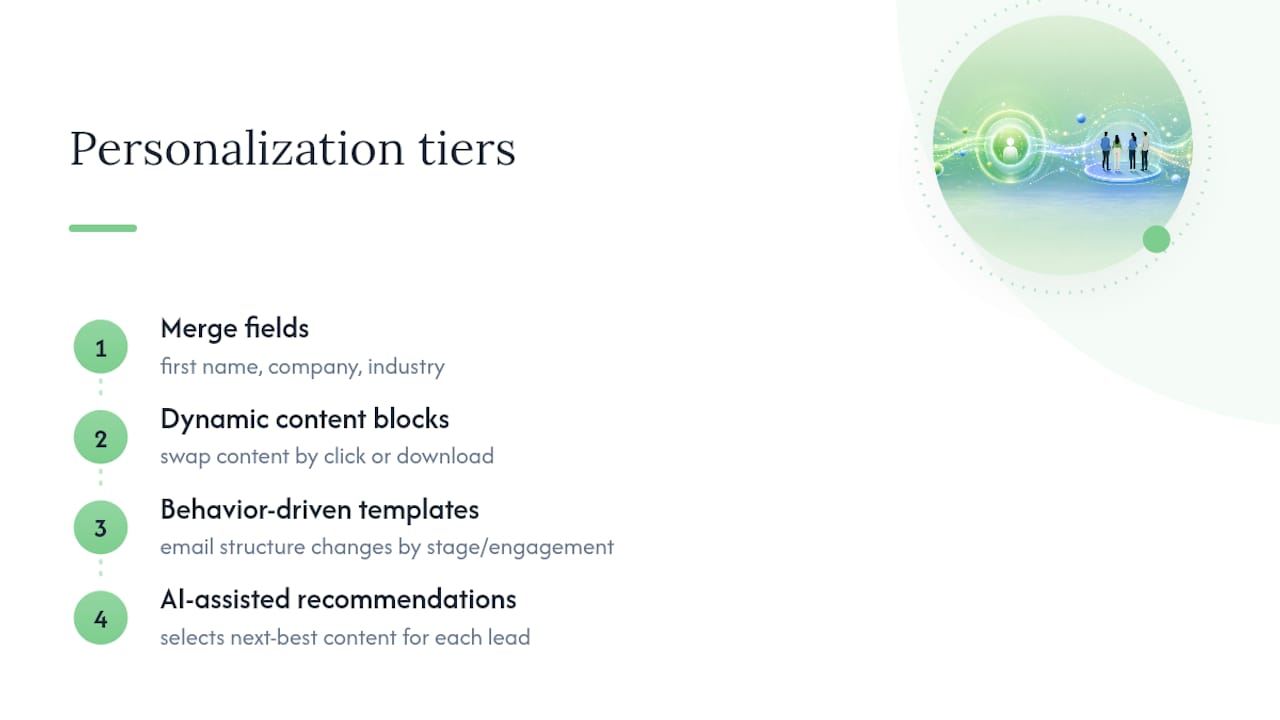
Personalization works in tiers. The base tier is a merge field: first name, company, industry. The next tier is dynamic content blocks that swap based on what a lead clicked or downloaded. Above that sits behavior-driven templates, where the entire email structure changes based on stage or engagement history. At the top: AI-assisted recommendations that pick the next best piece of content for each individual lead.
Multichannel touches earn their place when email alone stalls. A lead who opens every email but never clicks is a good candidate for a personalized SMS or a short recorded video instead of another written message. Most workflow guides now recommend layering chat, SMS, or retargeting ads on top of email once intent signals get strong, according to Vanillasoft’s automation research.
AI fits best in narrow jobs: scoring which leads are sales-ready, picking which content block to show, or generating a short personalized video intro, a use case documented by Sendspark. Keep a human reviewing routing decisions. AI recommending content is fine; AI deciding who talks to sales without oversight is a mistake.
How Do You Measure and Improve a Nurture Program?
Track five numbers: open rate, click-through rate, conversion rate, lead-to-opportunity rate, and revenue per lead. Time-to-first-meeting matters too, since a workflow that converts slowly still ties up sales capacity.
Benchmark to know: B2B nurture sequences commonly land around a 39% open rate and roughly 2.2% click-through rate as a rough baseline, though this varies by industry and list quality.
Want this running in your business without doing it yourself?
Book a Free Consultation →
Set rewrite triggers instead of guessing. Refresh any content block older than six months. Review performance monthly and do a deeper quarterly refresh of subject lines, CTA placement, and cadence timing. Nurtured leads tend to produce larger opportunities at lower acquisition cost than un-nurtured ones, which is the whole ROI case for testing in the first place. For a broader view of what to put on a marketing dashboard, tracking the right KPIs keeps review meetings focused on numbers that move revenue, not vanity metrics.
What Mistakes Quietly Break Nurture Automation?
Most broken nurture programs share the same root cause: nobody mapped the buyer’s journey before writing emails.
- Skipping persona and journey mapping. Content gets misaligned with intent, so open rates look fine while conversions stay flat.
- No exit rule. Leads who already converted or unsubscribed keep getting emails, which damages deliverability and trust.
- Uncapped cadence. Stacking too many sequences on one contact buries your best message under noise.
- Set-and-forget thinking. Nobody owns the workflow after launch, so a broken link or dead offer runs for months unnoticed.
Assign one owner per workflow with a monthly check-in. That single habit fixes most of this list on its own.
How Does CloudSprout Set Up Nurture Automation for Small Businesses?
A typical build runs two to four weeks for a single lead-routing workflow, following the lead-routing automation approach CloudSprout uses with Ontario clients. The process stays consistent regardless of industry:
- Week 1: Audit current lead capture and existing (or missing) follow-up.
- Week 1 to 2: Map personas, define triggers, and build a content map for each stage.
- Week 2 to 3: Build the workflow inside the client’s CRM, wired with proper branching and exit rules.
- Week 3: Pilot on a small segment and watch open, click, and conversion data closely.
- Week 4: Scale to full list and hand off reporting.
One local trades client had leads sitting in a shared inbox for days before anyone replied. A routing workflow with automated first-touch emails cut that response gap to minutes, without adding staff hours.
What Should Small Teams Prioritize First?
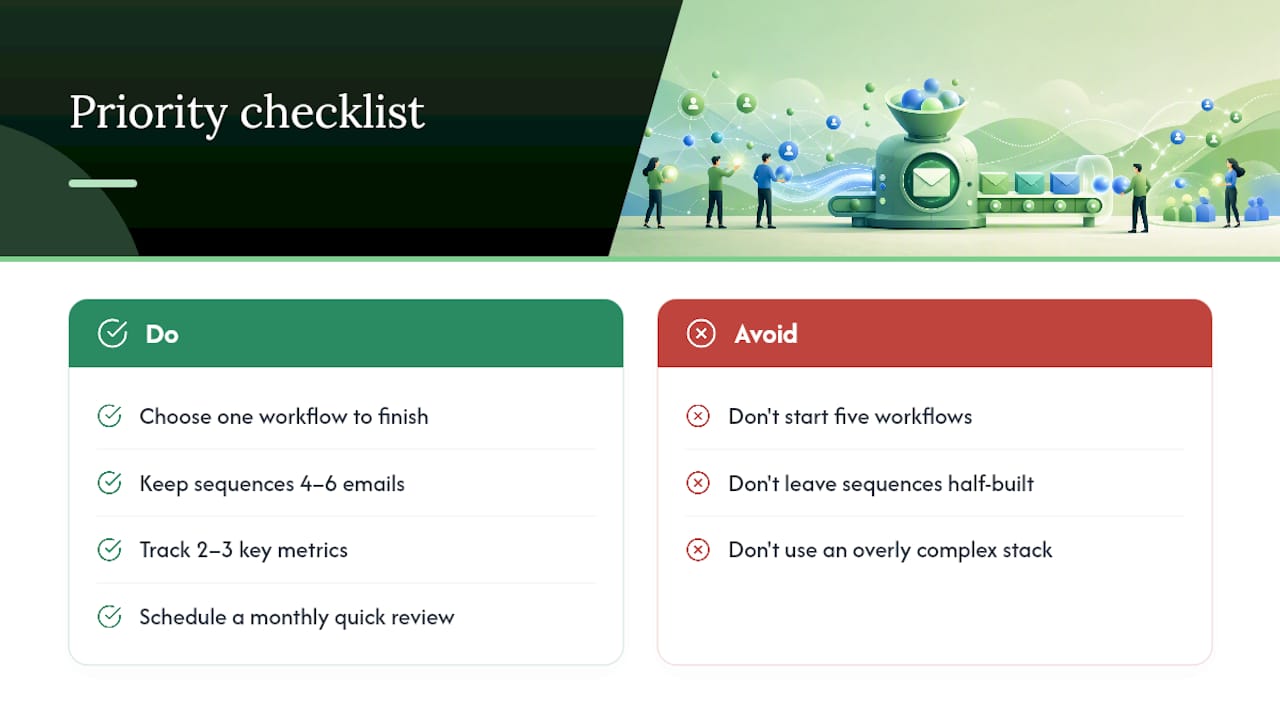
Pick one workflow. Not five. A demo no-show sequence or a welcome series you actually finish beats three half-built automations sitting in draft. Keep sequences short, four to six emails, and measure only the two or three numbers that tell you if it’s working: open rate on email one, conversion rate at the end.
Owner-operators don’t have marketing departments checking dashboards daily. Build the monthly quick review into your calendar now, or it never happens. A clean four-tool setup, CRM, email platform, a personalization layer, and basic analytics, usually beats a complicated stack nobody has time to maintain.
— Cristo
How Do You Get Started Without Building This Yourself?
There are services that offer alternative solutions to hiring an in-house marketing hire or managing multiple disconnected tools for nurture automation, providing workflow build, email copy, CRM setup, and transparent month-to-month pricing without long-term contracts.

The process starts with a free digital audit that looks at your current lead capture and follow-up gaps, the same audit that feeds the two-to-four week lead-routing timeline described above. From there, CloudSprout builds the workflow inside your existing CRM, using the CRM automation approach built specifically for small operations, not enterprise software you’ll never fully use.
If you’d rather see the full picture of what’s included, the services overview covers everything from automation to website work, and the Sprout, Grow, and Scale plans lay out month-to-month pricing with no setup surprises. Claim the free audit and get a real answer on what your nurture gaps are costing you.
Sources
- Lead nurturing workflow: a 9-step framework for 2026 — Dashly
- Automated lead nurturing: Step-by-step guide — Sendspark
- Lead nurturing with HubSpot — HubSpot Academy
- What is lead nurturing? — Oracle
- The ultimate lead nurturing guide for 2026 — Zendesk
FAQ
What Does Email Nurture Mean?
Email nurture means sending a sequence of emails triggered by lead behavior, moving someone from first contact toward a sale rather than blasting a fixed schedule at everyone. It works through five stages: capture, welcome, educate, convert, and re-engage, as Oracle’s lead nurturing framework lays out.
What Is the Best Way to Automate Emails?
Start with one high-ROI workflow, like demo no-show follow-up or trial-to-paid, and build its trigger, branching, and exit rule before adding a second sequence. Platforms built into most CRMs handle this natively, or a service like Cloudsprout can build the workflow directly inside your existing CRM.
What Are the Top Email Automation Tools?
Most small businesses do fine with a lean stack: a CRM, an email sending platform, a personalization or video layer, and basic analytics, rather than a large multi-vendor setup, according to Sendspark’s automation guide. The specific tool matters less than whether triggers, segmentation, and exit rules are actually configured correctly.
Is Email Marketing Still Worth It in 2026?
Yes. Nurtured leads consistently produce larger sales opportunities at lower acquisition cost than leads left un-nurtured, which is the core ROI argument in Zendesk’s lead nurturing guide. Email remains one of the few channels a small business fully owns, with no algorithm deciding who sees it.
What Does CloudSprout Charge for Nurture Automation Setup?
CloudSprout’s monthly plans start at the Sprout plan for 300 CAD per month, with Grow at 600 CAD per month and Scale at 1200 CAD per month, each listed on the pricing page. One-time setup fees range from 500 to 1500 CAD for Sprout, up to 3500 to 7500 CAD for Scale, depending on project scope.
Recommended
Less reading. More growing.
We build the systems these articles describe. Websites, AI follow-up, reviews, automation. And run them for you.
Keep reading
One Page Voice Chart: 8 Brand Voice Examples Small Businesses Can Use