
A content strategy is a high-level plan that ensures every piece of content you create serves a real user need and a specific business goal. Without one, you end up with a pile of blog posts, social captions, and web pages that nobody reads and nobody maintains. NN/g describes it as the intentional creation and ongoing management of useful, usable content tied to both audience needs and organizational goals.
Three reasons it matters for small businesses:
- Clarity: You stop guessing what to publish and start making deliberate choices about topics, formats, and timing.
- Maintenance: Content you publish today needs updates, not just a publish date. Strategy builds that into the plan.
- ROI: Every piece connects to a measurable outcome, so you can see what is working and cut what is not.
| Quick-Start Signal | What It Means for You |
|---|---|
| You have no content goals | Start with strategy before creating anything |
| You publish but see no results | Audit first, then rebuild with purpose |
| Nobody owns your content | Assign roles before you write another word |
| You never update old posts | Add a maintenance step to your workflow |
Table of Contents
- What does a content strategy actually cover?
- The four phases every piece of content moves through
- What should your content strategy actually produce?
- Who owns content strategy in a small team?
- How do you build a content strategy from scratch?
- How do you know if your content strategy is working?
- A one-page content strategy template you can copy today
- Key Takeaways
- Why most small businesses skip the part that matters most
- Useful sources and further reading
- FAQ
What does a content strategy actually cover?
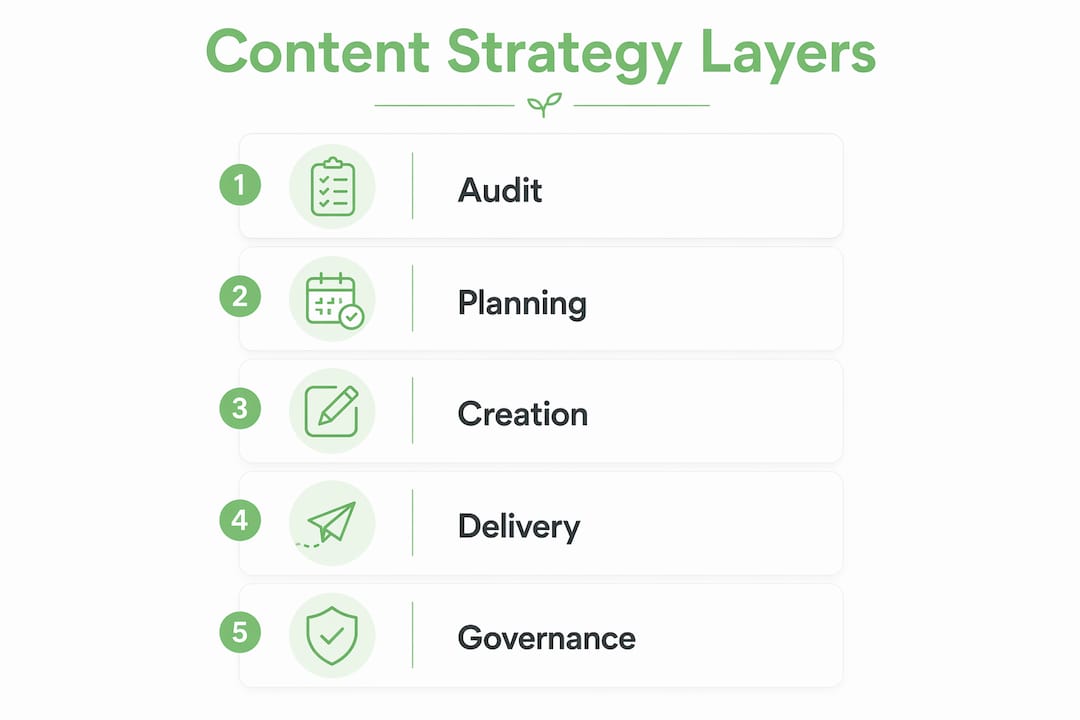
Digital.gov defines content strategy as planning, creating, delivering, and governing content. That last word, governing, is where most small businesses fall short. They plan and create but skip the part where someone is responsible for keeping content accurate and deciding when to retire it.

The confusion usually comes from mixing up three different things:
| Layer | What It Covers | Typical Output |
|---|---|---|
| Content strategy | What content exists, why, for whom, and who owns it | Strategy doc, content model, governance plan |
| Content marketing | How content attracts and converts an audience | Campaign briefs, blog series, lead magnets |
| Editorial calendar | When and where specific pieces get published | Spreadsheet, Trello board, Notion calendar |
Canva’s content strategy guide puts it plainly: strategy sets the what and why; plans and calendars handle the how and when. You need all three, but they are not interchangeable. A calendar without a strategy is just a to-do list. A strategy without a calendar never ships.
Signals you need strategy work, not just a calendar:
- Your website has overlapping pages covering the same topic.
- Your brand voice sounds different on Instagram than on your homepage.
- Nobody on your team can explain why a piece of content exists.
- You have published content you are embarrassed to link to.
The four phases every piece of content moves through
NN/g’s content strategy lifecycle breaks the process into four phases. Think of it as a loop, not a line.
- Planning: Define goals, audience, formats, and channels. Decide what content you need before you write a word.
- Creation: Write, design, record, or produce. This is where workflows, briefs, and style guides matter most.
- Maintenance: Update facts, refresh SEO, fix broken links, and measure performance. Most teams skip this entirely.
- Unpublishing: Retire, archive, or redirect content that no longer serves a purpose.
The maintenance and unpublishing phases are where small businesses lose the most ground. A plumber’s “2019 tips for winter pipes” page still ranks but sends visitors to a phone number that changed two years ago. That is a strategy failure, not a writing failure.
Pro Tip: Before you unpublish anything, check whether it gets organic traffic. If it does, redirect it to a current page. If it gets zero traffic and zero links, delete it. If it is outdated but still useful, update it instead of starting over.

A content inventory, a simple spreadsheet listing every page or post with its URL, topic, last-updated date, and traffic, is the tool that makes maintenance manageable. You do not need software. A Google Sheet works fine.
What should your content strategy actually produce?
A strategy is not a philosophy document. It should produce concrete artifacts your team can use. Here is what a complete set looks like:
| Artifact | Primary Purpose | Typical Owner |
|---|---|---|
| Content model | Defines content types, fields, and structure | Strategist or web lead |
| Content inventory | Lists all existing content with status and metrics | Content manager |
| Style and voice guide | Sets tone, grammar rules, and brand language | Editor or owner |
| Taxonomy and tagging rules | Organizes content for findability | Strategist or developer |
| Governance plan | Assigns ownership, review cadence, and retirement rules | Owner or manager |
| Editorial brief template | Standardizes how new content gets briefed and approved | Editor |
| Persona and journey maps | Describes audience segments and their decision paths | Strategist or marketer |
| Content roadmap | Prioritizes what to create or update over the next quarter | Owner or strategist |
You probably do not have all of these yet. That is fine. Use this as a checklist to audit what you own:
- [ ] Do you have a written style guide, even a one-pager?
- [ ] Do you have a list of every page on your site with its purpose?
- [ ] Does someone on your team own each piece of content?
- [ ] Do you have a roadmap showing what gets created next?
- [ ] Do you have criteria for when to update or retire a page?
If you answered no to three or more, you have strategy gaps worth fixing before you publish anything new. Website copy and SEO both depend on these foundations being in place.
Who owns content strategy in a small team?
In a large organization, content strategy is its own discipline. In a five-person trades business, one person wears three hats. That is fine, but the roles still need to be named.
Core roles for owner-operators:
- Strategist / owner: Sets goals, approves the roadmap, and makes final calls on what gets published or retired. In most small businesses, this is the owner.
- Content creator: Writes, records, or designs. Can be in-house or a freelancer.
- Editor: Reviews for voice, accuracy, and quality before anything goes live.
- Subject-matter reviewer: Checks technical accuracy. For a trades business, this is the technician who reads the how-to post before it publishes.
- Governance lead: Tracks the content inventory and flags items for review or retirement. Often the same person as the editor.
A compact RACI for common activities:
- Content audit: Owner is Responsible, strategist is Accountable, creator is Consulted.
- New content brief: Editor is Responsible, owner is Accountable, creator is Consulted.
- Publish decision: Creator is Responsible, editor is Accountable, owner is Informed.
- Quarterly review: Governance lead is Responsible, owner is Accountable, all team members are Informed.
- Retire or redirect: Governance lead is Responsible, owner is Accountable.
The one-maintainer rule matters here: every piece of content should have exactly one person whose job it is to keep it current. Shared ownership means nobody does it.
How do you build a content strategy from scratch?
Follow this sequence. It works for a solo operator or a team of ten.
Want this running in your business without doing it yourself?
Book a Free Consultation →- Audit what you have. List every page, post, and social profile. Note what is working, what is outdated, and what overlaps.
- Define your goals and audience. Pick one to three business goals (e.g., more service calls, more email subscribers). Write one sentence describing your ideal reader.
- Map the customer journey. What does someone search before they hire you? What questions do they ask? What content helps them decide?
- Prioritize topics. Use a simple impact-vs.-effort matrix: high impact, low effort goes first. A local HVAC company might prioritize “furnace maintenance checklist” over “history of HVAC systems.”
- Build a 90-day roadmap. Assign topics to weeks. Do not plan more than you can execute.
- Set governance and measurement. Decide who owns what, how often you review, and which KPIs you track.
90-day starter timeline:
- Week 1: Complete the audit. Identify your top three content gaps.
- Day 30: Publish your first two pieces. Set up Google Search Console and Google Analytics if you have not already.
- Day 60: Review performance on those first pieces. Update anything that needs fixing. Brief the next batch.
- Day 90: Run a mini strategy reset. What worked? What did not? Adjust the roadmap for the next quarter.
HubSpot’s content strategy framework ties this process directly to the buyer journey, which is worth reading alongside this guide. For a practical checklist version, the content marketing checklist for owner-operators covers the tactical execution layer in detail.
How do you know if your content strategy is working?
Measure outcomes tied to business goals, not vanity metrics. Page views feel good but tell you almost nothing about whether content is driving revenue.
| Business Goal | KPI to Track | Where to Get the Data |
|---|---|---|
| More service inquiries | Form submissions, call clicks | Google Analytics, CRM |
| Better search visibility | Keyword rankings, organic clicks | Google Search Console |
| Email list growth | New subscribers per piece | Email platform (Mailchimp, etc.) |
| Reduced support load | FAQ page views, ticket volume | Analytics, support inbox |
| Social engagement | Saves, shares, DMs | Platform insights |
Moz emphasizes that consistent, audience-focused content builds topical authority over time, which compounds in search rankings. That means patience is part of the strategy. Most content takes several months to show meaningful organic results.
Suggested cadence:
- Weekly: Check for broken links, new comments, or urgent updates.
- Monthly: Review top-performing and bottom-performing pieces. Update one or two.
- Quarterly: Full strategy reset. Revisit goals, adjust the roadmap, retire anything that has not performed.
For businesses focused on search, pairing this with an SEO audit every quarter gives you a clear picture of where content gaps are costing you rankings.
A one-page content strategy template you can copy today
Copy this template and fill it in. It takes under an hour.
One-Page Content Strategy Template
- Purpose: Why does your content exist? (e.g., “Help Ontario homeowners understand HVAC maintenance so they call us first.”)
- Audience: One sentence describing your ideal reader.
- Top 3 content types: Blog posts, how-to videos, FAQ pages, social posts — pick what fits your audience.
- Success measures: Two or three KPIs tied to your business goals.
- Ownership: Who creates, who edits, who maintains?
- 90-day plan: Three topics per month, one owner per topic.
Example 1: Ontario HVAC trades business
| Field | Answer |
|---|---|
| Purpose | Help homeowners maintain their systems and call us for service |
| Audience | Ontario homeowners, middle-aged and older, own their home, DIY-curious |
| Top content types | How-to blog posts, seasonal checklists, Google Business posts |
| Success measures | Phone call clicks, form submissions, Google ranking for “furnace tune-up [city]” |
| Owner | Owner writes, technician reviews, owner publishes |
Example 2: Local café in Toronto
| Field | Answer |
|---|---|
| Purpose | Build a loyal local following and drive foot traffic |
| Audience | Neighborhood regulars and remote workers within 2 km |
| Top content types | Instagram Reels, weekly email, Google Business updates |
| Success measures | Instagram saves and DMs, email open rate, in-store mentions of content |
| Owner | Owner or part-time social hire creates, owner approves |
For businesses selling across multiple languages or markets, content localization is the next layer to add once your core strategy is solid.
Key Takeaways
A content strategy works when it connects every piece of content to a specific user need, a business goal, and a named owner who keeps it current.
| Point | Details |
|---|---|
| Strategy vs. tactics | Strategy sets the what and why; calendars and campaigns handle the how and when. |
| Four lifecycle phases | Every piece of content moves through planning, creation, maintenance, and unpublishing. |
| Governance is the gap | Assign one owner per piece of content and set a review cadence before you publish more. |
| Measure outcomes, not vanity | Track form submissions, rankings, and subscribers — not just page views. |
| Start with a 90-day plan | Audit first, then build a roadmap with a few topics per month and clear ownership. |
Why most small businesses skip the part that matters most
The most common mistake is treating content strategy as a publishing schedule. A calendar tells you when to post. A strategy tells you why that post should exist at all and who is responsible for it six months from now.
Brain Traffic has been making this point for years: teams that conflate strategy with marketing tend to overproduce post schedules without solving structural problems like duplicated topics, inconsistent voice, or unmaintainable assets. The result is a website full of content that nobody trusts and nobody updates.
The single change that fixes most of this is the one-maintainer rule. Pick one person for each piece of content. Not a team. One person. When that person leaves, the handoff is explicit. When a page goes stale, there is someone to call. It sounds obvious, but almost no small business actually does it.
Three practical pro tips worth keeping:
- Name your files and pages consistently. “hvac-furnace-maintenance-toronto-2024” beats “blog-post-3-final-FINAL.” Good naming conventions make audits ten times faster.
- Set a retirement trigger. If a page gets fewer than ten organic visits per month for six consecutive months and has no inbound links, it is a candidate for deletion or redirect.
- Separate strategy from marketing. Your content marketing strategy is the campaign layer. Your content strategy is the foundation underneath it. Build the foundation first.
Useful sources and further reading
- NN/g: Content Strategy 101 — The most cited definition of content strategy and the source of the four-phase lifecycle. Start here.
- Digital.gov: Content Strategy — Government-grade governance practices adapted well for any team that needs to maintain content at scale.
- Brain Traffic: What Is Content Strategy? — Kristina Halvorson’s firm; the original practitioners of the discipline. Read their blog for practitioner-level depth.
- HubSpot: How to Develop a Content Strategy in 7 Steps — Practical templates and a buyer-journey framing that translates well to small business.
- Moz: Content Strategy — Best resource for understanding how content strategy connects to SEO and topical authority.
- Canva: How to Develop a Content Strategy — Clear visual breakdown of strategy vs. tactics; good for visual learners.
- Cloudsprout: Digital Marketing Strategy Guide — How content strategy fits inside a broader digital marketing plan for Canadian small businesses.
FAQ
What is the simplest content strategy definition?
A content strategy is a plan that governs what content you create, why it exists, who owns it, and how it gets maintained over time. It connects every piece of content to a user need and a business goal.
How is content strategy different from content marketing?
Content strategy is the foundation: it defines what content exists and why. Content marketing is the execution layer: campaigns, posts, and promotions that attract and convert an audience.
What does a content strategy include?
A complete content strategy includes a content model, style guide, governance plan, persona and journey maps, content inventory, editorial brief templates, and a prioritized content roadmap.
How long does it take to build a content strategy?
A one-page starter strategy for a small business takes a few hours to draft. A full strategy with audits, personas, and a roadmap typically takes several weeks of focused work.
Do I need a content strategy if I am a small business?
Yes. Without one, you publish content without clear goals, nobody maintains it, and it stops working over time. Even a one-page strategy with three goals and one owner per piece of content is enough to get measurable results.
Recommended
Less reading. More growing.
We build the systems these articles describe. Websites, AI follow-up, reviews, automation. And run them for you.
Keep reading
One Page Voice Chart: 8 Brand Voice Examples Small Businesses Can Use
