

You ran a Facebook ad, sent a newsletter and posted on Instagram. Then three people filled in your contact form. Which one worked? If your analytics says “direct” for all three, you are guessing with your budget. UTM tags fix that. They are short labels added to the end of a link so Google Analytics can tell you exactly which campaign sent each visitor. The best practices come down to a few habits: use the same lowercase names every time, write them down, tag only links that point to your site from outside, and check that the data lands where you expect.
TL;DR
- A UTM tag is a label on the end of a link. It tells Google Analytics 4 (GA4) which source, channel and campaign sent the visitor.
- Use lowercase everywhere. Google treats
googleandGoogleas two different values, so mixed capitals split your reports in two. - Keep a shared spreadsheet of every name you use, with one fixed format for source, medium and campaign.
- Tag links that live outside your site (ads, emails, social posts, QR codes). Do not tag links between your own pages.
- Click your own link before you launch, then look in GA4 a day later. If you see “(not set)”, a parameter is missing.
Table of Contents
- What is a UTM tag, in plain words?
- Why isn’t my analytics showing where my leads come from?
- The UTM naming convention that keeps reports clean
- How do I make a UTM link?
- UTM campaign examples for email, social and paid ads
- Where UTM tags do harm
- How do I check that my UTM tracking works?
- Our perspective: tag less, name better
- Want us to set it up?
- A one-page UTM checklist
- FAQ
- Sources
What is a UTM tag, in plain words?
Picture a parcel with a return address. Without it, you only know a parcel arrived. With it, you know who sent it. A UTM tag is that return address for a website visit.
Technically, UTM parameters are pieces of text added to a destination URL that identify the campaign that referred the traffic, as Google Analytics Help explains. Here is a tagged link for a plumber’s spring furnace tune-up email:
https://example.ca/furnace-tune-up?utm_source=newsletter&utm_medium=email&utm_campaign=2027_spring_tuneup
Everything before the question mark is your normal page. Everything after it is the tag. Your visitor sees the same page either way.
The five parameters you will actually use
Google’s own definitions are the safest place to start. Here they are with a small-business example for each.
| Parameter | What it answers | Example value |
|---|---|---|
utm_source | Who sent the visitor: the platform or referrer | google, newsletter, facebook |
utm_medium | What kind of channel it was | cpc, email, social, banner |
utm_campaign | Which promotion or initiative | 2027_spring_tuneup |
utm_content | Which version of the ad or button | video_a, blue_button |
utm_term | Which paid keyword triggered the ad | furnace_repair_ottawa |
The source, medium and campaign definitions come from Google Analytics Help. The same page says utm_content tells creatives apart and utm_term identifies paid keywords.
Google strongly recommends filling in all the relevant parameters, and names utm_source, utm_medium, utm_campaign, utm_id and utm_source_platform as the ones to prioritize, per the same help page. For a small business, the first three are the real workhorses. Add utm_content when you are testing two versions of something.
One trap: the help page notes that utm_creative_format and utm_marketing_tactic are not currently reported in Google Analytics properties, so tagging them gets you nothing in your reports, according to Google’s documentation.
Why isn’t my analytics showing where my leads come from?
Usually it is because the links you share carry no label. A visitor who taps a link in your email app, a text message or a PDF often arrives with no referrer attached, and analytics files them under direct traffic.
The cost is real for small budgets. Without UTM parameters, paid clicks can get lumped into direct or organic traffic, which makes budget decisions hard, as Cometly notes. If you spend $800 a month across ads, a newsletter and social posts, you want to know which of those earns the next $100.
If you are already running paid campaigns, our guide to search engine marketing for small businesses explains how the pieces fit before you start tagging.
The UTM naming convention that keeps reports clean
This is where most people go wrong, and it is the main thing readers search for. Tagging itself is easy. Naming consistently for two years is the hard part. A naming convention is just a rule you write once and follow every time.
Rule 1: Lowercase everything
Google states that UTM values are case-sensitive, so google and Google are different values and inconsistent capitalization fragments reporting, per Google Analytics Help. McGill University’s web team makes the same point: inconsistent case creates separate reporting categories, and it recommends keeping a spreadsheet of the parameters you use and what each means.
Pick lowercase and never think about it again.
Rule 2: Pick one separator
Use underscores or hyphens between words, not both, and not spaces. Sealmetrics advises a single consistent separator for multi-word values because mixing them fragments reporting. Shopify’s guidance adds that you should avoid spaces and reserved URL characters in values. We use underscores, because they are easy to read and never get confused with a minus sign.
Rule 3: One medium per channel, kept broad
Medium is the highest-level bucket. Adobe’s documentation advises using utm_medium for the top-level channel, such as email or social, rather than sub-channels, so reports stay clean. Put the detail elsewhere. Source says where, medium says what type, campaign says why.
Good example: utm_source=instagram&utm_medium=social.
Messy example: utm_source=insta&utm_medium=instagram_story_paid.
Rule 4: Make campaign names self-explanatory
Someone who was not in the room should understand the campaign name a year from now. Sealmetrics suggests a stable, self-describing structure such as year, initiative, detail, written like {year}_{initiative}_{detail}, so recurring campaigns can be compared over time.
For a Toronto bakery running a holiday order push, that could be 2026_holiday_pickup_preorder. A restaurant in Hamilton might use 2027_patio_opening. Skip names like promo1 or final_v2.
Rule 5: Write it down
A shared spreadsheet is the cheapest governance tool there is. Give it five columns: date, channel, full tagged link, who made it, and what it was for. Anyone on your team checks it before making a new tag, so nobody invents fb when facebook already exists.
How do I make a UTM link?
You have two safe options.
- Use a URL builder. Google’s Campaign URL Builder creates the tagged link for you. Shopify recommends it and also says to test the full customer path from link to conversion before you go live.
- Build it by hand. Add a question mark after the page address, then each parameter and value, with an ampersand between pairs. Google’s help page describes this format, and UTMTool confirms the question mark comes first and ampersands separate the rest.
If you run ads on a major platform, check whether it fills tags in for you. Google notes that dynamic UTM parameters, where an advertising platform supports them, automate tagging and remove manual entry errors. Google also explains that if you do not plan to connect Analytics to your ad platforms, you can tag destination URLs manually to collect basic traffic-source data.
A practical step by step:
- Decide the source, medium and campaign name using your spreadsheet.
- Paste your page address and values into the builder.
- Copy the result into your spreadsheet.
- Click the link yourself in a private browser window.
- Confirm the page loads normally and the tag survives any redirect.
- Use the link in your ad, email or post.
UTM campaign examples for email, social and paid ads
Seeing finished tags is the quickest way to get this. These are illustrative examples, written to the conventions above.
| Where the link lives | Source | Medium | Campaign | Content |
|---|---|---|---|---|
| Monthly customer email | newsletter | email | 2027_spring_tuneup | hero_button |
| Instagram bio link | instagram | social | always_on_bio | profile_link |
| Facebook post | facebook | social | 2027_spring_tuneup | before_after_photo |
| Google search ad | google | cpc | 2027_spring_tuneup | headline_b |
| Van wrap QR code | van_qr | print | 2027_spring_tuneup | rear_door |
Notice the same campaign name appears across four channels. That lets you open one campaign report and see which channel carried it. The channel columns do the splitting.
Microsoft’s documentation shows the same logic for an abandoned-cart journey: the journey name becomes the campaign, the channel becomes the medium, and the email name becomes the content, per Dynamics 365 guidance. Your own version is simple. Name the sequence, name the channel, name the specific message.
Video is where tagging often gets forgotten, because a link in a video description or pinned comment feels informal. If you publish short clips, look at these video marketing campaign examples for ideas, then give each clip’s link its own utm_content value so you can see which clip drove visits and not just which platform.
Where UTM tags do harm
Tagging is not always the right move.
- Internal links. Do not tag links between pages on your own site. McGill’s web team cautions against using UTM parameters on ordinary internal links; if you do tag internally for a short-term analysis, it should be time-limited and detailed enough to be actionable. The reason is practical: a new tag can start a fresh session label and hide where the visitor really came from.
- Untested redirects. If a link shortener or redirect strips your tags, you lose the data. Shopify’s advice to walk the whole path to conversion catches this.
- Tracking more than you can read. Every extra value is one more thing to keep consistent. If you will never look at
utm_term, leave it off. - Personal details in tags. Never put a customer’s name or email address in a UTM value. Links get shared, bookmarked and logged. The Office of the Privacy Commissioner of Canada notes that an IP address may identify a visitor when combined with other data collected during a visit, which is a reminder that visit data can become personal quickly. If you are unsure about your obligations, ask a privacy lawyer or your analytics provider.
How do I check that my UTM tracking works?
Do this the day after launch, not a month later.
- Open GA4 and go to Acquisition, then Traffic acquisition, as Google describes.
- Find your campaign name in the list.
- Look for “(not set)”. Google says missing parameters can appear that way in reporting, according to the same help page.
- Look for near-duplicates such as
facebookandFacebook, oremailande-mail. - Fix the source link, then add the correction to your spreadsheet.
Make it a habit. Cometly recommends regular audits of your UTM data in the analytics platform to catch inconsistent tags. A quarterly 20-minute review is enough for most owner-operated shops.
Our perspective: tag less, name better
We build websites, run SEO and manage social accounts for owner-operators across Ontario, and we see the same pattern. Most small businesses do not have a tracking problem. They have a naming problem. Someone tags one email with Email and the next with email_newsletter, and six months later the report is unreadable.
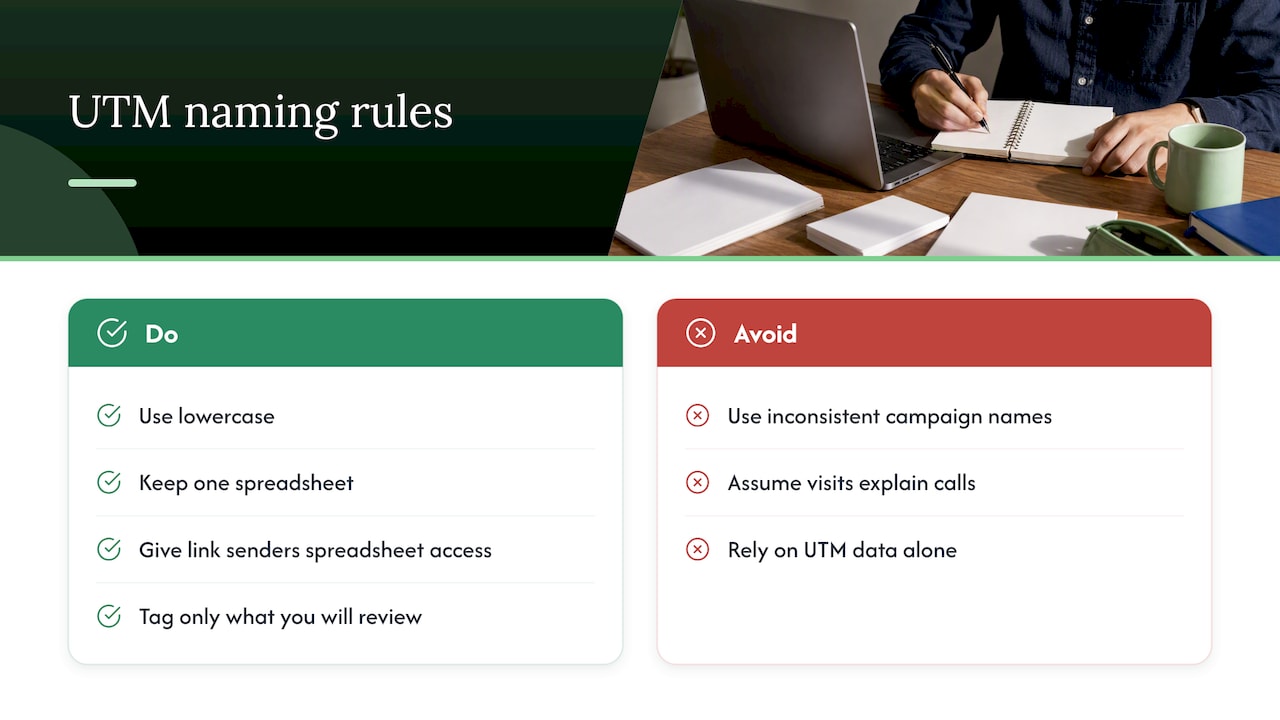
Our advice is boring on purpose. Write five rules on one page. Use lowercase. Keep one spreadsheet. Give the person who sends the links the keys to that spreadsheet. And only tag what you will actually look at.
The other thing we tell clients: UTM data tells you what brought a visit, not what made someone call. Pair it with a phone number you can attribute and a form that asks “How did you hear about us?” One without the other will mislead you now and then.
— Cristo
Want us to set it up?
If you would rather spend your week running the business than debugging analytics, we can build the tracking into your website and campaigns. Our plans are month-to-month with no lock-in contracts: Sprout is $300 CAD per month, Grow is $600 CAD per month and Scale is $1,200 CAD per month, each with a one-off setup fee that depends on scope (Sprout Setup $500 to $1,500, Grow Setup $1,500 to $3,500, Scale Setup $3,500 to $7,500). Every client starts with a free trial that includes a full digital audit, so you can see what is and is not being tracked before you commit to anything.
See what each plan includes, or read how we approach digital marketing for small businesses. Everything is done by our own team, with no outsourcing, and you can talk directly to the people doing the work.
A one-page UTM checklist
Copy this into the first tab of your spreadsheet.
- All values lowercase.
- One separator, underscores.
- Source is the platform, medium is the broad channel.
- Campaign names follow year, initiative, detail.
- Tag links that point to your site from outside only.
- Never put personal information in a tag.
- Test every new link in a private window.
- Review GA4 the next day, then once a quarter.
If you want to go further into the content side of what you are tracking, our Canadian small business digital marketing guide covers the channels worth measuring first, and our marketing automation checklist shows how tagged links can flow into your email and CRM tools.
FAQ
What is the best UTM naming convention for a small business?
Use lowercase, one separator such as underscores, and a fixed structure: platform as source, broad channel as medium, and a campaign name like year, initiative, detail. Google’s guidance is to use distinct source values for platforms, one medium per channel and a campaign name matching the exact campaign. Record each name in a shared spreadsheet so nobody invents a new variation.
Are UTM parameters case-sensitive?
Yes. Google Analytics Help states that google and Google are different values, and inconsistent capitalization fragments your reporting. The fix is simple: write every value in lowercase from day one.
Should I add UTM tags to links inside my own website?
Generally no. McGill’s web team advises against UTM parameters on ordinary internal links. If you need one for a short-term analysis, keep it time-limited and specific, and remove it afterwards.
Which UTM parameters are required?
Google strongly recommends setting all relevant parameters, especially source, medium and campaign, plus utm_id and utm_source_platform. For most small businesses, source, medium and campaign cover nearly everything, with utm_content added for tests.
Why do I see “(not set)” in my campaign report?
It usually means a parameter is missing from the link. Open the link you shared, check that all the values you meant to include are present, and fix the original. Then check GA4 again the next day.
Sources
- URL builders: Collect campaign data with custom URLs, Google Analytics Help
- Traffic-source dimensions, manual tagging, and auto-tagging, Google Analytics Help
- UTM tracking demystified, McGill University Web Services
- UTM Parameters, Adobe Marketo Measure
- Measure marketing effectiveness using UTM codes, Microsoft Dynamics 365
- Website terms and conditions of use, Office of the Privacy Commissioner of Canada
- UTM Parameters: How To Use UTM Tracking Links, Shopify
- UTM Governance: Naming Conventions, Sealmetrics
- What is UTM tracking? UTM links and the five parameters, UTMTool
- Ad Tracking For Small Business: 7 Proven Strategies, Cometly