

Picture this: you send a quote follow-up to “Bob Smith,” and he gets it three times, at three different email addresses, one of which has been dead since 2022. That is what a dirty CRM looks like in real life. CRM data hygiene is the habit of keeping your customer records accurate, complete, consistent and current, so the system you pay for helps you win work instead of embarrassing you. The fix is not a heroic cleanup weekend. It is a short audit, a few entry rules and a 15-minute weekly routine. At CloudSprout we build and maintain CRM automation for owner-operated businesses across Ontario, and the pattern below is the one we would hand a friend.
TL;DR
- Clean CRM data has one record per person, the same format everywhere, the fields you actually act on filled in, and someone who owns it.
- Start with a backup, then audit: count duplicates, missing phone numbers and emails, bounced addresses and records nobody has touched in a year.
- Stop new mess at the door: required fields, dropdown lists instead of free text, and duplicate warnings when someone adds a contact.
- Keep it clean with 15 minutes a week, not a yearly rescue mission.
- In Canada, privacy law adds a rule most guides skip: keep personal information only as long as you need it, and fix it when it is wrong.
Table of Contents
- What does “clean CRM data” actually mean?
- Why a messy CRM costs a small business real money
- How do I clean my CRM data? A step-by-step routine
- How do I stop the mess from coming back?
- What Canadian privacy rules apply to CRM data?
- A quick example: the plumber with 2,400 contacts
- What the CloudSprout team thinks
- Want it done for you?
- Frequently asked questions
- Sources
What does “clean CRM data” actually mean?
Clean data is data you can act on without double-checking it. If you can pull a list of last year’s customers and phone them tomorrow, your data is clean. If you would first have to squint at it, it is not.
In practice, clean means five things:
- Unique. One record per person or company. No “Bob Smith” five times with five emails.
- Consistent. Phone numbers, addresses and company names follow one pattern. “Ltd.”, “Limited” and “ltd” are one thing, not three.
- Complete where it counts. The fields that drive follow-up, quoting and invoicing are filled in. Nobody needs a birthday for every contact.
- Current. People move, change jobs and abandon email addresses. An old record is worse than a blank one because you trust it.
- Owned. A named person is responsible for it. Data nobody owns decays.
That last point is the one owners skip. Hygiene is not a one-time cleanup. It is an operating habit, like reconciling your books.
Why a messy CRM costs a small business real money
When you have five employees, every wasted hour is yours. Dirty data wastes them quietly:
- Missed follow-ups. The lead is in the system, but with a wrong number or a stale email, so the call never lands.
- Bounced emails. Campaigns to dead addresses hurt your sending reputation, which can push even your good emails toward spam folders.
- Double contact. Two staff members call the same customer because the record was duplicated.
- Bad forecasts. If the same deal sits in your pipeline twice, your numbers lie to you.
- Dead automation. Automated reminders and booking confirmations are only as good as the contact details behind them.
The quietest cost is trust. When your crew sees duplicates and wrong postal codes, they stop using the CRM and go back to their own spreadsheets and phone notes. Then you are paying for software that nobody believes. If you are about to move into a new CRM, clean first: importing messy spreadsheets into a fresh system just moves the mess into a nicer-looking home. Our CRM migration plan walks through that sequence for small and mid-sized businesses.
How do I clean my CRM data? A step-by-step routine
Here is the order that works, with where each step tends to go wrong.
Step 1: Back up before you touch anything
Export your contacts, companies and deals to a file and save it somewhere safe. Bulk merges and deletes can be hard or impossible to undo, and a backup is your recovery point. This takes ten minutes and is the step people skip right before they regret it.
Step 2: Map where your data comes from
List every way a record gets into the CRM: website forms, imported lists, manual typing, a booking tool, an accounting or email integration. Dirty data almost always has a source. If your website form lets people type their province any way they like, you will get “ON,” “Ont.” and “Ontario” forever, no matter how often you clean. If your site and CRM are not talking to each other properly, our guide on how to connect your website to a CRM covers the setup.
Step 3: Decide which fields matter
Pick the handful of fields that drive money: name, email, mobile number, company, lead source, status, owner and, for trades, the service address. Clean those first. Ignore the rest until later. Trying to perfect every field is how cleanup projects die.
Step 4: Audit with five simple counts
You do not need a data scientist. Sort and filter your CRM and write down:
- How many records are missing an email or a phone number?
- How many look like duplicates (same email, same phone, or same name and company)?
- How many emails have bounced recently?
- How many records have had no activity in 6, 12 or 18 months?
- Which fields hold inconsistent values (provinces, industries, lead sources)?
These numbers are your baseline. Next quarter, you will see whether the routine is working.
Step 5: Merge duplicates, do not just delete them
Merge so you keep the history: the notes, the quotes, the past emails. Match on more than one field, because two people can share a name and one person can have two emails. When a match is uncertain, a human should look at it. Auto-merging “J. Singh at Brampton Auto” with a different J. Singh is how you create a worse problem than the duplicate.
Step 6: Standardize the formats
Write down one convention and stick to it: phone numbers as (416) 555-0123, provinces as two-letter codes, postal codes in capitals with a space (M5V 2T6), company names without trailing punctuation. For Canadian businesses, bilingual names and accented characters in Quebec contacts are worth deciding on early so imports do not mangle them. A one-page cheat sheet beats a policy nobody reads.

Step 7: Fill gaps, then archive the dead weight
Fill the missing key fields where you can, from your own emails, invoices and past conversations. For records that have been silent for a year or more and that you cannot verify, archive them so they stay out of active campaigns and reports but your history remains. Delete only records that are confirmed invalid, or that you are required to remove (more on that below).
How do I stop the mess from coming back?
Cleaning once is the easy half. Prevention happens at the point of entry, and it is mostly settings:
- Required fields. A contact cannot be saved without a name and either an email or a phone number.
- Dropdowns instead of free text. Lead source, province, service type and deal status should be picked from a list. Free text is where the variants come from.
- Validation rules. Emails must look like emails; phone numbers must have ten digits.
- Duplicate warnings. The CRM should flag a matching email or phone number before the new record is created.
- Ownership. Every record and every deal has one named owner.
A modern CRM can do all of this. Whether yours is set up to is another matter, and that setup is a one-time job worth doing properly. It is exactly the kind of thing our CRM automation work for small businesses covers.
The 15-minute weekly routine
Pick the same slot every week, say Friday at 3 p.m., and do this:
- Open a view of active records with a missing key field and fill in what you can.
- Fix naming and status oddities from the week.
- Close stale deals with a reason (“went with someone else,” “no budget,” “no response”), so your reports mean something.
- Merge the obvious duplicates.
- For anything unclear, add a note and a follow-up date rather than guessing.
On top of that, check bounced emails and unowned records monthly, and do a stale-data review every six to twelve months. Fifteen minutes weekly is far cheaper than the one-day rescue you will otherwise need every two years.
What Canadian privacy rules apply to CRM data?
Hygiene is not only about efficiency. In Canada, it overlaps with privacy law, so this is the part where being tidy also keeps you onside. If your business is subject to PIPEDA, the Office of the Privacy Commissioner’s fair information principles say that:
- You generally need a person’s knowledge and consent to collect, use or disclose their personal information, unless an exception applies.
- You should collect only what you need for the purposes you have identified.
- Personal information should be as accurate and current as its purpose requires.
- You should keep it only as long as necessary for those purposes, and safeguard it while you do.
- People have a right to access their information and ask for corrections.
That last point matters for your cleanup rules. A record you cannot correct is a record you cannot answer for. The Ontario Information and Privacy Commissioner’s guidance on privacy in marketing and customer relationship management adds that when personal information is no longer needed for its stated purpose, it should be destroyed, erased or made anonymous. It also recommends access and correction mechanisms, explaining any abbreviations or codes in a record when someone asks to see it, and limiting access to staff who need it.
Translated into shop-floor terms: your stale-data review is not just housekeeping. Old records you have no reason to keep should go, your internal codes should be readable by a human, and not every employee needs access to every customer’s details. If you handle sensitive client information or are unsure which privacy law applies to your business, a privacy lawyer is the right person to confirm it.
A quick example: the plumber with 2,400 contacts
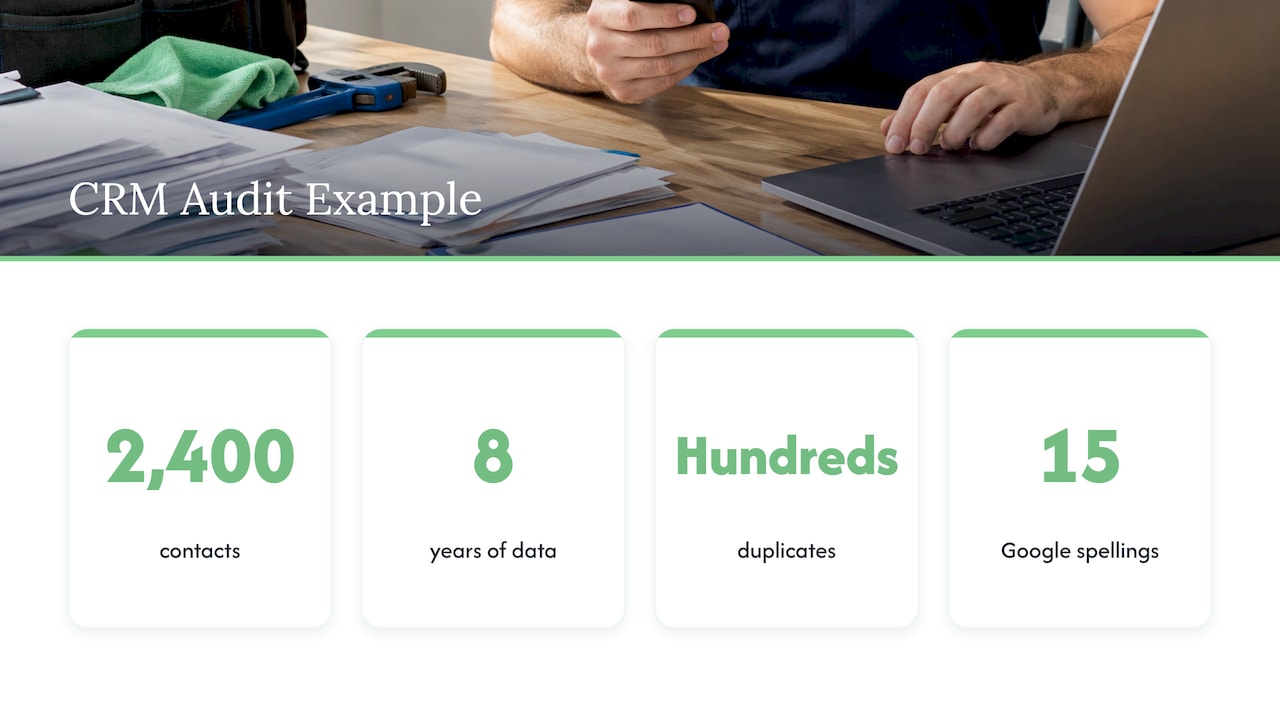
Take a hypothetical Mississauga plumbing company with 2,400 contacts built up over eight years from a booking form, a paper-to-spreadsheet import and the owner’s phone. An audit like the one above might turn up several hundred duplicates, a pile of contacts with no phone number, and a lead-source field with fifteen spellings of “Google.” The fix is not exotic: back up, merge, make lead source a dropdown, require a mobile number on the booking form, archive the long-silent. Afterward, a seasonal “furnace tune-up” reminder goes to people who actually exist and can be reached. (This is an illustration of the method, not a client result.)
What the CloudSprout team thinks
Most owners come to us saying their CRM is “not working.” Usually the CRM is fine. The data feeding it is the problem, and nobody was ever given the job of looking after it.
We would rather fix the cause than the symptom. That means looking at how records enter the system, such as your website forms, your booking flow and your imports, and setting the rules there. A cleanup that ignores the intake points is a cleanup you will repeat next year.
We also think the people doing the work should be the people you can talk to. Our CRM and ERP automation is done in-house, by our own team, with no outsourcing, and you have direct access to them. Clean data, simple rules and a CRM your crew actually trusts: that is the goal.
Cristo
Want it done for you?
If you would rather spend your Fridays on customers than on merge screens, this is what we do. CloudSprout offers CRM and ERP automation as part of a single in-house team that also handles your website, SEO and more. Our plans are month-to-month with no lock-in contracts: Sprout is $300 CAD per month, Grow is $600 CAD per month and Scale is $1,200 CAD per month, each with a one-off setup fee (Sprout $500 to $1,500 CAD, Grow $1,500 to $3,500 CAD, Scale $3,500 to $7,500 CAD). New clients start with a free trial that includes a full digital audit. See the pricing page for what each plan includes, or look at our Zoho CRM services.
Prefer to start with a look at where you stand? Our free trial and audit are the place to begin.
Frequently asked questions
What does CRM hygiene mean?
CRM hygiene means keeping the records in your customer system accurate, complete, consistent and current. It covers removing harmful duplicates, standardizing formats, filling the fields you act on and assigning someone to own the data. It is an ongoing habit rather than a one-off project.
How often should I clean my CRM?
Do a short weekly pass of about 15 minutes, a monthly check for bounced emails and records with no owner, and a deeper review of stale records every six to twelve months. Small, regular passes keep each one quick. A big annual cleanup is a sign the weekly habit slipped.
Should I delete or merge duplicate contacts?
Merge them whenever you can, because merging keeps the notes, quotes and history from both records. Delete only records that are confirmed invalid or that you are required to remove. Always back up first so a wrong merge can be reversed.
How do I keep CRM records from getting messy again?
Set rules where data enters: required fields, dropdown lists, validation and duplicate warnings. Give every record an owner. Then keep the weekly routine going. Prevention at the source does more than any amount of later cleanup.
Is CRM data covered by Canadian privacy law?
If your organization is subject to PIPEDA, customer records with personal information fall under it, including consent, accuracy, limited retention and access and correction rights. Which law applies can depend on your province and your business, so confirm with a privacy lawyer if you are unsure.
Sources
- PIPEDA fair information principles, Office of the Privacy Commissioner of Canada
- Incorporating Privacy into Marketing and Customer Relationship Management, Information and Privacy Commissioner of Ontario