

You’re on a roof, under a sink or behind the counter, and a new inquiry lands in your inbox. By the time you wipe your hands, the person has called someone else. AI lead follow-up fixes that gap: software (or an AI employee) answers every new inquiry within minutes, asks the right questions, books a time or flags the lead for you, and keeps nudging the ones who go quiet. At CloudSprout, we build this for Ontario owner-operators as part of our CRM and automation work, and you can start with a free trial that includes a full digital audit.
The short version: speed and consistency win jobs, and a person can’t give you either while also doing the work. A well-set-up system can.
TL;DR
- AI lead follow-up replies to new inquiries right away, qualifies them with a few questions and hands the good ones to you. AI lead nurturing keeps warm leads moving over days or weeks.
- It only works when it’s connected to a CRM (the list where your leads and their history live), so nothing gets lost or contacted twice.
- In Canada, CASL (Canada’s anti-spam law) governs every automated email or text you send. You need consent, a clear sender identity and a working unsubscribe.
- Keep a human in the loop for quotes, complaints and anything unusual. Let the AI handle the first reply, the reminders and the scheduling.
- Start small: one lead source, one follow-up sequence, one month of watching the results.
Table of Contents
- What AI lead follow-up actually is (and how it differs from lead nurturing)
- The Short-Video Version: Your Best Lead Is Gone in the Time It Takes to Finish a Coffee
- How an AI follow-up workflow runs, step by step
- How to keep it personal and not creepy
- Canadian rules you need to follow: CASL and privacy
- Connecting follow-up to your CRM and other tools
- What results can you reasonably expect?
- A worked example: an Ontario landscaping company
- What we do about it
- Getting started with CloudSprout
- FAQ
- Sources
What AI lead follow-up actually is (and how it differs from lead nurturing)
A lead is anyone who raised their hand: a contact form, a missed call, a Facebook message, a quote request. Lead follow-up is what happens in the first minutes and hours after that. Lead nurturing is what happens afterwards, when the person isn’t ready to buy yet and needs a reason to remember you.
With AI, both get easier:
- Follow-up: the system thanks the person, answers common questions (service area, hours, rough pricing), and asks two or three qualifying questions such as “What’s the job?” and “When do you need it?”
- Nurturing: it sends useful messages over time, such as a seasonal reminder, a checklist or a “still thinking about that deck?” check-in, and stops the moment the person replies or books.
The AI part is the ability to read a free-text reply (“can you come Thursday after 3? We have a dog”) and respond sensibly, instead of blasting the same template to everyone. If you want the deeper look at deciding which leads deserve your time, our guide to AI for lead qualification covers scoring and routing.
The Short-Video Version: Your Best Lead Is Gone in the Time It Takes to Finish a Coffee
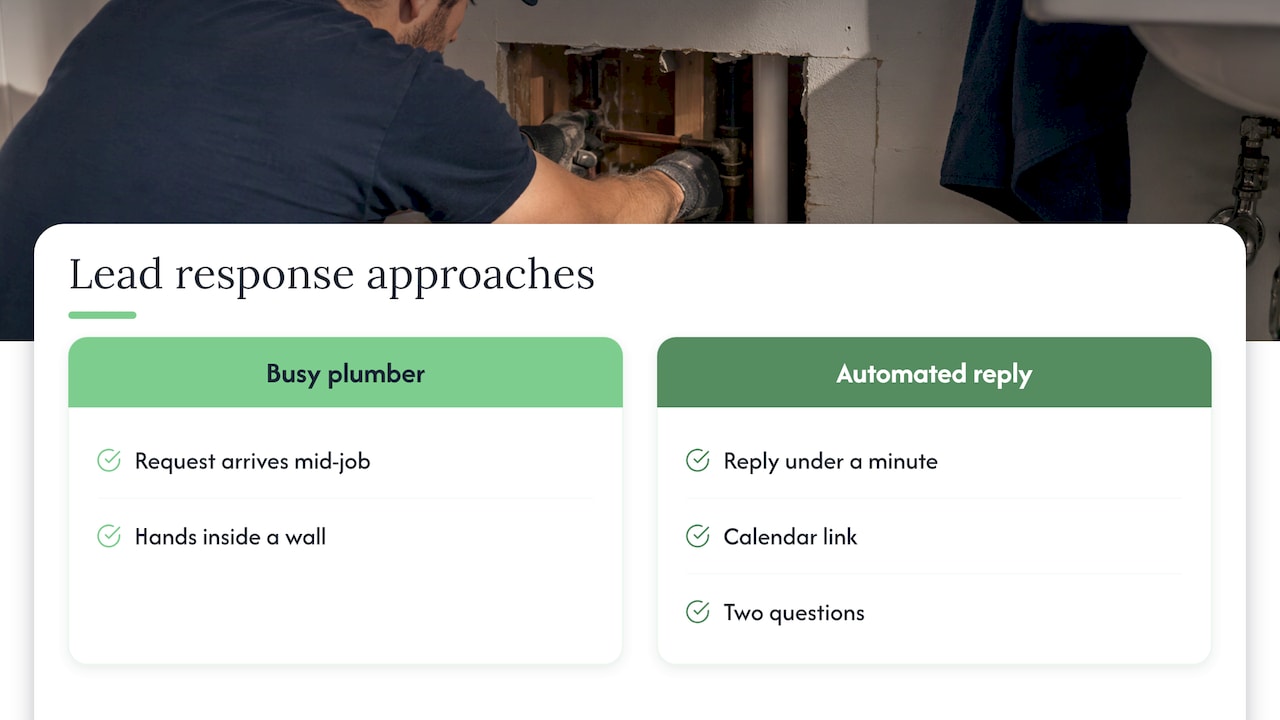
Picture a split screen. On the left, a plumber’s phone buzzes with a quote request while his hands are inside a wall. On the right, the same request gets a friendly reply in under a minute, a calendar link and two questions. The takeaway worth remembering: the business that answers first usually gets the conversation, so make the first answer automatic.
We’ve written more on why good leads go cold before you call back, if you want the longer story behind this.
How an AI follow-up workflow runs, step by step
Here’s the path a new inquiry takes in a typical setup. Each step shows what it takes and where it commonly goes wrong.
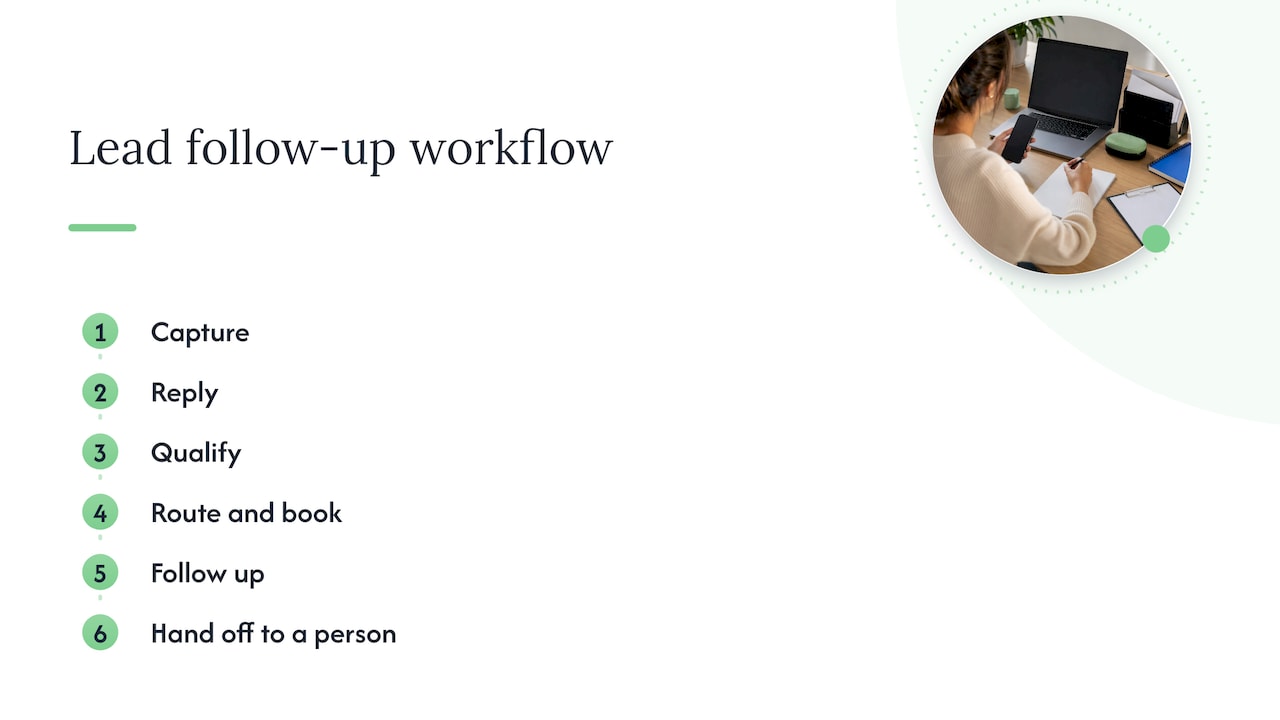
1. Capture every lead in one place
Website forms, missed calls, email, social messages and ad leads should all land in the same CRM. The common failure is leads scattered across a form inbox, a Facebook Messenger app and a personal phone, so the AI only sees some of them. We set up the CRM and the connections so every source feeds one list; see CRM automation for small businesses for how that works.
2. Reply within minutes
The first message should be short, human and specific: the person’s name, the service they asked about, and one clear next step. Avoid the wall of text. A common mistake is a reply that sounds like a robot and asks the person to fill out the same form again.
3. Ask a few qualifying questions
Three is plenty: what they need, where (your service area), and when. The AI reads the answers and scores the lead. A lead in your service area wanting work this month is hot. One outside your area or asking for something you don’t do can get a polite, automatic reply.
4. Route and book
Hot leads go straight to you or your office manager with a summary, or get a booking link for a call or site visit. Routing rules matter more than people expect: who gets the lead, how fast, and what happens if nobody responds. Our piece on automating lead routing walks through the rules.
5. Follow up when they go quiet
Most people don’t reply to the first message. A short sequence of reminders over several days, across the channel they used, keeps you in mind without nagging. It should stop automatically when they answer, book or say no.
6. Hand off to a person
The AI should hand over, with the whole conversation attached, whenever the lead asks for a quote, sounds upset, mentions something unusual or asks for a person. Nothing is more frustrating for a customer than being looped by a bot after they’ve asked for a human.
How to keep it personal and not creepy
People don’t mind automation. They mind feeling ignored or tricked. A few habits help:
- Use real details. Mention the job type, the neighbourhood or the date they asked for. Generic “Dear customer” messages get ignored.
- Match the channel. If they filled out a form with an email, reply by email. If they texted, text back. Don’t jump to a phone call they didn’t ask for.
- Time it sensibly. A reply at 2 a.m. can wait until morning unless the person expects an instant answer, as with an after-hours emergency service.
- Say who they’re talking to. A line like “I’m the CloudSprout assistant; a team member will follow up on pricing” is honest and builds trust.
- Write in your voice. Give the AI examples of how you actually talk: your tone, your common answers, your prices and policies.
For busy owners, the cleaner way to get this right is to have someone configure it with you. Our AI employee pilot is a 30-day way to try an AI team member on a defined job such as follow-up.
Canadian rules you need to follow: CASL and privacy
This is where generic US-written guides fall short. In Canada, automated follow-up is regulated, and the rules apply to AI-written messages just as they do to messages you type yourself. This is general information, not legal advice; for a specific situation, talk to a lawyer.
Consent comes first
CASL requires consent before you send a commercial electronic message, meaning an email, text or social message that promotes your services. Consent can be express (the person clearly agreed) or implied in limited cases. The government’s own guidance says implied consent from an existing relationship may last up to two years, or just six months for inquiries or applications.
Practically, that means:
- Someone who fills out your quote form can be followed up with for about six months from that inquiry.
- A past customer can be contacted for about two years after their last purchase.
- After those windows, you need express consent to keep sending promotional messages. A new inquiry or purchase restarts the clock.
- Consent is tied to the channel. An email address someone gave you does not automatically cover texting them.
A simple reply to a specific question someone just asked is different from a promotional sequence, but nurturing campaigns are firmly in promotional territory. Set up your CRM to record where and when each lead’s consent came from, so the AI knows who it can and can’t message.
Identify yourself and make unsubscribing easy
Every commercial message must say who you are, give your contact details and include a working unsubscribe link. Unsubscribe requests have to be honoured promptly, and no later than 10 business days, according to the CRTC’s guidance as summarized. Your automation should stop messaging the person the moment they opt out, not after your next manual list clean-up.
Enforcement is real
This isn’t a theoretical risk. Government reporting shows the CRTC issued over $137,000 in administrative penalties under CASL in 2024-2025, along with hundreds of notices to produce records and dozens of warning letters. Since the law took effect in 2014, enforcement has added up to more than $3.6 million in penalties.
Privacy law still applies to the data
Your AI will handle names, phone numbers and the details of people’s projects. That’s personal information, covered by PIPEDA (the federal privacy law for private businesses) or provincial laws. The proposed overhaul, Bill C-27, died when Parliament was prorogued in January 2025, so the existing laws continue to apply to AI tools. We lay out the practical duties in our guide to AI data privacy in Canada.
Connecting follow-up to your CRM and other tools
AI follow-up without a CRM is a clever autoresponder that forgets everyone. With a CRM, each lead has a history: where they came from, what they asked, what was sent, what they replied, and what consent you hold. Before you connect anything, check:
- Does it connect to the sources you actually use? Your website form, phone system, calendar and ad platforms.
- Who owns the data? You should be able to export your contacts and conversations at any time.
- Where is data stored? Know whether it leaves Canada and whether your privacy notice says so.
- Can you pause it? You need a single switch to stop all automated messages if something goes wrong.
- Can you see what it said? Every message the AI sends should be logged and readable by you.
Plenty of CRMs have free tiers, and a comparison of CRM alternatives and their AI features helps you see what’s on offer. The harder part isn’t picking the tool, it’s configuring the sequences, routing and consent tracking so they match how your business really works. Our marketing automation checklist lists eight checks to run before you commit to any platform.
What results can you reasonably expect?
Be wary of big promised numbers, including from vendors. What you can measure yourself is more useful. Before you switch it on, write down three baselines from your last 30 days:
- How many inquiries came in
- How long, on average, it took you to reply
- How many became booked jobs or paid work
After a month with automated follow-up, compare. The realistic wins for a small business are a much shorter first-reply time, fewer inquiries slipping through on busy days, and fewer hours spent chasing. Whether those turn into more revenue depends on your pricing, your reputation and how well you handle the call once the lead reaches you. That’s why we pair follow-up with a full digital audit: it shows whether the leak is in follow-up, on your website or in how people find you.
A worked example: an Ontario landscaping company
This is an illustrative scenario, not a client result. A three-person landscaping company in Barrie gets quote requests through its website and Google Business Profile, mostly from April to June. The owner is on site all day and replies in the evening, often a day later.
With automated follow-up, here’s what changes:
- A request comes in at 10:40 a.m. The system replies by email within minutes with the person’s name, the service requested and three questions: address, type of job, preferred start date.
- The answers tell the system it’s a patio job in the service area, starting within a month. It flags the lead hot and sends the owner a one-paragraph summary.
- The customer picks a site-visit time from the calendar link. The owner just sees it appear in his schedule.
- A different lead says “just browsing for next year.” The system tags her as a future lead, and with her consent on file, sends a short seasonal reminder in February.
- Every message has the company’s name, address and an unsubscribe link, and the CRM records when and how consent was given.
The owner still does the quoting and the relationship. The system does the chasing.
What we do about it
At CloudSprout, we do everything in-house with no outsourcing, so the people who build your website, set up your CRM and configure your follow-up work together and you can talk to them directly. We offer month-to-month pricing with no lock-in contracts, and we start every client with a free trial that includes a full digital audit.
Our perspective
Most small businesses don’t have a lead problem, they have a response problem. The phone rings, the form comes in, and the owner is busy doing the work that pays the bills. Hiring a full-time person to sit on the inbox isn’t realistic at 5 or 15 employees, and hoping to catch up in the evening costs jobs.
That’s why we think follow-up belongs inside a connected system: website, CRM, scheduling and an AI assistant working off the same information. When those pieces come from one team that talks to each other, nothing falls between them, and you have one group to call when you want a change.
We also think AI should act like a good receptionist: fast, polite, honest that it’s an assistant, and quick to bring in a person. In Canada it should also respect CASL from day one, which is much easier to build in at the start than to repair later.
Cristo
Getting started with CloudSprout
If you’d like this running without learning a new platform yourself, our monthly plans start at $300 CAD per month (Sprout), with Grow at $600 CAD and Scale at $1,200 CAD per month. One-off setup fees range from $500 to $1,500 CAD for Sprout, $1,500 to $3,500 CAD for Grow and $3,500 to $7,500 CAD for Scale. Our services include business automation and AI employees, and pricing for those is scoped to your project.
Begin with the free trial and digital audit at cloudsprout.ca, and we’ll show you where your leads are slipping away.
FAQ
Is AI lead follow-up legal in Canada?
Yes, as long as your messages comply with CASL. You need express or valid implied consent, clear sender identification and a working unsubscribe in every commercial message, whether a person or AI wrote it. Keep a record of when and how each lead gave consent.
How long can I follow up with someone who sent an inquiry?
Under CASL, implied consent from an inquiry generally lasts six months, and up to two years after a purchase. After that, you need express consent to keep sending promotional messages. A new inquiry or purchase starts the clock again.
Will customers know they’re talking to AI, and does it matter?
It’s best to be upfront. A short line saying you’re an assistant and that a team member will follow up on quotes builds trust, and it sets the right expectation. The AI should hand off to a person whenever someone asks or the situation gets complicated.
What’s the difference between lead follow-up and lead nurturing?
Follow-up is the fast response right after someone reaches out: reply, qualify, book. Nurturing is the longer, lighter sequence for people who aren’t ready yet. Both can run from the same CRM, and both fall under CASL when the messages are promotional.
Do I need a CRM to use AI for follow-up?
In practice, yes. The CRM holds each lead’s history and consent record, which stops duplicate messages and lets the AI hand a complete picture to you. Without one, follow-up tends to be patchy.
Sources
- Getting consent to send email, Government of Canada (ISED)
- Canada’s anti-spam legislation report, 2024-2025
- Office of the Privacy Commissioner annual report 2024-25
- CASL unsubscribe and consent summary