

Here is a strange fact about your website: two visitors can look at the same page and see two different phone numbers. That is not a glitch. It is how call tracking works, and it is the quickest way to learn whether your Google Ads, your Google Business Profile or your website is the reason the phone rings. A proper call tracking setup takes a few hours: pick tracking numbers, point them at your real line, add one small script to your site, and test every path before you spend a dollar on ads. We set it up as part of ads work for Ontario small businesses, and this guide walks through every step so you know what to ask for and what good looks like.
TL;DR
- Call tracking gives each marketing source its own phone number, so every call can be traced back to the ad, listing or page that produced it.
- The website piece is called dynamic number insertion: a script swaps the number a visitor sees based on where they came from.
- A working setup has five parts: tracking numbers, a destination line, the website script, ad and listing connections, and a full test.
- In Canada, if you record calls you must tell callers, state the purpose and get consent. The Office of the Privacy Commissioner updated its call-recording guidance in October 2026.
- Plan on a short weekly check, because tracking that is never reviewed quietly breaks.
Table of Contents
- Why your phone calls disappear from your reports
- How call tracking works, in plain words
- A call tracking setup in eight steps
- A worked example
- Privacy: what Canadian businesses need to know
- What call tracking costs, and what to budget for
- Where we come in
- Our view: count the calls before you buy more of anything
- FAQ
- Sources
Why your phone calls disappear from your reports
If you run a plumbing company in Hamilton, a bakery in Ottawa or a bookkeeping practice in Kitchener, the phone is probably your best lead source. It is also the one your analytics cannot see. A form submission shows up in a report with a source attached. A phone call just rings, and your front desk writes “new customer, not sure how they found us.”
That gap is expensive. You might pay for ads that bring calls you never credit to them, and cut the one thing that works. Or you keep paying for a listing that sends nothing. Without call data you are guessing, and small budgets cannot afford many wrong guesses.
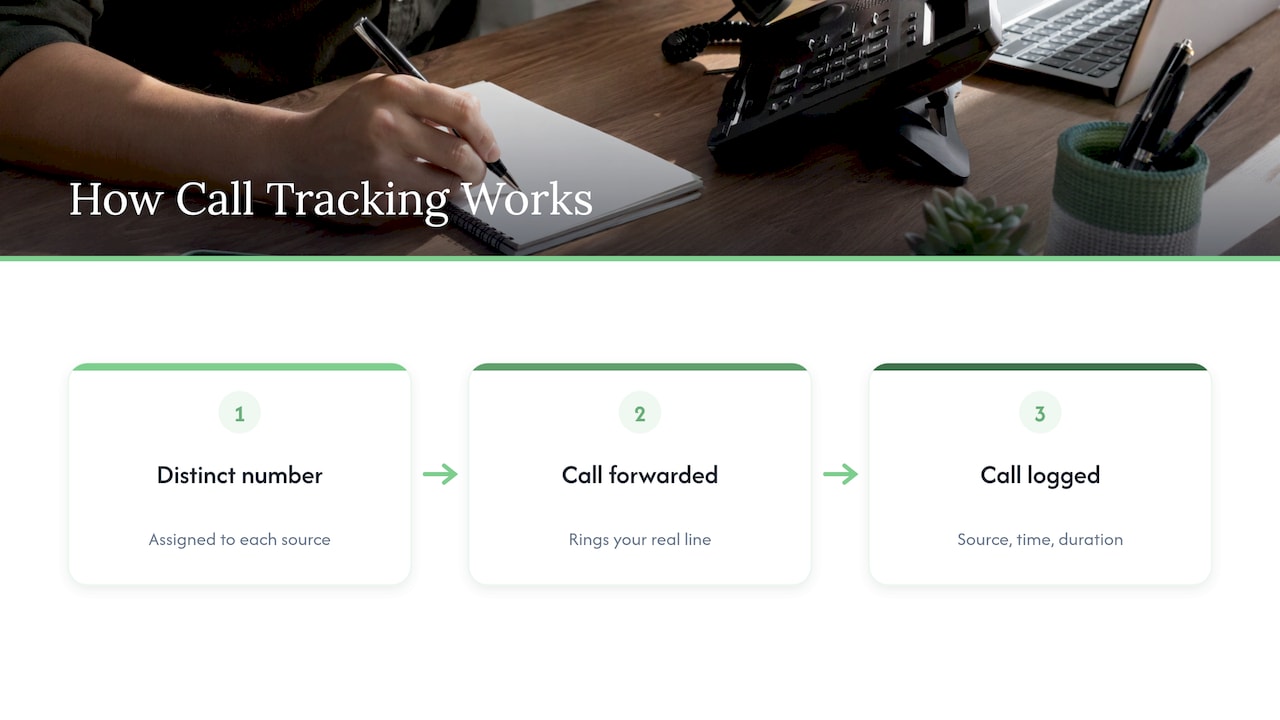
Call tracking closes the gap by giving each source a distinct number. Calls to that number are forwarded to your real line, and the system logs where the caller came from, when they called and how long they stayed.
How call tracking works, in plain words
There are two layers, and most small businesses need both.
Source-specific numbers. You use one number on your Google Business Profile, another in your ads, another on a printed flyer or truck wrap. Every call to a given number tells you which channel produced it. This is the simple layer, and it needs no code.
Dynamic number insertion (DNI). This is the technical term for the swapping trick. A small script on your website notices where each visitor came from, such as a paid ad, a Google search result or a link in an email. It then replaces the phone number on the page with a tracking number reserved for that source. The visitor sees a normal local number. You see the source, and often the campaign or keyword too.
Two practical details matter:
- The number has to be visible as text. The script finds your phone number on the page and swaps it, so it needs to be written out in a standard format such as (416) 555-0123. A number baked into a logo image or a banner graphic is invisible to it.
- Visitors keep the same number. The system remembers the visitor for a while, so someone who browses, leaves and calls back later is still credited to the original source.
If you have ever wondered why a competitor’s website seems to show a different number than the one on their Google listing, that is almost certainly why.
A call tracking setup in eight steps
Whoever does the work, these are the steps. Here is what each one takes and where it usually goes wrong.
Step 1: Decide which calls you want to count
Write down where calls come from today: your website, Google Business Profile, Google Ads, Facebook or Instagram, directories, printed material, referrals. Then decide what counts as a real lead. A salesperson cold-calling you is not one. A customer asking for a quote is. A call under about 30 seconds is often a wrong number or a hang-up, so many owners set a minimum duration before a call counts as a conversion.
The common mistake is tracking everything and defining nothing. If “a lead” is not defined in advance, your reports will flatter you.
Step 2: Choose your tracking numbers
Pick local numbers with the area code your customers know: 416, 647, 905, 613, 519, 705 and so on. A local number builds trust far better than a toll-free one for a service business.
How many you need depends on how you want to track:
- One number each for Google Business Profile, Google Ads and any print or offline campaign.
- A pool of numbers for the website, so several visitors can be on the site at once, each with a different number. If the pool is too small during a busy spell, some calls end up unattributed. A modest local business usually needs a pool of several numbers, not hundreds.
Step 3: Point every number at your real line
Each tracking number needs a destination: the phone you already answer, whether that is a mobile, an office line or a ring group. Set up the call flow so it rings the right people, and add a simple fallback such as voicemail or a second line if no one picks up. Missed calls are the most expensive leak in this whole process.
Dial each number from a different phone and confirm that it rings where it should. This takes ten minutes and catches most early errors.
Step 4: Add the website script
The provider gives you one snippet of code. It goes on every page of your site, usually in the header, the same way analytics code does. On a WordPress site it can be added through a plugin or a tag manager. On a custom build, it goes into the template once.
Where it goes wrong: the script is added to the home page only, so calls from a service page or a contact page are not tracked. Or a site redesign later drops it without anyone noticing. Also confirm that your number appears as real text on every page, including the header, footer and contact page. If you are rebuilding your site anyway, our small business websites built to bring calls are designed with a visible, tappable number from the start, so the script has something to work with.
Step 5: Tell Google your Business Profile has a tracking number
Your Google Business Profile lets you list your main number and additional ones. The usual approach is to put the tracking number as the primary and keep your real number as an additional number, so calls from Maps and local search are counted while Google still has your actual number on file. Keep the name, address and phone details consistent everywhere else, because inconsistent listings can confuse customers and local search alike. Our guide to Google Business Profile optimization for Canadian small businesses covers how to set the profile up properly before you swap anything.
Step 6: Connect call tracking to your ads
This is where call data turns into money decisions. Three things have to be in place:
- Auto-tagging switched on in Google Ads, so each click carries an identifier that links it to the call.
- Call-extension or call-only ads using a tracking number, or website ads using the swap script.
- Calls imported back as conversions, so Google Ads can see which keywords and campaigns produce real calls and, over time, bid toward them.
If you are comparing options, our page on Google Ads setup for local businesses in the GTA shows how a first campaign is structured, and the ads setup page explains how call tracking is included in that first build.
One caution on expectations: imported conversions can take about a day to appear in Google Ads. Do not judge a campaign by an empty report on day one.
Step 7: Test every path before you go live
Testing is the step most people skip, and the one that matters most. Run each of these yourself:
- Visit your site from a paid ad click and check that the swapped number shows.
- Visit from a normal Google search and check it shows a different one.
- Call each number from a mobile and from a landline.
- Tap the number on a phone, since click-to-call is how many customers actually dial.
- Check that every test call appears in your call log with the right source.
If a test call appears under the wrong source or not at all, fix it now. Bad data is worse than no data, because you will trust it.
Step 8: Review the calls every week
Set a recurring 15-minute check. Look for spam or robocalls polluting the numbers, calls attributed to “direct” that should have a source, number pools running dry during busy periods and any change in your website that might have broken the script. Mark each call as a real lead, a non-lead or a booked job. That last step is what lets you compare cost per booked job across channels, not just cost per click.
A worked example
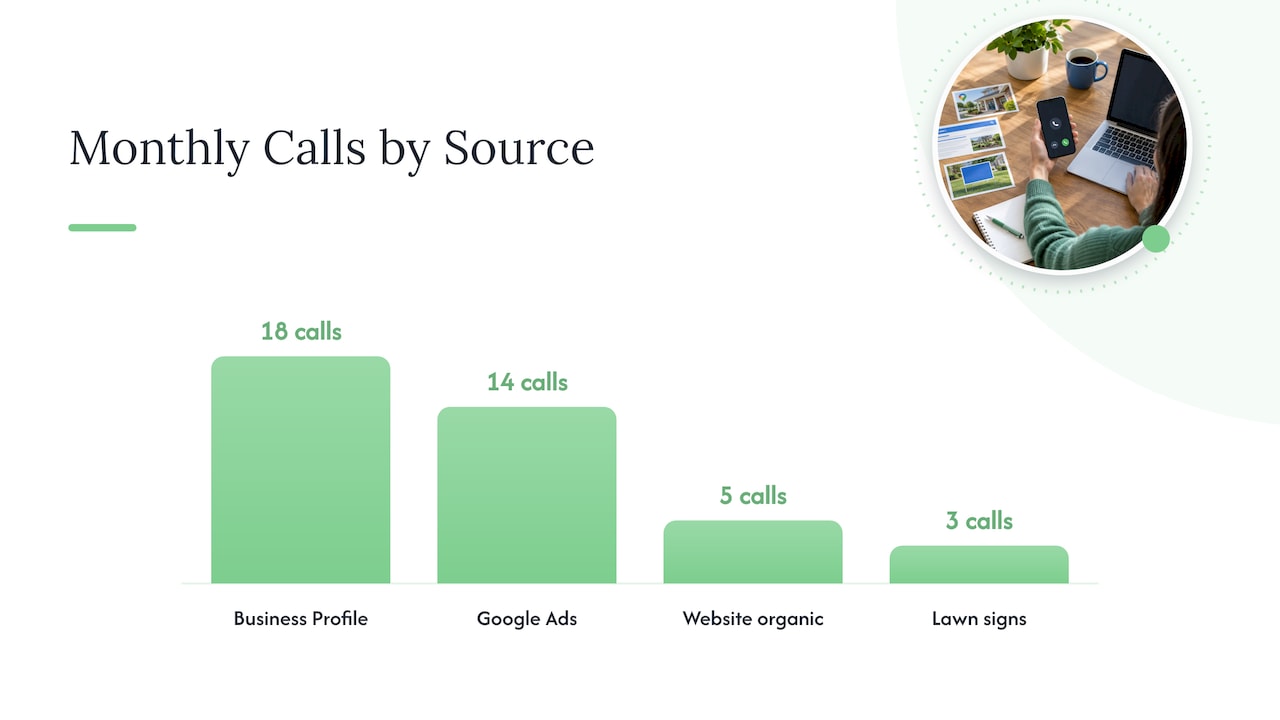
Imagine an Ontario roofing contractor spending money on Google Ads, a Google Business Profile and a few lawn signs. Before tracking, the owner counts 40 calls a month and credits them all to “word of mouth.” After a month of tracking, the log might show 18 calls from the Business Profile, 14 from ads, 5 from the website’s organic traffic and 3 from signs. Now the owner can see that ads are producing about a third of calls, check how many of those become booked jobs and decide whether to raise or cut the budget. The figures here are made up to show the logic, not results from a real business. The point is that the decision becomes arithmetic instead of instinct.
Privacy: what Canadian businesses need to know
Tracking which number was dialled is one thing. Recording the conversation is another, and that is where Canadian rules apply.
Recording is legal with consent. Under section 184 of the Criminal Code, a recording is lawful when one party to the conversation consents, and that includes you as the business. A legal overview of recording rules in Canada also notes that businesses recording calls must still follow PIPEDA, the federal private-sector privacy law that applies in Ontario, or the provincial privacy statutes in B.C., Alberta and Quebec.
What PIPEDA asks of you. The Office of the Privacy Commissioner of Canada says that when you record customer calls, you must tell the caller the call is being recorded, state the purpose as narrowly as possible and get consent. In most cases implied consent is enough: the caller hears the notice and carries on. If recording is not essential to the service, callers should be offered an alternative, such as continuing without recording, emailing or visiting in person. Keep recordings only as long as you need them, store them securely and be ready if a customer asks for access.
What changed recently. On October 8, 2026, the OPC updated its guidance on recording customer calls to align with best practices on biometric data. Voiceprints, which identify a person by their voice, are sensitive information, and express consent is generally required when information is sensitive. If you plan to use voice analysis or AI features that build a voice profile, get consent that is explicit, not assumed.
In practice:
- Put a short notice at the start of the call, for example “This call may be recorded to help us handle your request.”
- List every purpose. If you record for training and also keep recordings for your records, say both.
- If you serve customers in Quebec, which has its own, stricter private-sector law, get advice before recording those calls.
- Regulated professionals such as lawyers and health practices have extra rules, so check with your regulator or a privacy lawyer.
- Call tracking without recording, which logs only source, time and duration, is a lighter touch than recording, but your website privacy policy should still mention it. Our copy-ready privacy policy and checklist for small Canadian businesses is a good place to start.
This is general information, not legal advice. If your situation is unusual, speak to a privacy lawyer.
What call tracking costs, and what to budget for
There are three costs: the tracking service itself (usually a monthly fee plus usage for minutes or calls), the setup work (numbers, call flows, script, ad and listing connections, testing) and the time to review the data. The first is often the smallest. The second is where mistakes become expensive, because a misconfigured system produces confident but wrong reports.
If you manage your own ads, you can run the setup yourself with a long afternoon and the checklist above. If you would rather spend that afternoon on customers, we include call tracking in our ads setup, and ad management is priced at $500 to $2,000 per month on our pricing page. Our Sprout plan starts at $300 per month, with a one-off setup fee of $500 to $1,500.
Where we come in
Most owners we speak with do not want another dashboard. They want to know whether the phone is ringing because of what they paid for. We build the pieces together: the website where the number is visible and tappable, the Google Business Profile, the ads and the tracking that ties them to real calls. Everything is done in-house by our own team, on month-to-month pricing with no lock-in contract, and you speak directly to the people doing the work. We also offer a free trial that includes a full digital audit, so you can see where your calls are coming from, or going missing, before you commit.
If you want call tracking set up and tested without learning the tools yourself, look at our services or start with the free audit on cloudsprout.ca. Once calls are tracked, our CRM, booking and follow-up setup can make sure each one gets a quick, consistent response.
Our view: count the calls before you buy more of anything
Most small businesses we meet are making marketing decisions with half the picture. They can tell you what a click costs, but not what a phone call costs, and for trades, clinics, restaurants and professional offices, the call is the sale.
We think call tracking should be the first thing set up, not the last. Before more ads, before a redesign, you should know which channels already make the phone ring. That is why we build tracking into ads and website work from the start, and why we do it all with our own team, so the person who sets up your number is the same person who looks at the results.
Our approach is simple: make the number easy to find, make every source measurable, test it properly and review it weekly. Marketing money then goes where the calls are. If you want a second pair of eyes on how your calls are tracked today, our free audit is where we start.
Cristo
FAQ
Can someone track my phone calls without me knowing?
Call tracking as marketing software is set up by the business that owns the number, and it logs calls to that business, not private calls on your personal phone. If you are a customer, a business recording you must tell you and explain why under Canadian privacy rules. If you are an owner, tell your callers and your staff what is logged.
Do I need to record calls to track them?
No. You can track the source, time and duration of each call without recording the conversation. Recording adds privacy duties, such as notice, purpose and consent, so many small businesses start with tracking alone and add recording later if they need it for training or quotes.
How many tracking numbers does my website need?
As many as you have visitors who might be on the site at once from different sources. A small local business typically starts with a modest pool, plus one dedicated number each for Google Business Profile, ads and any print campaign. If calls start showing up as unattributed during busy periods, the pool is too small.
How do I track phone call conversions from Google Ads?
Turn on auto-tagging, use a tracking number in your call extension or on your landing page, and import calls back into Google Ads as conversions. Allow about a day for them to appear. Set a minimum call length so short wrong-number calls are not counted as leads.
How do I check whether my own calls are being tracked?
Visit your site from different sources, such as an ad click and a plain search, and see whether the phone number changes. Then call each number and check that the call appears in your log with the right source. Do this after any website change.
Sources
- Recording of Customer Telephone Calls, Office of the Privacy Commissioner of Canada
- OPC updates guidance on safe handling of recorded calls, news release, October 8, 2026
- PIPEDA Fair Information Principle 3, Consent, Office of the Privacy Commissioner of Canada
- Is It Illegal to Record Someone in Canada? 2026 Guide