

Someone loaded your product into their cart, typed in their email, and then vanished. That is not a lost customer. It is a customer who was interested enough to nearly pay you. An abandoned cart recovery email is an automatic, personalized reminder sent to that shopper, nudging them to finish checking out. Done well, it is the cheapest sales you will ever win back, because you are talking to someone who already wanted what you sell.
This guide shows you why Canadian shoppers walk away, how many emails to send and when, what to write in each one, how to stay on the right side of Canada’s anti-spam law, and how to tell whether the whole thing is working.
TL;DR
- Three out of four Canadian online shoppers abandon their carts, and surprise costs are a big reason.
- A simple three-email sequence is enough for most small stores: a quick reminder, a follow-up the next day or two, and a final nudge.
- Show the product photo, price, a one-click link back to the cart and a real way to reach you.
- In Canada, every commercial email needs consent, your identity and a working unsubscribe link.
- Count a sale as recovered only when someone clicks the email and then completes checkout.
Table of Contents
- Why do people leave without buying?
- How many emails should you send, and when?
- What should the email actually say?
- Abandoned cart email examples you can adapt
- Subject lines that get opened
- What does Canadian law require?
- How do you automate it and measure results?
- Common mistakes to avoid
- Perspective
- Want us to set this up for you?
- FAQ
- Sources
Why do people leave without buying?
Before you write a single email, it helps to know what you are up against. Shoppers rarely abandon a cart because they forgot. They leave because something at checkout felt wrong.
The most common culprits are well documented: high extra costs, forced account creation, worries about credit card security and checkout that takes too long, according to Twilio’s overview of recovery strategies.
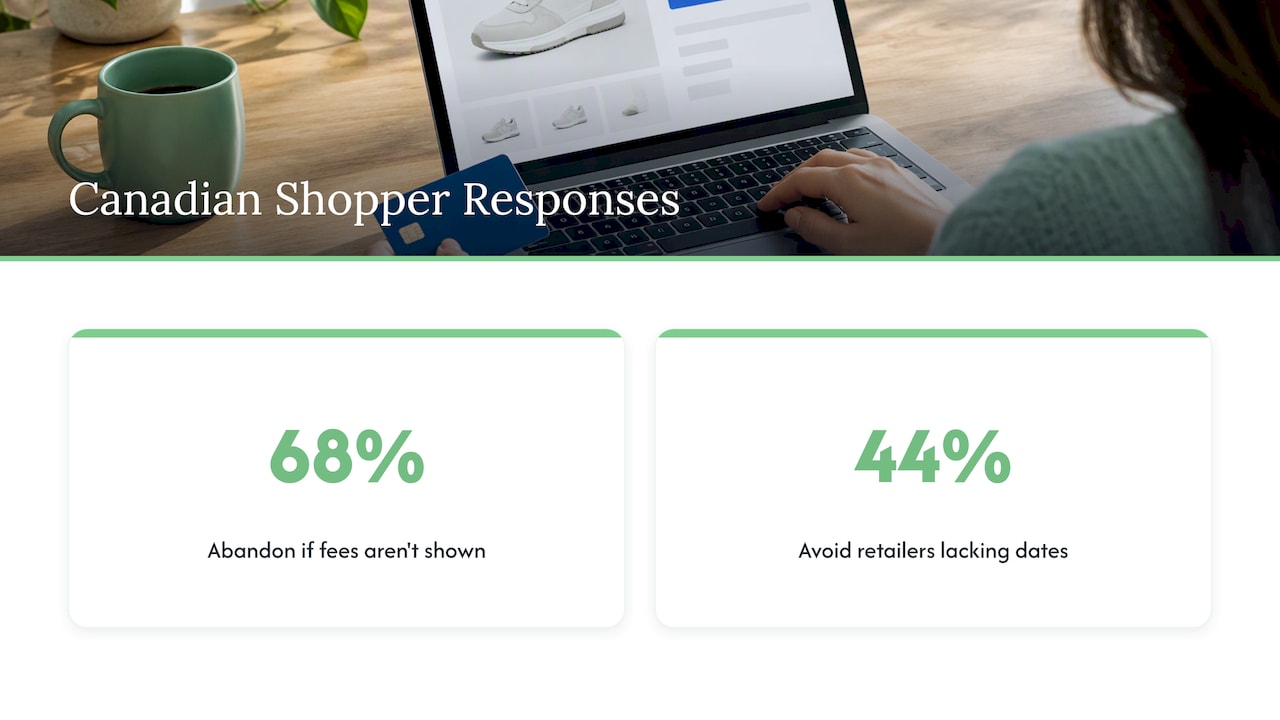
Canada adds its own twist. Canada Post reports that 68% of Canadian online shoppers will abandon a cart if taxes, duties and brokerage fees are not shown upfront, and 44% avoid retailers that do not give a delivery date. If you ship across the border or sell to customers in other provinces, that matters a lot.
The surprise at the last step
Picture a shopper in Hamilton who adds a $48 item, then sees shipping and tax push the total to $71 on the final screen. Nothing about your product changed. The price just appeared too late. A recovery email cannot fully fix that, but it can address it directly: “Free shipping over $75” or “Your total includes all taxes” in the email speaks to the exact worry.
The same logic applies to sellers who list promotions. A page such as this LED grow light discount codes example shows how a store can put its offers where shoppers see them before checkout, instead of making them hunt for a code at the last step and leave to look for one.
Fix the leak, then catch the drips
Email recovers some carts. Clearer pricing, a delivery estimate, guest checkout, and an easy-to-find return policy prevent others. Canada Post notes that clear return policies and visible checkout security can build trust with Canadian buyers. If your site is slow or confusing, our website development work starts with exactly these checkout friction points.
How many emails should you send, and when?
Start with three. More than that, and a small store risks annoying people who simply changed their minds.
| When to send | Job | |
|---|---|---|
| 1. The reminder | Within a few hours of abandonment | Make it easy: here is what you left behind |
| 2. The answer | About a day later | Remove doubt: reviews, shipping, returns, support |
| 3. The last nudge | One to two days after email 2 | Give a reason to act now |
Shopify’s Canadian guidance describes a pattern of a reminder 2 to 4 hours after abandonment, a follow-up 24 to 48 hours later, and a third message to shoppers who have not responded. Some store platforms automate the first step for you. Ecwid, for example, can send a recovery email 2 hours after abandonment.
The principle is simple: the sooner you reach the shopper, the more likely the cart is still fresh in their mind. If your tool lets you choose, test a shorter delay against a longer one and let your own numbers decide. A shop with a $25 average order and a shop selling $900 furniture will not behave the same way. Higher-priced items usually need more thinking time, so the follow-ups can be spaced further apart.
A note on discounts
Do not open with a discount. If every abandoned cart gets 10% off in the first email, shoppers learn to abandon on purpose. Save any incentive for email three, and consider offering free shipping instead of a percentage, since shipping cost is one of the main reasons people leave.
What should the email actually say?
An effective recovery email is short and specific. MailCharts’ analysis of recovery sequences lists the building blocks that work: the shopper’s name, the abandoned items with prices and images, a link to the cart, support information, and reviews or ratings.
Here is the checklist we use:
- A subject line that names the problem or the product. Plain beats clever.
- The product photo and name. People recognize pictures faster than text.
- The price, with tax and shipping clarified if possible.
- One big button back to the cart. Not three links. One.
- A human contact. A real reply-to address or phone number.
- Trust signals. Your return policy, a review or two, and secure payment mention.
- The legal footer. Your business name, mailing address and an unsubscribe link.
The same MailCharts piece makes a point worth remembering: a recovery email is also a chance to answer questions and fix problems that stopped the sale. Treat it as customer service, not a sales ambush.
Abandoned cart email examples you can adapt
The examples below are original templates written for a fictional Ontario shop, Maple & Thread, which sells handmade wool blankets. Swap in your own products and voice.
Email 1: The friendly reminder
Subject: Still thinking about the Muskoka blanket?
Preview text: We saved it for you.
Hi Priya,
You left a Muskoka wool blanket in your cart. We have set it aside for you.
[Photo] Muskoka Wool Blanket, Charcoal. $129.00 CAD
[Button: Return to my cart]
Questions about size or shipping? Just reply to this email and a real person will answer.
Why it works: it is short, it shows the item, and it offers help without pushing.
Email 2: The answer to the doubt
Subject: Free returns on your blanket, plus the answers you may need
Preview text: Shipping, size and care, in 30 seconds.
Hi Priya,
Buying online means you cannot touch the wool first, so here is what customers ask us most:
- Ships from Ontario, with an estimated delivery date at checkout
- Returns accepted within 30 days
- Machine washable on a gentle cycle
“Warmer than I expected.” (a verified customer review goes here)
[Button: Finish my order]
Why it works: it takes each common worry (delivery, returns, care) and answers it. Use only real reviews and real policies. Never invent either.
Email 3: The last nudge
Subject: Free shipping on your blanket, ends soon
Preview text: One last reminder from us.
Hi Priya,
Your cart is still waiting. Finish your order in the next 48 hours and we will cover the shipping.
[Button: Claim free shipping]
Why it works: it is the first and only incentive, and it has a clear, honest time limit. Keep the deadline real, or the next customer will not believe you.
Subject lines that get opened
A subject line has one job: get the shopper to open. These patterns tend to work for small stores, and you should test them against each other rather than trust any rule.
- Name the item: “Your Muskoka blanket is waiting”
- Ask a plain question: “Did something go wrong at checkout?”
- Lead with help: “Need a hand finishing your order?”
- Offer the benefit: “Free shipping on the item in your cart”
Avoid all caps, a string of exclamation marks and fake urgency. Also avoid guilt (“You forgot something!”), which can feel pushy. Keep subject lines short enough to read on a phone, and use the preview text to finish the thought.
What does Canadian law require?
This is where many small businesses stumble, because abandoned cart emails are commercial messages and Canada’s anti-spam law (CASL) applies. The CRTC’s FAQ says that for a commercial electronic message you must obtain consent, identify yourself and include an unsubscribe mechanism.
In practice:
- Consent. Get it clearly at the point of collection. The Privacy Commissioner’s guidance says businesses must tell people how their email addresses will be used and let them opt out of future messages. A short line near the email field at checkout does this.
- Sender identification. Name your business and give your contact details in every email.
- Unsubscribe. Make it simple, and act fast. Best Buy Canada’s policy page states that unsubscribe requests must be honored within 10 business days. Doing it sooner is better practice.
- Suppliers count too. The Privacy Commissioner reminds businesses they remain accountable and must ensure suppliers obtain appropriate consent. If an outside tool collects emails for you, check how.
Best Buy’s policy also illustrates how a large retailer treats a purchase as creating implied consent for promotional emails for 24 months. That is one company’s policy, not a rule you can copy blindly. Whether a shopper who only abandoned a cart counts as having given consent depends on the facts, so if you are unsure, ask a lawyer who handles Canadian privacy and marketing law, and make sure you have a plain, written privacy policy. Our privacy policy checklist for small Canadian businesses is a good place to start drafting one.
How do you automate it and measure results?
You should never send these by hand. Most store platforms and email tools can detect an abandoned checkout, wait the delay you choose and send the message with the right product inside. The set-up usually comes down to four steps:
- Turn on cart tracking in your store or email platform.
- Add a consent line at the email field in checkout.
- Build the three emails with dynamic product blocks (photo, name, price, link).
- Set the delays and stop rules, so a shopper who buys stops receiving reminders immediately.
If you are choosing tools, our marketing automation checklist walks through eight checks before you buy, and the email nurture setup plan shows how to stage the work over two to four weeks.
Count recovered sales honestly
A fair method is the one Ecwid uses: its Abandoned Carts page marks an order as recovered only when the customer clicks the email link and completes checkout. That avoids taking credit for shoppers who would have come back anyway.
Track four numbers each month:
- Open rate for each email, to judge subject lines.
- Click rate, to judge the message and button.
- Recovered orders, counted as above.
- Recovered revenue divided by the cost of your tool, to see if it pays.
Change one thing at a time. Test the subject line for a few weeks, then the timing, then the incentive. Small shops have less traffic, so give each test enough time to collect a meaningful number of carts before you decide.
Common mistakes to avoid
- Sending only one email. One message gives you one chance. Two or three give the shopper time to resolve the doubt.
- Forgetting the mobile view. Many shoppers open email on a phone, so a tiny button or a huge image that does not load kills the click.
- Ignoring the cause. If most abandonment happens at the shipping step, fix shipping information on the site.
- Hiding the unsubscribe link. It is both a legal requirement and a trust signal.
- Sending after purchase. Always suppress the sequence when an order comes through.
- Pretending to be urgent. A fake countdown costs you credibility.
If your store pages themselves are thin, shoppers may not trust them enough to buy even after the reminder. Our guides on ecommerce SEO and product page SEO cover how to make product pages clearer and easier to find.
Perspective
Most small store owners we meet treat abandoned cart emails as a trick. We see them as a conversation that got interrupted.
The best sequences we build are quiet and useful: one reminder, one answer to the likely doubt, one honest last nudge. They work because the website behind them is clear about price, delivery and returns. An email cannot rescue a checkout that surprises people.
That is why we do the website, the email automation and the reporting under one roof, with our own team and no outsourcing. When the person who designs your checkout also writes your reminder emails and reads the numbers, problems get fixed at the source instead of patched in a tool. And because we work month to month with no lock-in contract, you keep the system only if it earns its place.
Start small, count honestly, and improve one thing at a time.
Cristo
Want us to set this up for you?
If you would rather spend your week making and shipping products than wiring email flows, we can build and run the whole thing. Our plans are month to month: Sprout is $300 CAD per month, Grow is $600 CAD per month and Scale is $1,200 CAD per month, each with a one-off setup fee that ranges from $500 to $7,500 CAD depending on the plan. You can see exactly what each one covers on our pricing page.
We start with a free trial that includes a full digital audit of your site, so you will see where shoppers are dropping off before you commit to anything. Browse our full list of services or get in touch through our home page.
FAQ
What is an abandoned cart recovery email?
It is an automatic email sent to a shopper who added items to a cart but did not finish buying. It reminds them what they left behind and links straight back to the cart, as Mailchimp’s glossary describes. It works best when it is personal, short and helpful.
How soon should I send the first email?
Within a few hours is a sound starting point. Shopify’s Canadian guide suggests 2 to 4 hours for the first reminder, and some platforms default to about two hours. Test earlier and later sends against your own results, especially if you sell higher-priced items.
Do I need consent to send these emails in Canada?
Yes, CASL applies to commercial electronic messages, so you need consent, clear sender identification and an unsubscribe mechanism, according to the CRTC. Rules about what counts as consent can be nuanced, so check with a lawyer if your situation is unclear.
How many abandoned cart emails are enough?
For most small shops, three is plenty: a reminder, a follow-up that answers doubts, and a final nudge with an incentive if you choose to offer one. Stop the sequence the moment the shopper buys or unsubscribes.
Sources
- Stopping Canadian cart abandonment, Canada Post
- Abandoned cart recovery strategies for marketers, Twilio
- Abandoned Cart Emails: Best Practices and Examples, Shopify Canada
- Abandoned cart recovery emails, Ecwid Help Center
- How to Create an Abandoned Cart Sequence That Converts, MailCharts
- Abandoned Cart Email Tips, Mailchimp
- Frequently Asked Questions about Canada’s Anti-Spam Legislation, CRTC
- Guidance for businesses doing e-marketing, Office of the Privacy Commissioner of Canada
- Email Spam FAQ, Best Buy Canada
- Discount Codes, Coupons, and Promos for LED Grow Lights