

Picture a pile of 200 supplier invoices on a Friday afternoon, and someone retyping every total into your accounting software. AI document processing does that reading and typing for you. Software opens each invoice, PDF, form or scan, works out what kind of document it is, pulls out the fields you care about (vendor, date, total, tax) and sends them to the system where you work. A person only looks at the pages the software is unsure about.
This guide is for Canadian owner-operators who are tired of manual data entry. It explains how the technology works, what it can and cannot read reliably, what it costs to set up, what Canadian privacy law expects of you, and how to test it on a small scale before you commit.
TL;DR
- AI document processing classifies documents and extracts structured data from them. Old-style OCR only turns a picture of text into plain text.
- The usual flow is intake, classification, extraction, validation, human review of doubtful items, then export to your accounting, CRM or inventory system.
- Vendors often quote 98% to 99% page-level accuracy, but field-level accuracy on your own documents is the number that matters. Test with your own files.
- If documents contain personal information, Canada’s PIPEDA principles apply to how you collect, use and protect it.
- Start with one document type, run a two to four week pilot, and measure minutes per document and corrections before you expand.
Table of Contents
- What is AI document processing, in plain words?
- How does AI data extraction actually work?
- What can AI pull out of invoices, PDFs and other documents?
- How accurate is it, really?
- Is it safe for Canadian businesses? Privacy and legal basics
- What does AI document data extraction cost?
- How do I start without a giant IT project?
- How do I know it is working?
- Perspective: why we build this in-house
- Want us to look at your paperwork?
- FAQ
- Sources
What is AI document processing, in plain words?
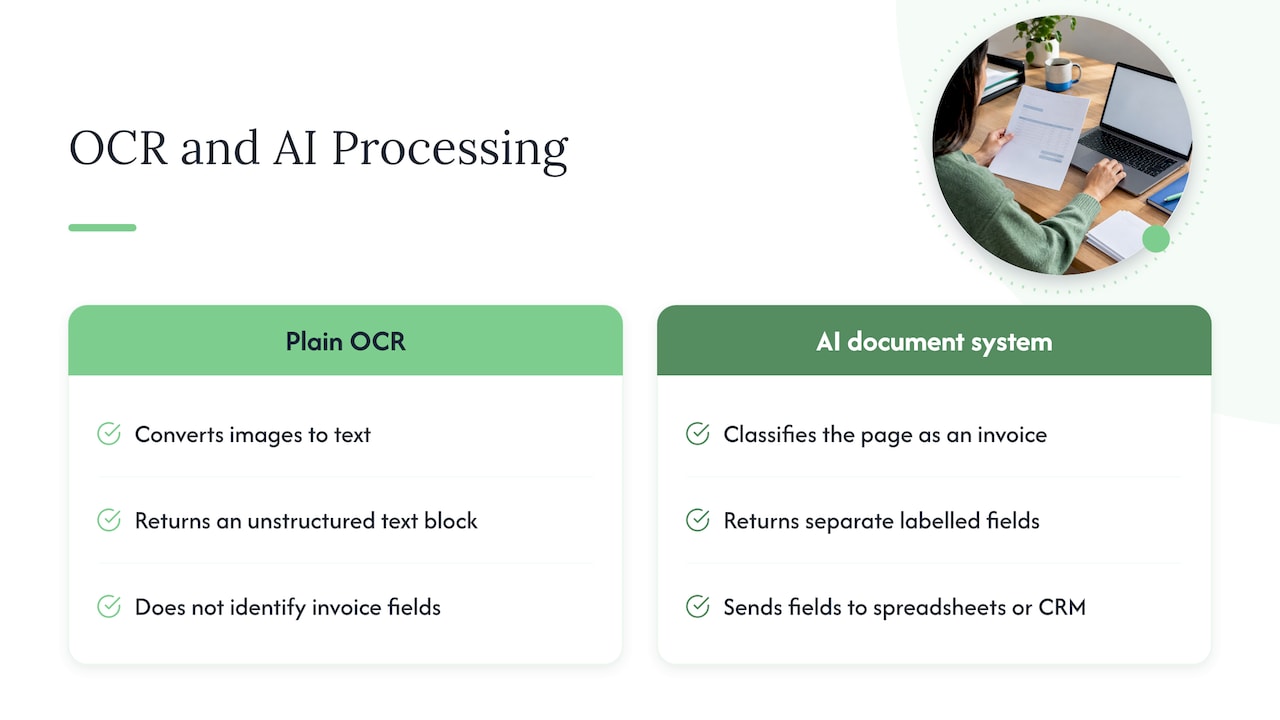
The industry term is intelligent document processing, or IDP. It is automation that uses artificial intelligence, machine learning and natural language processing to classify documents and pull structured data out of them. TechTarget describes IDP as going beyond traditional OCR, which is a static tool that converts images into machine-readable text without understanding what the text means.
Here is the difference in a concrete case. Plain OCR looks at a plumbing supplier’s invoice and gives you a block of text. It does not know that “Total due” is the number you want, or that the figure labelled “HST” is a tax amount and not a line item. An AI document system recognizes the page as an invoice, finds the vendor name, invoice number, date, line items, HST and total, and returns them as separate labelled fields. Those fields can then land in a spreadsheet, an accounting package or a CRM without anyone retyping them.
That is also why the same technology answers a lot of different searches. People type “extract data from PDF with AI,” “AI invoice data extraction” or “document data extraction” and they are all describing the same job: turning a file a human can read into data a system can use.
The visual idea worth remembering
Think of OCR as a photocopier that can also type. Think of AI document processing as a new hire who has read ten thousand invoices and knows where to look. The photocopier gives you words. The new hire gives you answers.
How does AI data extraction actually work?
Most systems follow the same sequence, even when vendors name the steps differently:
- Intake. Documents arrive from an email inbox, an upload form, a shared folder, a scanner or a phone photo.
- Pre-processing. The software straightens tilted scans and cleans up noise so text is easier to read.
- Classification. It decides what each file is: invoice, purchase order, contract, work order, receipt, ID, application form.
- Extraction. Models find the fields you defined for that document type.
- Validation. The system checks the results against rules you set. Do the line items add up to the total? Does the vendor exist in your records? Is the date plausible?
- Human review. Anything the software is unsure about goes to a person, with the original page beside the extracted values.
- Export. Approved data flows into the accounting, CRM, ERP or inventory system.
Step 6 is the one owners underestimate. A well-built system does not try to be right about everything. It is built to know when it is not sure and to hand that page to you. That keeps your books clean and gives you a way to see how often the software needs help.
What about generative AI and “agentic” systems?
Newer systems use large language models that read a page more like a person would. They cope better with layouts they have never seen, such as a supplier’s one-off quote with a strange format. Some go further and run the whole workflow: they compare an invoice against the purchase order and the delivery note, flag a mismatch, and route the exception to the right person. For a small business this means fewer templates to maintain, but the same discipline applies: define the fields, set the rules, and keep a human in the loop for exceptions.
What can AI pull out of invoices, PDFs and other documents?
The common wins for small Ontario businesses look like this:
| Document | Fields it can capture | Where the data goes |
|---|---|---|
| Supplier invoices | Vendor, invoice number, date, line items, HST, total | Accounting software |
| Receipts | Merchant, date, amount, tax, category | Expense tracking |
| Purchase orders and delivery slips | Item, quantity, price, order number | Inventory or ERP |
| Customer intake forms | Name, contact details, service requested | CRM |
| Contracts and quotes | Parties, dates, amounts, renewal terms | Document folder with searchable fields |
| Work orders and job sheets | Address, job type, hours, materials | Scheduling and invoicing |
A landscaping company, for example, might receive fuel receipts, supplier invoices and signed job sheets by email and photo all week. A document pipeline can sort them, extract the numbers and prepare them for the bookkeeper, so the owner is not sorting photos on Sunday night.
If you want to see how this fits into a bigger picture, our guide to workflow automation examples small teams can build in two to four weeks shows where document capture usually sits. For product businesses, inventory automation for receiving is a natural neighbour: delivery slips and purchase orders are exactly the documents that slow a receiving desk down.
How accurate is it, really?
Vendors often advertise high accuracy. Stripe’s overview of OCR invoice processing notes that modern systems often report 98% to 99% page-level accuracy, and that field-level accuracy is the more critical measure because it varies with document complexity and quality.
Why does that distinction matter? Imagine a one-page invoice with ten fields. If the software reads nine correctly and gets the total wrong, a page-level score might still look healthy, but you have a wrong number going into your books. What you care about is how often the key fields (total, tax, invoice number, vendor) are right on your documents.
A few things change the result:
- Scan quality. A crisp PDF generated by accounting software reads far better than a crumpled receipt photographed in a truck.
- Layout variety. Ten suppliers with ten formats is harder than one supplier with one.
- Handwriting. Handwritten notes and signatures are the hardest part of any document.
- Your rules. Validation checks catch errors that the model itself cannot see.
The practical answer is to test with your own documents. Take 50 real files from last month, run them through, and compare the output to what your bookkeeper actually entered. That gives you a field-by-field accuracy number that you can trust more than any brochure.
Is it safe for Canadian businesses? Privacy and legal basics
Invoices, applications, HR forms and customer intake sheets often contain personal information: names, addresses, phone numbers, sometimes health or financial details. If you run a commercial business in Canada, the federal privacy law for the private sector, PIPEDA, is likely to apply to how you handle that data. Some provinces have their own laws that apply instead in certain cases, so confirm which applies to you.
The Office of the Privacy Commissioner of Canada explains that PIPEDA’s 10 fair information principles are the ground rules for collecting, using and disclosing personal information. It also states that any collection, use or disclosure must be for purposes a reasonable person would consider appropriate in the circumstances.
In practice, here is what that means when you add AI to your paperwork:
- Know what is in your documents. List which document types contain personal information before you connect them to any tool.
- Use data only for the purpose it was collected. An invoice processed to pay a supplier is a different thing from feeding client files into a system for some unrelated purpose.
- Ask where the data is stored and who can see it. Before you choose a tool, ask whether your files are used to train a vendor’s models, where servers are located, and how deletion works.
- Limit access. Only the people who need the extracted data should see it.
- Keep a person accountable. Someone in your business should own the process and be able to answer a customer’s question about their information.
For anything sensitive, such as health records, legal files or HR documents, talk to a privacy lawyer or your industry regulator before automating. We build systems for small businesses, and we would rather slow a project down for a proper privacy check than create a problem you find out about later.
What does AI document data extraction cost?
There is no single price, because the cost depends on four things: how many documents you process, how many document types and layouts there are, how many systems the data has to reach, and how much human review you want built in. A single document type flowing into one accounting package is a small job. Ten document types feeding a CRM, an inventory system and a reporting dashboard is a bigger one.
You are usually paying for three layers:
- The extraction tool or model, often priced per page or per month.
- The build, which means connecting intake, validation rules and your existing software.
- The upkeep, which covers monitoring, fixing odd cases and adjusting when a supplier changes a format.
At CloudSprout, we do not publish a fixed price for custom automation projects, because the scope decides the price. What we do publish is our monthly plans: Sprout is $300 CAD per month, Grow is $600 CAD per month and Scale is $1,200 CAD per month, each with a one-off setup fee ranging from $500 to $1,500 CAD for Sprout, $1,500 to $3,500 CAD for Grow and $3,500 to $7,500 CAD for Scale. Details are on our pricing page, and plans are month-to-month with no lock-in contract.
How do I start without a giant IT project?
A small team does not need a six-month rollout. A workable path looks like this.
Step 1: Pick the one document that hurts most
Choose the document type with the highest volume or the most retyping. For many owners it is supplier invoices. For others it is customer intake forms or job sheets. Resist the urge to automate everything at once.
Step 2: Write down the fields and the rules
List the five to ten fields you need, and the checks that would make you trust them. For example: total must equal the sum of line items, invoice number must not already exist, vendor must match your supplier list.
Step 3: Collect a test batch
Gather 50 to 100 real documents, including the ugly ones. Keep a note of what a person entered for each, so you have an answer key.
Step 4: Run a two to four week pilot
Run the new process alongside your current one. Do not switch off the manual way until the numbers hold up. If you are weighing how to staff this, our 30 day pilot approach to hiring an AI employee explains how we structure a small, measurable first test.
Step 5: Connect the output
Once the extraction is reliable, send approved data into your accounting, CRM or inventory tool. This is where many do-it-yourself attempts stall, because the extraction works but the data still ends up in a spreadsheet someone has to copy from.
Step 6: Keep a human review lane
Even at 98% accuracy, one page in fifty needs a person. Decide who looks at exceptions and how fast. That lane is what keeps errors out of your books.
Document-heavy trades and professional firms also benefit from tidy document control on the human side. A page on construction document control and keeping one current revision shows why a single source of truth matters when many versions of a drawing or spec are circulating. Teams that deal with conversations as much as files may also like this look at how to automate meeting notes into structured records.
How do I know it is working?
Measure before and after. If you do not know today’s numbers, you cannot prove a saving. Track these for the pilot and for the first three months after:
| Measure | How to track it | What good looks like |
|---|---|---|
| Minutes per document | Time ten documents by hand before the pilot, then time the review step after | A clear drop in handling time |
| Field-level accuracy | Compare extracted values to your answer key for the key fields | High on total, tax, invoice number and vendor |
| Exception rate | Share of documents sent to human review | Falling as rules improve |
| Turnaround | Days from document arriving to data in your system | Same day or next day |
| Corrections found later | Errors your bookkeeper or customers catch afterwards | Fewer than before |
A simple way to turn this into money: multiply the minutes saved per document by the number of documents per month and by the hourly cost of the person doing the work. Use your own figures, not a vendor’s. If the saving is smaller than the monthly cost of the system, tighten the scope or choose a different document type.
Proposals and quotes are another document type worth looking at. Our piece on proposal automation for small teams covers the outgoing side of the same paperwork problem.
Perspective: why we build this in-house
We see the same pattern in small businesses across Ontario. The owner is paying for software that reads documents, but the data still ends up in a spreadsheet, because nobody connected the last step. The tool is rarely the problem. The gap is between the tool and the way the business actually runs.
That is why we build document automation as part of the wider system: the intake, the rules, the review step, and the link to your accounting, CRM or inventory tools. Everything is done in-house by the people you talk to, with no outsourcing, so the person who understands your suppliers is the person who writes the checks that catch a bad total.
Our view is simple. Start small, measure honestly, keep a person in the loop for exceptions, and expand only when the numbers justify it. That is how an AI employee earns its place on a small team, and it is why we pilot first and scale second.
Cristo
Want us to look at your paperwork?
If you are not sure which documents are worth automating, we can look at your process with you. Clients start with a free trial that includes a full digital audit, so you can see where the time goes before you commit to anything.
See our services for business automation and AI employees, or compare the monthly plans. Everything is delivered by our own team, month to month, with direct access to the people doing the work. You can also start at cloudsprout.ca.
FAQ
Is AI document processing the same as OCR?
No. OCR converts an image of text into machine-readable text. AI document processing adds classification and understanding, so it can tell an invoice from a contract and return labelled fields such as total and tax. Most modern systems use OCR as one step inside a larger pipeline.
Can AI extract data from a PDF or a phone photo?
Yes, in both cases. Clean digital PDFs give the best results, and photos work when they are sharp, well lit and flat. Blurry, creased or handwritten pages are more likely to be sent to human review, which is why that step matters.
Do I need to be technical to use it?
No. Many tools are point-and-click for one-off needs, but connecting them to your accounting, CRM or inventory system is where technical help pays off. We handle that setup for small businesses, including the validation rules and review step.
Is it legal to run customer documents through AI in Canada?
It can be, as long as you meet your privacy obligations. PIPEDA’s principles, including appropriate purposes and safeguards, apply to personal information in your documents. For sensitive files such as health or legal records, check with a privacy lawyer or your regulator first.
How long does a pilot take?
A focused pilot on one document type usually fits in two to four weeks: define fields, test on a real batch, run alongside the manual process, then compare results. The scope of your systems and the quality of your documents change the timeline.
Sources
- What is intelligent document processing (IDP)? | TechTarget
- What is OCR invoicing and invoice processing? | Stripe
- PIPEDA fair information principles | Office of the Privacy Commissioner of Canada