

You tapped “Boost” on a post, spent $50, and got a pile of likes from people who will never hire you. Sound familiar? The difference between a boosted post and an ad comes down to the goal. A boosted post puts money behind something you already published, mostly to get more eyes and reactions. An ad is built in Meta’s Ads Manager around a business result, like calls, form fills or sales, with far more control over who sees it and what happens next.
For most Ontario trades, restaurants and professional-service owners, the honest answer is this: boost to test and to say hello, build an ad when you need customers.
TL;DR
- A boosted post is the one-tap shortcut on Facebook and Instagram. An ad is built from scratch in Ads Manager. Both are paid, and both carry a sponsored label.
- Boosting is fine for event reminders, a new-hire shout-out or testing which post people react to. It is weak at producing leads.
- Ads give you more goals, custom and lookalike audiences, retargeting and more placements, so they suit “I need the phone to ring.”
- Budget realistically: a Canadian small business testing Meta ads should expect something like $500 to $1,500 a month and 4 to 8 weeks before the numbers settle.
- Whichever you pick, send people to a page that makes the next step obvious. A great ad pointing at a weak page wastes the money.
Table of Contents
- What a boosted post actually is
- What an ad is, and why it feels harder
- Boosted post vs ad, side by side
- Which one should you use? Start with the goal
- A worked example: the same $300, two ways
- What does it cost in Canada?
- The five mistakes that burn small-business budgets
- Do boosted posts show up as sponsored?
- How to make either one work better
- Our perspective: stop buying reach, start buying a result
- Want us to run it for you?
- A simple decision path
- FAQ
- Sources
What a boosted post actually is
Picture a post on your business page: a before-and-after of a bathroom you tiled in Hamilton. You posted it for free, 40 people saw it. Boosting means paying Meta to show that same post to more people. Shopify describes boosting as turning organic Instagram feed posts into ads, which then appear with a sponsored label.
So a boosted post is technically an ad. It is just the most basic kind. You skip Ads Manager, pick an audience and a budget in a few taps, and Meta handles the rest.
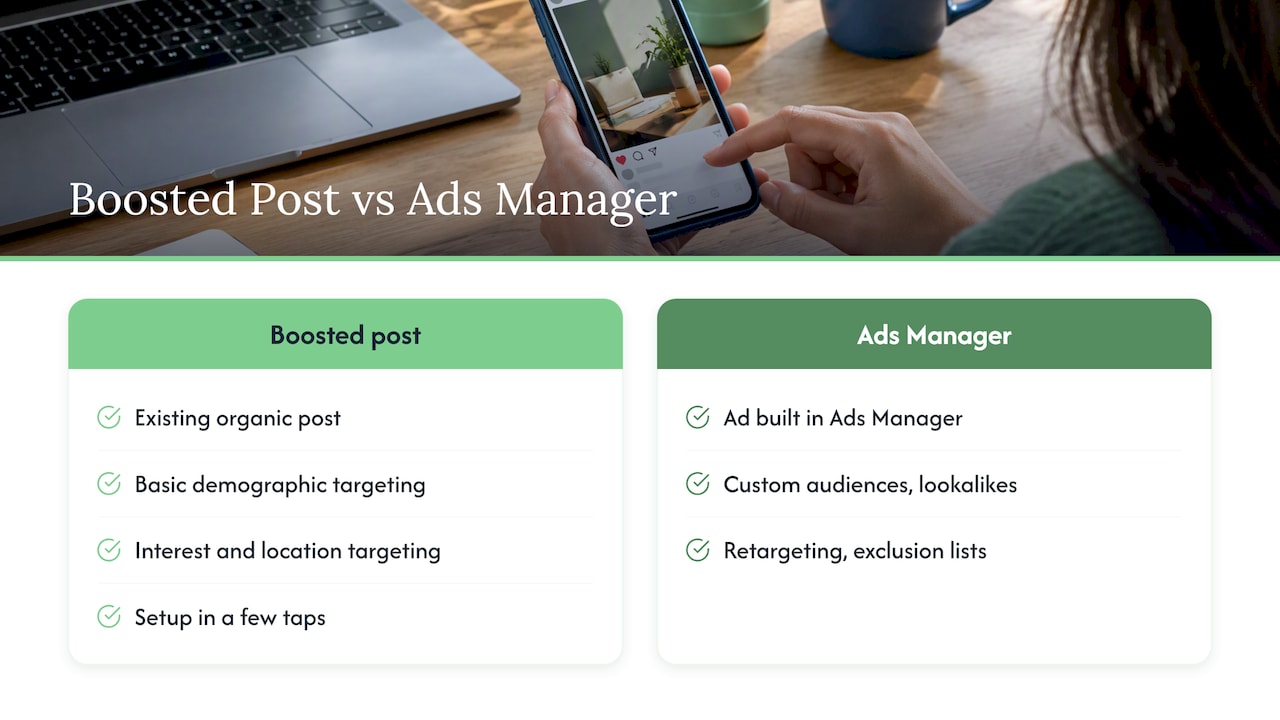
That simplicity is the appeal, and also the limit. Hootsuite’s comparison puts it plainly: boosted posts start from an existing organic post, with basic demographic, interest and location targeting, while ads built in Ads Manager add custom audiences, lookalikes, retargeting and exclusion lists.
What an ad is, and why it feels harder
An ad starts from a blank page in Ads Manager. You choose the goal first (sales, leads, website traffic, messages, awareness), then the audience, then where it shows up, then the creative. The post you write for it does not need to exist on your page at all.
That order is the real difference. With a boost, the content comes first and you hope it does something. With an ad, the result comes first and the content is built to deliver it.
Boosted post vs ad, side by side
The table below follows Hootsuite’s feature comparison, with plain-language notes on what it means for a small shop.
| Boosted post | Ad in Ads Manager | |
|---|---|---|
| Starting point | A post you already published | A blank campaign you build |
| Goals on offer | Engagement, reach, profile visits, link clicks | Those plus sales, website conversions, store traffic and more |
| Targeting | Basic age, interests, location | Custom audiences, lookalikes, retargeting, exclusions |
| Where it shows | Mostly feed | Feed, Stories, Reels, Messenger and more |
| Creative control | Whatever the post already is | Full control of format, copy, button, variations |
| Time to set up | A minute or two | Longer, and worth it |
| Best for | Quick reach, testing a post | Leads, bookings, sales |
Platform menus change, so check what your own account shows before you plan around any single option.
Which one should you use? Start with the goal
Skip the debate and ask one question: what do you want a stranger to do after they see this?
Boost when the goal is attention
Boosting works for things where reach is the point:
- A grand opening, a seasonal menu or a Saturday sale in your town.
- A post already doing well organically, to see if it holds up with a bigger audience.
- A hiring post for a local job.
- A quick “we’re open through the storm” notice.
The idea of boosting a post that is already performing is worth keeping. If a post earned comments for free, that is a cheap signal that people care.
Build an ad when the goal is a customer
Build a proper ad when you want:
- Quote requests for roofing, landscaping or renovations.
- Table bookings or catering enquiries.
- Consultation bookings for an accountant, lawyer or clinic.
- Online orders for an e-commerce shop.
- To follow up with people who visited your site but did not buy.
That last one is retargeting, and it is the strongest argument for ads. Experts quoted by AGO International describe Ads Manager as the professional standard because it lets you follow warm leads who engaged but have not purchased yet.
A worked example: the same $300, two ways
Imagine a snow-removal and landscaping company in Barrie. Same month, same $300, two plans. These numbers are an illustration of the logic, not a result anyone measured.
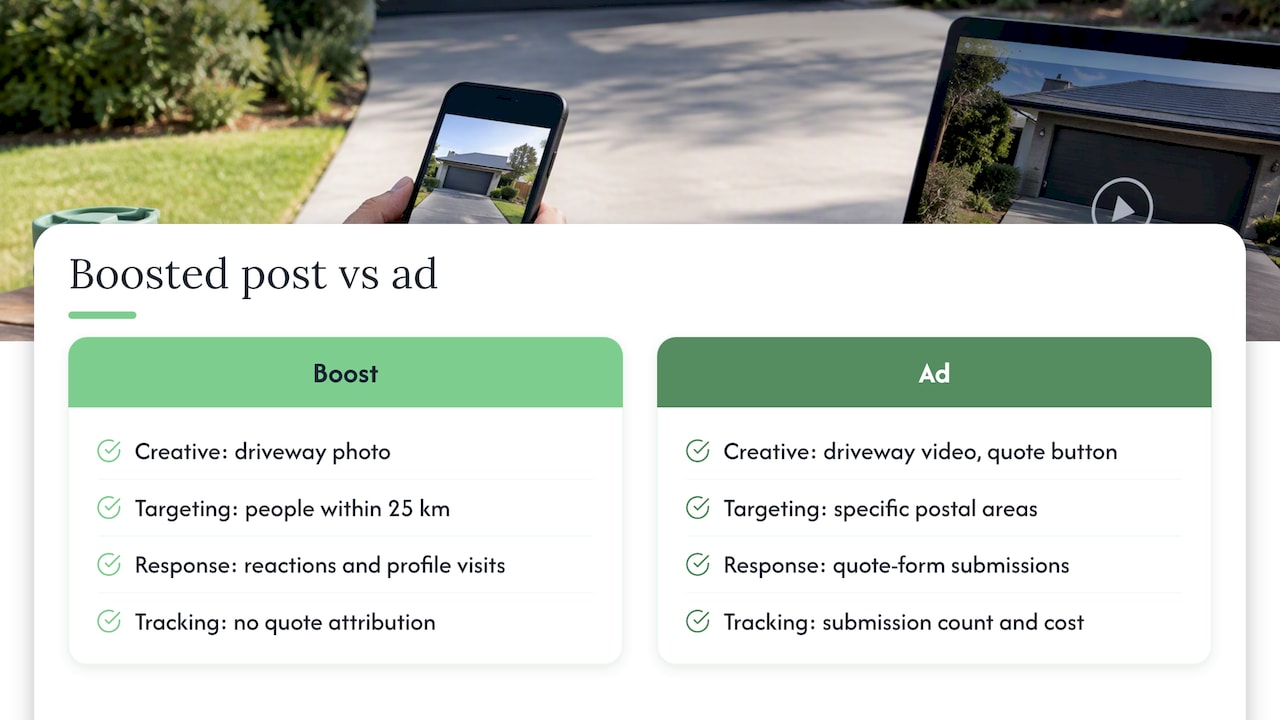
Plan A, boost. The owner boosts a photo of a freshly cleared driveway to people within 25 km. It gets reactions, a few comments (“nice work!”) and some profile visits. Nobody can tell which of those became a customer, because the boost was never aimed at a goal like “request a quote.”
Plan B, ad. The owner builds one ad with a short video of the same driveway, a clear line (“Seasonal contract, limited spots on your street”) and a button to a quote form. The audience is homeowners in specific postal areas. Visitors who open the form but do not submit see a reminder later in the week.
Plan B takes an hour or two more to set up. It also gives you something Plan A never will: a count of form submissions and what each one cost. That number is what lets you decide to spend more or stop.
What does it cost in Canada?
There is no fixed price list, because Meta runs an auction. Costs move with season, audience and goal.
- Reach cost. One 2025-2026 estimate puts the average cost per thousand impressions on Meta for Canadian businesses at roughly $5 to $15 for awareness campaigns, varying a lot by season and objective.
- Testing budget. The same source suggests Canadian small and mid-sized businesses plan on about CAD $500 to $1,500 a month and a 4 to 8 week window to refine results.
- Cost per click. Another industry roundup cites social ad clicks averaging around $0.30 to $0.80, with impressions at $5 to $15 per 1,000. Treat those as broad benchmarks, not promises for your trade or town.
A word on tax: Canada’s digital services tax, which covered online advertising platforms, was cancelled in June 2025, so you should not budget for it. Ask your accountant how GST/HST and ad costs show up on your own books.
The cheaper-looking option is not always the cheaper one. A $100 boost that produces no customers costs more per customer than a $300 ad that produces three. Podium’s older guide makes the same point, noting that there is no clear winner on cost alone, because it depends on your goal.
The five mistakes that burn small-business budgets
- Boosting for likes. Likes are pleasant and do not pay invoices. If the objective is engagement, that is what you will get.
- Targeting “everyone in Ontario.” A plumber in Kitchener has no use for views in Thunder Bay. Narrow the area to where your trucks drive.
- Sending people to your homepage. Give them a page that matches the ad: one offer, one button, a phone number that works on mobile.
- Judging after three days. Ads need time to learn. Give a test several weeks before you decide.
- Never checking the result. If you cannot say how many enquiries came from the spend, you are not advertising, you are donating.
Do boosted posts show up as sponsored?
Yes. A boosted post carries the sponsored label like any other ad. Do not pretend it is organic reach, and do not expect people to treat it that way. That is one more reason the creative has to be good: a stranger sees it as an ad and decides in a second whether to keep scrolling.
How to make either one work better
The boring work around the ad matters more than the ad button.
- Make the post worth paying for. Real photos of your work, a face, a price range or a specific offer beat stock images. Our social media content pillars plan helps you decide what to post so you have something strong to boost.
- Have a destination. A slow or confusing page kills conversions. Our website development work focuses on pages that bring calls.
- Be findable when they search. Someone who sees your ad may Google you next. Local SEO keeps your Google profile and map listing ready for that moment.
- Plan the whole month. If you are weighing paid against organic effort, our guide to what social media costs a small business in Canada sets the numbers side by side.
For wider context, the Canada small business digital marketing guide shows where paid social fits next to search, email and your website. A Canadian business roundup of advertising methods makes a similar point for local businesses: Google Business Profile and local SEO often deliver the strongest return, and starting with two or three methods beats spreading thin.
Our perspective: stop buying reach, start buying a result
We talk to owner-operators every week who tried boosting, saw the likes, and concluded that Facebook ads “don’t work.” Usually the ad did what it was asked to do. It was asked to get attention, not customers.
Here is how we think about it at CloudSprout:
- Pick the result before the button. If you cannot finish the sentence “I want 10 more ___ this month,” no ad type will help.
- Treat boosting as a thermometer. A quick boost tells you which post your community responds to. Then you build the ad around that idea.
- Fix the landing spot first. Money spent sending traffic to a page that does not convert is the most common leak we see.
- Ask who is doing the work. We do everything in-house, with no outsourcing, and you talk directly to the people running your campaigns. That means when a number looks off, the person who can fix it is the person you are speaking with.
- Keep the commitment low. We price month to month with no lock-in contracts, because a test should be easy to stop if it is not working.
— Cristo
Want us to run it for you?
If you would rather not spend your evenings inside Ads Manager, our Ads Management service is priced at 500 to 2,000 CAD per month, depending on scope. Our Sprout, Grow and Scale plans start at 300 CAD, 600 CAD and 1,200 CAD per month, each with a one-off setup fee you can see on our pricing page. You can also start with a free trial that includes a full digital audit, so you see where your website and social presence stand before you commit to any ad spend. Browse everything we offer on our services page.
A simple decision path
- Do you have a post that already did well organically? Boost it for a small amount to see if it holds up.
- Do you need leads or sales? Build an ad with a lead or conversion goal and a page to match.
- Do you have visitors who did not convert? Add a retargeting ad aimed at them.
- Is your page ready? If it loads slowly or hides your phone number, fix that before spending.
- After four to eight weeks, compare cost per enquiry. Keep what works, cut what does not.
FAQ
Are boosting and ads the same?
Not quite. A boosted post is a simplified type of ad made from a post you already published. A full ad is built in Ads Manager, where you choose a business goal and get deeper targeting, placements and creative options.
Can I change a boosted post after it starts?
You can usually pause or stop a boost and adjust budget or schedule from the post’s promotion settings. Changing the content itself generally means a new post or a new ad, so check the options in your own account. If you need to test several versions, Ads Manager is built for that.
Do boosted posts show up as sponsored?
Yes. Boosted posts appear with a sponsored label in people’s feeds, the same as other Meta ads. They are paid placement, not extra organic reach.
Is Instagram boosting any different from Facebook boosting?
The idea is the same: you pay to push an existing post to more people. On Instagram, many post types can be boosted, including Reels, Stories, carousels and static posts. For lead and sales goals, you still get more control by building the ad in Ads Manager.
How much should a small Canadian business spend to start?
There is no universal number. One Canadian source suggests $500 to $1,500 a month for a proper test. If that is too much, start smaller with one clear goal and measure it, rather than spreading a few dollars across many boosts.
Sources
- Boosted posts vs. ads: What to know in 2026, Hootsuite
- Google Ads vs Meta Ads for Canadian SMEs, AGO International
- How To Boost an Instagram Post, Shopify
- How Social Media Ad Budgets Are Shaping Digital Marketing, Jasmine Directory
- Canada’s Digital Service Tax in 2026, SAL Accounting
- Boosted Post vs. Ad On Facebook, Podium
- 20 Effective Advertising Methods for Canadian Businesses, Venn