

A website redesign goes well when you settle seven things in order: what the site must achieve, what your current site already does well, how the pages are organized, how it looks and works on a phone, how you keep your Google rankings, what you test before launch, and what you watch afterward. Skip the early steps and you get a prettier site that brings in fewer calls. This checklist walks through each step in plain language, for owner-operators who would rather spend the time on their business than on their homepage.
Here is a quick test before you start. Hold your phone at arm’s length and open your homepage. Give a friend three seconds with it. Can they tell what you do, where you do it and how to reach you? If not, the problem is probably the structure and the message, not the colours. That is what a redesign should fix.
TL;DR
- Write down what the new site must do (more quote requests, more bookings, more calls) and record today’s numbers first, so you can prove it worked.
- Audit before you design: keep the pages that earn leads, merge or drop the ones that do not.
- Map every old web address to a new one with permanent redirects, or you can lose the Google visibility you spent years building.
- Test forms, phone links and mobile layouts on real devices before launch, then watch your numbers weekly for the first couple of months.
- Plan the sitemap and copy before design starts. Changes after building begins are the expensive ones.
Table of Contents
- Why isn’t my website getting leads, and is a redesign the answer?
- Step 1: Decide what the new website is for
- Step 2: Audit what you already have
- Step 3: Plan the pages, the sitemap and the words
- Step 4: Make it look good and work well on a phone
- Step 5: Protect your Google rankings during the switch
- Step 6: Test everything before you go live
- Step 7: Launch, then watch the numbers
- How long does a redesign take?
- Our perspective: a redesign is a business project, not a design project
- Want help with the redesign?
- FAQ
- Sources
Why isn’t my website getting leads, and is a redesign the answer?
Sometimes it is, and sometimes it is not. A redesign is the right move when the site is hard to use on a phone, when you cannot update it yourself, when it no longer matches the services you sell, or when the structure hides your best offer. It is the wrong move if the real issue is that nobody finds the site. In that case the fix is search visibility, and a new coat of paint will not change it.
This is why the checklist starts with numbers and not with mockups. If you do not know how many people visit, call or fill in your form today, you cannot tell whether the new site is better. If you want a second opinion on where you stand, our free website audit guide for Ontario small businesses shows what a useful audit covers.
Step 1: Decide what the new website is for
Start with a plain sentence: “After the redesign, more of the right people will ___.” Fill in the blank with one action, such as request a quote, book a table, call the shop or sign up for a class.
The Business Development Bank of Canada says goals should be specific, attainable and measurable, such as increasing lead volume, boosting conversion rates or building customer trust, and that they drive your marketing plan and budget (BDC business website checklist). BDC also notes that setting measurable goals helps you work out what needs to be done and how much to invest (BDC on marketing budgets).
For a small local business, a good goal set looks like this:
- One main action. For an HVAC contractor, that might be “call or request a quote.” For a restaurant, “order or reserve.”
- One or two baseline numbers. Monthly visitors, monthly form submissions, monthly phone taps from mobile.
- A review date. Pick when you will compare, for instance three months after launch, so you are judging real data and not a first impression.
Write these on one page. Every later decision, from the menu to the button colour, gets checked against that page.
Capture your baseline now
BDC recommends judging success by comparing post-launch data against the baseline metrics you set beforehand, such as traffic and conversion numbers over specific periods (BDC). So before anything changes, screenshot or export:
- Visitors per month and where they come from (Google, social, direct)
- Your top ten pages by visits
- Number of contact form submissions and calls from the site
- The search terms and pages that bring people from Google, from Google Search Console
- Your Google Business Profile views and calls, if you serve a local area
This takes an hour, and it is the single most skipped step.
Step 2: Audit what you already have
Do not start from a blank page. Your current site has pages that Google already knows, content customers already read and links from other sites. A redesign should keep what works.
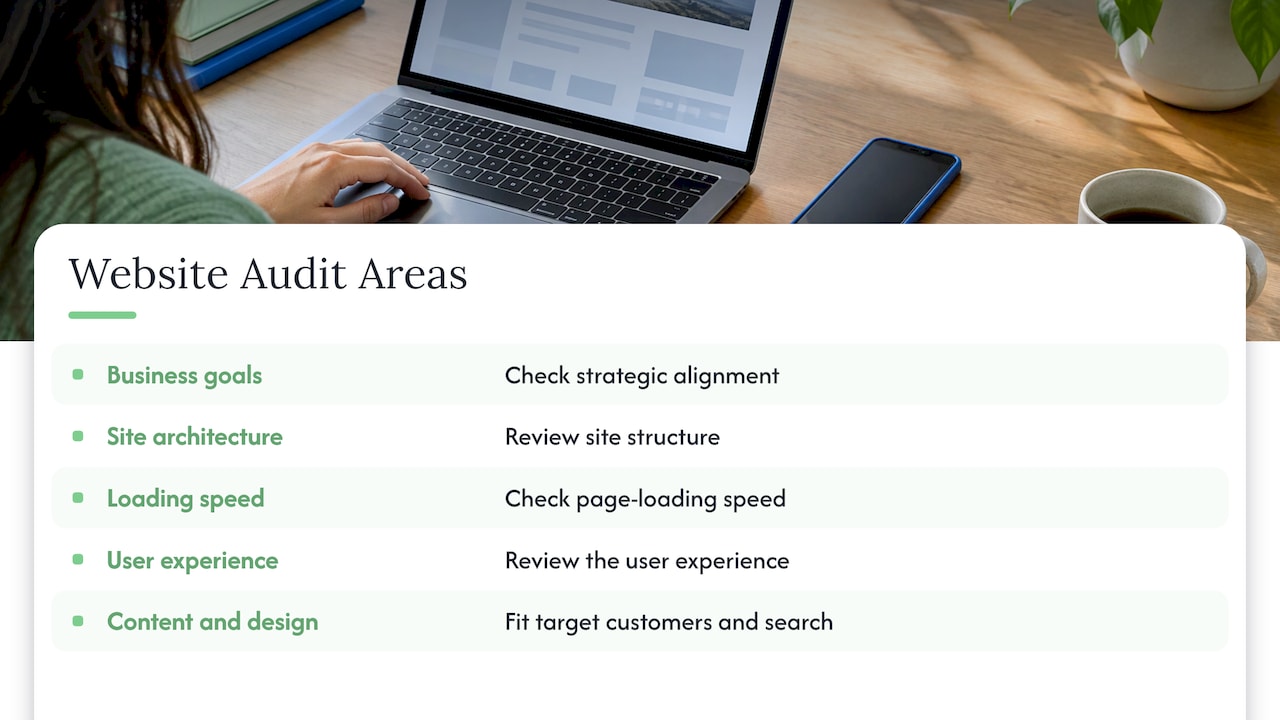
BDC suggests checking strategic alignment with your business goals, then technical factors such as site architecture, page-loading speed and user experience, and asking whether your content and design actually serve your target customers and search (BDC on website analysis).
If your site is small, you can go through all of it. One SEO software company suggests that sites under 50 pages can be audited end to end, while bigger sites should focus on high-traffic pages and the main conversion paths (Semrush). Most trades, restaurants and professional-services sites sit well under that, so a simple spreadsheet works.
The page-by-page spreadsheet
List every page in a row, then add four columns:
| Column | What to write | Why it matters |
|---|---|---|
| Visits | Last 12 months, from your analytics | Shows what people actually read |
| Leads | Forms or calls that started on this page | Shows what earns money |
| Search traffic | Visits from Google | Shows what you risk losing |
| Decision | Keep, improve, merge or remove | Gives the designer a clear brief |
A page with search traffic and leads is untouchable: keep its address and its main message. A page with neither can be merged into a stronger one. An old blog post that still brings in visitors should be refreshed, not deleted.
Step 3: Plan the pages, the sitemap and the words
A sitemap is simply the list of pages and how they connect. Think of it as the floor plan of a shop. You would not build the walls before you decide where the door and the counter go.
One planning guide notes that stakeholders should review the sitemap before development begins, because restructuring after building starts can cost weeks of rework (DYNO Mapper). The logic is simple: moving a box on a sketch costs nothing, while moving a finished page costs design, development and testing time.
Build the structure around customer questions
For each main service, ask what a nervous first-time customer wants to know before calling:
- What exactly do you do, and in which towns?
- What does it cost, or how is it priced?
- Can I see proof, such as photos, reviews or past projects?
- What happens after I contact you?
A plumber in Hamilton does not need a page called “Solutions.” They need “Drain Cleaning in Hamilton,” with a phone number at the top. Plain labels in the menu beat clever ones.
Write the words before the design
Designers often receive placeholder text, then the real copy does not fit and the layout is rebuilt. Draft your headlines and key paragraphs first, even roughly. If you are unsure how to say what you do in one clear sentence, our messaging framework walks through it, and our guide on why website copy matters for SEO explains how the words on a page affect whether Google shows it.
If your logo, colours or name are changing too, sort that out first. Our rebranding checklist covers what to settle before touching the site.
Step 4: Make it look good and work well on a phone
“How do I make my website look beautiful?” is the question we hear most. The honest answer is that sites people call beautiful tend to share a few boring traits: one clear message at the top, plenty of white space, real photos of your team and work, one or two fonts, and one obvious button. A “cool” site is one where the visitor never has to hunt.
Try this visual exercise. Print your homepage, squint at it from across the room and circle what you see first. If it is a stock photo of a handshake and not your phone number or main offer, the page is working against you.
Mobile first, not mobile last
Most local searches happen on a phone, so design the phone layout first and expand it for desktop. Check that:
- The phone number is a tap-to-call link
- Buttons and links are large enough for a thumb and spaced apart
- The menu is short and opens easily
- Forms ask only for what you need (name, contact, what they want)
- Text is readable without zooming
Accessibility is part of good design
Accessibility means people with low vision, motor limitations or hearing loss can use your site. A recent Government of Canada procurement scope for a website asks for responsive mobile design and conformance to WCAG 2.1 AA or later versions (CanadaBuys scope of work). You are not a federal department, but the same habits make your site easier for every customer. Practical checks:
- Text has strong contrast against its background
- Every page can be used with a keyboard alone, and you can see where focus is
- Images that carry information have descriptive alt text
- Videos have captions
- Links say where they go, not just “click here”
If you are in Ontario, ask your web team whether the Accessibility for Ontarians with Disabilities Act applies to your organization’s size and sector, and check the Government of Ontario’s guidance for the current rule.
Speed
Slow pages lose visitors. The usual causes are oversized photos, too many plugins and cheap hosting. Run your key pages through Google’s free PageSpeed Insights tool on a mobile setting before and after, and compare the results. Compress images, remove plugins you do not use, and keep video hosted on a video platform instead of uploading it to your own server.
Build in room to grow
The same Government of Canada scope asks for a long-term, scalable site that can adapt to evolving AI-driven practices without a full redesign. Small businesses benefit from the same thinking: choose a platform where you or your team can add a service page or a blog post without rebuilding anything. Our website development page explains how we approach that.
Step 5: Protect your Google rankings during the switch
This is where most redesigns go wrong, and the damage is quiet. Pages get new addresses, the old ones return “not found,” and Google stops sending visitors to pages that used to bring in calls.
Google’s own documentation on site moves gives a clear process. It recommends preparing a mapping of old URLs to new URLs, and using server-side permanent redirects from the old addresses to the new ones. It also says permanent redirects such as 301s do not cause a loss in PageRank, and it advises using Search Console during the move (Google Search Central).
In practice, that means:
- Export every old URL. Use the spreadsheet from Step 2, plus a crawl of the live site so you do not miss pages.
- Keep addresses the same where you can. If
/furnace-repairis working, do not rename it to/services/heating-solutions. - Map each changed address to its closest new page. Send an old service page to the new version of that service, not to the homepage.
- Carry over the page titles, descriptions and headings that already rank, then improve them carefully.
- Set up the redirects on launch day and test a sample of them.
- Update your sitemap file and submit it in Search Console.
- Fix your internal links so they point to the new addresses directly.
- Update your Google Business Profile, directory listings and social profiles with the right website address.
For the detailed version, see our website migration checklist for small businesses. If search is your main source of customers, our SEO services team can handle the redirect plan as part of the project.
Step 6: Test everything before you go live
Never launch a site that only the designer has looked at. Build the new site on a private staging address and have someone who did not build it click through it. Work through this list:
| Test | How to do it | Pass looks like |
|---|---|---|
| Contact forms | Submit each form with a real email | You receive the message and the visitor sees a thank-you |
| Phone and email links | Tap them on an iPhone and an Android | The call or email opens correctly |
| Mobile layout | Check on at least two real phones | Nothing overlaps or cuts off |
| Browsers | Open in Chrome, Safari, Edge and Firefox | Same content and working buttons |
| Redirects | Try ten old addresses | Each lands on the right new page |
| Analytics | Check real-time reports | Visits and form submissions are recorded |
| Speed | Run PageSpeed Insights on key pages | No major warnings on the home and service pages |
| Accessibility | Tab through a page with the keyboard | You can reach every link and button |
| Proofreading | Read every page aloud | No typos, no leftover placeholder text |
| Search settings | Check that the site is not blocked from search | The “discourage search engines” setting is off |
That last one catches more teams than you would think. Staging sites are usually hidden from Google on purpose, and the setting sometimes gets carried into the live site.
Step 7: Launch, then watch the numbers
Pick a quiet time to launch, not the start of your busiest week. Keep the old site backed up, turn on the redirects, and spend the first day clicking through the live site yourself.
After launch, the work is not finished. BDC advises linking your measures to your objectives, using analytics to measure results, and improving your marketing through a continuous cycle of small, incremental changes (BDC marketing primer). BDC also suggests tracking website leads and customer reviews.
A simple routine for the first few months:
- Week 1, daily: check Search Console for errors and crawl problems, and test the contact form.
- Weeks 2 to 4, weekly: compare visits, form submissions and calls with your baseline.
- Month 2 to 3: look at which pages bring leads and which do not, then improve the weak ones one at a time.
- At your review date: compare with the goal you wrote in Step 1 and decide what to change next.
Expect some movement in search results after a redesign. If a key page drops sharply and stays down, the first suspects are a missing redirect, changed page content or a technical block, and they are all fixable.
How long does a redesign take?
The time depends on the number of pages, how quickly you provide photos and copy, and how many rounds of feedback you need. The most common cause of delay is waiting on content from the owner, not the build itself. We lay out a realistic schedule in our website redesign timeline for small businesses.
Our perspective: a redesign is a business project, not a design project
We have seen the same pattern many times: an owner picks a template they love, launches it and then wonders why the phone is quiet. The look was never the problem.
That is why we start with a free full digital audit and trial, before you commit to anything. We want you to see what is working, what is not and what we would change, with the numbers in front of you.
We also think the people planning your site should be the people building it. Everything we do is in-house, with no outsourcing, so when you ask why a page is laid out a certain way, you talk to the person who made that call. You get direct access to the team doing the work.
And we do not believe a website should lock you into a long contract. Our pricing is month to month with no lock-in, because we would rather earn your business every month by bringing in leads and traffic. We back that with results guarantees on leads and traffic, including money-back offers.
If you remember one thing: write your goal and capture your numbers before anyone opens a design tool.
Cristo
Want help with the redesign?
If you would rather not manage a spreadsheet of redirects yourself, we can take it on. CloudSprout is an Ontario-based agency that builds custom websites, handles SEO and keeps everything in-house. Our plans are month to month: Sprout is $300 CAD per month, Grow is $600 CAD per month and Scale is $1,200 CAD per month. One-time setup fees run from $500 to $1,500 CAD for Sprout, $1,500 to $3,500 CAD for Grow and $3,500 to $7,500 CAD for Scale. Project Build and Website Development are quoted to your needs.
The easiest first step is the free digital audit and trial. See the plans and pricing, or tell us about your site through cloudsprout.ca and we will show you what we would keep, fix and rebuild.
FAQ
What should be on a website redesign checklist?
A good checklist covers goals and baseline numbers, a content and page audit, a sitemap, mobile and accessibility checks, a redirect plan, pre-launch testing and post-launch monitoring. The order matters: goals and audit come before design, and redirects and testing come before launch.
Will a redesign hurt my Google rankings?
It can if old addresses are removed without redirects, but it does not have to. Google says permanent redirects from old to new addresses do not cause a loss in PageRank when they are set up properly. Keep working page addresses where possible and map every changed one to its closest new page.
Should I redesign my whole website or just fix parts of it?
Let your audit decide. If the pages that bring leads are sound and the problems are a few weak pages or a poor mobile layout, targeted fixes can be enough. If the structure, platform or look holds the whole site back, a full redesign is the better investment.
What do I need to prepare before I talk to a web agency?
Bring your goal, your current traffic and lead numbers, a list of pages you want to keep, logins for your domain and hosting, and examples of two or three sites you like. It also helps to have your photos, logo and a rough list of services ready.
Sources
- BDC: Business website checklist
- BDC: What is an average marketing budget for a small business?
- BDC: How to conduct a website analysis
- BDC: Marketing your business, an essential read for entrepreneurs
- Semrush: How to do a website audit
- DYNO Mapper: Website development planning process
- CanadaBuys: Website scope of work
- Google Search Central: Site moves and migrations