
TL;DR:
- Pay-per-click advertising charges only when a user clicks your ad, making it highly measurable for small businesses. Effective campaigns target precise audiences, use relevant keywords, and focus on conversion tracking to ensure profitability. Proper management and continuous optimization are essential for maximizing ROI and avoiding wasted budget.
Pay-per-click (PPC) advertising is a digital ad model where you pay only when someone clicks your ad — not when it appears, not when someone sees it, only when they act. Unlike a billboard or a TV spot, every dollar you spend is tied to a measurable interaction. For a small business owner, that distinction matters: you can start with $10 a day, target people searching for exactly what you sell, and see traffic to your site within hours rather than months.
Is PPC right for you? Quick check:
- You need visibility fast (new business, seasonal promotion, testing a new offer)
- You serve a specific location or audience you can target precisely
- You have a clear offer and a page on your site that matches it
- You can track whether visitors become leads or sales
Be cautious if: you have no conversion tracking set up, your website is not ready to receive traffic, or you have no budget to test and learn before expecting profit.
Table of Contents
- How does pay-per-click advertising work?
- Which PPC platforms should you use?
- What ad formats will you actually encounter?
- How do you set up your first PPC campaign?
- How do you find the right keywords?
- What does PPC cost, and how do you control your budget?
- How do you measure whether your PPC is actually working?
- How much does PPC cost, and when will you see results?
- What are the most common PPC mistakes?
- Your “get started” checklist and the DIY vs. hire question
- Good ads vs. bad ads: what the difference actually looks like
- Key Takeaways
- The part most guides skip
- Cloudsprout can run your PPC so you do not have to learn it the hard way
- Useful sources and further reading
- FAQ
How does pay-per-click advertising work?
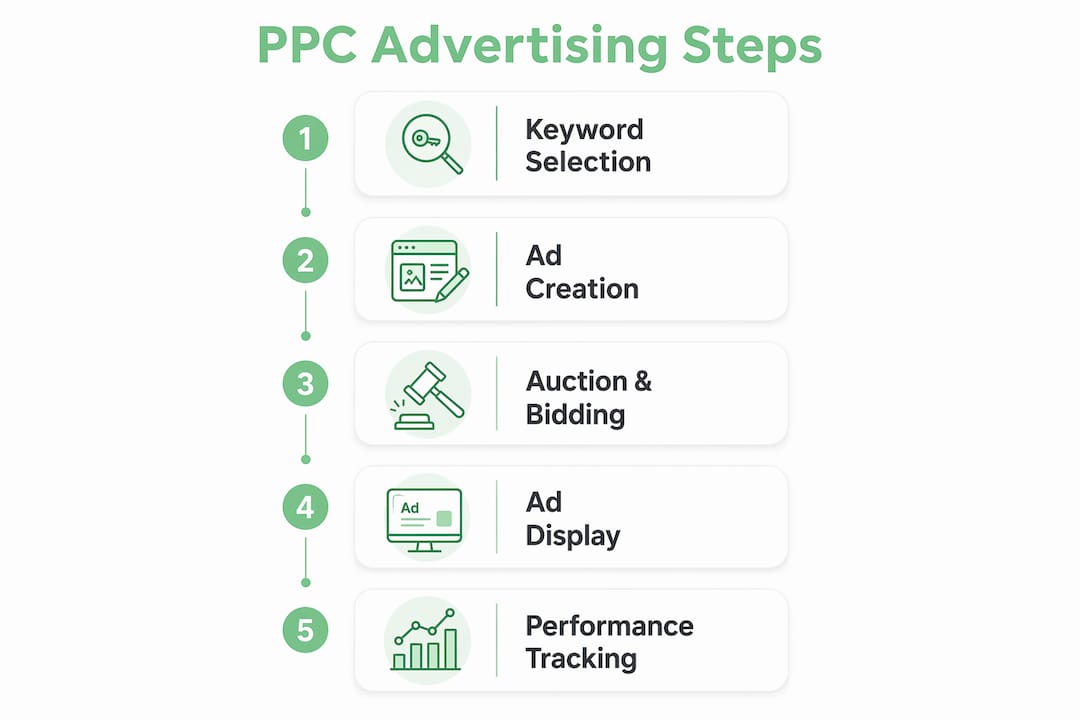
Every time an ad slot opens up on a search engine or social platform, an automated auction runs in milliseconds. Platforms evaluate bids, ad relevance, and landing-page quality to decide which ad shows, in what position, and what the winner pays.
Your bid is just one input. Google Ads, for example, calculates an Ad Rank score that weighs your maximum bid against your Quality Score, which itself reflects three things: how relevant your ad is to the search query, the expected click-through rate based on historical performance, and the experience a user gets after clicking through to your landing page. A well-written ad pointing to a tight, relevant landing page can outrank a competitor who bids twice as much. That is not a small detail — it means quality work directly lowers your costs.
Here is the flow from search to charge:
- A user in Toronto types “emergency plumber near me” into Google.
- Google’s auction fires instantly, evaluating every advertiser targeting that query.
- Your ad wins a top spot based on your Ad Rank.
- The ad appears. If the user scrolls past without clicking, you pay nothing.
- They click. Google charges your account the actual CPC, which depends on the next highest bid and other factors.
- The user lands on your page. What happens next determines whether that click becomes a lead.
Quick glossary:
- Ad Rank: The score that determines your ad’s position; calculated from bid, Quality Score, and context.
- Quality Score: Google’s 1–10 rating of your ad’s relevance, expected CTR, and landing page experience.
- CPC (cost per click): What you actually pay each time someone clicks.
- CTR (click-through rate): Clicks divided by impressions, expressed as a percentage.
- Impression: One instance of your ad being displayed.
- Conversion: A desired action taken after the click (a call, form fill, purchase, etc.).
Targeting adds another layer of control. You can narrow your audience by keyword, geographic location, device type, time of day, and demographic or interest segments. A local HVAC company, for instance, can show ads only to mobile users within 15 miles of their service area between 7 AM and 9 PM, as demonstrated by real-world campaigns like those detailed on cold calling lead generation.
Which PPC platforms should you use?
PPC campaigns run across Google Ads, Microsoft Advertising, Meta Ads, and Amazon Advertising, and the right choice depends on where your customers are looking and what stage of the buying process you want to reach them at.
-
Google Ads — The largest search network by volume. Best for capturing high-intent searches (“best accountant in Ottawa,” “buy running shoes online”). Pros: massive reach, granular keyword targeting, strong conversion data. Con: competitive keywords in popular industries can get expensive fast.
-
Microsoft Advertising (Bing Ads) — Covers Bing, Yahoo, and DuckDuckGo search. Audience skews slightly older and often includes more desktop users. Best for: local services and B2B where the demographic fits. Pro: lower average CPCs than Google in many categories. Con: smaller search volume overall.
-
Meta Ads (Facebook and Instagram) — Demand-generation rather than intent capture. You are reaching people who are not actively searching but match your audience profile. Best for: brand awareness, local events, visual products, and retargeting past website visitors. Pro: detailed demographic and interest targeting. Con: lower purchase intent at the moment of ad exposure compared to search.
-
Amazon Advertising — Purpose-built for product sales. Best for: e-commerce businesses selling physical goods, especially those already listed on Amazon. Pro: shoppers on Amazon are in buying mode. Con: limited use for service businesses or brands not selling on the platform.
For most Ontario local service businesses starting out, Google Ads is a common first stop. Search ads are known to be effective for commercial-intent queries where the user already wants what you offer. Once you have search working, Meta Ads makes sense for retargeting and awareness. For social ad campaign ideas and management, Cloudsprout’s social media marketing services cover the full setup.
What ad formats will you actually encounter?
Search ads are text-based ads that appear at the top and bottom of search engine results pages. They include a headline (up to three parts on Google), a description, and a display URL path. Because the user triggered them with a specific query, they carry the highest purchase intent of any format.

Display ads are image or banner ads that appear across websites in Google’s Display Network or similar publisher networks. They are better for brand awareness and retargeting (showing your ad to people who already visited your site) than for direct response. A user who browsed your catering menu but did not book sees your ad on a news site the next morning.
Shopping ads (also called Product Listing Ads) show a product image, price, and store name directly in search results. They are built for e-commerce and pull data from a product feed rather than keyword-matched text. If you sell physical goods, these often outperform standard text ads for purchase intent.
Video ads run on YouTube and in social feeds. A pre-roll ad before a YouTube video, a short in-feed clip on Instagram Reels, or a TikTok-style sponsored video all fall here. The creative elements that matter most: a visual hook in the first three seconds, a clear spoken or on-screen CTA, and a URL or button that takes the viewer somewhere specific.
Social feed ads on Meta platforms blend into the organic feed as sponsored posts. They can be static images, carousels, or short videos. The anatomy of a strong one: a scroll-stopping image or video, a headline that states the benefit, a one-line description, and a CTA button (“Book Now,” “Get a Quote,” “Shop Now”).
How do you set up your first PPC campaign?
- Create your account. Sign up for Google Ads (or your chosen platform) and link it to Google Analytics 4 for cross-platform measurement.
- Define your goal. Leads, phone calls, store visits, or purchases — pick one. Your goal drives every other decision.
- Choose a campaign type. Search campaigns for intent-based traffic; Performance Max if you want Google to optimize across formats automatically (better once you have conversion data).
- Set your budget and bidding strategy. Start with a manual CPC or “Maximize Clicks” strategy while you gather data. Set a daily budget you can afford to lose while learning.
- Build your ad groups. Group keywords by theme (one service or product per ad group). Tight grouping keeps your ads relevant and your Quality Score high.
- Write your ads. Match the headline to the keyword. If someone searches “emergency plumber Toronto,” your headline should say “Emergency Plumber in Toronto.” Include a benefit and a CTA in the description.
- Build or confirm your landing page. The page the ad points to must deliver exactly what the ad promises. A mismatched landing page raises bounce rates, lowers Quality Score, and increases what you pay per click. For small businesses without a strong page yet, Cloudsprout’s website development service covers this before you spend a dollar on ads.
- Install conversion tracking. Place the platform’s tag on your site, define the conversion event (form submission, phone call, purchase), and test it with a real click before going live.
- Launch and monitor. Check in daily for the first two weeks.
7–14 day monitoring checklist:
- Daily: Check spend vs. budget, click volume, and any obvious anomalies (a single keyword eating 80% of budget).
- Days 3–5: Open the Search Terms report. Add irrelevant queries as negative keywords immediately.
- Day 7: Review CTR by ad. Pause ads with CTR below 1% on search campaigns.
- Day 10: Check conversion data. If no conversions, verify tracking is firing correctly before adjusting bids.
- Day 14: Compare CPA against your target. Pause keywords with high spend and zero conversions.
How do you find the right keywords?
Keyword targeting shows your ads when a user’s search query matches the keywords you have selected, filtered by the match type you assign. The match type is the variable most beginners overlook.
| Match Type | How It Works | Example Keyword | Triggers For |
|---|---|---|---|
| Broad Match | Widest reach; Google interprets intent | plumber |
“fix leaking pipe,” “plumbing school,” “drain cleaning” |
| Phrase Match | Query must contain the keyword phrase in order | "emergency plumber" |
“emergency plumber Toronto,” “24hr emergency plumber” |
| Exact Match | Query must match the keyword closely | [emergency plumber Toronto] |
“emergency plumber Toronto,” “Toronto emergency plumber” |
| Negative Match | Blocks irrelevant queries | -free, -DIY |
Prevents showing for “free plumber” or “DIY plumbing” |
For a small business, start with phrase and exact match. Broad match can work once you have enough conversion data for Google’s algorithm to learn, but early on it burns budget on irrelevant traffic.
Low-cost research tactics:
- Google Keyword Planner (free inside Google Ads) shows search volume and estimated CPCs for any keyword.
- Search Terms report inside your live campaign reveals the actual queries triggering your ads — the single best source of new keyword ideas and negatives.
- SERP observation: Search your own target keywords and note what competitors are bidding on. Their ad copy tells you what angles they think convert.
PPC search-term data is also valuable for SEO: the queries that convert in paid search are strong candidates for organic content investment. Running a small paid test before committing to a long-form content strategy is one of the smarter uses of a modest PPC budget. For a practical look at how paid and organic search work together, the Cloudsprout guide on search engine marketing covers the overlap clearly.
What does PPC cost, and how do you control your budget?

Small advertisers can control spend with granular daily budgets — there is no minimum spend requirement to open a Google Ads account. The actual cost depends on your industry, keyword competition, and platform.
Common pricing models:
- CPC (cost per click): You pay each time someone clicks. The most common model for search campaigns and the right starting point for most small businesses.
- CPM (cost per thousand impressions): You pay per 1,000 ad views regardless of clicks. Better for brand awareness on display or social.
- CPA (cost per acquisition): You set a target cost per conversion and Google’s algorithm adjusts bids to hit it. Requires existing conversion data to work reliably.
- ROAS (return on ad spend): You set a revenue target per dollar spent. Best for e-commerce with clear transaction values.
Manual vs. automated bidding:
Manual CPC gives you full control over what you bid on each keyword. It is the right choice when you are starting out and do not yet have conversion data. Automated strategies like Target CPA or Maximize Conversions use machine learning to optimize bids in real time, but they need at least 30–50 conversions per month to perform well. Start manual, collect data, then graduate to automation.
Budget basics:
- Daily budget is the average you are willing to spend per day. Google may spend up to twice that on a high-traffic day but averages out over the month.
- Lifetime budget applies to campaigns with a fixed end date (a promotion running for two weeks, for example).
Pro Tip: Set your daily budget at a level where losing it entirely teaches you something useful. If $15/day for two weeks gives you 200 clicks and zero conversions, that data tells you the problem is the landing page or the keyword choice — not that PPC “doesn’t work.”
For choosing the right bidding strategy, align the model to your goal: awareness campaigns suit CPM, direct-response campaigns suit CPC or CPA, and e-commerce suits ROAS once you have enough transaction volume.
How do you measure whether your PPC is actually working?
The metrics that matter for a small business campaign are simpler than most guides suggest. Focus on these:
- Impressions: How many times your ad was shown. Low impressions mean your bids or budget are too low, or your targeting is too narrow.
- CTR (click-through rate): Clicks divided by impressions. A low CTR on a search ad (below 2–3%) usually means the ad copy does not match what the searcher wanted.
- Average CPC: What you are paying per click. Rising CPC without rising conversions is a warning sign.
- Conversions: The actions you defined as valuable (calls, form fills, purchases).
- Conversion rate: Conversions divided by clicks. If some people click and a smaller portion convert, that ratio is your conversion rate.
- CPA (cost per acquisition): Total spend divided by conversions. Compare this against what a new customer is worth to you.
- ROAS: Revenue generated divided by ad spend. A ROAS of 3 means you earned $3 for every $1 spent.
Optimization checklist (run weekly):
- Review the Search Terms report and add new negatives.
- Pause keywords with high spend and zero conversions over a sufficient number of clicks.
- Test a new headline variant against the current best performer.
- Check performance by device and location — adjust bids up or down based on where conversions actually come from.
- Use ad extensions (sitelinks, callouts, call extensions) to improve CTR without changing your core ad.
PPC data feeds directly into SEO strategy: keywords that convert in paid search are worth targeting organically. If you are building out both channels, the Cloudsprout SEO checklist for owner-operators is a practical companion resource.
Want this running in your business without doing it yourself?
Book a Free Consultation →For A/B testing, change one element at a time: headline first, then CTA, then landing page layout. Run each test until you have at least 100 clicks per variant before drawing conclusions.
How much does PPC cost, and when will you see results?
Costs vary by industry and keyword competition, but here is a realistic picture for local service businesses in the US:
| Timeline | What to Expect |
|---|---|
| Days 1–3 | Account setup, campaign live, first impressions and clicks rolling in |
| Days 4–7 | Enough click data to identify wasted spend; add negatives, pause poor performers |
| Weeks 2–3 | First conversion data; begin adjusting bids and landing page based on real behavior |
| Weeks 4–6 | Stable enough data to compare CPA against customer lifetime value |
| Month 3+ | Sufficient history for automated bidding strategies to perform reliably |
PPC can place your business at the top of search results within hours, unlike SEO which typically takes months to build organic rankings. That speed is the core argument for PPC when you need immediate visibility.
Simple ROI math for a local service business:
Suppose you run Google Ads for a home cleaning service. Suppose your average CPC is moderate, you get clicks from your budget, and a fraction convert into cleaning bookings worth more than spend, resulting in a positive ROAS. If each new customer books again three times over the year, the lifetime value of those two customers is $900 — and the math looks very different.
The key decision rule: if your CPA is consistently below your customer lifetime value, the channel is profitable and worth scaling. If CPA exceeds LTV, fix the landing page or keyword targeting before spending more.
What are the most common PPC mistakes?
Most wasted PPC budget comes down to a short list of avoidable errors:
- Sending traffic to the homepage. Every ad should lead to a tightly aligned landing page that fulfills the ad’s specific promise. A homepage is too generic and tanks both conversion rate and Quality Score.
- No conversion tracking. Running ads without tracking is flying blind. Install the platform tag, verify the conversion event fires, and test it before you spend.
- Overly broad keywords. “Plumber” will trigger searches for plumbing school, DIY repairs, and plumbing jobs. Use phrase and exact match until you have data to support broader targeting.
- Ignoring negative keywords. Without negatives, your budget leaks to irrelevant queries. Check the Search Terms report every week and add negatives aggressively in the first month.
- No geo-targeting for local businesses. If you serve a specific city or region, restrict your ads to that area. Paying for clicks from users 200 miles away helps no one.
- Setting it and forgetting it. PPC requires active management. A campaign left untouched for a month will drift toward wasted spend as competition and search behavior shift.
On click fraud: Unusual traffic spikes (sudden surge in clicks with zero conversions, traffic from unexpected geographic locations) can signal invalid clicks. Google’s own fraud protection filters out a significant portion automatically. For high-spend campaigns in competitive industries, third-party tools like ClickCease add an extra layer of protection. Monitor your traffic quality report inside Google Ads and flag anomalies to platform support.
Your “get started” checklist and the DIY vs. hire question
Launch checklist:
- Google Ads account created and billing confirmed.
- Google Analytics 4 linked and conversion events defined.
- Campaign type selected (Search for most local businesses starting out).
- Daily budget set at a test level you can sustain for 30 days.
- Ad groups built around tight keyword themes (one service per group).
- At least two ad variants written per ad group.
- Landing pages confirmed: each ad group points to a page that matches its keyword theme.
- Conversion tracking verified with a test click.
- Negative keyword list seeded (at minimum: “free,” “DIY,” “jobs,” “course,” “how to”).
- Calendar reminder set for daily check-ins (first two weeks) and weekly reviews (ongoing).
DIY vs. hire:
Managing PPC yourself makes sense if you have 5–8 hours per week to dedicate to it, you enjoy data and testing, and your monthly budget is under $1,000. The learning curve is real but manageable with Google’s own training resources.
Hiring an agency or freelancer makes sense when your budget exceeds what you can afford to waste on mistakes, your time is better spent running your business, or you have tried DIY and results have plateaued. A competent PPC manager typically charges $500–$1,500/month for small-business accounts, on top of ad spend. The trade-off is expertise and time saved versus cost.
Before scaling budget, you need: at least 10–15 consistent conversions at or below your target CPA over a two-week period. That is the minimum signal that the campaign is working before you pour more money in.
Good ads vs. bad ads: what the difference actually looks like
Search ad examples
Bad search ad:
Headline: Welcome to Smith Plumbing Services
Description: We offer plumbing services for all your needs. Call us today.
Landing page: Homepage with a general “About Us” intro
What is wrong: the headline does not match the search query, the description says nothing specific, and the landing page makes the user hunt for a way to contact you. Quality Score suffers, CPC rises, and the user bounces.
Good search ad:
Headline: Emergency Plumber in Toronto | Available 24/7
Description: Burst pipe? Blocked drain? We arrive in 60 min. Free estimate. Call now.
Landing page: A page titled “Emergency Plumbing Toronto” with a phone number above the fold and a short form
What works: the headline mirrors the search query, the description answers the user’s immediate concern with a specific promise, and the landing page delivers exactly what the ad offered.
Social/video ad examples
Bad social ad:
Visual: Stock photo of a smiling family
Copy: “We clean homes! Book today.”
CTA button: “Learn More”
No hook, no specificity, no reason to click. “Learn More” is the weakest CTA button available.
Good social ad:
Visual: A 6-second before/after video of a kitchen transformation
Copy: “Your kitchen could look like this. First clean is 20% off — this week only.”
CTA button: “Book Now”
The visual does the work in the first three seconds. The copy adds urgency and a specific offer. The CTA tells the viewer exactly what happens next.
Do/don’t summary:
- Do: match your headline to the exact search query or audience pain point.
- Don’t: send paid traffic to a generic page.
- Do: use a specific offer or proof point in your description or social copy.
- Don’t: use “Learn More” as your CTA when “Get a Quote” or “Book Now” is available.
- Do: test two ad variants at all times so you always have a winner to keep and a loser to replace.
Key Takeaways
PPC advertising works when you pay only for clicks, align every ad to a specific landing page, start with a test budget, and measure CPA against customer lifetime value before scaling.
| Point | Details |
|---|---|
| Pay only for clicks | Unlike impression-based models, PPC charges you only when a user clicks your ad. |
| Quality beats bid size | Ad Rank rewards relevance and landing-page experience, so a well-built campaign can outrank bigger spenders. |
| Start small and measure | Set a daily test budget, install conversion tracking on day one, and confirm CPA is below customer lifetime value before scaling. |
| Platform choice is strategic | Google Ads captures high-intent searches; Meta Ads builds awareness; Amazon Advertising suits product sellers. |
| Cloudsprout handles the setup | Cloudsprout offers PPC campaign setup, tracking, and ongoing optimization for small businesses with no lock-in contracts. |
The part most guides skip
PPC gets oversold as a shortcut and undersold as a learning tool. The honest picture for most small businesses: the first month is tuition. You will find out your landing page has a problem, or that the keyword you assumed was perfect drives tire-kickers, or that mobile users convert at half the rate of desktop users in your category. None of that is failure — it is data you could not have gotten any other way, and it is genuinely useful beyond the ad campaign itself.
The mistake is treating PPC as a tap you turn on and expect revenue to flow. The businesses that get real returns from it treat it as a feedback loop: run a tight test, read the search terms report, fix the landing page, repeat. A small-budget test that reveals one high-converting keyword and one landing page improvement will outperform a large-budget campaign pointed at a generic homepage every single time.
One pattern worth noting: local service businesses often find their best-performing keywords are hyper-specific and lower-volume than they expected. “Emergency plumber Toronto” at $8 CPC with a 10% conversion rate beats “plumber” at $3 CPC with a 1% conversion rate by a wide margin. Specificity is almost always worth the higher bid.
PPC also works best when it is not the only thing you are doing. Paid search captures bottom-of-funnel demand that already exists; SEO and content build the top of the funnel over time. Running both is not redundant — they serve different moments in the buyer’s journey, and the data from each improves the other.
Cloudsprout can run your PPC so you do not have to learn it the hard way
Running PPC well takes time, attention, and a willingness to read data that most business owners simply do not have on top of running their actual business. Cloudsprout’s digital marketing service handles campaign setup, conversion tracking, weekly optimization, and plain-language reporting — no jargon, no lock-in contracts, and no outsourcing to a third party you have never met.

Before any ads go live, Cloudsprout audits your landing pages and recommends fixes so your budget is not wasted on a page that does not convert. If your site needs work first, the website development team builds pages designed to turn paid clicks into actual leads. Start with a free digital audit to see exactly where your biggest opportunities are, then decide whether to run ads yourself or hand it off.
Useful sources and further reading
- Wikipedia: Pay-per-click — Solid overview of the PPC model, pricing structures, and auction mechanics.
- Google Ads resources — Official Google documentation on Ad Rank, Quality Score, and campaign setup.
- Salesforce: What is PPC marketing? — Clear definition and contrast with other digital ad models.
- Search Engine Land: What is paid search? — Authoritative explainer on search ad formats and how paid search fits into digital marketing.
- Search Engine Journal: PPC advertising benefits — Covers the strategic value of PPC data for SEO and content planning.
- WordStream: Pay-per-click advertising guide — Practical breakdown of pricing models and bidding strategies.
- Forbes Advisor: PPC marketing guide — Budget flexibility and small-business considerations explained clearly.
- Unbounce: Conversion and landing page resources — Best practices for landing page alignment and conversion rate optimization.
- Cloudsprout: What is search engine marketing? — Small-business-focused guide on how paid and organic search work together.
FAQ
How does pay-per-click advertising work?
An automated auction runs every time an ad slot opens on a search engine or platform. Your ad’s position and cost are determined by your bid, your ad’s relevance to the query, and your landing page quality — not by bid alone.
What is an example of a PPC ad?
A search ad for “emergency plumber Toronto” that appears at the top of Google results, with a headline matching the query, a description offering a 60-minute response time, and a link to a dedicated landing page with a phone number and booking form.
What is PPC for beginners?
PPC is a paid advertising model where you set a budget, choose keywords or audiences, write ads, and pay only when someone clicks. Start with Google Ads on a small daily budget, track conversions from day one, and optimize based on what the data shows.
Is pay-per-click advertising worth it?
For most small businesses with a clear offer and a conversion-ready landing page, yes. The key test: if your cost per acquisition stays below what a new customer is worth to you over their lifetime, the channel pays for itself. If not, the data tells you exactly where to fix it.
Recommended
Less reading. More growing.
We build the systems these articles describe. Websites, AI follow-up, reviews, automation. And run them for you.
Keep reading
One Page Voice Chart: 8 Brand Voice Examples Small Businesses Can Use
