
Automating lead capture means every form fill, chat message, or ad click gets logged, checked for quality, and handed to the right person automatically, instead of sitting in an inbox. The immediate payoff is fewer lost inquiries and a much faster first response. For most small businesses, that alone is the difference between winning a job and losing it to whoever calls back first.
TL;DR:
- Small businesses should focus on automating inquiry capture channels like website forms, chat widgets, and ad-native forms to prevent lost leads and speed up response times.
- Implementation involves mapping current lead sources, setting up direct integrations or webhooks, and layering enrichment and routing over a one to two-week timeline.
- Testing should measure capture rate, time-to-first-contact, and duplicate rate, with continuous refinements to avoid common failures such as broken integrations and duplicate records.
- Starting automations with simple patterns like form-to-CRM and basic autoresponders yields quick returns before progressing to more complex routing and deduplication.
- An initial audit of current lead processes helps identify leaks, with a phased build plan typically completed within two to four weeks, ensuring the system is reliable and aligned with business needs.
Table of Contents
- Why Automate Lead Capture (And How It’s Different From Lead Generation)
- What Goes Into a Lead Capture Automation Stack
- Common Automation Patterns You Can Adopt Without Picking a Vendor
- How to Implement Lead Capture Automation Step by Step
- Testing Your Setup and Avoiding the Failures That Break It
- A Checklist and Starter Automations You Can Build This Week
- What Cloudsprout Has Learned Building This for Small Businesses
- Get Your Free Audit Before You Automate Anything
- Sources
- FAQ
Why Automate Lead Capture (And How It’s Different From Lead Generation)
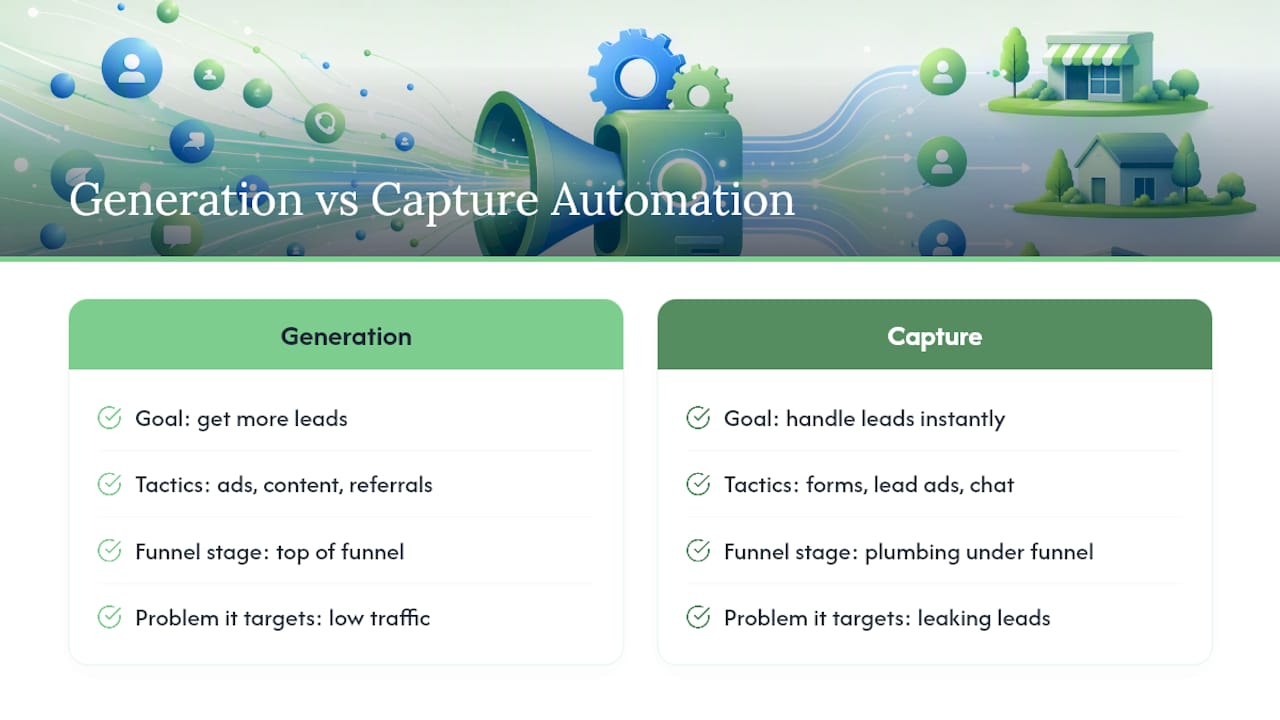
Lead generation is about getting more people to raise their hand. Lead capture automation is about what happens the second they do. Mix those up and you end up buying more traffic while the same leaky bucket loses half of it anyway.
Here’s the distinction that matters for a business owner: generation fills the top of the funnel with ads, content, and referrals. Capture automation is the plumbing underneath it. It grabs every inquiry the instant it arrives, whether it comes through a website form, a Facebook lead ad, or a chat widget, and does something with it immediately instead of waiting for a human to check email.
That “something” usually breaks down into four wins. Capture rate goes up because fewer leads fall through cracks like a form that emails an inbox nobody checks. Time-to-first-contact drops from hours or days to minutes. Data quality improves because entry mistakes from manual copy-paste disappear. And follow-up becomes consistent instead of dependent on whoever remembers to check the shared spreadsheet that afternoon.
Automated systems can qualify a lead by rules or a scoring model, enrich the record with extra details, and push it straight into a CRM, which keeps a business’s pipeline moving without a person babysitting every step, according to a breakdown of modern lead workflows.
So when should an Ontario plumber, a Toronto marketing consultant, or a Hamilton dental practice actually invest in this? Watch for three signs. First, you’re missing inquiries you only discover a week later, buried in a Facebook message or a form notification that landed in spam. Second, someone on your team is manually retyping the same lead information into a spreadsheet, a CRM, and an email thread. Third, your fastest competitor is calling prospects back before you’ve even opened their form submission. Any one of those is a signal that a fifteen-minute automation setup would pay for itself in the first week.
What Goes Into a Lead Capture Automation Stack
Think of lead capture automation as plumbing, not a single gadget. You have inlets (where leads come from), pipes (how the data moves), a filter (cleanup before it counts as a real lead), and a distribution system (who gets it and how fast).
The capture channels most SMBs need to cover:
- Website forms — contact pages, quote requests, and booking widgets, the most common entry point.
- Pop-ups and exit-intent widgets — useful for capturing visitors who are about to leave without converting.
- Chat widgets — live chat or AI-driven bots that qualify a visitor through a few quick questions before handing them to a human.
- Ad-native lead forms — the built-in forms inside Facebook and LinkedIn ads that never actually touch your website.
- Event and trade-show scans — QR codes or badge scans that need to land in your CRM the same day, not weeks later.
Each of those inlets needs a pipe. That’s where webhooks, APIs, and native form-to-CRM connectors come in. A webhook is essentially a notification that fires the instant something happens, like a form submission, and pushes that data wherever you tell it to go. Native connectors, the built-in integrations most CRMs and form builders now offer, handle the simple cases. When a native connector doesn’t exist for a specific tool, a webhook fills the gap. Practical implementation guides point to patterns like chat-to-CRM handoffs, LinkedIn Lead Gen Forms feeding directly into a CRM, and webhook-based captures as the backbone of most small-business setups, according to one lead capture automation guide.
Once the data lands somewhere, it needs cleaning. Validation catches malformed emails and fake phone numbers before they waste a sales rep’s time. Enrichment adds context, like company size or job title, pulled automatically from public data. Deduplication merges the same person if they filled out two different forms on two different days, which happens more often than most owners assume.
Only after cleanup should qualification and routing kick in. Scoring assigns a numeric value based on behavior and fit (did they request a quote, or just download a checklist?). Business rules then route based on that score, service area, or urgency, often with a service-level agreement attached, meaning a hot lead has to be contacted within, say, fifteen minutes or it escalates to a manager. Visitor-identification tools go a step further, spotting companies browsing your site anonymously and turning that traffic into a named account you can act on, a tactic detailed in this guide to automated lead generation.
Common Automation Patterns You Can Adopt Without Picking a Vendor
You don’t need to shop for software to understand which pattern fits your business. The patterns exist independent of any specific tool, and most small businesses only need one or two of them running well.
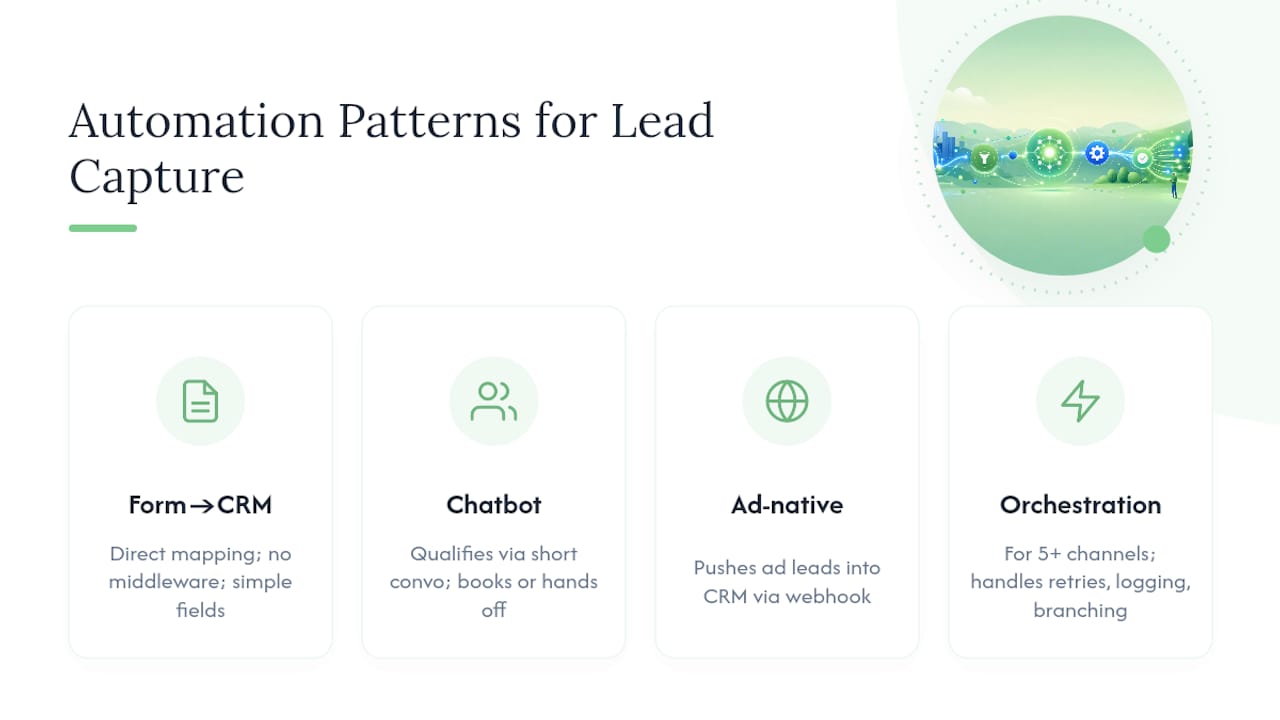
Form-to-CRM direct mapping is the simplest and cheapest pattern. A visitor fills out a website form, and a native integration (built into most CRMs and form builders now) pushes that submission straight into your CRM as a new contact. No middleware, no custom code. This works well for straightforward service businesses, a landscaping company or an accounting firm, where the form only asks for name, email, phone, and a brief description of the need. The trade-off is flexibility: if you want conditional logic (route landscaping leads to one person, tax leads to another) you’ll often need a slightly more sophisticated setup than the most basic direct mapping offers.
Chatbot-first capture suits businesses where visitors want an answer before they commit to filling out a full form. A chatbot that qualifies leads through a short back-and-forth, asking about budget, timeline, or service type, can lift qualified-lead volume and cut time-to-first-contact, according to a 2025 study from the University of Pennsylvania’s Wharton School cited in research on automated lead workflows. The chatbot then hands the conversation to a human or books a calendar slot directly, which matters for service businesses where speed genuinely closes deals.
Ad-native form flows solve a different problem: leads that come through Facebook or LinkedIn lead ads never touch your website at all. Without automation, someone has to manually export those leads from the ad platform, which can take days. With a webhook or native connector, the ad form data flows into your CRM the moment someone submits, gets auto-confirmed by email, and enters a nurture sequence before your team even logs in that morning.
Orchestration platforms versus lightweight scripts is the trade-off that decides how much you’ll spend on infrastructure. A lightweight webhook script works fine when you have two or three channels and simple routing rules. Once you’re juggling five-plus channels, multiple team members, and conditional logic based on service area or lead score, a dedicated automation or orchestration platform earns its cost by handling retries, error logging, and complex branching that a single webhook script wasn’t built for. More advanced setups now use AI agents that search multiple public sources, enrich and score contacts automatically, and deliver qualified prospects to a CRM on a schedule, functionally automating tasks that used to require a dedicated prospecting hire, per research on AI lead generation agents.
Pro Tip: Start with the pattern that matches your current lead volume, not the one that sounds most impressive. A five-location HVAC company juggling 200 leads a month needs orchestration. A solo bookkeeper getting eight inquiries a month needs a form-to-CRM connector and nothing else.
How to Implement Lead Capture Automation Step by Step
You don’t need a six-month IT project to get this running. Most small businesses can have a functional system live inside a single weekend, then layer on sophistication over the following weeks. Here’s the sequence that avoids wasted rebuild work.
-
Phase 0: Audit your current capture points (half a day). Before touching any tool, map every place a lead currently enters your business: website contact forms, Facebook ads, a booking widget, walk-ins logged on paper, referral emails. Write down what happens to each one right now. Most owners are surprised to find two or three “leaks,” a form that emails an address nobody checks, or a chat widget nobody ever connected to anything.
-
Phase 1: Build the minimum viable automation (two to four days). This is the weekend project. Connect your main website form directly to your CRM using a native integration or a simple webhook, so every submission creates a contact automatically. Set up an instant auto-confirmation email so the lead knows you received their message (this alone cuts perceived response time even before a human replies). Add basic routing: if you have more than one salesperson or service area, a simple rule (by postal code, by service type) sends the lead to the right inbox instead of a shared one. Connecting a website form to a CRM is often a same-day task once you know which fields map where.
-
Phase 2: Layer on enrichment and scheduling (one to two weeks). Add enrichment so incoming leads get extra context automatically, company size, source, or past interaction history, without a rep looking it up manually. Connect a calendar booking tool so qualified leads can grab a slot on your schedule without a phone tag. If you’re using a chatbot, this is the phase where you connect it to hand off warm leads directly to a human or a calendar link instead of leaving them in a chat transcript nobody reviews.
Want this running in your business without doing it yourself?
Book a Free Consultation → -
Phase 3: Add routing sophistication and deduplication (two to four weeks). This is where a scoring model comes in, ranking leads by fit and urgency so your best prospects get contacted first, not just fastest. Deduplication rules should run here too, matching leads by email and phone across every channel before they reach your sales team, since the same rules-based routing without dedupe first just means duplicate outreach to the same person, an approach data hygiene specialists recommend as a standard sequence. This phase also covers advanced integrations, tying your ad platforms, chatbot, and CRM together so nothing requires manual export ever again.
Realistically, expect Phase 0 and Phase 1 to take a matter of days if you’re comfortable with basic software settings, or about a week if you’re delegating it. Phases 2 and 3 combined typically run two to four weeks for a small business team working through it alongside regular operations, which lines up with the timeline Cloudsprout sees on its own lead-routing implementation projects for small business clients. Don’t skip straight to Phase 3 sophistication before Phase 1 is solid. A perfectly scored, perfectly routed lead is worthless if the underlying form-to-CRM connection drops half your submissions.
Testing Your Setup and Avoiding the Failures That Break It
Three numbers tell you whether your automation is actually working: capture rate (what percentage of visitors who show intent actually get logged as a lead), time-to-first-contact (how fast someone reaches out after submission), and conversion-to-qualified (what percentage of captured leads turn into something sales-ready). A fourth number, duplicate rate, tells you whether your plumbing has a leak even when the first three look fine.
Automation rarely works perfectly the first time you flip it on. Treat the first few weeks as a testing period, not a finished product. Run small A/B tests on your qualification questions (does asking for budget upfront scare people off, or does it filter out tire-kickers faster?) and on your routing rules (does a fifteen-minute response SLA actually beat a one-hour one in your close rate?). This test-and-refine approach is standard practice among teams running lead automation seriously, since workflows almost never perform optimally on the first configuration, according to deduplication and data hygiene research.
The most common failure modes are boring but costly. Duplicate leads pile up when the same person fills out a form twice, or submits through both a chat widget and a contact page, and nobody merged the records, wasting two reps’ time contacting the same prospect. Enrichment services occasionally go down or hit rate limits, so build a fallback that still routes the lead even if the enrichment step fails, rather than letting the whole pipeline stall. And webhook connections silently break more often than owners realize, a CRM changes its API, a form plugin updates, and no lead has fired through in three days before anyone notices. Set up a basic alert (even a simple “no new leads in 24 hours” check) so a broken pipe doesn’t go undetected for a week.
A Checklist and Starter Automations You Can Build This Week
If you want a place to start today, run through this six-step sequence before adding anything fancier.
- Map every current lead source and where its data currently lands.
- Connect each source to your CRM using a native integration or webhook.
- Confirm every new lead automatically with an instant email or text so they know you received it.
- Score leads with a basic rule set, even something as simple as “requested a quote” versus “downloaded a guide.”
- Route each scored lead to the right person or team based on service area or urgency.
- Test the whole flow with a dummy submission monthly to catch broken connections early.
Four starter automations deliver the fastest visible return relative to setup time:
- Autoresponder plus calendar booking: the instant a form submits, the lead gets a confirmation email with a direct link to book a call, cutting out the back-and-forth of scheduling by phone.
- Chatbot warm handoff: a chat widget asks two or three qualifying questions, then either books a slot or pings a team member directly with the transcript attached.
- Ad-lead auto-confirm and nurture: Facebook or LinkedIn lead ads feed into a short nurture email sequence automatically, since those leads often expect slower follow-up than a website form but still convert if you nurture the relationship with a couple of well-timed emails.
- Deduplication rule: a simple check that matches new leads against existing contacts by email and phone before creating a duplicate record.
Prioritize by impact versus effort rather than novelty. The autoresponder and dedupe rule take the least setup time and prevent the most damage. Chatbot handoffs and ad-lead nurture sequences take longer to configure but tend to move the needle most on actual conversion once they’re running.
What Cloudsprout Has Learned Building This for Small Businesses
Most lead capture problems aren’t a technology gap. They’re a follow-up gap dressed up as a technology problem. A business owner blames the website for “not generating leads” when the real issue is a form that’s been quietly emailing a Hotmail address nobody has opened since 2019.
The uncomfortable truth is that automating lead capture exposes how disorganized a business’s sales process already was. If nobody had a clear routing rule before automation, automation just makes the chaos happen faster. The fix isn’t a better tool. It’s deciding, on paper, who gets which lead and how fast, before wiring anything up.
Cloudsprout has run lead-routing projects for small businesses on a two-to-four-week build timeline, and the pattern holds every time: the businesses that get the most value aren’t the ones with the fanciest chatbot. They’re the ones willing to sit down for an hour and map their actual sales process before automating it. Lead capture automation projects are often built in-house by some providers, typically including an audit before work begins, so a business owner can see where leads are leaking before paying for a fix.
If you’re evaluating whether to build this yourself or hand it off, start with the audit, not the tool.
— Cristo
Get Your Free Audit Before You Automate Anything
Some agencies offer lead capture automation without locking clients into long-term contracts or outsourced teams, running projects in-house with transparent month-to-month pricing and starting with a free audit to identify lead losses.

That audit typically maps your existing capture points, checks your form-to-CRM connections, and flags the leaks (a form emailing the wrong inbox, a chatbot that never got connected to anything) within about a week of kickoff. From there, Cloudsprout’s CRM automation work for small businesses follows the same phased build most owners need: a working MVP inside days, full routing and deduplication inside two to four weeks. No lock-in contracts, no outsourced developers you’ll never meet, just the same team handling the audit and the build.
Check current plans and setup fees on the Cloudsprout pricing page, or start with the free lead capture and SEO audit to see exactly where your inquiries are slipping through.
Sources
The guides and research behind this playbook cover the technical patterns in more depth than a single article can. The monday.com breakdown of lead generation workflows explains how instant qualification and CRM syncing work together. Rework’s lead capture automation guide walks through channel-specific patterns like chat-to-CRM and webhook captures in more technical detail. For the data hygiene side, Matchlogic’s deduplication resource is worth reading before you build any routing logic. And Leadfeeder’s guide to automated lead generation covers visitor identification as a complementary tactic to form-based capture.
For hands-on implementation help, Cloudsprout’s own resources include a marketing automation checklist built for Canadian small businesses, a lead routing case study, and a breakdown of CRM automation outcomes for owner-operated teams.
- Lead Generation Automation: Workflows That Convert In 2026
- Lead contact deduplication and data hygiene advice
- Lead Capture Automation guide and patterns
- Automated Lead Generation: the Complete Guide
FAQ
How do I generate leads automatically?
You connect your capture points (forms, chat, ad-native forms) directly to a CRM using native integrations or webhooks, so every submission creates a record without manual entry. Layer on auto-confirmation emails, scoring, and routing rules to keep the process running without daily oversight, and add a dedupe rule so the same contact doesn’t get created twice.
What is the best lead capture tool for a small business?
There’s no single best tool. The right choice depends on your channel mix and volume: a simple form-to-CRM connector suits low-volume service businesses, while a chatbot or full orchestration platform fits teams juggling several channels and routing rules. Map your channels first, then choose the pattern, not the other way around.
Can ChatGPT do lead generation?
AI tools like chatbot-style qualifiers can handle the qualification step, asking a few questions and scoring a lead before handing it to a human, and research from Wharton found this can reduce time-to-first-contact when properly integrated to a CRM and calendar, according to research on lead generation workflows. It doesn’t replace the plumbing (forms, webhooks, CRM connections) that gets a lead into your system in the first place.
What does “automation lead” mean?
An “automation lead” typically refers to a contact captured, qualified, or routed through an automated system rather than manual entry, meaning it arrived, got scored, and reached the right person without someone copying data between tools by hand. It’s shorthand for a lead that moved through your automated capture pipeline end to end.
How much does Cloudsprout charge to automate lead capture?
Cloudsprout’s Business Automation service doesn’t have a published flat price since scope varies by business, but its monthly plans start at $300 CAD per month for the Sprout plan, with Grow and Scale tiers available for more complex routing needs. A free audit comes first, so you’ll know the scope before any contract is signed.
Recommended
Less reading. More growing.
We build the systems these articles describe. Websites, AI follow-up, reviews, automation. And run them for you.
Keep reading
One Page Voice Chart: 8 Brand Voice Examples Small Businesses Can Use
