Most Toronto small businesses pay between $3,500 and $12,000 for a professional website in 2026, with the full Canadian range stretching from roughly $2,500 to $75,000 or more depending on complexity. The one thing that decides where you land on that spectrum isn’t the designer you pick. It’s whether you and your vendor agree, in writing, on exactly what “done” means before anyone quotes a number.
TL;DR:
- The total website cost in Toronto depends mainly on scope and complexity, with small-business sites typically ranging from $3,500 to $12,000 for five to ten pages.
- Custom design, integrations, and e-commerce features significantly increase the price, especially with more pages, unique templates, or multi-location setups.
- Hidden costs include ongoing expenses like hosting, domain renewal, plugins, SaaS integrations, and maintenance, which can add hundreds of dollars annually.
- Comparing quotes requires evaluating detailed deliverables, such as page templates, SEO, content ownership, and support, rather than just bottom-line prices.
- Building with accessibility standards from the start is more cost-effective than retrofitting after launch, especially when involving WCAG compliance and assistive technology testing.
Table of Contents
- How Much Does Web Design Cost in Toronto?
- What Actually Drives the Price Up or Down?
- What Do Real Toronto Projects Actually Cost?
- What Hidden Costs Should You Budget For?
- How Do You Compare Quotes That Look Nothing Alike?
- Does Your Website Need to Meet Accessibility Standards?
- What Should “Fast” and “SEO-Ready” Actually Mean at Launch?
- Who Should Supply Your Content, and What Do You Need to Own?
- What Does a Staged, Transparent Pricing Model Look Like?
- What Toronto Buyers Get Wrong About Web Design Pricing
- Get a Fixed-Scope Quote Instead of Guessing
- Sources
- FAQ
How Much Does Web Design Cost in Toronto?
The real answer depends less on Toronto’s location and more on what you’re actually asking your site to do. A single-page site for a new consultant costs almost nothing compared to a full e-commerce build with inventory syncing and custom checkout logic.
Here’s how the budget bands generally break down for Canadian small businesses in 2026:
- One-page or landing site: $800 to $2,500. Turnaround is usually one to two weeks. Good for a launch announcement, a single service, or a placeholder while you build something bigger.
- Small-business site (5 to 10 pages): $3,500 to $12,000, matching the typical Toronto range. Timeline runs three to six weeks. This covers most trades, clinics, restaurants, and professional-service firms.
- Mid-market or multi-location site: $10,000 to $30,000, which lines up with the initial build costs BDC sees among many of its small-business clients. Expect six to ten weeks, plus custom design work and integrations like booking or CRM syncing.
- E-commerce store: Costs vary widely based on features, generally starting in the mid-thousands and up. Ten to fourteen weeks is common for anything beyond a basic Shopify setup.
- Custom platform or portal: $25,000 to $75,000+, with occasional outliers reaching $60,000 to $100,000 for heavily customized systems. Timelines stretch three to six months.
Toronto agencies tend to price slightly above the national average because overhead and talent costs run higher than in smaller Ontario cities or Atlantic Canada. That premium usually buys faster turnaround and deeper local market knowledge, not necessarily a better final product. A freelancer in Kitchener or Ottawa can build the same small-business site for less, though you’re trading local accountability and often SEO context for the savings.
What Actually Drives the Price Up or Down?
Scope is the single biggest lever, but it’s not the only one. The choices you make on design, integrations, and who does the work all stack on top of each other.
The main cost drivers, roughly in order of impact:
- Scope and page count: More unique templates mean more design and development hours. A ten-page site with three distinct layouts costs less than a ten-page site where every page looks different.
- Custom design vs. template: A themed WordPress build using WordPress or a similar CMS runs cheaper than a fully custom design system built from scratch.
- E-commerce complexity: Basic product catalogs cost far less than stores needing real-time inventory sync, subscription billing, or multi-currency support.
- Integrations and APIs: Booking systems, CRM connections, and payment gateways each add development and testing time.
- Accessibility work: Meeting recognized standards from the start costs less than retrofitting a site later.
- Performance optimization: Compressing images, lazy-loading assets, and cleaning up code all take deliberate hours, not just default settings.
Team structure matters just as much as feature lists. A senior developer working fixed-price on a well-scoped project usually delivers more predictable costs than an hourly junior freelancer learning as they go. Agencies that do everything in-house, without outsourcing pieces to subcontractors, tend to avoid the price creep that happens when three different vendors each add their own margin.
A multilingual site with a custom checkout can easily run three to four times the cost of a template-based English-only brochure site, purely because of translation workflows, currency handling, and extra QA cycles.
Pro Tip: Ask every vendor to quote the exact same feature list on paper before you compare prices. A $4,000 quote and an $8,000 quote for “a website” mean nothing if one excludes mobile testing and the other includes six months of support.
What Do Real Toronto Projects Actually Cost?
Numbers on a chart feel abstract until you match them to a business you recognize. Here’s how the ranges play out for common Ontario buyer types.
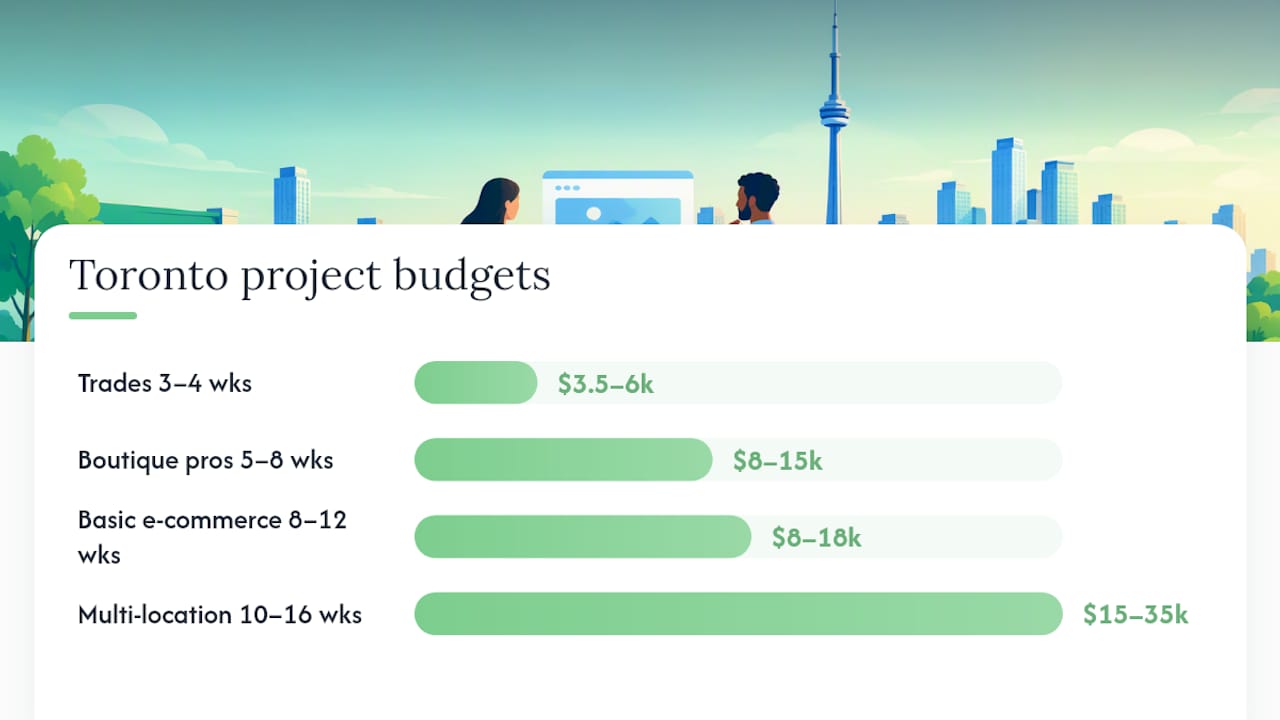
Trades business (plumber, electrician, HVAC). Budget: $3,500 to $6,000. Timeline: three to four weeks. Deliverables typically include five to seven pages, a quote request form, service-area pages, and mobile-first design since most trade searches happen on a phone. Best for owner-operators who need to look credible fast and start capturing leads.
Boutique professional-services brand (law firm, accounting, design studio). Budget: $8,000 to $15,000. Timeline: five to eight weeks. This tier usually includes custom photography direction, a content strategy pass, and a blog structure built for long-term SEO. Best for businesses competing on trust and reputation rather than price.
Basic e-commerce store. Budget: $8,000 to $18,000. Timeline: eight to twelve weeks. Includes product catalog setup, payment processing, shipping rules, and basic email automation. Best for retailers moving from marketplace-only sales to owning their customer data.
Multi-location or franchise site. Budget: $15,000 to $35,000. Timeline: ten to sixteen weeks. Includes location page templates, centralized CMS management, and often a staged rollout by region. Best for businesses expanding past a single storefront.
Rush timelines add 15% to 30% to most quotes because they force a vendor to reprioritize other clients. Staged launches, where you go live with core pages first and add features in phases, help spread cost over a few months instead of demanding it all upfront. Most Toronto agencies structure payment in milestones, commonly a deposit, a design-approval payment, and a final payment at launch, rather than one lump sum.
What Hidden Costs Should You Budget For?
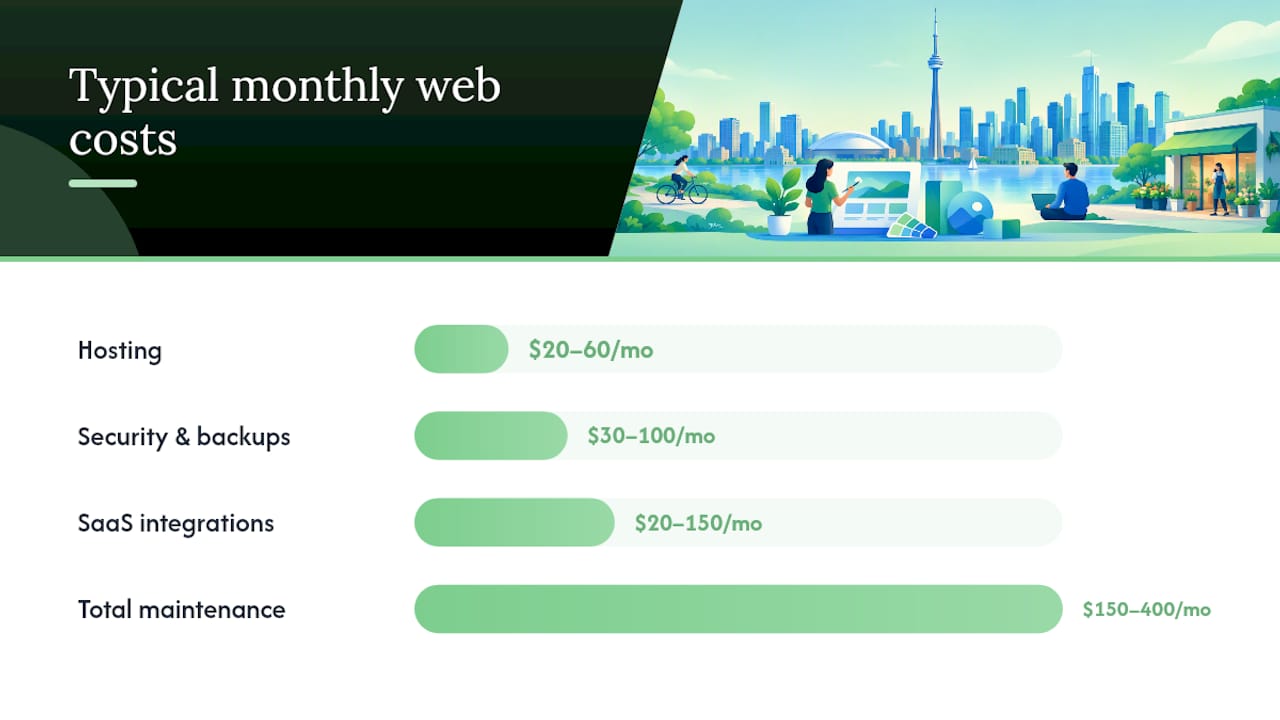
The upfront build price is rarely the full story. A site that costs $6,000 to build can easily cost $150 to $400 a month to keep running properly, and skipping that maintenance is how sites break within a year.
Recurring costs to plan for:
- Hosting: $20 to $60 a month for most small-business sites, more for e-commerce with high traffic.
- Domain renewal: $15 to $25 a year, easy to forget until it lapses and takes your email down with it.
- SSL certificate: Often bundled free with modern hosting, but confirm it explicitly.
- Plugin or theme licenses: $50 to $300 a year depending on how many premium tools your site relies on.
- SaaS integrations: Booking tools, email marketing platforms, and CRM connections each carry their own monthly fee, typically $20 to $150 each.
- Security monitoring and backups: $30 to $100 a month if not included in your hosting package.
One-off extras that catch buyers off guard include professional photography ($500 to $2,500), translation for a bilingual site ($0.10 to $0.25 per word), product data import for large catalogs, and complex third-party integrations that weren’t scoped in the original quote.
A quote that excludes content, SEO structure, accessibility, or maintenance isn’t actually cheaper. It’s incomplete, and you’ll pay for the missing pieces later, usually at a worse rate because you’re now negotiating from a live, revenue-dependent site instead of a blank slate.
How Do You Compare Quotes That Look Nothing Alike?
Two proposals with wildly different prices are often quoting two different projects wearing the same label. The fix is comparing deliverables line by line, not the bottom-line number.
Work through this checklist with every vendor before signing anything:
Want this running in your business without doing it yourself?
Book a Free Consultation →- How many unique page templates are included, not just total page count.
- Who writes and supplies the copy, and is revision included or billed separately.
- Who provides or shoots photography, and what happens if you don’t have assets ready.
- Is mobile and accessibility testing included, or treated as a paid add-on.
- Is SEO migration and URL redirection covered if you’re replacing an existing site.
- Is analytics and conversion tracking set up at launch, or left for you to configure.
- How many revision rounds are included before extra rounds cost more.
- Who owns the domain, hosting account, and code after the project ends.
- What launch QA process is used across browsers and devices.
- What post-launch support period is included, and what it costs after that window closes.
Ask each vendor directly: “What’s excluded from this price?” A hesitant answer is more revealing than the quote itself. The selection guidance from BDC recommends exactly this kind of deliverables-first comparison over chasing the lowest headline number.
Pro Tip: Send every finalist the exact same one-page brief describing your pages, features, and content status. Fixed-scope proposals against identical requirements are the only fair way to compare two prices.
Does Your Website Need to Meet Accessibility Standards?
Accessibility obligations in Canada depend on your organization type and jurisdiction, not on a single blanket rule. Federally regulated private-sector organizations fall under the Accessible Canada Act framework, while Ontario businesses need to check their own provincial obligations rather than assume compliance is automatic or optional.
Regardless of which rules technically apply to your business, building with accessibility in mind from day one is far cheaper than fixing it after launch. Tasks that affect your quote:
- Accessibility audit: Reviewing color contrast, keyboard navigation, and screen-reader compatibility against WCAG standards.
- Remediation work: Fixing issues the audit finds, which costs far less when caught during design than after a live launch.
- Testing across assistive technology: Confirming the site actually works with screen readers and voice navigation, not just that code passes automated checks.
- Documentation: A record of what standard you tested against, useful if a complaint or audit ever comes up.
When you write your contract, specify the testing standard (WCAG 2.1 AA is the common baseline), define acceptance criteria in plain language, and set a remediation window if issues surface after launch. Vague language like “accessibility best practices” gives you nothing to hold a vendor to.
What Should “Fast” and “SEO-Ready” Actually Mean at Launch?
A beautiful site that loads slowly on a phone will quietly bleed leads before you ever notice a problem. Google measures this with three Core Web Vitals: Largest Contentful Paint (LCP) should be under 2.5 seconds, Interaction to Next Paint (INP) under 200 milliseconds, and Cumulative Layout Shift (CLS) under 0.1, all measured at the 75th percentile on both mobile and desktop.
Your launch checklist should include:
- Indexability confirmed: No accidental “noindex” tags blocking search engines.
- 301 redirects mapped: Every old URL points somewhere useful if you’re replacing an existing site.
- XML sitemap submitted: So Google can find every page without hunting.
- Titles, headings, and schema markup set: Basic on-page structure, not full keyword strategy.
- Analytics installed and verified: You should be able to see traffic the day you launch, not weeks later.
Treat these as one-time launch fundamentals, separate from ongoing SEO work like content production and link building, which is an entirely different monthly investment. A vendor who bundles “SEO included” into your build price should tell you exactly which of these items that phrase covers.
Who Should Supply Your Content, and What Do You Need to Own?
Content delays are the single most common reason launches slip past their deadline, and they’re entirely avoidable with a five-minute conversation upfront. Before signing anything, assign responsibility for every content type your site needs:
- Service or product descriptions
- Staff bios and team photos
- Professional photography or video
- Product data for e-commerce catalogs
- Translations for bilingual sites
- Legal copy like privacy policies and terms of service
Just as important is knowing what you’ll own once the project wraps. Confirm access to your domain registrar, hosting account, CMS admin login, code or design source files, and analytics property before you sign, and get it in writing what happens to that access if the vendor relationship ends. A contract that doesn’t spell out handover and export rights leaves you stuck if you ever need to switch developers.
What Does a Staged, Transparent Pricing Model Look Like?
Some Ontario agencies now price web work in tiers rather than one-off custom quotes, which makes budgeting far more predictable for a small business owner comparing options.
Some agencies structure their plans in tiers from a few hundred to over a thousand dollars a month, each with its own one-time setup fee covering the initial build work before ongoing monthly costs.
The model behind it matters as much as the numbers. Some agencies handle services mostly in-house without outsourcing and may offer month-to-month contracts without long-term lock-in, allowing clients flexibility with recurring costs.
If you’re building your own buying process regardless of who you hire, follow this order: define the outcome you need the site to produce, request fixed-scope proposals from a short list of vendors using identical requirements, and confirm ownership and support terms before you sign. BDC’s own advice echoes this: ask what the site needs to help customers do, not how many pages you’re getting for the money.
What Toronto Buyers Get Wrong About Web Design Pricing
The biggest mistake isn’t overpaying, as explained in why cheap website development fails. It’s accepting a quote that looks cheap because it quietly excludes the things that make a site actually work, then discovering the gaps three months after launch when the site can’t do what the business needed.
Three patterns show up again and again. First, lowball quotes that exclude content writing, SEO structure, or mobile testing, then bill for them separately once you’re already committed. Second, vague deliverables where “custom design” means a slightly recolored template, not the layout you actually described in your kickoff call. Third, missing content, where a business signs a contract without having photos, bios, or product data ready, and the launch date slides for weeks waiting on assets nobody assigned.
Keeping cost down without gutting lead generation comes down to sequencing, not cutting. Launch with a tighter page count and add sections later. Skip the custom illustration work in phase one. But never skip mobile performance or a working contact form. Those two things generate the leads that pay for everything else you’ll add down the line, including reviews and local search visibility.
— Cristo
Get a Fixed-Scope Quote Instead of Guessing
Cloudsprout is the option for Toronto and Ontario business owners who want the deliverables checklist above handled by one in-house team instead of three subcontractors passing the file around. Everything, from the initial build to ongoing SEO and maintenance, stays with the same people, priced month-to-month with no long-term contract locking you in.

Every new client starts with a free digital audit and trial, so you see exactly what your current site is missing before committing to a build. If you’re comparing quotes right now, request a fixed-scope proposal against the same checklist covered above, and see how Cloudsprout’s pricing tiers stack up against what you’ve been quoted elsewhere. You can also browse the full website development service details to see what’s included at each stage before you talk to anyone.
Sources
- Accessible Canada guidance for digital technologies
- How Much Does it Cost to Develop a Website in Toronto (2026)?
FAQ
Is Web Design Still Worth It in 2026?
Yes. A working website remains the one digital asset a small business fully owns and controls, unlike a social media profile that can change its rules overnight. For most Toronto businesses, a well-scoped site in the $3,500 to $12,000 range pays for itself through lead generation within the first year.
How Much Should a Full Website Design Cost?
It depends entirely on scope, but most Toronto small-business sites land between $3,500 and $12,000, with the broader Canadian range running from $2,500 for a simple site up to $75,000 or more for custom platforms. Get fixed-scope quotes against an identical feature list before comparing numbers.
How Much Do Web Designers Usually Charge?
Freelance web designers in Canada typically charge hourly rates or flat project fees, while agencies more often quote fixed project prices tied to defined deliverables. Cloudsprout structures pricing as monthly plans starting at $300 a month for the Sprout tier, with a one-time setup fee, so costs stay predictable instead of scaling unpredictably by the hour.
How Much Does It Cost to Get a Website Made in Canada?
Canada-wide, costs range from roughly $2,500 for a basic one-page site to $75,000 or more for complex custom platforms, with many small-business builds falling between $10,000 and $30,000. Toronto pricing tends to sit at or slightly above the national average due to higher local overhead and talent costs.
Recommended
Less reading. More growing.
We build the systems these articles describe. Websites, AI follow-up, reviews, automation. And run them for you.
Keep reading