

You search for your own business and the listing is gone, or it’s there but you can’t edit it. Calls dry up the same week. Take a breath: most suspensions come from a fixable mismatch, such as a name, an address or a category that doesn’t match how Google reads your business. The way back is a careful appeal with the right evidence, submitted once, from the right Google account.
This guide is written for Ontario and Canadian owner-operators: plumbers, restaurants, accountants, non-profits and online shops with a local footprint. It covers what Google says, what to gather, how to file, what to do while you wait, and what to check once you’re back.
TL;DR
- Don’t appeal in a panic. Google’s own guidance says to make sure the profile follows all of its guidelines before you submit.
- The usual culprits are address problems (P.O. boxes, virtual offices, shared spaces), a business name stuffed with keywords or a city, and details that don’t match the real world.
- Gather proof of the business: registration, licence, tax certificate or a utility bill in the business’s name, plus photos of your signage.
- File one appeal from the correct Google account. Google says reviews can take up to 5 business days, and that sending several appeals for the same issue won’t help.
- After reinstatement, confirm the profile is verified and that nothing was changed without you knowing.
Table of Contents
- What does a suspended Google Business Profile actually mean?
- Why would Google suspend a real business?
- What should you do in the first hour?
- What proof should an Ontario business have ready?
- How do I appeal a suspended Google Business Profile?
- What if the appeal is denied?
- How do you keep customers while you wait?
- What should you check after you’re reinstated?
- How to avoid a suspension in the first place
- Perspective
- How we can help
- FAQ
- Sources
What does a suspended Google Business Profile actually mean?
A suspension means Google has decided your profile breaks its rules, so it limits or removes the listing. Google says it may suspend or disable profiles that don’t follow its guidelines, and that if you believe the profile should be reinstated, you can appeal.
In practice owners describe two situations:
- You can still see the listing, but you can’t manage it. Edits, posts and replies to reviews are blocked. Some people call this a soft suspension.
- The listing no longer shows in Google Search or Maps. Customers who search your name find nothing, or find a competitor. This is the one that hurts, and it’s the one that usually needs proof that the business is real.
Before you do anything else, sign in to the Google account that manages the profile and look at the notice. The email or the banner in your profile tells you the date of the decision, the reason and the policy involved. Screenshot it. That one screenshot will shape everything you write in the appeal.
Why would Google suspend a real business?
Because an automated system sees a pattern that looks like spam, and it can’t tell that you’re the plumber down the road. Here are the patterns that trigger it most often.
Your address doesn’t look like a real storefront or workplace
Address problems are among the most common causes. According to Search Engine Land, P.O. boxes, UPS Store boxes, virtual offices and co-working addresses aren’t allowed unless the business rents a dedicated office with permanent signage, staffed during business hours, where customers can be seen.
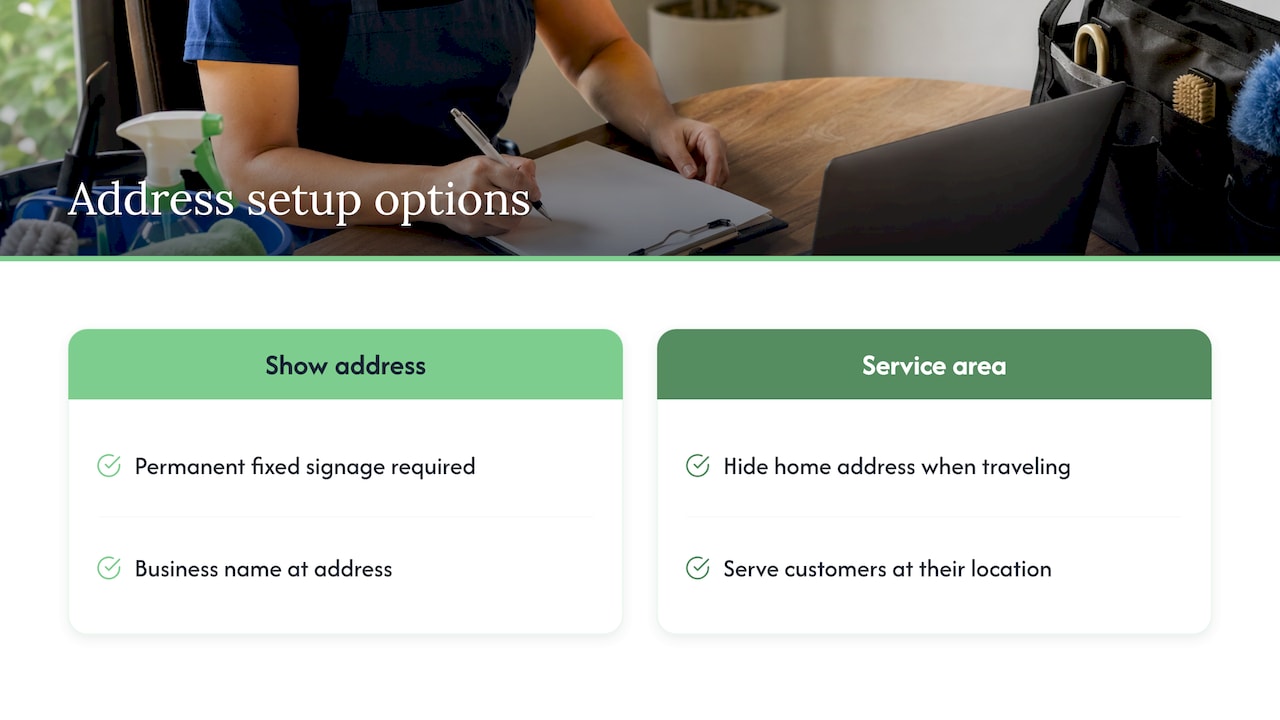
This catches a lot of Ontario home-based trades and consultants. If you work from your house and travel to customers, you usually don’t want to show your address at all. Google’s representation guidelines separate businesses that show an address from those that serve customers at their location, and the service-area setup is built for the second group. Businesses that show an address are expected to keep permanent fixed signage with the business name at that address.
Your business name carries extras
A profile named “Smith Plumbing” is safe. “Smith Plumbing | Best Emergency Plumber Mississauga 24/7” is not. Google asks that your name reflect your real-world name, as used on your storefront, website and stationery. Search Engine Land also notes that adding city names or keywords to the business name risks suspension. Put the city in your service area and your description instead.
Your details don’t match the real world
If your profile says one thing and your website, signage and invoices say another, Google may decide it can’t verify you. A recent move, a rebrand, a new phone number or a changed category can all trigger a review. If you’ve just rebranded, our rebranding checklist covers the places a name change has to be updated so they all say the same thing.
Something else was changed in the profile
Sometimes the cause is edits by a staff member, a former marketing helper or a third-party app. Other times the profile is a duplicate of one that already exists. If you suspect that, read how to find and fix a duplicate Google business listing before you appeal, because appealing while a duplicate is live can muddy the picture.
Sometimes it’s the account, not the business
Google also notes that account restrictions can suspend every profile you manage and block you from creating or claiming others. If you manage several locations, check whether all of them are affected or only one. That tells you whether to look at one address or at the account itself.
What should you do in the first hour?
Slow down. The most common mistake is changing things in a hurry, then appealing before the profile is clean. Work through this order:
- Save the notice. Screenshot the reason, the date and the policy link.
- Read the named policy. Open Google’s link and compare it honestly with your profile.
- Fix only what is clearly wrong. If your name has a keyword added, remove it. If a P.O. box is listed, replace it with your real address or switch to a service area. Don’t rewrite everything.
- Check the account. Make sure you’re signed in to the Google account that actually manages the profile. A wrong account is one reason people think nothing is happening.
- Collect evidence (next section) before you click submit.
Here’s a visual idea you can use to explain this to your team or film as a short video: stand outside your business and take a photo from across the street that shows the sign, the door and the street number in one frame. If you can’t take that photo, Google may not be able to confirm you either, and that’s worth knowing before you appeal.
What proof should an Ontario business have ready?
Google lists the kinds of documents that count. Its help page names official business registration, a business licence, tax certificates and utility bills for the business, such as electricity, phone, water or internet. For an Ontario business, here’s how that tends to map:
| What Google asks for | What you might have | Tip |
|---|---|---|
| Business registration | Ontario business name registration or incorporation documents | Make sure the name matches your profile exactly |
| Business licence | Municipal licence, trade licence or professional licence | Show the licence number and the address if it appears |
| Tax certificate | CRA business number or HST registration paperwork | Hide anything personal that isn’t needed |
| Utility bill | Hydro, internet or phone bill in the business’s name | The address should match the one on the profile |
Add photos that Google’s own guidance on signage would want to see: your storefront or vehicle with your name, the interior, and the street number. A short, factual explanation of how customers reach you (walk-in, appointments, or you travelling to them) helps too.
A good rule: every document should show the same business name and address as your profile. If they differ because you moved or renamed, say so in one sentence and include proof of the change.
How do I appeal a suspended Google Business Profile?
Google’s process has six steps in the official appeals tool:
- Open the Google Business Profile appeals tool.
- Confirm the Google account tied to the profile, or switch accounts.
- Select the suspended Business Profile and continue.
- Select the decision you want to appeal. The tool shows the date, the reason, a link to the policy and whether it can be appealed.
- Optionally, add supporting evidence and an explanation. You can attach multiple files.
- Check the confirmation box and submit.
Step 5 is optional in the tool, but we’d treat it as required. An appeal with no evidence and no explanation gives the reviewer nothing to work with.
What to write in the explanation
Keep it short and plain. Four or five sentences is plenty:
- Who you are and what you do (“We’re a family-run HVAC company serving Barrie and Simcoe County.”)
- The one thing you changed, if anything (“We removed the city from our business name to match our signage.”)
- How the attached files prove the business is real
- A polite request to review the decision
Avoid long stories, anger or pleas about lost revenue. A reviewer is looking for facts that match the policy.
How long does it take?
Google’s appeal help page says reviews and decisions can take up to 5 business days, and it tells businesses not to submit multiple appeals for the same issue before getting a decision. Real life can be slower. Search Engine Journal reported that during a surge of suspensions in early 2025, resolution times grew from about five days to nearly five weeks, and that experts advised pausing changes to listings while waiting.
So plan for a range. Expect an answer within a week, but have a plan for the business if it takes a month.
How do I check where my appeal stands?
Open the appeals tool again. Google says the status will show one of these: Submitted, Approved, Not Approved, Can’t be appealed, or Eligible for appeal. Check it every few days, not every few hours, and don’t file again while it says Submitted.
What if the appeal is denied?
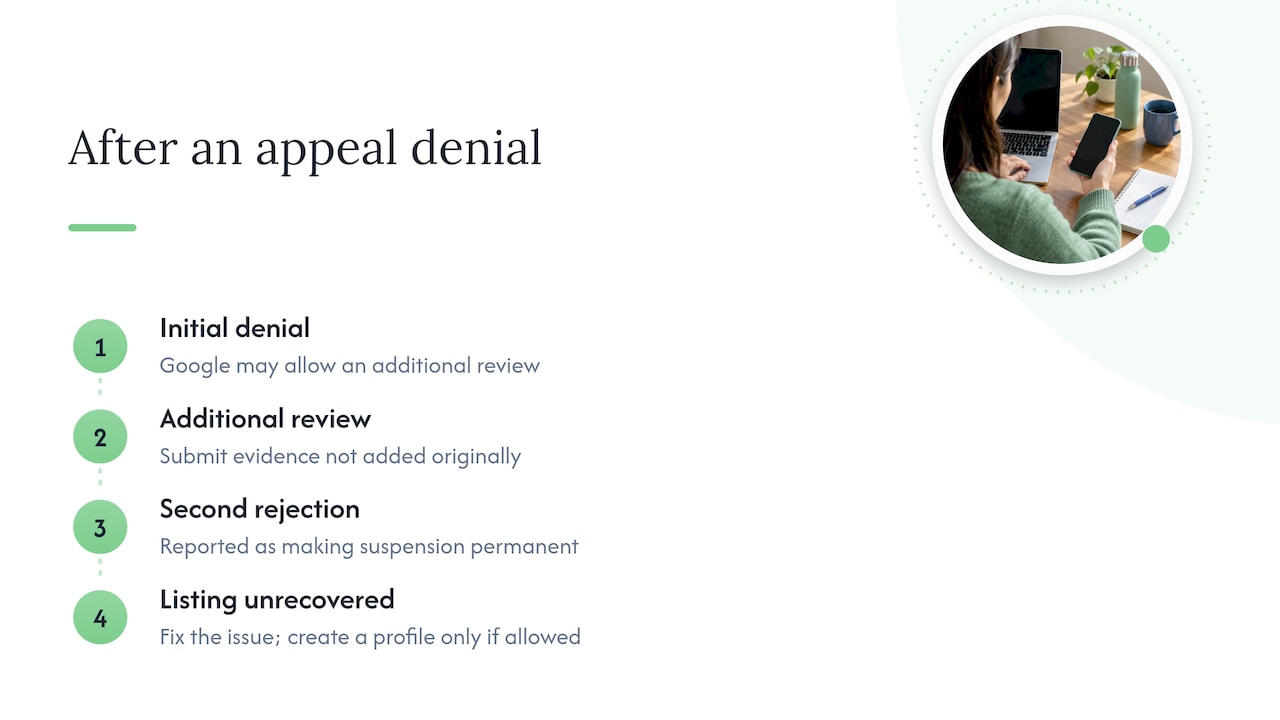
Don’t resubmit the same thing. Google says that if a reinstatement request is denied, it may allow an additional review where you can provide evidence that wasn’t added with your original appeal. So the second try only makes sense if you have something new: a clearer photo of the sign, a utility bill that shows the right address, or registration papers you skipped the first time.
Be prepared for how frustrating this can feel. Daily Hive reported on a B.C. small business owner who found the process vague, with no phone number or email to reach and Google’s offices closed to the public. The same report says a second rejection makes the suspension permanent. That’s why we tell owners to make the first appeal their best one, and to treat any additional review as a chance to add evidence rather than repeat yourself.
If you end up unable to recover the listing, the business is not lost. You can fix the underlying issue, such as a compliant name and a genuine address, and then create a fresh profile only if Google’s guidance allows it for your situation. Meanwhile, keep customers finding you through your website, your other directories and your social accounts.
How do you keep customers while you wait?
A suspended profile is a good reminder not to depend on a single listing. While the appeal is in review:
- Make your website carry more weight. Put your phone number, address or service area, hours and services on the home page and a dedicated contact page in plain text.
- Tidy your listings elsewhere. Consistent business details across directories help customers and search engines trust you. Our guide on why your business isn’t showing up on Google Maps explains how local citations fit in.
- Add structured data. Local business markup tells search engines your name, address and hours in a machine-readable way. We explain how to add it with no coding in our LocalBusiness schema guide.
- Tell customers directly. Send a short note to your email list or post on social media with your phone number and booking link.
- Avoid big edits to the profile. If the listing is still partly editable, resist the urge to change categories, hours and names all at once.
A simple example: an Ontario landscaper whose listing vanished in May could post a “Book your spring clean-up” page on the website, send the booking link to past customers, and keep taking calls while the appeal is pending. That isn’t a replacement for the listing, but it keeps the phone from going quiet.
What should you check after you’re reinstated?
Getting the listing back is the start, not the finish. Run through this list the same day:
- Is it verified? If a reinstated profile needs verification again, it may not show in normal results until that’s done. Complete any verification prompt.
- Do the name, address and main category match what you sent in the appeal? Fix anything that drifted.
- Did anything change that you didn’t do? Revert unintended edits.
- Who has access? Remove managers you don’t recognize, and disconnect any apps or tools you no longer use.
- Does the profile match the real world? Name on the sign, name on the website, name on invoices, all the same.
- Have you saved your documents? Keep a folder with your registration, licence and utility bill so the next request takes ten minutes.
Then put a basic maintenance routine in place: check the profile monthly, answer reviews, and update hours before holidays. Our guide to Google Business Profile optimization for Canadian small businesses walks through the settings that keep a profile healthy.
How to avoid a suspension in the first place
Most of what gets a profile flagged is avoidable with habits that cost nothing:
- Use your real business name, exactly as it appears on your sign.
- Show an address only if customers can really visit you there. Otherwise use a service area.
- Pick the fewest categories that describe your core business, which is what Google’s guidelines recommend.
- Make any change to name, address or phone number once, then update your website and other listings the same day.
- Limit who can edit the profile, and use a business email you control, not a freelancer’s personal account.
- Avoid more than one profile for the same location.
For a wider look at what supports local visibility, our owner-operated business SEO checklist puts the basics in one list.
Perspective
A suspension feels personal, but it’s usually a data problem. When we look at a struggling local listing, the story is often the same: a name that drifted from the sign, an address that doesn’t match the website, and nobody on the team who owns the profile.
That’s why we like to handle search, website and listings under one roof. When the same team who builds your site also manages your local presence, your business details say the same thing everywhere, and there’s one person to call when something breaks. We do all of our work in-house, with no outsourcing, so the people who fix the problem are the people who know your account.
Our advice: treat your Google profile like your front door. Keep it consistent, keep your paperwork handy, and don’t rely on it as your only source of calls.
Cristo
How we can help
If your profile is suspended, or you’d like to make sure it never is, we can audit your listing, website and business details so they line up, then keep them that way. Our plans are month-to-month with no lock-in contract: Sprout is $300 CAD per month, Grow is $600 CAD per month and Scale is $1,200 CAD per month, each with a one-off setup fee shown on our pricing page. You can also see how our SEO and local search services fit a small business like yours.
We start with a free trial that includes a full digital audit, so you’ll know exactly what’s wrong before you commit to anything. Start at cloudsprout.ca.
FAQ
How do I get my Google Business Profile unsuspended?
First make sure the profile follows Google’s guidelines, then file one appeal in the appeals tool from the correct Google account. Add evidence such as registration, a licence, a tax certificate or a utility bill, plus a short explanation. Then wait for the decision rather than filing again.
Can I reinstate a profile if Google says the business doesn’t exist?
That message usually points to missing proof that you operate at the address. Gather documents with the same name and address as the profile, plus photos of your signage or vehicle, and include them in your appeal. If the appeal is denied, Google may allow an additional review where you can add evidence you didn’t provide the first time.
How long does a Google Business Profile appeal take?
Google says reviews and decisions can take up to 5 business days. During busy periods, reports show it can stretch to several weeks. Avoid submitting repeat appeals for the same issue while you wait.
Why did my profile get suspended suddenly?
Sudden suspensions often follow an edit, such as a changed name, address or category, or a pattern Google’s systems read as spam. Common causes include a virtual office or P.O. box address, keywords or a city added to the business name, and details that don’t match your real-world signage. Check the notice for the named policy and start there.
What should I do if I work from home?
If customers don’t visit you at home, don’t show your home address. Set up a service area instead so Google knows where you travel to work. Keep the name on your profile the same as on your invoices, truck and website.
Sources
- Fix suspended or disabled profiles, Google Business Profile Help
- Appeal Business Profile content and profile restrictions, Google Business Profile Help
- Guidelines for representing your business on Google
- 5 reasons your Google Business Profile might get suspended, Search Engine Land
- Google Business Profile suspensions rise, but appeals are delayed, Search Engine Journal
- B.C. small business owner outraged after Google disables profile, Daily Hive