

You verify your Google Business Profile by signing in to the Google Account that manages it, finding your business on Google Search, selecting “Get verified” and finishing whichever method Google offers you. That might be a phone call or text, an email, a video recording, a live video call or a postcard. You don’t get to pick the method. Google chooses it based on your business, and the review can take up to five business days.
Until you finish, your listing stays mostly invisible. Customers searching “plumber near me” or “best pizza in Hamilton” won’t see you the way they see verified competitors. Here is how to get through it the first time, what to film if Google asks for a video, and why the request sometimes comes back months later.
TL;DR
- Sign in, find your business on Google Search, select “Get verified” and follow the method Google shows. You can’t swap it for another one.
- Reviews take up to 5 business days. Some profiles are verified instantly, and postcard codes usually arrive within 14 days.
- Video verification must be at least 30 seconds, unedited, and recorded live on a mobile device. It has to show your location, proof the business exists and proof you run it.
- Creating and verifying a profile costs nothing.
- Changing your business name or moving address can trigger a new verification, so plan edits carefully.
Table of Contents
- What does verification actually do for your business?
- Is Google Business Profile verification free?
- How to verify your Google Business Profile, step by step
- Which verification method will Google give you?
- How to pass Google’s video verification
- What if your verification is rejected or delayed?
- Why does Google keep asking me to verify again?
- Common mistakes that slow people down
- After you’re verified: make the profile work
- Our perspective
- Want help getting found after you’re verified?
- FAQ
- Sources
What does verification actually do for your business?
Verification is Google’s way of confirming that you really manage or represent the business you’re claiming. It protects customers from fake listings and protects you from someone else taking over your profile.
The practical payoff is control. Once verified, you can update your hours, add photos, answer questions and respond to reviews. If you run a trade, a restaurant, a clinic or a shop, that profile is often the first thing a customer sees, before your website.
Think of it like a business licence for the map. Without it, you exist, but you can’t speak for yourself.
Is Google Business Profile verification free?
Yes. Google’s Canadian Business Profile page confirms that listing your business on Google is free, and you can manage it from Search and Maps at no cost. Be cautious of anyone who emails or calls offering to “verify your listing” for a fee. You can do it yourself, with Google, at no charge.
How to verify your Google Business Profile, step by step
Google’s own steps are short. Here they are with the practical detail an owner needs.
- Sign in with the right Google Account. Use the account that is, or will be, the owner of the profile. If you use a personal Gmail today, consider whether a business-controlled account is safer for the long term, so a staff departure doesn’t lock you out.
- Find your business. Search for your business name on Google Search. If you already created a profile, it appears with management options. If not, you can add it from there.
- Select “Get verified.” Google then shows the methods available for your profile.
- Complete the method offered. Follow the on-screen prompts for phone or text, email, video, live video call or postcard.
- Wait for the review. According to Google’s help page, Google reviews the information you submit and this takes up to 5 business days, and occasionally longer.
- Confirm you’re verified. Once approved, your profile shows as verified and you can manage it fully.
A small Ontario example: a mobile dog groomer in Barrie with no storefront signs in, finds the business, taps “Get verified” and is asked for a video. The next section is for that person.
Which verification method will Google give you?
Google decides automatically, and you can’t change it. The options depend on factors such as your business type, the public information about you, your region and your business hours. Sometimes more than one method is required.
That means two neighbouring businesses can see different options. A shop on a busy street might get a quick phone or email option. A home-based consultant might be sent to video. Don’t assume something is wrong with your account because a friend got an easier route.
| Method | What you do | Typical timing from Google |
|---|---|---|
| Phone or text | Choose the listed number and receive a code | Often quick, subject to review |
| Use the email Google offers and enter the code | Often quick, subject to review | |
| Video recording | Record and upload a live video from your phone | Review up to 5 business days |
| Live video call | Join a call with Google when offered | Offered only in some cases |
| Postcard | Receive a code by mail and enter it | Most codes arrive within 14 days; they expire after 30 days |
The postcard timing comes from Google’s verification help. Because mail can be slow, type your address exactly as it appears on your mail, including unit number and postal code, before you request it.
Can verification be instant?
Sometimes. Google notes that in some cases a profile is verified instantly, for example when your website is already verified with Google Search Console or when bulk verification is used. If you have a website, having Search Console set up first is a sensible move for other reasons too, since it shows you how people find your site.
How to pass Google’s video verification
Video is the method that trips up the most owners, especially service businesses working from home or from a truck. The rules come from Google’s video verification page.
The technical rules
Your video must be at least 30 seconds long, unedited, unique and complete with no breaks. It has to be recorded and uploaded live from a mobile device through your Business Profile. Pre-recorded clips from your camera roll aren’t allowed.
So plan a walk-through before you press record. Fix your battery, clear your phone storage and make sure you have signal or Wi-Fi at the location.
If you have a storefront or hybrid business
Google asks you to show three things in one continuous take:
- Your location. Street signs, building numbers or nearby businesses so Google can place you.
- Proof the business exists. Storefront or signage with the business name clearly printed on a permanent fixture that matches your Business Profile name.
- Proof you manage it. For example, opening the cash register, a kitchen or a storage room, or using a point-of-sale system.
A cafe owner in Kitchener might start at the street corner, pan to the sign over the door, walk in, step behind the counter and ring up a test item on the till. That one smooth shot covers all three.
If you run a service-area business
If you travel to customers, Google asks for a different set of proof. Show street signs or landmarks at your business address, your professional tools or equipment, and proof of management. That can be performing a service or showing a business permit, invoice or utility bill with a name matching the profile.
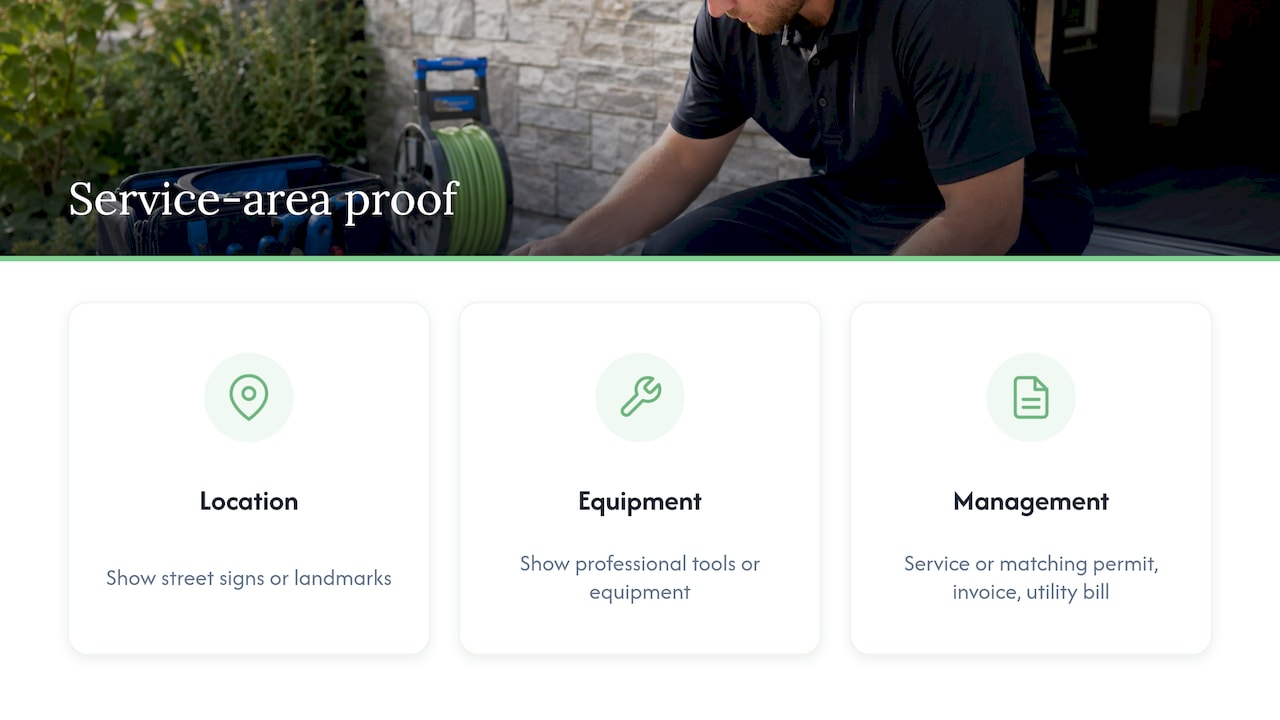
A landscaper in Oshawa could film the street outside the yard, the sign or the truck, the mowers and trimmers in the shed, then hold up a recent invoice with the business name clearly visible. Make sure the name on the paper matches the name on the profile, character for character.
A pre-flight checklist
- Does your business name on the profile match the name on your signage and paperwork?
- Is the sign legible at normal phone distance, in good light?
- Will you show the street and the entrance in one continuous move?
- Do you have the tools, register or paperwork within reach before you start?
- Is the phone charged, and are you at the actual business location?
What if your verification is rejected or delayed?
Don’t create a second profile. That’s how duplicates start, and duplicates cause their own trouble (we cover how to find and fix a duplicate listing separately).
If your video isn’t accepted, tap “Review issues” on your Business Profile. Google lists the specific reasons, such as the business name not being visible on the storefront, no nearby area shown, or missing proof of authorization. Then record a new video that includes everything from the first one plus what was missing.
For a delay, remember the official window: up to five business days, and in rare cases longer. Google’s Canadian French help page gives the same five-business-day guidance for Canadian businesses. Count business days, not calendar days, so a Friday submission runs well into the next week.
Why does Google keep asking me to verify again?
It feels unfair when you already did this once. Reverification usually follows a change that makes Google question whether the facts still match.
According to Google’s help page, if you change your business name after verification you might need to verify again, and if you move to a new address you must verify again. If the “Get verified” button reappears on a profile you thought was done, that is Google telling you it needs more confirmation.
A few ways to stay out of trouble:
- Treat name and address edits as planned projects, not quick tweaks. If you’re changing your brand, our rebranding checklist puts your Google profile on the list before the logo changes.
- Keep your name consistent everywhere: the sign, the profile, the website and invoices.
- Make edits when you can respond quickly, not the day before a long weekend rush.
- Keep proof handy: a recent invoice, a permit or a utility bill in the business name.
Common mistakes that slow people down
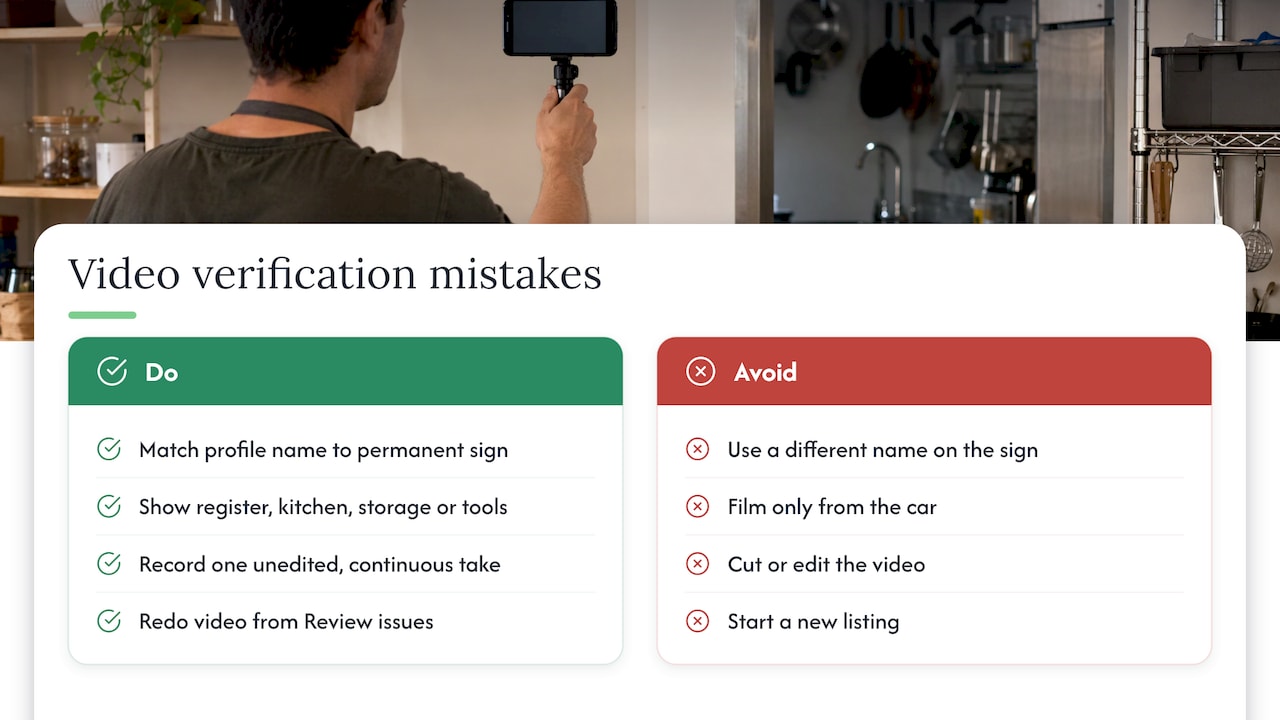
Using a different name on the profile than on the sign. Video verification asks for a business name on a permanent fixture that matches the profile. A catchy tagline added to the profile name creates a mismatch.
Filming from the car and never going in. Proof of management needs you to actually show the register, kitchen, storage room or tools.
Cutting the video together. The clip must be unedited and continuous. One take, even if it’s slightly imperfect, beats a polished edit.
Starting over with a new listing. A rejected video can be redone from “Review issues”. A new profile adds a duplicate to untangle.
Forgetting where mail goes. If a postcard is offered, make sure someone is watching the mailbox at that address. Codes expire after 30 days.
After you’re verified: make the profile work
Verification only unlocks the profile. It doesn’t make customers call. Once you’re in, fill out the basics: accurate hours, your service area or address, categories, photos of real work and a steady stream of reviews you answer.
Our guide to Google Business Profile optimization for Canadian small businesses walks through that next stage. If you also want search engines to read your business details from your website, see LocalBusiness schema without code. And since a short walk-around video is exactly what Google may ask for, our video marketing guide for small businesses shows how to reuse that footage thoughtfully.
Our perspective
Most owners we meet treat verification as paperwork. We see it as the moment your business becomes a real, controllable storefront on the map. That’s why we’d rather you do it carefully once than rush it three times.
Our advice is simple. Decide the exact business name first, make sure it matches your sign and your paperwork, and keep the account in the owner’s hands. Then film the video as if a stranger had to find you with no help. Street, sign, door, proof you run the place.
The harder part comes after verification: keeping the profile accurate, active and connected to a website that turns a tap into a call. We handle that kind of work in-house for small Ontario businesses, with the team doing the work available to you directly, so nobody is passing your profile to a subcontractor.
Cristo
Want help getting found after you’re verified?
If you’d rather spend your day on customers than on profile settings, we can help. Our local SEO service for Ontario businesses focuses on getting you found on Google and Maps, and we start every client with a free trial that includes a full digital audit.
Our monthly plans are published on our pricing page: Sprout is 300 CAD per month, Grow is 600 CAD per month and Scale is 1200 CAD per month, each with a one-off setup fee shown there. Pricing is month-to-month with no lock-in contract. Prefer to talk it through first? Start from cloudsprout.ca.
FAQ
How long does Google Business Profile verification take?
Google says reviews take up to 5 business days, and rarely longer. Some profiles are verified instantly, for instance when the website is already verified with Search Console. Postcard codes usually arrive within 14 days.
Can I choose how to verify my business?
No. Google determines the available methods automatically based on factors such as your business type, region and public information, and they can’t be changed. Follow the option shown under “Get verified” in your profile.
What should my verification video show?
Show where you are, proof the business exists and proof you manage it. Storefronts should include street signs, a permanent sign with the business name and something like a register or kitchen. Service-area businesses show a landmark, tools and an invoice or permit. See Google’s video requirements.
Why was my video rejected?
Google gives specific reasons, such as a business name not visible on the storefront or missing proof of authorization. Tap “Review issues”, read them and record a new video with everything from the first one plus the missing items.
Is it free to verify my business?
Yes. Google’s Canadian page confirms that listing your business on Google is free. You don’t need to pay anyone to verify it for you.
Sources
- Verify your business on Google, Google Business Profile Help
- Valider votre entreprise sur Google, Aide Google Profil de l’entreprise
- Verify your business with a video recording, Google Business Profile Help
- Get listed on Google, Google Business Profile Canada